Average Ratings 0 Ratings
Average Ratings 0 Ratings
Similar Products
-
HighchartsHighcharts, a Javascript-based charting library, makes it easy to add interactive charts and graphs to web or mobile projects of any size. Highcharts is used by more than 80% of the 100 biggest companies in the world, as well as thousands of developers from a variety of industries, including finance, publishing, application development, and data science. Highcharts is in active development since 2009. It remains a favorite among developers due to its robust feature set and ease-of-use documentation, accessibility features and vibrant community.
-
All in One AccessibilityAn AI based accessibility tool enables websites to be accessible among people with hearing or vision impairments, motor impaired, color blind, dyslexia, cognitive & learning impairments, seizure & epileptic, ADHD, elderly, and Parkinson. It installs in just 2 minutes. It reduces the risk of time-consuming accessibility lawsuits by improving accessibility compliance for the standards WCAG 2.0, 2.1, 2.2, ADA, Section 508, European EAA EN 301 549, Canada ACA, California Unruh, Israeli Standard 5568, Australian DDA, UK Equality Act, Ontario AODA, Indian RPD Act, GIGW 3.0, France RGAA, German BITV, Brazilian Inclusion law LBI 13.146/2015, Spain UNE 139803:2012, JIS X 8341, Italian Stanca Act, Switzerland DDA & more. It supports GDPR, HIPAA, CCPA, SOC Type 2, ISO 9001:2015, & ISO 27001:2022. It supports 190+ languages. It is a cornerstone of improving web accessibility through its ease of use for companies of all sizes and with the help of paid add-ons like manual accessibility audit, remediation, PDF accessibility remediation, VPAT/ ACR, white label subscription, live site translation, SkynetAccessibility Scanner, video subtitle, and voice search. Top features of the All in One Accessibility: - AI Screen Reader - Accessibility statement - Accessibility interface for UI design fixes - Free Accessibility Statement Generator - Keyboard / Voice Navigation - Talk & Type - Libras (Brazilian Portuguese) Sign Language - Dashboard Automatic accessibility score - AI based Image Alternative Text remediation - AI based Text to Speech Screen Reader - Select Screen Reader Voice - Auto-detect language - Keyboard navigation adjustments - Content, Color, Contrast, Orientation Adjustment - Custom widget color, position, icon size, type - Dedicated support
-
DXchartsIn just a few days, you can integrate and customize a lightning-fast financial table with your product. You can make changes or create a completely new interface. You want more? We offer a full access alternative. Data feeds with futures and indices, equities, FX and cryptocurrencies by default. Sign up now to get your data feeds. DXcharts can be integrated with any market data source, as it is data feed-agnostic. Native libraries for all platforms. Native web, native mobile & desktop. Get a solution that is specifically tailored to your product. Analyzing statistics from trading activity can help you evaluate securities and predict their future movements. You can create custom studies with the intuitive dxScript. You can adjust the layout of charts however you like and sync them by instrument, chart type and timeframe, range, studies & appearance.
-
Adobe FireflyAdobe Firefly is a versatile AI-powered creative platform designed to help users generate and edit multimedia content with ease. It allows users to create images, videos, and audio using simple text prompts within an interactive and flexible workspace. The platform features tools like generative fill, image editing, and video editing, enabling users to refine and enhance their creations. Firefly also includes quick actions such as background removal, cropping, resizing, and format conversion to streamline workflows. Users can explore an infinite canvas for creative production and experiment with various styles and outputs. The platform encourages creativity by allowing users to remix content from a shared community gallery. With its intuitive design, it reduces the need for advanced technical skills. Firefly integrates AI capabilities to speed up content creation and editing processes. It supports both beginners and professionals in producing high-quality results. Overall, Adobe Firefly provides a powerful and accessible environment for modern digital creativity.
-
PDF GuruEasily convert, edit, merge, and compress your PDF files with just a few simple clicks. You can quickly download your document without any hassle, as our PDF converter generates files in mere seconds! To ensure the safety of your digital information, we implement HTTPS encryption while you create PDF files on our site. You can redact PDFs, alter text, insert new elements, and engage in various other tasks, all from a single platform. Our user-friendly interface is designed for seamless navigation, allowing you to utilize our PDF creator with minimal effort. Compatible with every major operating system, our online PDF maker functions flawlessly on Windows, Mac OS, Linux, iOS, and Android. For those who wish to maintain privacy, you have the option to secure your file by locking or restricting access, preventing others from opening, editing, or printing it. This comprehensive tool simplifies your document management and enhances your productivity.
-
TraceEngineThe world's leading authority on case management systems has developed a software dedicated to skip tracing. TraceEngine will make skip tracing faster, easier, and more efficient. It is powered by PoloniousEngine, and benefits from the 20 years of experience with world-class investigation and system delivery software. Cloud-based hosting and security is taken care of and you can be up and running within 10 minutes. Your first 30 days are free. You can get our ongoing support at $165 per month. There are no contracts and you can cancel any time. TraceEngine has powerful features designed specifically for skip tracing, allowing you to manage more cases and generate additional business. You can easily assign cases to investigators using a simple search and select tool. If the details are not in the system, a widget will appear to allow you to add them.
-
Checksum.aiEngineering teams shipping with AI have a new bottleneck: validation. Code output has accelerated. Quality hasn't. Checksum closes the gap. Checksum is a continuous quality platform with a suite of AI agents that handle testing end-to-end, at every stage of the development lifecycle. Where most tools wait for a human to trigger them, Checksum runs autonomously in the background, generating tests, executing them, and repairing failures without manual intervention. Seventy percent of test failures are resolved automatically through real-time auto-recovery. The platform covers every layer: end-to-end UI flows via Playwright, API endpoint chains, and targeted CI tests scoped to exactly what changed in a PR. All tests land as real code in your repository and are delivered as standard Playwright, owned by your team. Checksum is fine-tuned on 1.5+ million test runs and integrates natively with Cursor, Claude Code, and 100+ AI coding agents. Type /checksum and your coding agent's output gets tested before it ever reaches review. Generation and healing happen on Checksum's cloud infrastructure which means no LLM tokens consumed, no local resources required. The result: test suites that stay green as the product evolves, fewer regressions reaching production, and release confidence that scales alongside AI output.
-
DriveStrikeDriveStrike is simple to use, implement, and manage. DriveStrike allows you to perform remote wipe, remote lock, or remote locate commands on any platform. Mobile device management MDM for mobile platforms. Integrated drive encryption support. Our support team is available to answer any questions, help you install our services, or manage your account. It's never been easier to protect your data and devices. We are happy to answer any questions you may have or help you understand how to best protect your data. Protect your business with a device- and data protection platform that keeps all devices protected with a single solution. Your Workstations, iPads and iPads, Smartphones as well as Tablets, Tablets, Tablets, and Laptops will be protected, organized, secure, & protected.
-
FusionAuthFusionAuth is the authentication and authorization platform engineered for developers who demand flexibility and control. Built from the ground up to integrate with any stack, every feature — from user registration to MFA and SSO — is exposed via a modern, well-documented API. Support for every major identity protocol is included out of the box: OIDC, SAML, OAuth2, JWT, passwordless login, social sign-on, and more. Whether you’re building a greenfield app or retrofitting auth into a legacy system, FusionAuth adapts to your use case — not the other way around. Need compliance? FusionAuth helps you meet GDPR, HIPAA, and COPPA standards quickly and reliably. Deploy it your way: install on Linux, Windows, macOS, Docker, or Kubernetes — or go with FusionAuth Cloud, our managed SaaS hosting. No black boxes. No vendor lock-in. Just powerful, customizable auth that works the way you do.
-
KinderpediaKINDERPEDIA is an AI-powered, cloud-based school management and communication platform for K-12 schools and childcare centres. Trusted by 2,000+ institutions in 40+ countries, it helps leaders, teachers and admin teams simplify operations, reduce repetitive work, strengthen family engagement and create a connected educational experience. The platform brings academic, administrative, financial and communication workflows into one secure ecosystem. Schools can manage student and family records, attendance, timetables, classroom activities, gradebook, assignments, progress tracking, daily reports, events, admissions, tuition, invoicing, payments and reporting. Kinderpedia includes practical AI tools. They help educators and leaders communicate clearly, create content faster, streamline reporting, document progress and identify patterns. Teachers plan schedules, record attendance, manage lessons, track progress or developmental milestones, share feedback and document observations in real time. Families receive updates, photos, videos, event alerts, progress info, invoices and notifications, with multi-language tools for diverse communities. Kinderpedia’s Admissions CRM supports the journey from first enquiry to enrolment, managing leads, follow-ups, workflows and the transition into the school management system. Financial tools support tuition plans, automated invoicing, payment tracking, family balances, overdue amounts, bank statement import and reports across one or multiple locations. Payment and accounting integrations include Stripe, Paymob, InvoiceXpress, BT Pay, SAGA-compatible exports, CSV/XLS exports and PDF invoices. Dashboards, reports, multi-location management, role-based permissions and secure cloud access give leaders visibility and control as they grow
Description
Colormind serves as a generator for color schemes, leveraging deep learning technology. It has the capability to analyze and learn from various sources such as photographs, films, and well-known artworks. Each day, new datasets are incorporated, so be sure to return tomorrow for fresh color ideas. For technical insights, visit the blog or explore our API offerings. When colors are not locked, Colormind creates random color palettes. Should you have a particular color to start with, you can select and lock it in; the position of this color is essential, so feel free to try out different arrangements. If you possess two complementary colors, consider placing them at opposite ends of the palette to achieve appealing intermediate shades. For greater diversity, try positioning contrasting colors in close proximity, which encourages Colormind to develop triadic and other intricate color combinations. You can see how the color palette is utilized within the Paper Dashboard bootstrap template, where lighter hues are displayed on the left side. To implement this template, you can download it at no cost and incorporate our CSS to modify the colors as you desire. Experimenting with various placements and combinations can lead to unique results that perfectly suit your design needs.
Description
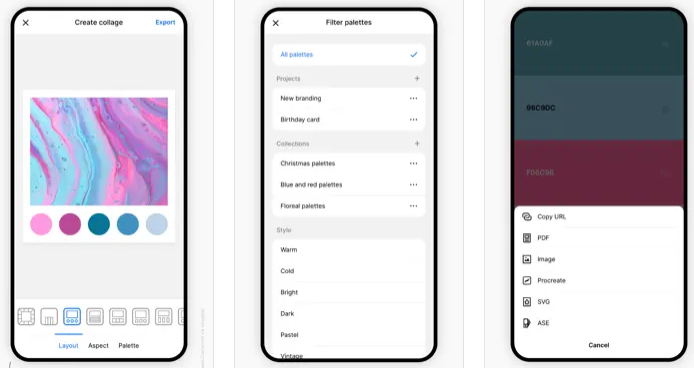
Coolors is a rapid color palette generator that assists you in crafting the ideal color palette or finding inspiration from a myriad of stunning color schemes. Accessible via web platforms, mobile applications, plugins, and extensions, it allows users to create color palettes in mere seconds by tapping the space bar, secure preferred colors to enhance the palette, and rearrange or modify the number of colors included. Additionally, it features an Image Picker to derive color schemes from personal photos and a Contrast Checker to ensure the combinations are accessible for all users. The Palette Visualizer offers a way to see how colors look in real design scenarios, while other tools, including a Color Picker, Collage Maker, gradient generator, and extensive color libraries, further enhance the experience. Users can export their palettes in various formats such as PDF, image, CSS, and SVG, as well as share links and integrate with design software like Figma or a Chrome extension. The platform also supports multiple color-space values including HEX, RGB, and CMYK, and includes functionalities for simulating color-blindness along with adjusting luminance, hue, and temperature for precision in design. Overall, Coolors combines functionality and creativity to cater to both amateur and professional designers alike.
API Access
Has API
Yes
API Access
Has API
No


Integrations
Adobe Acrobat
No
CSS
No
Figma
No
Google Chrome
No
Instagram
No
Integrations
Adobe Acrobat
Yes
CSS
Yes
Figma
Yes
Google Chrome
Yes
Instagram
Yes
Pricing Details
Free
Free Trial
No
Free Version
Yes
Pricing Details
Free
Free Trial
No
Free Version
Yes
Deployment
Web-Based
Yes
On-Premises
No
iPhone App
No
iPad App
No
Android App
No
Windows
No
Mac
No
Linux
No
Chromebook
No
Deployment
Web-Based
Yes
On-Premises
No
iPhone App
Yes
iPad App
Yes
Android App
Yes
Windows
No
Mac
Yes
Linux
No
Chromebook
No
Customer Support
Business Hours
No
Live Rep (24/7)
No
Online Support
Yes
Customer Support
Business Hours
No
Live Rep (24/7)
No
Online Support
Yes
Types of Training
Training Docs
Yes
Webinars
No
Live Training (Online)
No
In Person
No
Types of Training
Training Docs
Yes
Webinars
No
Live Training (Online)
Yes
In Person
No
Vendor Details
Company Name
Colormind
Website
colormind.io
Vendor Details
Company Name
Coolors
Founded
2014
Country
Italy
Website
coolors.co
Product Features
Product Features
Graphic Design
Collaboration
No
Data Visualization
No
Filtering
No
Image Database
No
Image Editor
No
Templates
No
