Code::Blocks
3.0 out of 5 starsAverage Ratings 1 Rating
Average Ratings 0 Ratings
Similar Products
-
DbVisualizerDbVisualizer is a universal database client for anyone who works with data, from indie developers and startups to professional teams managing complex database environments, including developers, DBAs, analysts, and data engineers working across relational and NoSQL databases. Key features: - SQL editor with intelligent autocomplete, visual query builders, variables, and execution tools - AI Assistant for answering questions, explaining errors, and analyzing code - Git integration for managing SQL scripts and team collaboration - Customizable layouts, key bindings, and UI themes - Favorites for frequently used scripts and database objects - Configurable security settings for organizational requirements Connects via JDBC to MySQL, PostgreSQL, SQL Server, Oracle, Snowflake, SQLite, Cassandra, BigQuery, and more. Runs on Windows, macOS, and Linux. Nearly 7 million downloads, with Pro users in 150 countries, scaling from solo projects to enterprise database management.
-
RaimaDBRaimaDB, an embedded time series database that can be used for Edge and IoT devices, can run in-memory. It is a lightweight, secure, and extremely powerful RDBMS. It has been field tested by more than 20 000 developers around the world and has been deployed in excess of 25 000 000 times. RaimaDB is a high-performance, cross-platform embedded database optimized for mission-critical applications in industries such as IoT and edge computing. Its lightweight design makes it ideal for resource-constrained environments, supporting both in-memory and persistent storage options. RaimaDB offers flexible data modeling, including traditional relational models and direct relationships through network model sets. With ACID-compliant transactions and advanced indexing methods like B+Tree, Hash Table, R-Tree, and AVL-Tree, it ensures data reliability and efficiency. Built for real-time processing, it incorporates multi-version concurrency control (MVCC) and snapshot isolation, making it a robust solution for applications demanding speed and reliability.
-
RetoolRetool is a modern AI-native application development platform designed to help teams build internal software quickly and efficiently. It enables users to create agents, workflows, dashboards, and full-stack apps using natural language prompts and visual tools. Retool connects directly to databases, APIs, vector stores, and AI models to ensure applications work seamlessly with existing systems. The platform allows teams to transform raw data into actionable tools such as dashboards, admin panels, and monitoring systems. With drag-and-drop UI building, code-level customization, and AI-assisted generation, Retool supports multiple development styles. Built-in workflows automate complex processes while maintaining auditability and security. Retool fits naturally into standard engineering stacks with support for CI/CD and version control. Enterprise-grade permissions and hosting options ensure sensitive data stays protected. Used by thousands of companies worldwide, Retool helps teams ship AI-powered software faster. It bridges the gap between idea and production with speed and control.
-
JS7 JobSchedulerJS7 JobScheduler, an Open Source Workload Automation System, is designed for performance and resilience. JS7 implements state-of-the-art security standards. It offers unlimited performance for parallel executions of jobs and workflows. JS7 provides cross-platform job execution and managed file transfer. It supports complex dependencies without the need for coding. The JS7 REST-API allows automation of inventory management and job control. JS7 can operate thousands of Agents across any platform in parallel. Platforms - Cloud scheduling for Docker®, OpenShift®, Kubernetes® etc. - True multi-platform scheduling on premises, for Windows®, Linux®, AIX®, Solaris®, macOS® etc. - Hybrid cloud and on-premises use User Interface - Modern GUI with no-code approach for inventory management, monitoring, and control using web browsers - Near-real-time information provides immediate visibility to status changes, log outputs of jobs and workflows. - Multi-client functionality, role-based access management - OIDC authentication and LDAP integration High Availability - Redundancy & Resilience based on asynchronous design and autonomous Agents - Clustering of all JS7 Products, automatic fail-over and manual switch-over
-
VaizVaiz is a work management platform built for small and mid-sized teams — startups, agencies, and growing SaaS companies — who want the structure of tools like Jira, Asana, or ClickUp without the complexity or price tag. It centralizes task management, document sharing, and team coordination in one lightweight workspace, so teams of 5-50 people can get started in minutes, not weeks. Vaiz offers customizable task boards (lists, Kanban, Gantt charts), an AI assistant that drafts, summarizes, and analyzes work, and built-in automation that handles routine tasks without extra setup. Integrations with tools like Slack, GitHub, and Google Workspace keep teams aligned without switching between apps. Vaiz scales with you, from a 5-person startup to a growing team, without forcing you to re-learn the tool as you grow."
-
KitecyberKitecyber: Data & Gen AI Security, Built on the Endpoint Your most sensitive data leaves through browsers, Gen AI prompts, SaaS uploads, and clipboards — faster than any network tool can catch it. Kitecyber stops that at the source, with a single lightweight agent that runs directly on the endpoint and acts the instant data is touched, not after it's already gone. Because it lives on the device, Kitecyber has full context — device, OS, process, data, user, and network activity together, in real time. That's the vantage point network- and cloud-only tools simply don't have. Data security that keeps up with your data. Kitecyber classifies sensitive information with LLM-powered, context-aware intelligence across 80+ categories — PII, PHI, PCI, source code, IP — at over 90% accuracy, not brittle keyword matching. It tracks data lineage through screenshots, encoding, and file conversion that defeat traditional scanners, and blocks policy violations inline, before data ever leaves the endpoint. Gen AI security for the age of AI agents. Kitecyber tracks sensitive data pasted or uploaded into tools like ChatGPT, Claude, and Gemini and stops it in real time. It discovers shadow AI reaching your devices and extends visibility to the AI agents now acting on your users' behalf — the blind spot identity- and network-based tools were never built to see. Trusted and proven. Kitecyber secures fast-growing fintech, BFSI, and SMB organizations in highly regulated environments, partnering with GRC leaders like Scrut Automation to unify security and compliance. It's SOC 2 Type II compliant, deploys in about a day, and delivers enterprise-grade protection without enterprise complexity. See what full-context data and Gen AI security looks like. Learn more at kitecyber.com.
-
4K Video DownloaderYou can watch videos from anywhere, anytime, even offline. It's easy to download: simply copy the link from your browser, and then click 'Paste Link" in the application. You can save full playlists and channels on YouTube in high-quality and other video or audio formats. Download your YouTube Mix, Watch Later and Liked videos as well as private YouTube playlists. Receive new videos from your favorite YouTube channels automatically. You can feel the action around you with virtual reality videos. To experience the amazing VR experience in 360deg, download 360deg videos. You can bypass any restrictions placed by your Internet service provider to bypass your school firewall or workplace firewall. To access YouTube and other sites, set up an in-app proxy connection.
-
Gemini Enterprise Agent PlatformGemini Enterprise Agent Platform is Google Cloud’s next-generation system for designing and managing advanced AI agents across the enterprise. Built as the successor to Vertex AI, it unifies model selection, development, and deployment into a single scalable environment. The platform supports a vast ecosystem of over 200 AI models, including Google’s latest Gemini innovations and popular third-party models. It offers flexible development tools like Agent Studio for visual workflows and the Agent Development Kit for deeper customization. Businesses can deploy agents that operate continuously, maintain long-term memory, and handle multi-step processes with high efficiency. Security and governance are central, with features such as agent identity verification, centralized registries, and controlled access through gateways. The platform also enables seamless integration with enterprise systems, allowing agents to interact with data, applications, and workflows securely. Advanced monitoring tools provide real-time insights into agent behavior and performance. Optimization features help refine agent logic and improve accuracy over time. By combining automation, intelligence, and governance, the platform helps organizations transition to autonomous, AI-driven operations. It ultimately supports faster innovation while maintaining enterprise-grade reliability and control.
-
TrustInSoft AnalyzerTrustInSoft commercializes a source code analyzer called TrustInSoft Analyzer, which analyzes C and C++ code and mathematically guarantees the absence of defects, immunity of software components to the most common security flaws, and compliance with a specification. The technology is recognized by U.S. federal agency the National Institute of Standards and Technology (NIST), and was the first in the world to meet NIST’s SATE V Ockham Criteria for high quality software. The key differentiator for TrustInSoft Analyzer is its use of mathematical approaches called formal methods, which allow for an exhaustive analysis to find all the vulnerabilities or runtime errors and only raises true alarms. Companies who use TrustInSoft Analyzer reduce their verification costs by 4, efforts in bug detection by 40, and obtain an irrefutable proof that their software is safe and secure. The experts at TrustInSoft can also assist clients in training, support and additional services.
-
Interfacing Integrated Management System (IMS)Interfacing’s Integrated Management System (IMS ) is an AI-supported platform that brings BPM, QMS, Document Control, and GRC together in one environment. Teams use IMS to design and manage processes, govern documentation, oversee risks, and demonstrate compliance with complete visibility and reliable audit evidence. Built for sectors that depend on strict oversight, such as aerospace, life sciences, public sector, and financial services, IMS offers real-time monitoring, automated workflows, and AI-driven analytics that strengthen quality and lower operational exposure. The system is ISO 27001 certified and validated for 21 CFR Part 11, ensuring secure and compliant use in regulated operations. IMS also provides low-code automation, process mining, audit tools, training management, CAPA workflows, and dashboards that help organizations improve performance and maintain regulatory control. AI enhances governance, improves precision, and supports continuous compliance.
Description
Code::Blocks is a free, open-source Integrated Development Environment (IDE) that is cross-platform and primarily aimed at developers working with C, C++, and Fortran. Renowned for its lightweight architecture and modular design, Code::Blocks provides a customizable user interface that supports various compilers such as GCC, Clang, and Microsoft Visual C++. The IDE is equipped with an easy-to-navigate interface that includes essential features like syntax highlighting, code folding, auto-completion, and a powerful debugging environment that allows for breakpoints, variable inspection, and tracing the call stack. Additionally, Code::Blocks is highly customizable through the use of plugins, which enable developers to integrate functionalities such as version control, scripting capabilities, and custom build systems. Its combination of being lightweight, flexible, and compatible across different platforms makes it an excellent option for students, educators, and developers engaged in small to medium-sized C/C++ projects. Overall, Code::Blocks serves as a versatile tool that caters to a wide range of programming needs.
Description
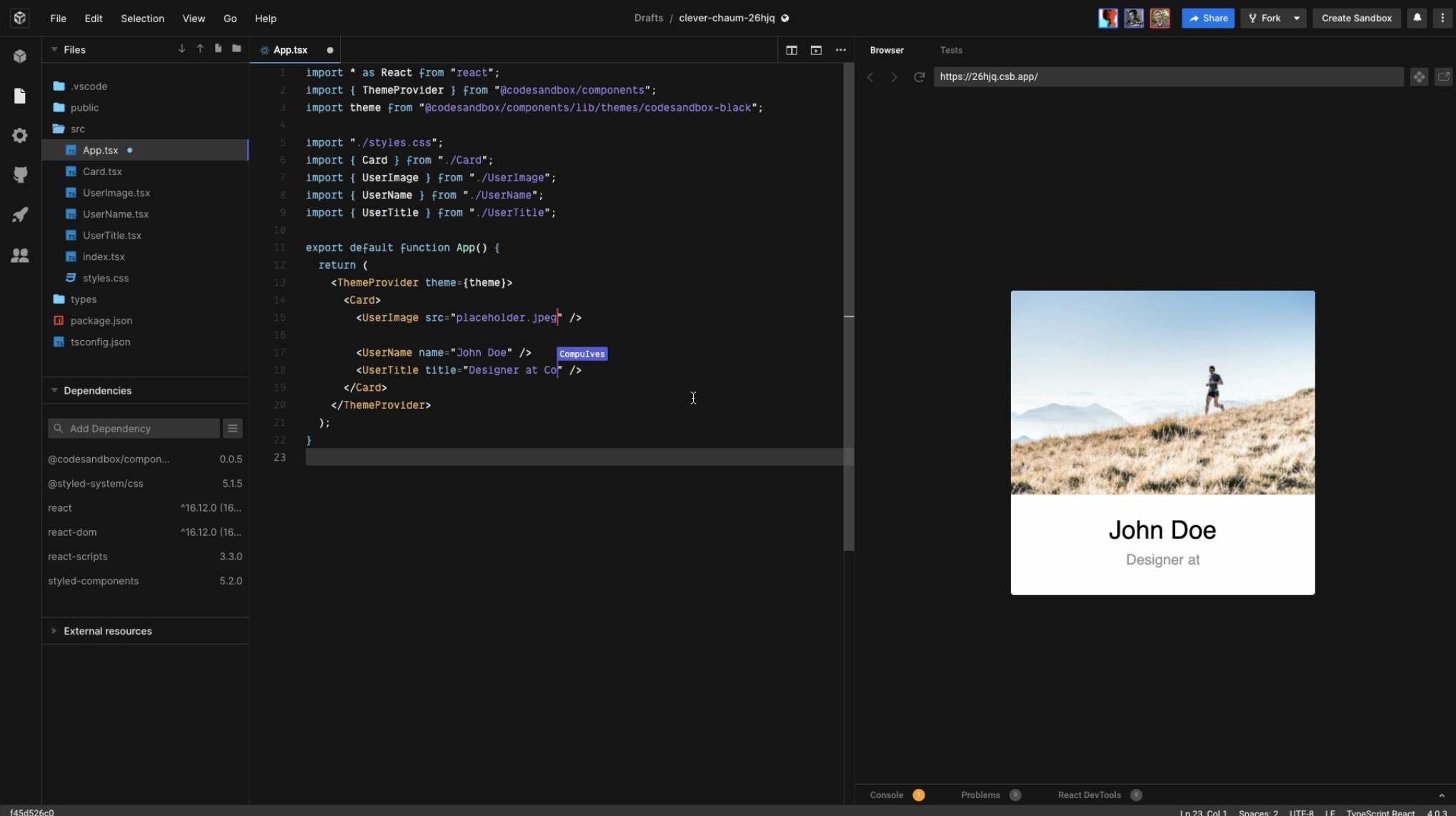
CodeSandbox aims to make it easier for you to express your ideas with code, and to validate them. It also removes the hassles of setting up development tooling and sharing your project. Join us to help build the future of web coding.
Over 4M developers use the platform each month. This includes organizations like Shopify and Atlassian. Since its launch, creators have created over 35M apps. It's used in thousands of open-source projects like React, Vue and Babel.
You can invite your friends, colleagues, or team to join you or simply view your creation by using a URL. Use any of 1M+ packages for building real, powerful applications quickly and efficiently. Import and run repos directly from GitHub or choose from hundreds of templates to start in seconds.
Boxy, CodeSandbox's AI-powered coding assistant, is now available to all Pro subscriptions.
API Access
Has API
No
API Access
Has API
Yes



Integrations
Python
Yes
Angular
No
Astro
No
C
Yes
Deno
No
Divjoy
No
Elixir
No
Gatsby
No
Go
No
HTML
No
Integrations
Python
Yes
Angular
Yes
Astro
Yes
C
No
Deno
Yes
Divjoy
Yes
Elixir
Yes
Gatsby
Yes
Go
Yes
HTML
Yes
Pricing Details
Free
Open source
Free Trial
No
Free Version
Yes
Pricing Details
$12 per month
Free Trial
Yes
Free Version
Yes
Deployment
Web-Based
No
On-Premises
No
iPhone App
No
iPad App
No
Android App
No
Windows
Yes
Mac
Yes
Linux
Yes
Chromebook
Yes
Deployment
Web-Based
Yes
On-Premises
Yes
iPhone App
Yes
iPad App
Yes
Android App
No
Windows
No
Mac
No
Linux
No
Chromebook
Yes
Customer Support
Business Hours
No
Live Rep (24/7)
No
Online Support
Yes
Customer Support
Business Hours
No
Live Rep (24/7)
No
Online Support
Yes
Types of Training
Training Docs
Yes
Webinars
No
Live Training (Online)
No
In Person
No
Types of Training
Training Docs
Yes
Webinars
No
Live Training (Online)
No
In Person
No
Vendor Details
Company Name
Code::Blocks
Founded
2005
Website
sourceforge.net/projects/codeblocks/
Vendor Details
Company Name
CodeSandbox
Founded
2017
Country
Netherlands
Website
codesandbox.io
Product Features
Code Editors
API
No
Auto-Complete
Yes
Code Folding
Yes
Column Editing
Yes
Customizable Themes
Yes
Debugging
Yes
Formatting / Table Editing
Yes
Keyboard Shortcuts
Yes
Multi-Monitor Editing
Yes
Syntax Highlighting
Yes
WYSIWYG
Yes
IDE
Code Completion
Yes
Compiler
Yes
Cross Platform Support
Yes
Debugger
Yes
Drag and Drop UI
Yes
Integrations and Plugins
Yes
Multi Language Support
Yes
Project Management
Yes
Text Editor / Code Editor
Yes
Text Editors
API
No
Auto-Complete
Yes
Code Folding
Yes
Column Editing
Yes
Customizable Themes
Yes
Debugging
Yes
Formatting / Table Editing
Yes
Keyboard Shortcuts
Yes
Multi-Monitor Editing
Yes
Syntax Highlighting
Yes
WYSIWYG
Yes
Product Features
Code Collaboration
Audio Conferencing
Yes
Chat / Messaging
Yes
Code Review
Yes
Discussion Threads
Yes
IDE Integration
Yes
Remote Control
No
Remote Pair Programming
Yes
Screen Sharing
No
Video Conferencing
No
Code Editors
API
Yes
Auto-Complete
Yes
Code Folding
Yes
Column Editing
Yes
Customizable Themes
Yes
Debugging
Yes
Formatting / Table Editing
Yes
Keyboard Shortcuts
Yes
Multi-Monitor Editing
Yes
Syntax Highlighting
Yes
WYSIWYG
No
IDE
Code Completion
Yes
Compiler
Yes
Cross Platform Support
Yes
Debugger
Yes
Drag and Drop UI
No
Integrations and Plugins
Yes
Multi Language Support
Yes
Project Management
No
Text Editor / Code Editor
Yes
