Average Ratings 1 Rating
Average Ratings 0 Ratings
Similar Products
-
PaligoPaligo supports teams working with complex technical documentation that needs to grow, adapt, and stay consistent over time. Built specifically for structured content at scale, Paligo enables organizations to treat documentation as a long-term business asset—powered by reuse, automation, and strong content governance. Paligo’s cloud-based CCMS is designed around modular content. Teams can write once, reuse components across multiple outputs, and keep documentation aligned across products, formats, and languages. This reduces manual effort, speeds up updates, and cuts translation overhead, allowing teams to publish faster while minimizing errors. The platform pairs advanced structured authoring capabilities with a modern, approachable interface. This makes Paligo effective for experienced documentation specialists while remaining accessible to contributors across the organization. From creation and collaboration to translation and multichannel delivery, Paligo brings the entire documentation workflow into one controlled environment. Paligo’s purpose is to help organizations move past static, fragmented documentation practices and build content operations that support continuous growth. With Paligo, teams stay in control of complexity and deliver documentation that evolves alongside their business.
-
Curbside LaundriesCurbside Laundries is the leader in wash and fold software designed exclusively for laundromats. The POS software manages the wash and fold process to help eliminate mistakes and has a built in laundry pickup and delivery solution too. Customers can schedule laundry pickups from their phones and the Curbside software manages the entire process from beginning to end. The software is designed by laundromat owners and is used by hundreds of laundromats across the United States, over 2 MILLION orders have been placed through Curbside Software and over 90 MILLION pounds of laundry has been processed through the Curbside System, too. At Curbside Laundries, we do not just provide software, we provide the expertise to help you grow your business. In addition, we provide our clients with free tours to our laundromat in Long Beach, California where we process over $1,500,000 of wash and fold EVERY year from a single location.
-
JS7 JobSchedulerJS7 JobScheduler, an Open Source Workload Automation System, is designed for performance and resilience. JS7 implements state-of-the-art security standards. It offers unlimited performance for parallel executions of jobs and workflows. JS7 provides cross-platform job execution and managed file transfer. It supports complex dependencies without the need for coding. The JS7 REST-API allows automation of inventory management and job control. JS7 can operate thousands of Agents across any platform in parallel. Platforms - Cloud scheduling for Docker®, OpenShift®, Kubernetes® etc. - True multi-platform scheduling on premises, for Windows®, Linux®, AIX®, Solaris®, macOS® etc. - Hybrid cloud and on-premises use User Interface - Modern GUI with no-code approach for inventory management, monitoring, and control using web browsers - Near-real-time information provides immediate visibility to status changes, log outputs of jobs and workflows. - Multi-client functionality, role-based access management - OIDC authentication and LDAP integration High Availability - Redundancy & Resilience based on asynchronous design and autonomous Agents - Clustering of all JS7 Products, automatic fail-over and manual switch-over
-
Source DefenseSource Defense is an essential element of web safety that protects data at the point where it is entered. Source Defense Platform is a simple, yet effective solution to data security and privacy compliance. It addresses threats and risks that arise from the increased use JavaScript, third party vendors, and open source code in your web properties. The Platform offers options for securing code as well as addressing an ubiquitous gap in managing third-party digital supply chains risk - controlling actions of third-party, forth-party and nth-party JavaScript that powers your website experience. Source Defense Platform provides protection against all types of client-side security incidents, including keylogging, formjacking and digital skimming. Magecart is also protected. - by extending the web security beyond the browser to the server.
-
Wash-Dry-Fold POSWash-Dry-Fold POS is a laundromat POS system engineered by laundromat operators, built by the team running Liberty Laundry in Tulsa, Oklahoma. One platform runs wash-dry-fold, pickup and delivery, commercial accounts, and retail — every feature included, no long-term contract. Purpose-built for laundry operations rather than adapted from generic retail software: • Wash-dry-fold — order intake, weigh-in, pricing, and live status tracking • Pickup and delivery — customer accounts, scheduling, and recurring orders • Order tracking — a Kanban pipeline from drop-off to ready-for-pickup • Commercial accounts — B2B invoicing for hotels, gyms, and salons • Hardware integrations — Speed Queen / Alliance, Laundroworks, ESD, FasCard, LaundryCard machine-start and card systems • Attendant controls — role-based logins and guided task workflows • Theft prevention — audit reporting on voids, discounts, and cash variance • Repair tracking and analytics — maintenance logs plus revenue, labor, and machine-start data
-
TrustInSoft AnalyzerTrustInSoft commercializes a source code analyzer called TrustInSoft Analyzer, which analyzes C and C++ code and mathematically guarantees the absence of defects, immunity of software components to the most common security flaws, and compliance with a specification. The technology is recognized by U.S. federal agency the National Institute of Standards and Technology (NIST), and was the first in the world to meet NIST’s SATE V Ockham Criteria for high quality software. The key differentiator for TrustInSoft Analyzer is its use of mathematical approaches called formal methods, which allow for an exhaustive analysis to find all the vulnerabilities or runtime errors and only raises true alarms. Companies who use TrustInSoft Analyzer reduce their verification costs by 4, efforts in bug detection by 40, and obtain an irrefutable proof that their software is safe and secure. The experts at TrustInSoft can also assist clients in training, support and additional services.
-
DocmosisDocmosis is a self-hosted or SaaS template-based document generation solution. Integrate with custom-built software applications or popular third-party apps using the API. Create templates using MS Word or LibreOffice. Add plain-text placeholders to control: the insertion of text/images/tables; conditionally add/remove any content; perform calculations; loop over repeating data; format data/numbers and much more. Integrate with: Custom software built using Java, C#, Python, PHP, Ruby and more via a REST API; Low-code and no-code platforms like Appian, Bubble, Mendix, Outsystems; Third-party form builders or apps that can perform a webhook such as FormAssembly or Salesforce. Used by customers in Finance, Health, Legal, Education, Government, HR, Insurance, Logistics, and Manufacturing to generate customized letters invoices, proposals, contracts, statements, reports and more.
-
GoCodesTrack every tool, vehicle, and piece of equipment your team owns from a single account. GoCodes is asset tracking software built for contractors, manufacturers, and facilities teams. Each account includes customizable QR code labels at no extra cost. Scan them with the GoCodes mobile app (4.7 stars on the App Store) or any phone browser. Check-in and check-out takes seconds. Most teams are live within a week. Need more than QR? Add real-time GPS trackers, Bluetooth beacons, or RFID/NFC tags to the same platform. Four tracking technologies, one system. Schedule maintenance, log service history, and track warranties and utilization. Build custom reports, rename fields, add your own data points, and lock access with role-based permissions. GoCodes pairs cloud software, scanner apps, and rugged labels into one package. Start a free trial and see where your assets actually are.
-
ScreencaptScreencapt allows you to record the entire screen or a selected area. You can also record a specific window. Screencapt is the ideal screen recorder because of its flexibility. Using the integrated audio recording you can also add your commentary or system sound directly into the screen recording. This is particularly useful when creating explanation videos or presentations. Screencapt's ability to record a webcam is a special feature. You can now add your comments and reactions to the video. This makes your screen recordings more personal and professional. Screencapt offers advanced options to record the cursor. You can choose to hide the cursor or add special effects to highlight specific actions. This is especially useful for software tutorials and demonstrations where a clear cursor view is required.
-
Google AI StudioGoogle AI Studio is an all-in-one environment designed for building AI-first applications with Google’s latest models. It supports Gemini, Imagen, Veo, and Gemma, allowing developers to experiment across multiple modalities in one place. The platform emphasizes vibe coding, enabling users to describe what they want and let AI handle the technical heavy lifting. Developers can generate complete, production-ready apps using natural language instructions. One-click deployment makes it easy to move from prototype to live application. Google AI Studio includes a centralized dashboard for API keys, billing, and usage tracking. Detailed logs and rate-limit insights help teams operate efficiently. SDK support for Python, Node.js, and REST APIs ensures flexibility. Quickstart guides reduce onboarding time to minutes. Overall, Google AI Studio blends experimentation, vibe coding, and scalable production into a single workflow.
Description
Code Browser is a versatile folding text editor available for both Linux and Windows platforms, aimed at organizing various types of text files, particularly source code, in a hierarchical manner. By enhancing the efficiency of navigating through source code, it significantly simplifies the process. While Code Browser is particularly beneficial for managing extensive projects, it also proves handy for editing shorter files like CSS. It eliminates the frustration of scrolling through lengthy code by providing a more structured view. Additionally, it features syntax highlighting for all major programming languages, with the option to incorporate custom syntax highlighting as well. Although originally intended for programming tasks, Code Browser is versatile enough to assist with plain text outlining or gaining insights into existing codebases. Furthermore, I've created a dedicated page with tips on maximizing the benefits of the folding feature. This makes it an invaluable tool for both novice and experienced developers alike.
Description
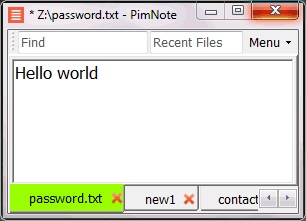
PimNote is a text editor that allows for faster document access. It also combines both the useful and unutilized features of all other text editors.
This tool is designed for knowledge management. You can quickly access the recent file list with a single click. You can easily access an old file that has been opened long ago with the unlimited and searchable recent files list. You can type less with the one-click search and find history feature.
This product is designed for remote work. No freezing from a remote file monitoring/opening/writing when disconnected. You can save files offline by closing the application and not closing the tabs. During file opening, auto-reconnect the network drive. Recurring file notifications are displayed politely on top bar, instead of a popup dialog box that requires frequent actions and tends not to be used.
API Access
Has API
No
API Access
Has API
No


Pricing Details
No price information available.
Free Trial
No
Free Version
No
Pricing Details
No price information available.
Free Trial
No
Free Version
Yes
Deployment
Web-Based
No
On-Premises
No
iPhone App
No
iPad App
No
Android App
No
Windows
Yes
Mac
No
Linux
Yes
Chromebook
No
Deployment
Web-Based
No
On-Premises
No
iPhone App
No
iPad App
No
Android App
No
Windows
Yes
Mac
No
Linux
No
Chromebook
No
Customer Support
Business Hours
No
Live Rep (24/7)
No
Online Support
Yes
Customer Support
Business Hours
No
Live Rep (24/7)
No
Online Support
Yes
Types of Training
Training Docs
Yes
Webinars
No
Live Training (Online)
No
In Person
No
Types of Training
Training Docs
Yes
Webinars
No
Live Training (Online)
No
In Person
Yes
Vendor Details
Company Name
Code Browser
Website
tibleiz.net/code-browser/
Vendor Details
Company Name
Pimtel
Founded
2018
Website
www.pimtel.com/pimnote/
Product Features
Code Editors
API
No
Auto-Complete
No
Code Folding
No
Column Editing
No
Customizable Themes
No
Debugging
No
Formatting / Table Editing
No
Keyboard Shortcuts
No
Multi-Monitor Editing
No
Syntax Highlighting
No
WYSIWYG
No
Text Editors
API
No
Auto-Complete
No
Code Folding
No
Column Editing
No
Customizable Themes
No
Debugging
No
Formatting / Table Editing
No
Keyboard Shortcuts
No
Multi-Monitor Editing
No
Syntax Highlighting
No
WYSIWYG
No
Product Features
Text Editors
API
No
Auto-Complete
No
Code Folding
No
Column Editing
No
Customizable Themes
No
Debugging
No
Formatting / Table Editing
No
Keyboard Shortcuts
No
Multi-Monitor Editing
No
Syntax Highlighting
No
WYSIWYG
No
