Average Ratings 0 Ratings
Average Ratings 0 Ratings
Similar Products
-
Adobe Experience ManagerAdobe Experience Manager is an enterprise content management platform designed to power seamless digital experiences across web, mobile, apps, and other channels. Experience Manager Sites enables teams to create, manage, and optimize content efficiently while ensuring high performance and rapid delivery. Experience Manager Assets provides a robust digital asset management system with automation tools to source, adapt, and distribute content at scale. AI-driven Experience Platform Agents enhance productivity by automating tasks such as high-volume page updates, content migration, governance enforcement, and content optimization. Forms capabilities allow organizations to create responsive digital forms with secure e-signature workflows for streamlined customer interactions. Adobe Learning Manager integrates training and development directly into brand ecosystems, while Experience Manager Guides supports scalable documentation through a cloud-native CCMS. Built-in governance tools ensure compliance, brand consistency, and permission control across digital properties. By combining automation, AI, and centralized management, Adobe Experience Manager accelerates time-to-market and enhances customer engagement.
-
HyperproofCompliance work eats engineering time. Hyperproof exists to give that time back by automating the parts of GRC that don't need a human: pulling evidence out of GitHub, Jira, ServiceNow, Snyk, and cloud storage on a schedule, running recurring tests against high-frequency controls, and kicking off a task automatically the moment something fails instead of waiting for the next audit cycle to find out. Under the hood, Hyperproof maps one control to 160+ frameworks (SOC 2, ISO 27001, HIPAA, NIST, and others), so a control tested once can satisfy several standards instead of forcing teams to rebuild the same work per framework. AI agents handle the first pass on evidence review and gap-flagging, leaving humans to make the actual judgment calls rather than hunting down documentation. Teams using it report cutting audit prep by roughly 350 hours a year, a 66% drop in duplicate controls, and about $150K saved annually on control orchestration. It also scales to messier org charts, with the ability to scope controls by business unit or entity instead of flattening everything into one program. Built in 2018 out of the Seattle area, Hyperproof is used by engineering and security-heavy orgs like Reddit, Fortinet, Appian, and Outreach that are tired of treating compliance as a manual, spreadsheet and email process and want it to run more like the rest of their infrastructure: automated, monitored, and auditable.
-
GaffaGaffa is a REST API built for web scraping and browser automation, allowing developers to run real, full browsers at scale with a single API call. It removes the difficulty of managing headless browser frameworks, rotating proxies, CAPTCHA solving, and scaling infrastructure, all of which are handled automatically. JavaScript-heavy and dynamic websites render exactly as they would for a human visitor by default. Beyond standard scraping, Gaffa supports AI-driven structured data extraction (extract data into a defined schema without writing CSS selectors), screenshot and PDF capture, infinite-scroll and form-filling automation, and clean Markdown conversion for feeding webpages directly into LLM and RAG pipelines. A rotating residential proxy network keeps access reliable across regions, and a credit-based pricing model means teams pay only for the browser time and bandwidth they actually use. Gaffa is designed for AI engineers, data teams, and developers who want production-grade web data extraction without having to build and maintain their own infrastructure.
-
3Q3Q is an API-first video infrastructure for developers and engineering teams who want direct control over their media backend. A REST video API and native player SDKs give you programmatic access to hosting, ingestion, encoding, live streaming, video-on-demand, and delivery, so you can build video portals, streaming apps, or OTT backends on a single European platform. The stack is transparent by design. 3Q supports adaptive bitrate streaming over HLS and DASH with mixed HEVC and AVC codecs and automatic Live-to-VoD. Delivery runs over a proprietary global CDN, encryption, and HTTP/2 over TLS 1.3. The Cookie- and Consent-free HTML5 Video Player is barrier-free in accordance with WCAG 2.1/BITV 2.0 and needs no consent layer. Video AI exposes speech-to-text transcription, automatic subtitles, translation, and chapter markers through the same API, and integration fits your existing pipeline and video workflows. What sets 3Q apart is ownership. 3Q runs on its own independent European video infrastructure, so your data stays in the EU and under German jurisdiction. 3Q is GDPR-compliant and all processes are ISO/IEC 27001 certified, with modular pay-as-you-go pricing and 24/7 support from real video experts.
-
one.comAll in one plan: Website tools, hosting, personalized email, and more. We will help you every step of your way. Register or transfer your domain name. Build your site and make it a success. Register the perfect domain name today to kick-start your success. We can help you transfer domain names that you already own. You can build your website using the Website Builder or more advanced WordPress. In just a few simple steps, you can create a beautiful and responsive website. Increase your customer base. You have put in the work to create something you are proud of. Now you want the rest of the world to see it. All our plans come with a free domain for a year. Our website builder is easy to use and will help you create your online dream. Google Ads can help you increase your website traffic. Sign up to receive a 1 month free trial. Our friendly support team is available 24/7/365. All plans include a free SSL certificate. Your website will be secure starting day 1.
-
OxylabsOxylabs is a market leader in web intelligence, helping businesses worldwide turn public web data into actionable insights with enterprise-grade, ethical, and compliant solutions. Its proxy infrastructure spans one of the largest global networks, offering residential, ISP, mobile, datacenter, and dedicated datacenter proxies, along with Web Unblocker – an AI-driven tool that ensures seamless, block-free access to even the most protected sites. On the scraping side, Oxylabs provides a complete ecosystem. The Web Scraper API manages every stage of large-scale data extraction, from proxy management to parsing, while OxyCopilot, an AI-powered assistant, generates parsing requests from simple natural language prompts. For dynamic, bot-protected websites, the Headless Browser, a headless browser designed to mimic human behavior, ensures uninterrupted access. Oxylabs also pioneers AI-driven tools like AI Studio, which enables natural language scraping and crawling so anyone can extract data without writing code. Its ready-made datasets provide instant, structured information across industries such as e-commerce, real estate, travel, and more – accelerating data projects without custom scraping. With the largest proxy services in the market, Oxylabs offers 177M+ IPs across 195 countries and is trusted by 4,000+ clients worldwide, including Fortune 500 companies. Plus, their 24/7 customer service ensures businesses get support whenever it’s needed.
-
CrowdinGet quality translations for your app, website, game, supporting documentation, and on. Invite your own translation team or work with professional translation agencies within Crowdin. Features that ensure quality translations and speed up the process • Glossary – create a list of terms to get consistent translations • Translation Memory (TM) – no need to translate identical strings • Screenshots – tag source strings to get context-relevant translations • Integrations – set up integration with GitHub, Google Play, API, CLI, Android Studio, and on • QA checks – make sure that all the translations have the same meaning and functions as the source strings • In-Context – proofreading within the actual web application • Machine Translations (MT) – pre-translate via translation engine • Reports – get insights, plan and manage the project Crowdin supports more than 30 file formats for mobile, software, documents, subtitles, graphics and assets: .xml, .strings, .json, .html, .xliff, .csv, .php, .resx, .yaml, .xml, .strings and on.
-
DocmosisDocmosis is a self-hosted or SaaS template-based document generation solution. Integrate with custom-built software applications or popular third-party apps using the API. Create templates using MS Word or LibreOffice. Add plain-text placeholders to control: the insertion of text/images/tables; conditionally add/remove any content; perform calculations; loop over repeating data; format data/numbers and much more. Integrate with: Custom software built using Java, C#, Python, PHP, Ruby and more via a REST API; Low-code and no-code platforms like Appian, Bubble, Mendix, Outsystems; Third-party form builders or apps that can perform a webhook such as FormAssembly or Salesforce. Used by customers in Finance, Health, Legal, Education, Government, HR, Insurance, Logistics, and Manufacturing to generate customized letters invoices, proposals, contracts, statements, reports and more.
-
csidec/side: The Client-Side Platform for Cybersecurity, Compliance, and Privacy Monitoring third-party scripts effectively eliminates uncertainty, ensuring that you are always aware of what is being delivered to your users' browsers, while also enhancing script performance by up to 30%. The unchecked presence of these scripts in users' browsers can lead to significant issues when things go awry, resulting in adverse publicity, potential legal actions, and claims for damages stemming from security breaches. Compliance with PCI DSS 4.0.1, particularly sections 6.4.3 and 11.6.1, requires that organizations handling cardholder data implement tamper-detection measures by March 31, 2025, to help prevent attacks by notifying stakeholders of unauthorized modifications to HTTP headers and payment information. c/side stands out as the sole fully autonomous detection solution dedicated to evaluating third-party scripts, moving beyond reliance on merely threat feed intelligence or easily bypassed detections. By leveraging historical data and artificial intelligence, c/side meticulously analyzes the payloads and behaviors of scripts, ensuring a proactive stance against emerging threats. Our continuous monitoring of numerous sites allows us to stay ahead of new attack vectors, as we process all scripts to refine and enhance our detection capabilities. This comprehensive approach not only safeguards your digital environment but also instills greater confidence in the security of third-party integrations.
-
Adobe FireflyAdobe Firefly is a versatile AI-powered creative platform designed to help users generate and edit multimedia content with ease. It allows users to create images, videos, and audio using simple text prompts within an interactive and flexible workspace. The platform features tools like generative fill, image editing, and video editing, enabling users to refine and enhance their creations. Firefly also includes quick actions such as background removal, cropping, resizing, and format conversion to streamline workflows. Users can explore an infinite canvas for creative production and experiment with various styles and outputs. The platform encourages creativity by allowing users to remix content from a shared community gallery. With its intuitive design, it reduces the need for advanced technical skills. Firefly integrates AI capabilities to speed up content creation and editing processes. It supports both beginners and professionals in producing high-quality results. Overall, Adobe Firefly provides a powerful and accessible environment for modern digital creativity.
Description
Introducing a self-hosted, headless, and API-driven content management system that grants you full control over your data, ensuring it remains exclusively yours. We are proud to present Cockpit, our open-source solution that we wish to share with the community. Designed with an intuitive interface and user experience, Cockpit makes it enjoyable to oversee your content management. This platform shines when you require a versatile content architecture without restrictions on how to utilize your data. It is an ideal choice for projects needing to support various devices or when a content management interface for static site generators is necessary. You can create distinctive applications and seamlessly integrate them with content from Cockpit. Installation is straightforward and can be completed in under a minute, enabling you to launch your next project effortlessly. Cockpit offers a simple yet robust headless CMS built around an API-first approach with a focus on JSON content. Whether you opt for SQLite or MongoDB, the choice is yours; Cockpit is suitable for both quick, straightforward projects and larger endeavors that demand the flexibility of MongoDB. Enjoy the freedom to craft your applications exactly as you envision with Cockpit.
Description
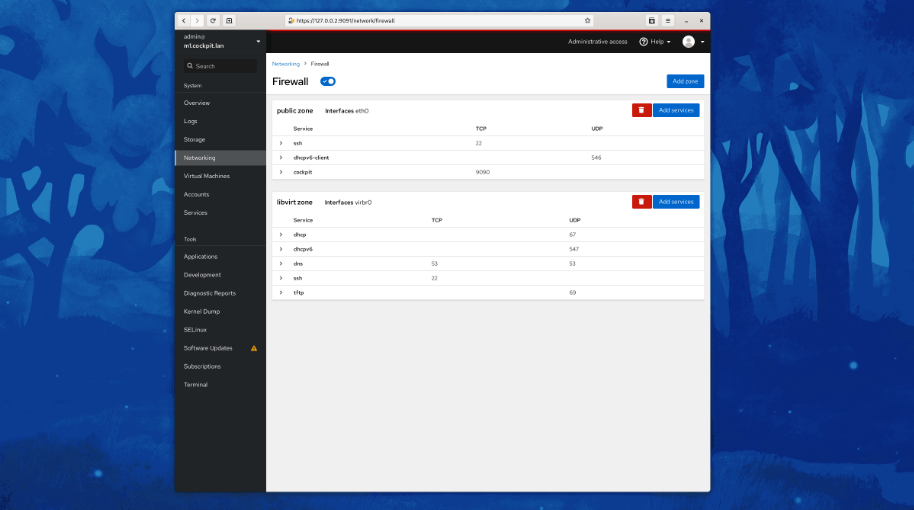
Cockpit serves as a user-friendly web-based graphical interface designed for server management, catering to everyone from beginners to seasoned Linux administrators. By leveraging system APIs and commands, Cockpit allows an entire team of administrators to manage systems in their preferred manner, whether that involves using the command line or various utilities alongside the Cockpit interface. With Cockpit, users can access their servers through a web browser and execute system tasks effortlessly using a mouse. It simplifies operations such as initiating containers, managing storage, configuring networks, and reviewing logs. Essentially, Cockpit acts like a graphical "desktop interface" tailored specifically for individual servers. If you have preferred applications or command-line tools for server management, you can continue utilizing those alongside Cockpit without any disruptions. Since Cockpit operates using the same system tools as the command line, you can seamlessly switch between Cockpit and your other preferred methods. This flexibility ensures that you can efficiently manage your servers while still maintaining your usual workflow.
API Access
Has API
No
API Access
Has API
No



Integrations
Ansible
No
CentOS
No
Debian
No
Fedora
No
Fedora CoreOS
No
MongoDB
Yes
Red Hat Enterprise Linux
No
Ubuntu
No
n8n
Yes
openSUSE Tumbleweed
No
Integrations
Ansible
Yes
CentOS
Yes
Debian
Yes
Fedora
Yes
Fedora CoreOS
Yes
MongoDB
No
Red Hat Enterprise Linux
Yes
Ubuntu
Yes
n8n
No
openSUSE Tumbleweed
Yes
Pricing Details
No price information available.
Free Trial
No
Free Version
Yes
Pricing Details
No price information available.
Free Trial
No
Free Version
Yes
Deployment
Web-Based
Yes
On-Premises
Yes
iPhone App
No
iPad App
No
Android App
No
Windows
No
Mac
No
Linux
No
Chromebook
No
Deployment
Web-Based
No
On-Premises
No
iPhone App
No
iPad App
No
Android App
Yes
Windows
Yes
Mac
Yes
Linux
Yes
Chromebook
No
Customer Support
Business Hours
No
Live Rep (24/7)
No
Online Support
Yes
Customer Support
Business Hours
No
Live Rep (24/7)
No
Online Support
Yes
Types of Training
Training Docs
Yes
Webinars
No
Live Training (Online)
No
In Person
No
Types of Training
Training Docs
Yes
Webinars
No
Live Training (Online)
No
In Person
No
Vendor Details
Company Name
Agentejo
Founded
2013
Country
Germany
Website
getcockpit.com
Vendor Details
Company Name
Cockpit
Website
cockpit-project.org
Product Features
Content Management
Audio Content
No
Customizable Templates
No
Document Indexing
No
E-forms
No
Full Text Search
No
Image Editor
No
SEO Management
No
Text Editor
No
Version Control
No
Video Content
No
Website Management
No
Product Features
Server Management
CPU Monitoring
No
Credential Management
No
Database Servers
No
Email Monitoring
No
Event Logs
No
History Tracking
No
Patch Management
No
Scheduling
No
User Activity Monitoring
No
Virtual Machine Monitoring
No
