Average Ratings 0 Ratings
Average Ratings 0 Ratings
Similar Products
-
Planview Software Product DeliveryPlanview Software Product Delivery Solution is a comprehensive enterprise platform that provides delivery intelligence by connecting strategy to execution across development toolchains. It integrates seamlessly with tools such as Azure DevOps, GitHub, and Jira to collect and unify real-time data from across teams. This allows organizations to gain full visibility into their delivery processes and make informed decisions. The platform includes features like cross-team dependency management, capacity planning, and agile planning at both team and portfolio levels. It enables users to analyze workflows, identify bottlenecks, and optimize delivery performance. Advanced analytics, including DORA metrics, provide insights into engineering efficiency and outcomes. AI-powered roadmapping helps align business objectives with execution strategies. The solution also supports connected OKRs to ensure teams stay aligned with organizational goals. Portfolio-level investment planning and scenario modeling allow leaders to evaluate different strategies. Risk signals are surfaced early through configurable thresholds and flow metrics. By replacing manual reporting with real-time dashboards, Planview improves transparency and decision-making. Ultimately, it helps enterprises deliver digital products more efficiently and with measurable impact.
-
GearsetGearset is a full‑featured Salesforce DevOps solution built for the enterprise, giving teams the tools to adopt best practices across every stage of the DevOps lifecycle. From metadata and CPQ deployments to CI/CD, testing, code analysis, sandbox seeding, backups, archiving, and observability, Gearset gives teams unmatched insight and control over their Salesforce workflows. Over 3,000 organizations — including names like McKesson and IBM — rely on Gearset to deliver with security and scale in mind. With advanced governance, detailed audit trails, SOX/ISO/HIPAA support, multi‑team pipelines, integrated security checks, and adherence to ISO 27001, SOC 2, GDPR, CCPA/CPRA, and HIPAA, Gearset combines enterprise‑ready compliance with rapid onboarding and an intuitive interface — all in one platform. Leading firms in finance, healthcare, and tech trust Gearset to power their DevOps initiatives without adding complexity.
-
FlagsmithFlagsmith gives software engineering teams a self-hosted or fully managed feature flagging platform for controlling releases across web, mobile, and backend systems. Ship code behind a flag, then decide who sees it — by environment, user, or custom segment — without redeploying. Run Flagsmith however fits your infrastructure: our managed cloud, your own private cloud, or fully on-premise. What you get: Progressive rollouts with one-click rollback if something breaks Live config changes — flip features on or off instantly, no redeploy required Segment-based A/B and multivariate testing Project and role-based access control for multi-team organizations Native integrations with the tools already in your stack MCP support and a CLI so AI agents and scripts can manage flags directly Open source at its core, Flagsmith is built for teams that want control over where their configuration data lives.
-
JS7 JobSchedulerJS7 JobScheduler, an Open Source Workload Automation System, is designed for performance and resilience. JS7 implements state-of-the-art security standards. It offers unlimited performance for parallel executions of jobs and workflows. JS7 provides cross-platform job execution and managed file transfer. It supports complex dependencies without the need for coding. The JS7 REST-API allows automation of inventory management and job control. JS7 can operate thousands of Agents across any platform in parallel. Platforms - Cloud scheduling for Docker®, OpenShift®, Kubernetes® etc. - True multi-platform scheduling on premises, for Windows®, Linux®, AIX®, Solaris®, macOS® etc. - Hybrid cloud and on-premises use User Interface - Modern GUI with no-code approach for inventory management, monitoring, and control using web browsers - Near-real-time information provides immediate visibility to status changes, log outputs of jobs and workflows. - Multi-client functionality, role-based access management - OIDC authentication and LDAP integration High Availability - Redundancy & Resilience based on asynchronous design and autonomous Agents - Clustering of all JS7 Products, automatic fail-over and manual switch-over
-
ParasoftParasoft's mission is to provide automated testing solutions and expertise that empower organizations to expedite delivery of safe and reliable software. A powerful unified C and C++ test automation solution for static analysis, unit testing and structural code coverage, Parasoft C/C++test helps satisfy compliance with industry functional safety and security requirements for embedded software systems.
-
Kasm WorkspacesKasm Workspaces streams your workplace environment directly to your web browser…on any device and from any location. Kasm is revolutionizing the way businesses deliver digital workspaces. We use our open-source web native container streaming technology to create a modern devops delivery of Desktop as a Service, application streaming, and browser isolation. Kasm is more than a service. It is a platform that is highly configurable and has a robust API that can be customized to your needs at any scale. Workspaces can be deployed wherever the work is. It can be deployed on-premise (including Air-Gapped Networks), in the cloud (Public and Private), or in a hybrid.
-
InnoslateSPEC Innovations’ leading model-based systems engineering solution is designed to help your team minimize time-to-market, reduce costs, and mitigate risks, even with the most complex systems. Available as both a cloud-based and on-premise application, it offers an intuitive graphical user interface accessible through any modern web browser. Innoslate's comprehensive lifecycle capabilities include: • Requirements Management • Document Management • System Modeling • Discrete Event Simulation • Monte Carlo Simulation • DoDAF Models and Views • Database Management • Test Management with detailed reports, status updates, results, and more • Real-Time Collaboration And much more.
-
Jama ConnectJama Connect®, a product development platform, uniquely creates Living Requirements™. This digital thread is created through siloed, test, and risk activities to provide end to end compliance, risk mitigation, process improvement, and compliance. Companies creating complex products, systems, and software can now define, align, and execute on what they need. This reduces the time and effort required to prove compliance and saves on rework. You can be sure of success by choosing a solution that is easy-to-use, flexible, and offers support and services that are adoption-oriented.
-
NeuBirdNeuBird is the Agentic Operations Center: one secure link to your telemetry and LLMs that resolves incidents, remembers every investigation, and shares one governed truth across your teams and agents.
-
CodemagicCodemagic’s macOS build environments facilitate the smooth creation of hybrid applications, bolstered by an extensive array of preinstalled software. You can efficiently configure your Cordova Android and iOS application builds and workflows through a single codemagic.yaml file. To maintain the performance of your Android and iOS applications, Codemagic provides automated testing on simulators, emulators, and actual devices, ensuring you receive prompt feedback on your build outcomes. Integration with the Apple Developer Portal streamlines iOS code signing, enabling seamless deployment to App Store Connect and Google Play. Similarly, you can also set up your React Native app builds and workflows in one straightforward codemagic.yaml file. With multiple versions of Xcode, Android SDK, and npm preinstalled, Codemagic’s macOS build machines are designed for effortless Android and iOS builds. Moreover, Codemagic simplifies the automation of testing for your React Native applications across a variety of testing platforms. This comprehensive approach not only boosts productivity but also enhances the overall development experience.
Description
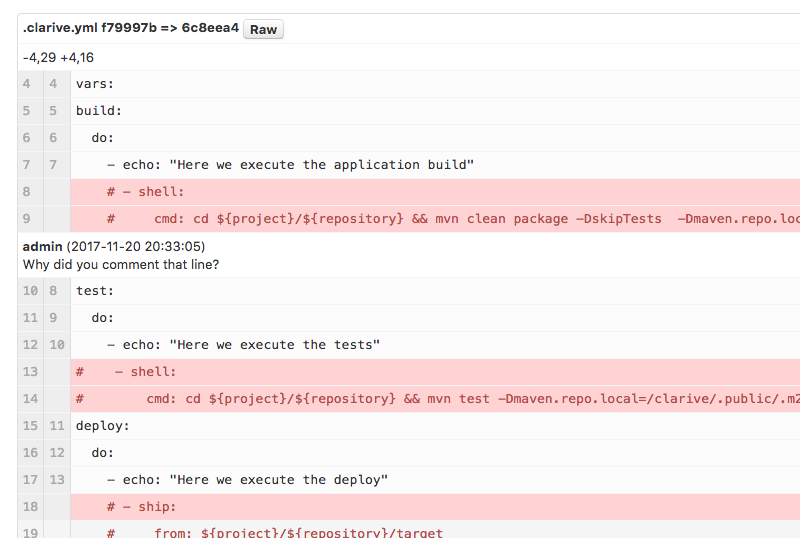
Embark on your DevOps journey and streamline application delivery with a cohesive and robust workflow. The path to continuous delivery begins here. Clarive stands out as the pioneering tool that offers an integrated experience for both Development and Operations teams. Establish and plan your milestones, quality checkpoints, and releases in alignment with your product vision and objectives. Package your source code or any related artifacts into changesets that facilitate various review, testing, or deployment workflows. Track your release journey through various stages and environments, while fostering collaboration and iterative improvements using kanban boards and discussions. Automate your release pipelines to set up infrastructure, manage dependencies, and deploy components seamlessly. This solution is perfect for Development teams eager to adopt lean delivery practices and optimize their workflows. It also serves Operations teams aiming to unify all delivery processes, break down silos, and effectively manage application dependencies. By consolidating tools, you can save both time and resources, paving the way for a more efficient and productive DevOps environment. Embrace this opportunity to enhance your collaborative efforts and achieve your goals with greater efficiency.
Description
JFrog Pipelines enables software development teams to accelerate the delivery of updates by automating their DevOps workflows in a secure and efficient manner across all tools and teams involved. It incorporates functions such as continuous integration (CI), continuous delivery (CD), and infrastructure management, automating the entire journey from code development to production deployment. This solution is seamlessly integrated with the JFrog Platform and is offered in both cloud-based and on-premises subscription models. It can scale horizontally, providing a centralized management system capable of handling thousands of users and pipelines within a high-availability (HA) setup. With pre-built declarative steps that require no scripting, users can easily construct intricate pipelines, including those that link multiple teams together. Furthermore, it works in conjunction with a wide array of DevOps tools, and the various steps within a single pipeline can operate on diverse operating systems and architectures, thus minimizing the necessity for multiple CI/CD solutions. This versatility makes JFrog Pipelines a powerful asset for teams aiming to enhance their software delivery processes.
API Access
Has API
No
API Access
Has API
Yes




Integrations
Gradle
Yes
Jenkins
Yes
Kubernetes
Yes
Amazon Elastic Container Service (Amazon ECS)
No
Amazon Web Services (AWS)
Yes
Apache Maven
Yes
Azure DevOps Server
No
Bamboo
No
CircleCI
No
Endevor
Yes
Integrations
Gradle
Yes
Jenkins
Yes
Kubernetes
Yes
Amazon Elastic Container Service (Amazon ECS)
Yes
Amazon Web Services (AWS)
No
Apache Maven
No
Azure DevOps Server
Yes
Bamboo
Yes
CircleCI
Yes
Endevor
No
Pricing Details
€2 per user per month
Free Trial
No
Free Version
Yes
Pricing Details
$98/month
Free Trial
Yes
Free Version
No
Deployment
Web-Based
Yes
On-Premises
No
iPhone App
No
iPad App
No
Android App
No
Windows
No
Mac
No
Linux
No
Chromebook
No
Deployment
Web-Based
Yes
On-Premises
Yes
iPhone App
No
iPad App
No
Android App
No
Windows
Yes
Mac
Yes
Linux
Yes
Chromebook
No
Customer Support
Business Hours
No
Live Rep (24/7)
Yes
Online Support
Yes
Customer Support
Business Hours
Yes
Live Rep (24/7)
No
Online Support
No
Types of Training
Training Docs
Yes
Webinars
Yes
Live Training (Online)
Yes
In Person
No
Types of Training
Training Docs
Yes
Webinars
Yes
Live Training (Online)
Yes
In Person
No
Vendor Details
Company Name
Clarive Software
Founded
2010
Country
Spain
Website
clarive.com
Vendor Details
Company Name
JFrog
Founded
2008
Country
United States
Website
jfrog.com/pipelines/
Product Features
Application Lifecycle Management
Administrator Level Control
No
Defect Tracking
No
Iteration Planning
No
Project Management
No
Release Management
Yes
Requirements Review
No
Task Management
No
Test Case Tracking
No
User Level Management
No
Version Control
Yes
DevOps
Approval Workflow
No
Dashboard
No
KPIs
No
Policy Management
No
Portfolio Management
No
Prioritization
No
Release Management
No
Timeline Management
No
Troubleshooting Reports
No
Product Features
Build Automation
Automated Testing
Yes
Build Cache
Yes
Build Management Tools
Yes
Build Metrics
Yes
Change Only Compiling
Yes
Debugging Tools
Yes
Dependency Management
Yes
IDE Compatibility
Yes
Parallel Testing
Yes
Plugin Library
Yes
Source Code Management
Yes
Version Conflict Resolution
Yes
Continuous Delivery
Application Lifecycle Management
No
Application Release Automation
No
Build Automation
No
Build Log
No
Change Management
No
Configuration Management
No
Continuous Deployment
No
Continuous Integration
No
Feature Toggles / Feature Flags
No
Quality Management
No
Testing Management
No
Continuous Integration
Build Log
No
Change Management
No
Configuration Management
No
Continuous Delivery
No
Continuous Deployment
No
Debugging
No
Permission Management
No
Quality Assurance Management
No
Testing Management
No
DevOps
Approval Workflow
No
Dashboard
No
KPIs
No
Policy Management
No
Portfolio Management
No
Prioritization
No
Release Management
No
Timeline Management
No
Troubleshooting Reports
No
