Average Ratings 0 Ratings
Average Ratings 0 Ratings
Similar Products
-
PackageX OCR ScanningPackageX OCR API turns any smartphone into an incredibly powerful universal label scanner. It can read every bit of text, including barcodes, QR codes and other information on the label. Our OCR technology is the best in the industry. It uses proprietary algorithms and deep learning models to extract information from labels. Our OCR API has been trained using information from more than 10 million labels. This allows for the highest scanning accuracy in the market, at over 95%. Our technology can scan in low-light conditions and read labels from any angle. Create your own OCR scanner app to eliminate pen-and-paper inefficiencies. Our OCR scanner allows you to extract information from printed text or handwritten labels. Our OCR software is trained using multilingual label data extracted in over 40 countries. Detect and extract information from barcodes or QR codes.
-
Square POSSquare POS is a simple, intuitive point-of sale (POS) solution. It provides a rich set of tools for inventory tracking, sales tracking, online payment processing and digital receipts. Square POS is available for Android and iOS devices. It records transactions offline by storing data locally, then automatically syncing information when there is an Internet connection. Square POS allows users to manage details such as names, prices and quantities. It also offers features such as a barcode scanner and discounts, credit card processing and gift cards, refunds and more.
-
WallesterWallester is an Estonian-licensed financial institution and has been an official Visa partner since 2018, specialising in innovative digital financial solutions and card issuance. We empower companies across the European Economic Area (EEA) and the UK to streamline payments, launch branded cards, and scale efficiently. What we do: 1. White-Label Solution with Embedded Finance Our White-Label solution enables businesses to integrate financial services directly into their platforms - a concept known as embedded finance. This allows companies to launch branded payment cards tailored to their specific needs, enhancing customer experiences and opening new revenue streams. We ensure a swift time-to-market with simplified integration and dedicated support from our implementation team. 2. Wallester Business: Corporate Expense Management Wallester Business is designed to modernise corporate expense management. It provides companies with instant access to virtual and physical Visa cards, streamlining financial processes through a modern app and comprehensive portal. Features include expense tracking, budget analytics, and seamless integration with accounting systems to enhance financial oversight and efficiency. With a diverse team of over 190 professionals located in Estonia, Latvia, France and the United Kingdom, we are dedicated to developing high-quality, profitable products for our clients. Our passion for innovation drives us to improve and adapt to the evolving financial landscape continuously. We aim to elevate businesses by providing the most advanced financial technologies, enabling them to reach new heights in efficiency and growth. We are always open to collaboration and eager to assist companies in navigating the future of finance.
-
ContractSafeContractSafe is AI-enabled contract management software that actually does what it promises, without the six-month implementation, per-seat charges, or admin overhead that makes most CLM tools their own kind of problem. If you've been through that cycle before (a tool that takes months to deploy, requires a dedicated admin, hides pricing behind a sales call, and still leaves contracts expiring without warning), ContractSafe is the way out. Search is Google-fast across every contract and attachment, including full OCR on scanned PDFs. The AI assistant automatically extracts key metadata, categorizes contracts by type, and answers plain-language questions about contract content. Smart Search understands your intent rather than requiring exact keywords. None of it needs configuration or a dedicated admin. It works out of the box. Pricing is published publicly. No "contact sales for a quote," no per-seat charges that penalize you for adding users, no implementation fees. Every plan includes unlimited users, automated renewal and key-date alerts, a dedicated Customer Success Manager, and free onboarding assistance. Higher-tier plans add approval workflows, redlining, and built-in e-signature. Security: hosted on AWS, SOC 2 Type II and ISO 27001 certified, HIPAA and GDPR compliant, with data residency options across the US, Canada, EU, and Australia. Most teams are fully operational within hours of signing up. Free trial, no credit card required.
-
Building LogisticsBuilding Logistics is a comprehensive solution that manages the incoming flow of packages in buildings, offices, universities, and hotels, ensuring seamless tracking, scanning, sorting, and recipient notifications for each package. With PackageX’s advanced AI scanning technology, the system captures text, QR codes, and barcodes to ensure flawless package intake, enabling efficient package management. The platform also features data validation, automatic contact matching, customizable notifications, and chain of custody tracking, all designed to improve delivery workflows and reduce errors. By providing a more efficient system, PackageX increases delivery speed, accuracy, and overall operational efficiency, making it the ideal choice for managing package logistics in high-traffic environments. With 99% accuracy in package intake, zero lost packages, and twice the efficiency of traditional methods, PackageX delivers a seamless and hassle-free recipient experience.
-
ScreenMeetScreenMeet offers a suite of secure, browser-based remote support and screen-sharing tools designed to enhance customer service and IT support. With capabilities like remote desktop access, live voice and video support, co-browsing, and asynchronous screen recording, ScreenMeet allows agents to assist customers or employees seamlessly. It integrates with major ITSM, CRM, and contact center platforms such as ServiceNow, Salesforce, and Microsoft Dynamics 365, providing a unified support experience. Designed for enterprises, ScreenMeet ensures high security, scalability, and flexibility, making it ideal for businesses aiming to improve support efficiency and customer satisfaction.
-
PostScan MailPostScan Mail is a virtual mailbox service that provides individuals and businesses with a convenient and secure way to manage their postal mail online. With PostScan Mail, users can access their physical mail from anywhere in the world through their digital devices. The service allows users to view and manage their mail, receive notifications of new mail items, forward mail to any address, scan and shred unwanted mail, and even deposit checks remotely. PostScan Mail eliminates the need for physical mailboxes and offers a practical solution for people who are always on the go or live in multiple locations. It is a modern and efficient way to manage your postal mail, making your life easier and more streamlined.
-
GroupTogetherGroupTogether is a user-friendly online platform designed for creating group cards, collecting gifts, and sending eGift Cards quickly and effortlessly. It allows users to initiate a group card, decide whether to gather funds or select a gift, and then distribute a single link to friends, family, coworkers, or teammates. Participants have the option to add personalized messages, share photos, and include GIFs, while also contributing a specific amount, any amount they choose, or simply signing the card without making a financial contribution. With privacy assured, GroupTogether eliminates the discomfort of using personal banking details and ensures secure transactions, complete with verifiable records of contributions and expenditures. Organizers have the flexibility to use the collected funds for a variety of gifts, including eGift Cards, gift baskets, flowers, or the versatile GroupTogether AnyCard that allows recipients to choose from over 100 eGift Cards. The platform provides the option for digital delivery or downloadable PDFs for printing, making it a practical solution for various occasions such as remote team celebrations, workplace events, classroom activities, birthdays, farewells, and retirements. Moreover, this seamless process fosters a sense of community and connection, even in virtual settings.
-
AiraloStay connected effortlessly across more than 200 countries and regions with an eSIM that can be installed in just minutes. Experience seamless global connectivity without the burden of roaming charges — it’s straightforward and budget-friendly. This technology is integrated into your phone's hardware, functioning just like a traditional SIM card but operating entirely in a digital format. By opting for an eSIM, you can bypass the hassle of physical SIM cards and spotty Wi-Fi, allowing you to connect to a mobile network as soon as you reach your destination. Choose from a variety of prepaid local, regional, or global eSIM plans tailored to help you stay online wherever you go. Simply download the eSIM, install it on your device, and you’ll be ready to access mobile networks seamlessly upon arrival. With this modern solution, you can enjoy the freedom and flexibility of staying connected without any unexpected fees or complications.
-
Notifii TrackNotifii Track, a cloud-based package tracker software, is available for apartment offices, university mailrooms and corporate mailrooms. You can quickly and easily log packages as they arrive. Notify the recipient automatically via email or text message. Capture signature proof-of-pickup/delivery. Notifii Track is a time-saver. It takes just a few seconds for a package to be scanned and increases package accountability. You can use Notifii Track via your web browser or any iOS/Android device. 30-day free trial.
Description
Are you looking to digitize your business cards into contacts for Outlook, Microsoft CRM, Salesforce, or Google Contacts? Look no further than Cardiris™ Corporate 5, the perfect solution for transforming your extensive collection of business cards into digital format. This innovative software effortlessly extracts and converts essential information such as names, companies, and phone numbers from your cards. You can easily export these digital contacts to your preferred platform, including Outlook, Salesforce, Lotus Notes, ACT!, and more. Cardiris™ is versatile and works seamlessly with any type of scanner, whether it's a flatbed or a portable one, allowing you to utilize your current equipment. As a standalone application, it is compatible with major scanner brands available in the market. Enhance your workflow and productivity by bringing your existing device back to life! With Cardiris™, you can also access dedicated connectors that facilitate the scanning of business cards directly into your favorite contact management systems, making the entire process more efficient.
Description
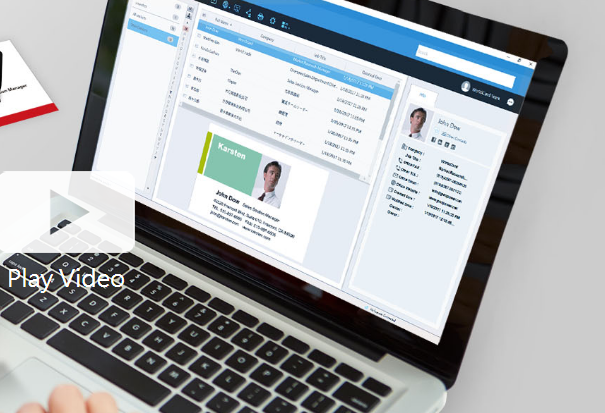
Business cards can be recognized and the associated data can be exported as a CSV file prior to the subscription's expiration. If you wish to retain the images of the business cards, it is advisable to reach out to PenPower's customer service for assistance. Please note that after the subscription expires, user data will be retained by the system for a period of 180 days; if renewal does not occur within this timeframe, all data will be permanently deleted. To optimize performance with WorldCard Team, it is recommended that the NAS edition should not exceed 20 users, while the Basic edition is best suited for fewer than 100 users. The maximum number of users allowed for the Windows Server edition will depend on the performance capabilities of your server. Additionally, you can transfer contact data to WorldCard Team from either WorldCard or WorldCard Mobile. When implementing the WorldCard Team system in your organization, we highly recommend migrating all contacts to WorldCard Team rather than continuing with WorldCard for improved efficiency and streamlined management of your business contacts. This approach not only enhances organization but also facilitates better collaboration among team members.
API Access
Has API
No
API Access
Has API
No



Integrations
Salesforce
Yes
Google Contacts
Yes
Microsoft 365
Yes
Microsoft Excel
Yes
Microsoft Outlook
Yes
Integrations
Salesforce
Yes
Google Contacts
No
Microsoft 365
No
Microsoft Excel
No
Microsoft Outlook
No
Pricing Details
$99
Free Trial
No
Free Version
No
Pricing Details
Contact PenPower Technologies for pricing details.
Free Trial
Yes
Free Version
No
Deployment
Web-Based
Yes
On-Premises
No
iPhone App
Yes
iPad App
Yes
Android App
Yes
Windows
Yes
Mac
No
Linux
No
Chromebook
No
Deployment
Web-Based
Yes
On-Premises
No
iPhone App
Yes
iPad App
Yes
Android App
Yes
Windows
Yes
Mac
Yes
Linux
No
Chromebook
No
Customer Support
Business Hours
Yes
Live Rep (24/7)
No
Online Support
Yes
Customer Support
Business Hours
Yes
Live Rep (24/7)
No
Online Support
No
Types of Training
Training Docs
Yes
Webinars
No
Live Training (Online)
No
In Person
Yes
Types of Training
Training Docs
Yes
Webinars
No
Live Training (Online)
Yes
In Person
No
Vendor Details
Company Name
I.R.I.S. Group
Founded
1987
Country
Belgium
Website
www.irislink.com/EN-US/c2061/Cardiris--5---Business-Card-Scanning-Software.aspx
Vendor Details
Company Name
PenPower Technology
Founded
1991
Country
United States
Website
www.worldcardteam.com/EN/
Product Features
Business Card
Contact Management
Yes
Data Extraction
Yes
Design Templates
No
Image Editor
No
Print Management
No
Step-by-Step Wizard
No
Product Features
Business Card
Contact Management
Yes
Data Extraction
Yes
Design Templates
No
Image Editor
No
Print Management
No
Step-by-Step Wizard
No
Contact Management
Activity Management
No
Appointment Management
No
Contact Database
Yes
Contact History
No
Contact Import/Export
Yes
Customer Pipeline
No
Email Marketing
No
Group Management
No
Interaction Tracking
Yes
Lead Management
No
Prospecting Tools
No
Sales Pipeline Management
No
Search / Filter
No
Segmentation
Yes
Shared Contacts
Yes
Social Media Integration
No
CRM
Calendar/Reminder System
No
Call Logging
No
Document Storage
No
Email Marketing
Yes
Internal Chat Integration
No
Lead Scoring
No
Marketing Automation Integration
No
Mobile Access
Yes
Quotes / Proposals
No
Segmentation
No
Social Media Integration
Yes
Task Management
No
Territory Management
No
Customer Engagement
Analytics
No
Churn Management
No
Communication Management
Yes
Community Management
Yes
Content Syndication
Yes
Feedback Collection
Yes
Gamification
No
Live Chat
No
Video Content
No
