Average Ratings 0 Ratings
Average Ratings 0 Ratings
Similar Products
-
OmnilertSave lives by detecting potential threats early and responding quickly with visual gun detection. Our AI-powered Gun Detect software provides reliable, 24-hour monitoring of security cameras. This makes it easy to deploy an early gun detection solution. Our Emergency Communications and Automation Platform shares intelligence by automatically activating emergency response plans and safety system. We help you maximize every second and protect your people from danger, no matter what the threat is, from guns to severe storms. Protect your people, facilities, and operations from any threat you face today.
-
Switcher StudioSwitcher Studio allows you to capture video from multiple angles and edit it in real-time. This will allow you to connect with your community in a more engaging way. You can stream it live or save it for later. Your audience will be attracted to you with relevant content. Make it look great. There's no need to purchase, lug or learn largeequipment. Switcher is compatible with iPads and iPhones. Switcher is so intuitive that anyone can create amazing video with it. You don't need to hire outside videographers or producers. It takes an hour to edit every minute of edited video. Every minute of live-editing takes, well, one second. You can share every moment, live or recorded, external or internal, with video -- no matter what it holds.
-
ReflectizReflectiz is a web exposure management platform that enables organizations to proactively identify, monitor, and mitigate security, privacy, and compliance risks across their digital environments. It provides comprehensive visibility and control over first, third, and even fourth-party components like scripts, trackers, and open-source libraries—elements that are often missed by traditional security tools. The unique advantage of Reflectiz is that it operates remotely, without embedding code on customer websites. This ensures no impact on site performance, no access to sensitive user data, and no additional attack surface. By continuously monitoring all publicly available components, Reflectiz identifies hidden risks in your digital supply chain, helping to detect vulnerabilities and compliance issues in real-time. With a centralized dashboard, Reflectiz gives businesses a holistic view of their web assets, making it easier to manage risk across all digital properties. The platform allows teams to establish baselines for approved behaviors, swiftly identifying deviations that may indicate threats. Reflectiz is particularly valuable for industries such as eCommerce, healthcare, and finance, where managing third-party risks is crucial. It helps businesses enhance security, reduce attack surfaces, and maintain compliance without requiring any changes to website code, offering continuous monitoring and detailed insights into external component behaviors.
-
Proton MailSecure your company’s communications with Proton Mail — the business email solution trusted by over 50,000 organizations. With end-to-end encryption built in, your internal and external communications stay confidential by default. Proton Mail helps your business meet GDPR, HIPAA, and other compliance standards, while giving you full control over your data under strong Swiss privacy laws. Empower your team with encrypted email and calendar, support for your custom email domains, professional branding, and simple migration from providers like Google Workspace or Microsoft 365 — no IT team required.
-
Maintenance CareMaintenance Care is a cloud-based, facilities maintenance management solution that helps organizations of all sizes manage work orders, assets, preventive maintenance tasks and more from any device. Maintenance Care includes a mobile CMMS to make task completion and tracking easier on-site or on the go. Maintenance Care’s CMMS (computerized maintenance management system) includes a host of powerful but easy-to-use features, including asset tracking, parts and inventory management, dashboards, reporting, document storage, third-party integrations and more. Preventive scheduling functionality helps users handle in-progress tasks and plan for bigger projects to address what work needs to be done and when. Additionally, document storage capabilities allow users to attach various forms, such as MSDS, training PDFs and safety documentation to tasks. The CMMS includes an asset management module that provides details related to purchase, manufacturing, technical specifications, warranty expiration and repair history on equipment. All paid plans include unlimited users — this means no extra cost per seat. Cost-effective paid plans include more robust features anyone can quickly learn and start using.
-
MentornityMentornity is mentoring and coaching program software for organizations that run structured programs and need to show what came of them. It covers the full cycle. Participants enrol and are matched by an algorithm that scores every possible pair against weighted criteria the program defines, discarding pairs that fail a mandatory rule; administrators approve suggestions individually or in bulk, assign by hand, or open a mentor pool and let participants choose. Mentors publish availability, mentees book within it, sessions sync to Zoom, Microsoft Teams or Google Meet, and reminders go out automatically before and after each meeting. Measurement runs alongside rather than after. Surveys and forms can be scheduled at any point in a cycle, and a program health score tracks participation, meeting frequency and completion against each program's own targets, flagging programs that drift before the cycle ends. Certificates are issued automatically on completion. Each program runs under its own branding on its own domain, with role-based access and six interface languages. Free for up to 10 users with no expiry and every feature enabled; paid plans start at $289 per month and scale by participant count. Running mentoring programs since 2015.
-
TinyPNGTinyPNG (by Tinify) is a free image optimization service built for developers and designers. It utilizes smart lossy compression to reduce the file sizes of JPEG, PNG, WebP, and AVIF files by up to 80% with no visible quality loss. That means faster load times, better SEO, and lower bandwidth. You can compress, convert, and resize images via a clean web interface or integrate it into your workflow with the API. The platform also provides an image CDN for fast global delivery of optimized assets. SDKs are available for Python, Node.js, PHP, Java, Ruby, and .NET. WordPress plugin included, plus plenty of community-driven integrations. No tuning, no noise, Tinify just works. Whether you're optimizing a handful of images or processing millions, it scales effortlessly. All plans include a generous free tier, and support is quick when you need it. George the panda 🐼 approves.
-
Rezku Point of SaleRezku POS is designed exclusively for the busiest restaurants, bars and pizzerias, providing a comprehensive solution that puts your brand in league with national chains. You can now get your own fully custom-branded, downloadable smartphone ordering app for your restaurant exclusively from Rezku. Rezku comes packaged with all of the advanced functionality restaurants need, without having to resort to 3rd parties and additional fees, including loyalty perks, gift card program with eGift cards, delivery driver management, custom reporting, and a beautiful, customized white-label online ordering site with zero commission for orders. Rezku's fully-loaded feature-set spans the entire scope of operational needs including mobile POS, customer facing displays, advanced kitchen display systems and sticky label printing. Rezku also includes the latest business management functionality industry professionals crave, with an incredibly well-designed manager’s smartphone app that lets you control every aspect of the system, including menus, pricing and time cards, all from the palm of your hand. Rezku delivers exceptional value, revolutionizing your entire operation, modernizing your operations, and growing your bottom line.
-
Azore CFDAzore is software for computational fluid dynamics. It analyzes fluid flow and heat transfers. CFD allows engineers and scientists to analyze a wide range of fluid mechanics problems, thermal and chemical problems numerically using a computer. Azore can simulate a wide range of fluid dynamics situations, including air, liquids, gases, and particulate-laden flow. Azore is commonly used to model the flow of liquids through a piping or evaluate water velocity profiles around submerged items. Azore can also analyze the flow of gases or air, such as simulating ambient air velocity profiles as they pass around buildings, or investigating the flow, heat transfer, and mechanical equipment inside a room. Azore CFD is able to simulate virtually any incompressible fluid flow model. This includes problems involving conjugate heat transfer, species transport, and steady-state or transient fluid flows.
-
D&B Finance AnalyticsAI-driven solutions for credit-to-cash powered by Dun & Bradstreet’s global data and analytics. D&B Finance Analytics offers AI-driven solutions backed by the Dun & Bradstreet Data Cloud. D&B Finance Analytics is a flexible, easy-to-use tool that helps finance teams reduce costs, improve customer service, and manage risk. Manage credit and receivables risks to minimize bad debts, reduce DSO and improve cash flow. Automate manual decisioning and monitoring, customer communication, and matching. Offer your customers an online credit application as well as a payment portal. D&B Finance Analytics consists of two platforms: D&B Credit Intelligence and D&B®, Receivables Intelligence. Together, they provide powerful insights and technologies to help you accelerate your success throughout all your credit-to cash processes. You can quickly gain visibility into credit risks, onboard customers, and set the right terms.
Description
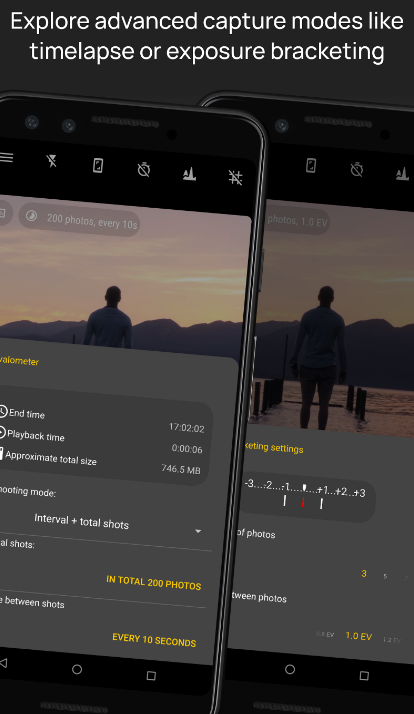
Camera FV-5 is a sophisticated camera app designed for everyone from casual users to seasoned professionals. It offers a streamlined and efficient camera experience, replicating the manual controls typically found on DSLRs right at your fingertips. Users can effortlessly switch between front and rear cameras, enjoying manual adjustments for all available options. The app enables quick and simultaneous shooting in both JPEG and DNG formats, granting users maximum flexibility during post-processing. Additionally, various settings such as shutter speed, zoom, exposure, and white balance can be customized using the volume keys. It ensures complete mastery over exposure settings, metering, white balance, focus, and sensitivity, allowing for tailored photography experiences. For privacy concerns, location embedding is disabled by default, but users can opt to enable it for GPS or cellular network-based tagging. Furthermore, if activated, the most recent photo captured will be shown for immediate review, making it convenient for users to assess their shots quickly.
Description
Camera FV-5 is an advanced photography app designed for mobile devices, providing users with DSLR-like manual controls right at their fingertips. This application is specifically crafted for both photography enthusiasts and professionals, enabling you to take remarkable raw images that can be edited later for breathtaking outcomes. The boundaries of your creativity and imagination are the only things that can limit your photography experience! Users have full access to adjustable photographic parameters, including exposure compensation, ISO settings, metering modes, focus options, white balance, and program modes. You can create impressive timelapse videos, including bracketed and HDR variants, as well as controlled series of images. Furthermore, all essential camera functions can be mapped to volume buttons, allowing for quick adjustments to EV, ISO, and color temperature. The app also supports devices equipped with dedicated hardware camera shutter keys, enhancing the shooting experience. Additionally, the capability for background photo and RAW development ensures that your camera operation remains fluid and uninterrupted. This combination of features empowers you to explore your photographic potential fully.
API Access
Has API
No
API Access
Has API
No




Integrations
No details available.
Integrations
No details available.
Pricing Details
No price information available.
Free Trial
No
Free Version
No
Pricing Details
Free
Free Trial
No
Free Version
Yes
Deployment
Web-Based
No
On-Premises
No
iPhone App
No
iPad App
No
Android App
Yes
Windows
No
Mac
No
Linux
No
Chromebook
No
Deployment
Web-Based
No
On-Premises
No
iPhone App
No
iPad App
No
Android App
Yes
Windows
No
Mac
No
Linux
No
Chromebook
No
Customer Support
Business Hours
No
Live Rep (24/7)
No
Online Support
Yes
Customer Support
Business Hours
No
Live Rep (24/7)
No
Online Support
Yes
Types of Training
Training Docs
Yes
Webinars
No
Live Training (Online)
No
In Person
No
Types of Training
Training Docs
Yes
Webinars
No
Live Training (Online)
No
In Person
No
Vendor Details
Company Name
Camera FV-5
Country
Germany
Website
www.camerafv5.com
Vendor Details
Company Name
Camera FV-5
Country
Germany
Website
www.camerafv5.com
