Average Ratings 0 Ratings
Average Ratings 0 Ratings
Similar Products
-
FinOpslyMost enterprises can report what AI cost them. Far fewer can say which team owns it, whether it was approved, or what it returned. FinOpsly closes that gap. The platform governs AI spend on the same cost model that carries the cloud, data platform and SaaS an AI workload consumes, so a business unit sees the full cost of an AI initiative instead of four disconnected bills. Capabilities include: Cost estimation before deployment. Model an architecture and get a priced workload across model APIs, GPU capacity, warehouse consumption and storage, with the assumptions on screen. Weigh model choices against consumption you have actually measured. Attribution that holds up in a chargeback cycle. Spend resolves to owners, teams, applications, business units and customers through hierarchies nine or more levels deep. Tagging is standardized across providers, keys and resources are labeled in bulk from plain-language rules, and whatever remains unattributed is published as a number, not absorbed. Guardrails that act. Set budgets by project, team or API key. Catch anomalies with root cause and route them to whoever owns the resource. Surface waste that provider tooling misses, using FinOpsly's own detection models. Plan commitments across AWS, Azure and Google Cloud. Park idle compute on approved schedules, reversibly. Financial results you can defend. Automated chargeback in a single cycle. Savings measured as what reached run-rate against a no-action baseline. Unit economics down to cost per call, per active user and per customer served. For technology and finance leaders accountable for what AI spend returns.
-
SetylGain full visibility and control over your IT assets, software licenses, usage, and spend with Setyl. Setyl is a cloud-based IT asset and license management (ITAM) platform that connects to your existing systems with 100+ out-of-the-box integrations. Use Setyl to manage all your hardware assets, software applications, SaaS subscriptions, licenses, vendors, admins, users, and spend in one place — helping you: 1. Manage both hardware and software assets in one place. 2. Automate and scale daily IT operations, including inventory management and employee onboarding and offboarding processes. 3. Identify and cut wasted IT spend. 4. Prepare for your security audit and stay compliant, including with SOC 2 and ISO 27001. With its intuitive interface and low learning curve, the Setyl platform offers a user-friendly experience and facilitates collaboration across your organization. Features include: • IT asset and license inventory • Asset lifecycle management • SaaS subscription, software application, and license management • Software renewal tracking • License rightsizing • Employee onboarding and offboarding workflows • ISO 27001 and SOC 2 compliance • Vendor management • IT spend management and reporting • 100+ native integrations (Microsoft, Google, MDM, RMM, IAM, HR, helpdesk tools, and more) • API access • Fully guided support
-
CloudZeroCloudZero helps businesses optimize cloud spend with full visibility into costs—so they can reduce wasteful spending and improve their unit economics. Unlike other solutions, we take an engineering-led approach to cost optimization, helping teams understand what drives 100% of their operational cloud spend, empowering them to reduce risk, minimize waste, and maximize profit.
-
AlisQIAlisQI is a cloud-based Quality Management platform built for process and batch manufacturers who want to move beyond reactive firefighting toward stable, predictable operations while maintaining full compliance control. Rather than organizing quality around static documents and isolated events, AlisQI was designed as a data-first system. Quality, laboratory, and production data are structured and connected in a shared operational backbone. This gives cross-functional teams early visibility into deviations, faster response times, and greater confidence in product integrity and daily execution. The platform combines configurable quality modules, including document control, training, deviations, CAPA, audits, risk management, supplier quality, SPC, and EHS, with targeted, ready-to-use Solvers. Solvers integrate forms, workflows, dashboards, and business logic to address specific operational problems without unnecessary scope. Because the system is built on structured data, manufacturers can apply practical AI within workflows, from automated COA extraction to conversational access to quality data and pattern detection across incidents. Solvers are production-ready from day one and evolve as processes, products, or plants change. This progression does not require custom development or disruptive IT projects. Manufacturers use AlisQI to harmonize quality practices across sites, reduce waste and rework, strengthen audit readiness, accelerate root cause analysis, and connect shop-floor and lab data directly to quality decision-making across industries including chemicals, plastics, packaging, food and beverage, personal care, automotive, and industrial manufacturing.
-
InfoBoxEliminate communication silos and simplify enterprise content delivery across your entire workforce. InfoBox provides IT and corporate communications teams with a secure, centralized hub for broadcasting updates, standard operating procedures (SOPs), and operational resources. Designed to overcome the low engagement of legacy intranets and messy email threads, InfoBox pushes targeted updates directly to mobile devices, web applications, and desktop email clients. Core Technical & Platform Capabilities: 1. Granular Role-Based Access & Segmentation: Categorize content delivery by department, location, role, or administrative unit to ensure users receive strictly relevant information. 2. Flexible Authentication & External Access: Support for multi-provider authentication (Google Workspace, Microsoft 365, Yahoo, and personal email accounts) enables secure inclusion of contractors, frontline workers, and external partners without requiring additional core directory domain licenses. 3. Google Workspace /Microsoft 365: Native add-on integration allows users to consume visual updates and company feeds directly inside without additional costs. 4. Cross-Platform Accessibility: Native mobile clients for iOS and Android alongside a unified Web portal (infobox.info) ensure consistent UI/UX across all endpoint devices. 5. No-Code Content Builder & Resource Management: Equips administrators with visual templates for broadcasting policy updates, announcements, and searchable document libraries without IT intervention. 6. Engagement & Usage Analytics: Gain visibility into reach, content consumption, and search trends across the organization.
-
FrameworkLTCFrameworkLTC's fully integrated and scalable platform automates all manual tasks, allowing LTC pharmacies to focus on what is most important: improving patient lives. Automation replaces manual tasks and allows you to expand your business while maximising margins. Delivering services that meet the needs of each facility will strengthen your partner relationships. Our facility-centric software allows you to provide concierge-level service, catering to every patient, wing, and facility. Allow facilities to print bills, check order statuses, and process returns according to your pre-defined rules. Your facilities will appreciate your reports. Automate refill and reorder prescriptions so they don't get lost on the production floor.
-
BlumiraEmpower Your Existing Team to Attain Enterprise-Level Security Introducing a comprehensive solution that combines SIEM, endpoint visibility, continuous monitoring, and automated responses to simplify processes, enhance visibility, and accelerate response times. We manage the burdens of security, allowing you to reclaim valuable time in your schedule. With ready-to-use detections, filtered alerts, and established response playbooks, IT departments can derive substantial security benefits through Blumira. Fast Setup, Instant Benefits: Seamlessly integrates with your technology ecosystem and is fully operational within hours, eliminating any waiting period. Unlimited Data Ingestion: Enjoy predictable pricing alongside limitless data logging for comprehensive lifecycle detection. Streamlined Compliance: Comes with one year of data retention, ready-made reports, and round-the-clock automated monitoring. Exceptional Support with a 99.7% Customer Satisfaction Rate: Benefit from dedicated Solution Architects for product assistance, a proactive Incident Detection and Response Team developing new detections, and continuous SecOps support around the clock. With this robust offering, your team can focus on strategic initiatives while we handle the intricacies of security management.
-
Google Compute EngineCompute Engine (IaaS), a platform from Google that allows organizations to create and manage cloud-based virtual machines, is an infrastructure as a services (IaaS). Computing infrastructure in predefined sizes or custom machine shapes to accelerate cloud transformation. General purpose machines (E2, N1,N2,N2D) offer a good compromise between price and performance. Compute optimized machines (C2) offer high-end performance vCPUs for compute-intensive workloads. Memory optimized (M2) systems offer the highest amount of memory and are ideal for in-memory database applications. Accelerator optimized machines (A2) are based on A100 GPUs, and are designed for high-demanding applications. Integrate Compute services with other Google Cloud Services, such as AI/ML or data analytics. Reservations can help you ensure that your applications will have the capacity needed as they scale. You can save money by running Compute using the sustained-use discount, and you can even save more when you use the committed-use discount.
-
ManageEngine Log360Log360 is a SIEM or security analytics solution that helps you combat threats on premises, in the cloud, or in a hybrid environment. It also helps organizations adhere to compliance mandates such as PCI DSS, HIPAA, GDPR and more. You can customize the solution to cater to your unique use cases and protect your sensitive data. With Log360, you can monitor and audit activities that occur in your Active Directory, network devices, employee workstations, file servers, databases, Microsoft 365 environment, cloud services and more. Log360 correlates log data from different devices to detect complex attack patterns and advanced persistent threats. The solution also comes with a machine learning based behavioral analytics that detects user and entity behavior anomalies, and couples them with a risk score. The security analytics are presented in the form of more than 1000 pre-defined, actionable reports. Log forensics can be performed to get to the root cause of a security challenge. The built-in incident management system allows you to automate the remediation response with intelligent workflows and integrations with popular ticketing tools.
-
SogolyticsSogolytics, an experience management platform, allows companies to collect, analyze and use employee and customer data to drive business growth. Sogolytics is used by organizations across all industries to track interactions at all touchpoints with customers and employees. The best-in-class reporting delivers real-time, actionable insights that help to prevent and mitigate potential problems. SogoCX improves every aspect of a company's customer experience. This means improved conversion rates, simplified data management, and understanding customers to increase return on investment. Organizations can use SogoCX to measure key metrics like NPS, CSAT and CES. SogoEX software is used by organizations to collect and use data to improve engagement and reduce turnover. This platform allows HR and leadership to drive organizational changes through real-time feedback collection and employee engagement.
Description
Preconfigured dashboards and intuitively designed views facilitate an immediate launch, promote transparency in your data without needing a data scientist, and enhance operational efficiency. The aggregation and representation of data adhere to industry best practices and cater to customer needs. You can leverage existing widgets to promptly begin analyzing KPIs, which allows for quicker and more informed decision-making. Seamless management of IT operations is just a click away. The CIO Cockpit essentials solution provides IT operations managers with an efficient way to grasp their IT landscape by offering essential metrics and KPIs related to all assets. The gathered information from various systems is structured and presented in predefined views, enabling swift detection of anomalies or significant changes for timely intervention. In addition to providing standardized, predefined IT reports in PDF format, whether for a CIO report, management summary, or detailed documentation, CIO Cockpit essentials ensures that all relevant insights are readily available at your fingertips. This immediate access to critical information empowers IT managers to navigate the complexities of their operations with confidence and agility.
Description
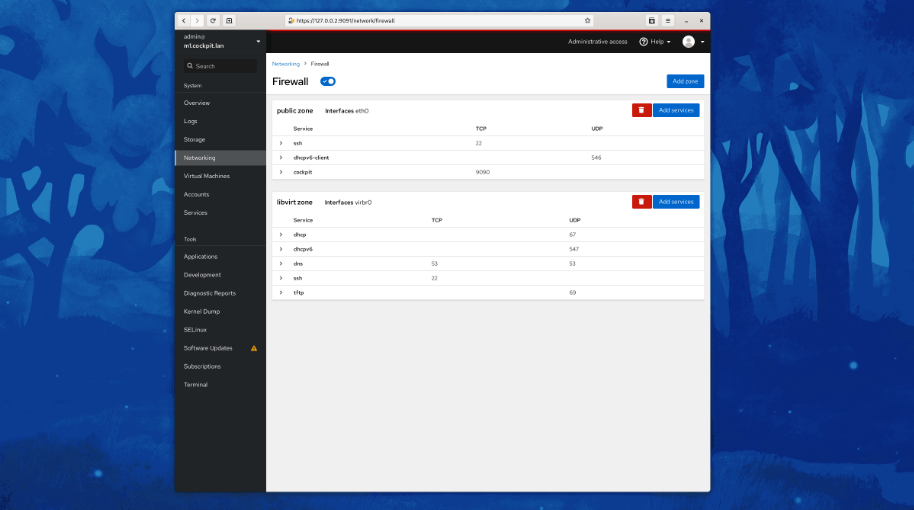
Cockpit serves as a user-friendly web-based graphical interface designed for server management, catering to everyone from beginners to seasoned Linux administrators. By leveraging system APIs and commands, Cockpit allows an entire team of administrators to manage systems in their preferred manner, whether that involves using the command line or various utilities alongside the Cockpit interface. With Cockpit, users can access their servers through a web browser and execute system tasks effortlessly using a mouse. It simplifies operations such as initiating containers, managing storage, configuring networks, and reviewing logs. Essentially, Cockpit acts like a graphical "desktop interface" tailored specifically for individual servers. If you have preferred applications or command-line tools for server management, you can continue utilizing those alongside Cockpit without any disruptions. Since Cockpit operates using the same system tools as the command line, you can seamlessly switch between Cockpit and your other preferred methods. This flexibility ensures that you can efficiently manage your servers while still maintaining your usual workflow.
API Access
Has API
No
API Access
Has API
No



Integrations
Ansible
No
CentOS
No
Debian
No
Fedora
No
Fedora CoreOS
No
Red Hat Enterprise Linux
No
Ubuntu
No
openSUSE Tumbleweed
No
Integrations
Ansible
Yes
CentOS
Yes
Debian
Yes
Fedora
Yes
Fedora CoreOS
Yes
Red Hat Enterprise Linux
Yes
Ubuntu
Yes
openSUSE Tumbleweed
Yes
Pricing Details
No price information available.
Free Trial
No
Free Version
No
Pricing Details
No price information available.
Free Trial
No
Free Version
Yes
Deployment
Web-Based
Yes
On-Premises
No
iPhone App
No
iPad App
No
Android App
No
Windows
No
Mac
No
Linux
No
Chromebook
No
Deployment
Web-Based
No
On-Premises
No
iPhone App
No
iPad App
No
Android App
Yes
Windows
Yes
Mac
Yes
Linux
Yes
Chromebook
No
Customer Support
Business Hours
Yes
Live Rep (24/7)
No
Online Support
Yes
Customer Support
Business Hours
No
Live Rep (24/7)
No
Online Support
Yes
Types of Training
Training Docs
Yes
Webinars
No
Live Training (Online)
Yes
In Person
No
Types of Training
Training Docs
Yes
Webinars
No
Live Training (Online)
No
In Person
No
Vendor Details
Company Name
DextraData
Founded
1995
Country
Germany
Website
www.ciocockpit.net
Vendor Details
Company Name
Cockpit
Website
cockpit-project.org
Product Features
Product Features
Server Management
CPU Monitoring
No
Credential Management
No
Database Servers
No
Email Monitoring
No
Event Logs
No
History Tracking
No
Patch Management
No
Scheduling
No
User Activity Monitoring
No
Virtual Machine Monitoring
No
