Average Ratings 0 Ratings
Average Ratings 0 Ratings
Similar Products
-
CodemagicCodemagic’s macOS build environments facilitate the smooth creation of hybrid applications, bolstered by an extensive array of preinstalled software. You can efficiently configure your Cordova Android and iOS application builds and workflows through a single codemagic.yaml file. To maintain the performance of your Android and iOS applications, Codemagic provides automated testing on simulators, emulators, and actual devices, ensuring you receive prompt feedback on your build outcomes. Integration with the Apple Developer Portal streamlines iOS code signing, enabling seamless deployment to App Store Connect and Google Play. Similarly, you can also set up your React Native app builds and workflows in one straightforward codemagic.yaml file. With multiple versions of Xcode, Android SDK, and npm preinstalled, Codemagic’s macOS build machines are designed for effortless Android and iOS builds. Moreover, Codemagic simplifies the automation of testing for your React Native applications across a variety of testing platforms. This comprehensive approach not only boosts productivity but also enhances the overall development experience.
-
GearsetGearset is a full‑featured Salesforce DevOps solution built for the enterprise, giving teams the tools to adopt best practices across every stage of the DevOps lifecycle. From metadata and CPQ deployments to CI/CD, testing, code analysis, sandbox seeding, backups, archiving, and observability, Gearset gives teams unmatched insight and control over their Salesforce workflows. Over 3,000 organizations — including names like McKesson and IBM — rely on Gearset to deliver with security and scale in mind. With advanced governance, detailed audit trails, SOX/ISO/HIPAA support, multi‑team pipelines, integrated security checks, and adherence to ISO 27001, SOC 2, GDPR, CCPA/CPRA, and HIPAA, Gearset combines enterprise‑ready compliance with rapid onboarding and an intuitive interface — all in one platform. Leading firms in finance, healthcare, and tech trust Gearset to power their DevOps initiatives without adding complexity.
-
Kasm WorkspacesKasm Workspaces streams your workplace environment directly to your web browser…on any device and from any location. Kasm is revolutionizing the way businesses deliver digital workspaces. We use our open-source web native container streaming technology to create a modern devops delivery of Desktop as a Service, application streaming, and browser isolation. Kasm is more than a service. It is a platform that is highly configurable and has a robust API that can be customized to your needs at any scale. Workspaces can be deployed wherever the work is. It can be deployed on-premise (including Air-Gapped Networks), in the cloud (Public and Private), or in a hybrid.
-
FlagsmithFlagsmith gives software engineering teams a self-hosted or fully managed feature flagging platform for controlling releases across web, mobile, and backend systems. Ship code behind a flag, then decide who sees it — by environment, user, or custom segment — without redeploying. Run Flagsmith however fits your infrastructure: our managed cloud, your own private cloud, or fully on-premise. What you get: Progressive rollouts with one-click rollback if something breaks Live config changes — flip features on or off instantly, no redeploy required Segment-based A/B and multivariate testing Project and role-based access control for multi-team organizations Native integrations with the tools already in your stack MCP support and a CLI so AI agents and scripts can manage flags directly Open source at its core, Flagsmith is built for teams that want control over where their configuration data lives.
-
Google Cloud RunFully managed compute platform to deploy and scale containerized applications securely and quickly. You can write code in your favorite languages, including Go, Python, Java Ruby, Node.js and other languages. For a simple developer experience, we abstract away all infrastructure management. It is built upon the open standard Knative which allows for portability of your applications. You can write code the way you want by deploying any container that listens to events or requests. You can create applications in your preferred language with your favorite dependencies, tools, and deploy them within seconds. Cloud Run abstracts away all infrastructure management by automatically scaling up and down from zero almost instantaneously--depending on traffic. Cloud Run only charges for the resources you use. Cloud Run makes app development and deployment easier and more efficient. Cloud Run is fully integrated with Cloud Code and Cloud Build, Cloud Monitoring and Cloud Logging to provide a better developer experience.
-
Google Cloud PlatformGoogle Cloud is an online service that lets you create everything from simple websites to complex apps for businesses of any size. Customers who are new to the system will receive $300 in credits for testing, deploying, and running workloads. Customers can use up to 25+ products free of charge. Use Google's core data analytics and machine learning. All enterprises can use it. It is secure and fully featured. Use big data to build better products and find answers faster. You can grow from prototypes to production and even to planet-scale without worrying about reliability, capacity or performance. Virtual machines with proven performance/price advantages, to a fully-managed app development platform. High performance, scalable, resilient object storage and databases. Google's private fibre network offers the latest software-defined networking solutions. Fully managed data warehousing and data exploration, Hadoop/Spark and messaging.
-
ActiveBatch Workload AutomationActiveBatch by Redwood is a centralized workload automation platform, that seamlessly connects and automates processes across critical systems like Informatica, SAP, Oracle, Microsoft and more. Use ActiveBatch's low-code Super REST API adapter, intuitive drag-and-drop workflow designer, over 100 pre-built job steps and connectors, available for on-premises, cloud or hybrid environments. Effortlessly manage your processes and maintain visibility with real-time monitoring and customizable alerts via emails or SMS to ensure SLAs are achieved. Experience unparalleled scalability with Managed Smart Queues, optimizing resources for high-volume workloads and reducing end-to-end process times. ActiveBatch holds ISO 27001 and SOC 2, Type II certifications, encrypted connections, and undergoes regular third-party tests. Benefit from continuous updates and unwavering support from our dedicated Customer Success team, providing 24x7 assistance and on-demand training to ensure your success.
-
JS7 JobSchedulerJS7 JobScheduler, an Open Source Workload Automation System, is designed for performance and resilience. JS7 implements state-of-the-art security standards. It offers unlimited performance for parallel executions of jobs and workflows. JS7 provides cross-platform job execution and managed file transfer. It supports complex dependencies without the need for coding. The JS7 REST-API allows automation of inventory management and job control. JS7 can operate thousands of Agents across any platform in parallel. Platforms - Cloud scheduling for Docker®, OpenShift®, Kubernetes® etc. - True multi-platform scheduling on premises, for Windows®, Linux®, AIX®, Solaris®, macOS® etc. - Hybrid cloud and on-premises use User Interface - Modern GUI with no-code approach for inventory management, monitoring, and control using web browsers - Near-real-time information provides immediate visibility to status changes, log outputs of jobs and workflows. - Multi-client functionality, role-based access management - OIDC authentication and LDAP integration High Availability - Redundancy & Resilience based on asynchronous design and autonomous Agents - Clustering of all JS7 Products, automatic fail-over and manual switch-over
-
StonebranchStonebranch’s Universal Automation Center (UAC) is a Hybrid IT automation platform, offering real-time management of tasks and processes within hybrid IT settings, encompassing both on-premises and cloud environments. As a versatile software platform, UAC streamlines and coordinates your IT and business operations, while ensuring the secure administration of file transfers and centralizing IT job scheduling and automation solutions. Powered by event-driven automation technology, UAC empowers you to achieve instantaneous automation throughout your entire hybrid IT landscape. Enjoy real-time hybrid IT automation for diverse environments, including cloud, mainframe, distributed, and hybrid setups. Experience the convenience of Managed File Transfers (MFT) automation, effortlessly managing and orchestrating file transfers between mainframes and systems, seamlessly connecting with AWS or Azure cloud services.
-
RunMyJobs by RedwoodRunMyJobs by Redwood is the only SAP endorsed and premium-certified and the most awarded SAP-certified SaaS workload automation platform and only allowing enterprises to achieve end-to-end IT process automation and unify complex across any application, system or environment without limits and with high availability as you scale. We're the #1 job scheduling choice for SAP customers with seamless integration to S/4HANA, BTP, RISE, ECC and more while maintaining a clean core. Empower teams with seamless integration with any present and future tech stack, a low-code editor and a rich library of templates. Monitor processes in real-time with predictive SLA management and get proactive notifications via email or SMS on performance issues or delays in all your processes. Redwood team provides 24/7/365 day global support with the industry’s strongest SLAs and 15-minute response times and a proven approach to migration that secures continuous operations, including team training, on-demand learning and more.
Description
The solution addresses the three key elements of Time, Cost, and Productivity, alleviating concerns for your technology teams. Introducing a new service environment is a straightforward process, as BuildPiper allows effortless modification and duplication of build and deployment specifications from existing environments. This cloning capability significantly streamlines the creation of new environments, making it both rapid and efficient. Additionally, BuildPiper features a well-structured ‘Build Details setup template’ that can easily construct the docker image of the service with just a few straightforward inputs and configurations. For any custom requirements in the docker build process, BuildPiper accommodates them seamlessly! With the inclusion of Pre hooks and Post hooks, it facilitates the execution of personalized steps before and after the Docker image is created. Furthermore, the build template permits the establishment of CI checks right at the build definition stage, ensuring thorough oversight throughout the process. This comprehensive approach not only enhances the efficiency of the build process but also empowers development teams to innovate without being bogged down by the complexities of environment management.
Description
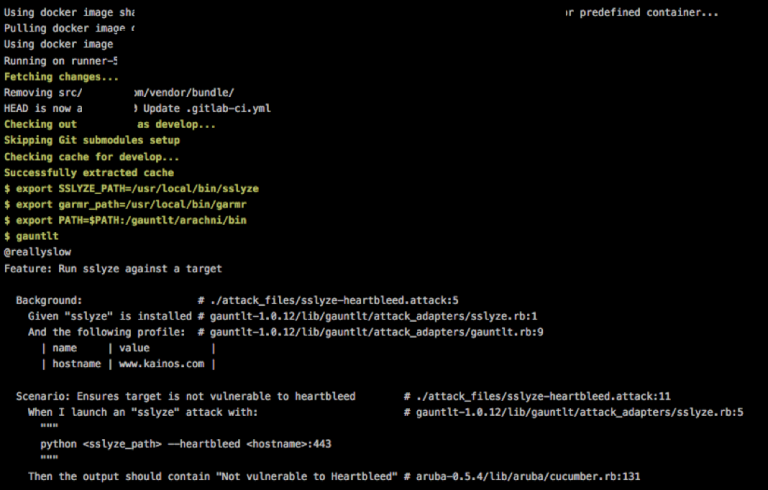
Gauntlt offers integrations with various security tools, enabling security, development, and operations teams to work together effectively in creating robust software. It is designed to enhance testing and foster communication among different teams, allowing for the creation of practical tests that can be incorporated into deployment and testing workflows. The attacks in Gauntlt are composed in a straightforward language that is easy to understand. It seamlessly integrates with your organization's existing testing tools and processes. Included with Gauntlt are security tool adapters that streamline the integration process. It utilizes standard error and standard output from Unix to communicate status updates. There are two primary methods for getting started with Gauntlt: you can either install it via the gem method, which requires you to download and configure the security tools (but rest assured, Gauntlt provides guidance throughout this process), or opt for the Gauntlt Starter Kit, a Vagrant script that automatically sets up the necessary tools for you. Traditionally, security testing occurs according to the auditors' timelines, and the resulting outputs often lack actionable insights, highlighting the need for more efficient solutions in security testing protocols. By using Gauntlt, teams can shift towards a more proactive and integrated approach to security testing, ultimately improving the overall security posture of their software projects.
API Access
Has API
No
API Access
Has API
No




Integrations
Amazon Web Services (AWS)
No
Docker
No
Kubernetes
No
Pricing Details
No price information available.
Free Trial
Yes
Free Version
No
Pricing Details
No price information available.
Free Trial
No
Free Version
Yes
Deployment
Web-Based
No
On-Premises
No
iPhone App
No
iPad App
No
Android App
No
Windows
Yes
Mac
No
Linux
Yes
Chromebook
No
Deployment
Web-Based
Yes
On-Premises
No
iPhone App
No
iPad App
No
Android App
No
Windows
No
Mac
No
Linux
No
Chromebook
No
Customer Support
Business Hours
No
Live Rep (24/7)
Yes
Online Support
No
Customer Support
Business Hours
No
Live Rep (24/7)
No
Online Support
Yes
Types of Training
Training Docs
Yes
Webinars
Yes
Live Training (Online)
No
In Person
Yes
Types of Training
Training Docs
Yes
Webinars
No
Live Training (Online)
Yes
In Person
No
Vendor Details
Company Name
Opstree Solutions
Founded
2014
Country
India
Website
www.opstree.com/buildpiper/
Vendor Details
Company Name
Gauntlt
Website
gauntlt.org
Product Features
Application Development
Access Controls/Permissions
No
Code Assistance
No
Code Refactoring
No
Collaboration Tools
No
Compatibility Testing
No
Data Modeling
No
Debugging
No
Deployment Management
No
Graphical User Interface
No
Mobile Development
No
No-Code
No
Reporting/Analytics
No
Software Development
No
Source Control
No
Testing Management
No
Version Control
No
Web App Development
No
Continuous Delivery
Application Lifecycle Management
No
Application Release Automation
No
Build Automation
No
Build Log
No
Change Management
No
Configuration Management
No
Continuous Deployment
No
Continuous Integration
No
Feature Toggles / Feature Flags
No
Quality Management
No
Testing Management
No
Continuous Integration
Build Log
No
Change Management
No
Configuration Management
No
Continuous Delivery
No
Continuous Deployment
No
Debugging
No
Permission Management
No
Quality Assurance Management
No
Testing Management
No
DevOps
Approval Workflow
No
Dashboard
No
KPIs
No
Policy Management
No
Portfolio Management
No
Prioritization
No
Release Management
No
Timeline Management
No
Troubleshooting Reports
No
Product Features
Automated Testing
Hierarchical View
No
Move & Copy
No
Parameterized Testing
No
Requirements-Based Testing
No
Security Testing
No
Supports Parallel Execution
No
Test Script Reviews
No
Unicode Compliance
No
