Average Ratings 0 Ratings
Average Ratings 48 Ratings
Description
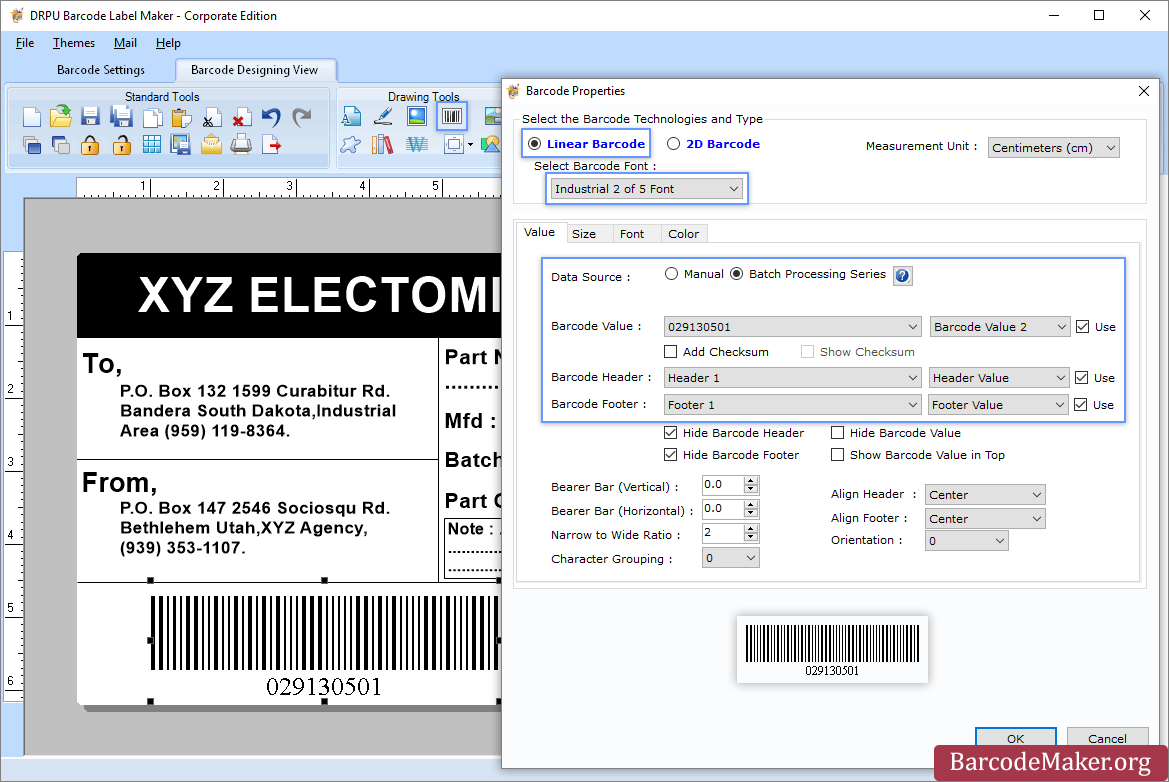
The optimal solution for generating barcodes in the publishing sector is a dedicated barcode label maker:
To start, download and install the Publisher Barcode Generator compatible with Windows. Once installed, open the application and select either the Quick Barcode Mode or the Barcode Designing View Mode. In Quick Barcode Mode, users can opt for either Linear or 2D barcode fonts, input the desired barcode along with header and footer values, and if needed, activate Batch Processing to create multiple barcodes simultaneously. Alternatively, in the Barcode Designing View Mode, users can personalize their labels by adjusting general properties, background settings, and image processing features. To add a barcode, navigate to the Drawing Tools tab and double-click on the barcode to access its properties, where you can select the barcode type and font before entering the specific barcode information. If you plan to generate barcodes in batches, remember to enable the Batch Processing Series option. Finally, the generated barcode labels or tags can be saved in various formats, facilitating easy usage across different platforms. This comprehensive approach ensures that users have all the tools necessary for efficient barcode label creation tailored to their needs.
Description
PackageX OCR API turns any smartphone into an incredibly powerful universal label scanner. It can read every bit of text, including barcodes, QR codes and other information on the label.
Our OCR technology is the best in the industry. It uses proprietary algorithms and deep learning models to extract information from labels.
Our OCR API has been trained using information from more than 10 million labels. This allows for the highest scanning accuracy in the market, at over 95%.
Our technology can scan in low-light conditions and read labels from any angle.
Create your own OCR scanner app to eliminate pen-and-paper inefficiencies.
Our OCR scanner allows you to extract information from printed text or handwritten labels.
Our OCR software is trained using multilingual label data extracted in over 40 countries.
Detect and extract information from barcodes or QR codes.
API Access
Has API
API Access
Has API


Integrations
Building Logistics
PackageX Fulfillment
PackageX Inventory
PackageX Ship
Integrations
Building Logistics
PackageX Fulfillment
PackageX Inventory
PackageX Ship
Pricing Details
$50 one-time payment
Free Trial
Free Version
Pricing Details
Ask us about usage-based pricing for powering your package logistics and operations!
Free Trial
Free Version
Deployment
Web-Based
On-Premises
iPhone App
iPad App
Android App
Windows
Mac
Linux
Chromebook
Deployment
Web-Based
On-Premises
iPhone App
iPad App
Android App
Windows
Mac
Linux
Chromebook
Customer Support
Business Hours
Live Rep (24/7)
Online Support
Customer Support
Business Hours
Live Rep (24/7)
Online Support
Types of Training
Training Docs
Webinars
Live Training (Online)
In Person
Types of Training
Training Docs
Webinars
Live Training (Online)
In Person
Vendor Details
Company Name
BarcodeMaker.org
Country
India
Website
www.barcodemaker.org
Vendor Details
Company Name
PackageX
Founded
2018
Country
United States
Website
packagex.io/ocr-api
Product Features
Barcoding
Barcode Generation
Barcode Scanning
Custom Labels
Inventory Management
Label Templates
RFID
Receiving Labels
Serial Number Tracking
Shipping Labels
Product Features
Barcoding
Barcode Generation
Barcode Scanning
Custom Labels
Inventory Management
Label Templates
RFID
Receiving Labels
Serial Number Tracking
Shipping Labels
OCR
Batch Processing
Convert to PDF
ID Scanning
Image Pre-processing
Indexing
Metadata Extraction
Multi-Language
Multiple Output Formats
Text Editor
Zone Selection Tool
Order Entry
Back Order Management
Customer Database
Inventory Management
Order Fulfillment
Order Management
Real Time Order Entry
Remote Order Entry
Shipping Management
Warehouse Management
