Average Ratings 0 Ratings
Average Ratings 0 Ratings
Similar Products
-
Switcher StudioSwitcher Studio allows you to capture video from multiple angles and edit it in real-time. This will allow you to connect with your community in a more engaging way. You can stream it live or save it for later. Your audience will be attracted to you with relevant content. Make it look great. There's no need to purchase, lug or learn largeequipment. Switcher is compatible with iPads and iPhones. Switcher is so intuitive that anyone can create amazing video with it. You don't need to hire outside videographers or producers. It takes an hour to edit every minute of edited video. Every minute of live-editing takes, well, one second. You can share every moment, live or recorded, external or internal, with video -- no matter what it holds.
-
Adobe FireflyAdobe Firefly is a versatile AI-powered creative platform designed to help users generate and edit multimedia content with ease. It allows users to create images, videos, and audio using simple text prompts within an interactive and flexible workspace. The platform features tools like generative fill, image editing, and video editing, enabling users to refine and enhance their creations. Firefly also includes quick actions such as background removal, cropping, resizing, and format conversion to streamline workflows. Users can explore an infinite canvas for creative production and experiment with various styles and outputs. The platform encourages creativity by allowing users to remix content from a shared community gallery. With its intuitive design, it reduces the need for advanced technical skills. Firefly integrates AI capabilities to speed up content creation and editing processes. It supports both beginners and professionals in producing high-quality results. Overall, Adobe Firefly provides a powerful and accessible environment for modern digital creativity.
-
3Q3Q is an API-first video infrastructure for developers and engineering teams who want direct control over their media backend. A REST video API and native player SDKs give you programmatic access to hosting, ingestion, encoding, live streaming, video-on-demand, and delivery, so you can build video portals, streaming apps, or OTT backends on a single European platform. The stack is transparent by design. 3Q supports adaptive bitrate streaming over HLS and DASH with mixed HEVC and AVC codecs and automatic Live-to-VoD. Delivery runs over a proprietary global CDN, encryption, and HTTP/2 over TLS 1.3. The Cookie- and Consent-free HTML5 Video Player is barrier-free in accordance with WCAG 2.1/BITV 2.0 and needs no consent layer. Video AI exposes speech-to-text transcription, automatic subtitles, translation, and chapter markers through the same API, and integration fits your existing pipeline and video workflows. What sets 3Q apart is ownership. 3Q runs on its own independent European video infrastructure, so your data stays in the EU and under German jurisdiction. 3Q is GDPR-compliant and all processes are ISO/IEC 27001 certified, with modular pay-as-you-go pricing and 24/7 support from real video experts.
-
SilverwareAt Silverware, we believe in empowering hospitality businesses with innovative, reliable, and scalable technology. Founded over 30 years ago, we provide enterprise solutions for tier-one hotels and resorts, multi-unit restaurant operations, and large-scale venues. As a Fullsteam company, our commitment goes beyond just providing software—we build relationships. With over 100+ integrations and a dedicated support team, we’re with you at every step. That’s why hospitality leaders in over 30 countries trust Silverware POS to drive operational efficiency and enhance guest experiences, ensuring success through custom-tailored solutions that grow with your business. Set the gold standard with Silverware.
-
ScreencaptScreencapt allows you to record the entire screen or a selected area. You can also record a specific window. Screencapt is the ideal screen recorder because of its flexibility. Using the integrated audio recording you can also add your commentary or system sound directly into the screen recording. This is particularly useful when creating explanation videos or presentations. Screencapt's ability to record a webcam is a special feature. You can now add your comments and reactions to the video. This makes your screen recordings more personal and professional. Screencapt offers advanced options to record the cursor. You can choose to hide the cursor or add special effects to highlight specific actions. This is especially useful for software tutorials and demonstrations where a clear cursor view is required.
-
MuzaicMuzaic.ai is a browser-based tool that scores video automatically. You give it a cut (or a folder of cuts); it returns a finished audio mix — music, SFX, ambience and voiceover as separate layers — mastered to broadcast spec, in roughly 30 seconds per clip. What it actually does The pipeline runs in four stages. First it analyses the video: scenes, objects, pacing, colour and sentiment. From that it builds an audio plan and commits each concept to a clear direction (the site's example: a string quartet under a battle scene) rather than averaging toward something inoffensive. Then it composes every layer to fit the picture and the other layers — SFX land on the action, ambience ducks under speech, the voiceover is drafted from your brief rather than read out. Finally it mixes and masters the result. Existing audio in the source can be kept, replaced or mixed under. Output is three concepts per clip, exported as MP3 or WAV. Layer balance is adjusted inside Muzaic before export; the deliverable is the finished mix, not separate stems. The commercial angle Pricing is metered in minutes of finished audio, not per track or per download; downloads are unlimited. Personal is free for 10 minutes a month, non-commercial only. Creator ($45/month) covers your own brand and paid ads. Studio ($249/month) is for agencies: the licence travels to the client and the legal cover extends to them too. Enterprise adds TV, radio, cinema and OOH, plus a custom contract, DPA and SLA. What it is not It is not a music-generation toy. The free tier exists to test the workflow on your own footage; nothing from it may be published. The target user is a team producing hundreds of ad variants a month, where the audio step is the bottleneck.
-
SynapSynap is an intelligent online exam platform for secure, question-based learning, trusted by organisations worldwide. Designed to help businesses, training providers, and educational institutions create, deliver, and manage both practice and high-stakes exams with ease. Synap offers a fully customisable, brandable portal, allowing companies to maintain their identity while providing seamless exam experiences. Our platform supports diverse question types including images, MCQs, and EMQs, which can be created directly or imported in bulk via CSV to streamline large-scale assessment needs. Integrated proctoring ensures exam integrity by monitoring candidates during live exams, preventing cheating and fraud. Synap delivers robust analytics and reporting tools, giving organisations detailed insights into learner performance, progress, and question effectiveness. This data empowers businesses to make informed decisions, improve training outcomes, and identify skill gaps quickly. With flexible exam timers, question randomisation, and secure environments, Synap scales effortlessly from small teams to enterprise-level clients. Plus, easy LMS integrations and API support enable smooth workflow automation. Synap’s intuitive interface requires minimal training, enabling organisations to deploy exams quickly and efficiently. Our dedicated customer success team provides ongoing support to ensure smooth implementation and continuous optimisation. Synap also supports compliance with data protection regulations, giving organisations peace of mind when handling sensitive learner data.
-
LTXMost AI video tools hand you a black box: closed weights, a subscription, and no way to see what is happening under the hood. LTX takes the opposite approach. Built by Lightricks, LTX is an open foundation model that generates and simulates across video, audio, and the physical world, and it puts the weights, the code, and the control in your hands. At the center of the model is LTX-2.5, a 22B-parameter dual-stream diffusion transformer that produces native 4K video at up to 50 frames per second, with audio and video generated together in a single pass rather than stitched together afterward. Artificial Analysis, an independent benchmarking group, currently ranks LTX among the top three AI video models in the world. You choose how you want to use it. Download the open weights and run LTX-2.5 on your own hardware. License the model for on-premise deployment backed by enterprise support. Or build directly on LTX Studio, the production suite that turns the model into a full creative workflow. Companies like ElevenLabs, Asteria Film Co., Magnopus, and NVIDIA already rely on LTX for their own work. LTX is not built for one-off social clips. It is infrastructure for teams that generate motion, audio, and physical environments as part of their own products and pipelines.
-
ClickLearnClickLearn simplifies complex business processes using popular software. You can create multi-format learning materials in any language and publish them to a 24/7 learning portal with just one click. A video walkthrough of the process, with narration in your preferred language. Put your learning to the test. This interactive simulation of your workplace allows you to test your knowledge without any hints. Interactive simulation of your workplace environment that guides you through the process. This guide is step-by-step. ClickLearn wrote this guide with perfectly cropped screenshots. ClickLearn Assist can be your go-to helper when you are stuck, need process help, or want to try a new process in the live system. You don't have to worry about making another mistake. All your learning materials can be auto-translated with a click of a button
-
Finastra LaserProFinastra’s LaserPro Lending Platform is a comprehensive, cloud-based digital lending solution that aims to enhance and unify the entire loan lifecycle, starting from the application process all the way to underwriting, analysis, and the preparation of closing documents within a cohesive system. This platform combines essential lending elements such as the collection of financial statements, automated analysis, relationship management, compliance verification, and document generation into a fluid workflow, thereby eliminating the delays caused by manual handoffs and disjointed processes that often hinder lending efficiency. It features integrated modules like Analyzer for financial assessment, Exchange for secure document transfer, Evaluate for orchestrating workflows, and LaserPro Cloud for generating compliant documentation, which together enable financial institutions to efficiently manage loans from origination to closure without sacrificing accuracy or compliance with regulatory standards. Furthermore, this solution not only boosts operational efficiency but also enhances the overall borrower experience, making it a valuable tool for lenders looking to modernize their lending practices.
Description
Portrait mode extends beyond still photography, as BOCA allows you to capture videos featuring a stunning depth-of-field blur effect. This term, known as depth-of-field, refers to a softly blurred background that keeps the subject in focus, creating a visually appealing contrast. You can customize the blur to your liking simply by adjusting the slider — whether you want more or less blur, you can achieve the perfect aesthetic. The result? Your videos will truly stand out! BOCA emulates the look of a professional photographer's lens by utilizing the depth information provided by the iPhone's TrueDepth or dual camera systems. To start or stop recording, use the volume button as your "shutter" — a quick press is all it takes. Once you've edited your videos, you can save them directly to your camera roll or share them through other applications. Additionally, you can browse through previously recorded videos via the explorer screen, or choose a specific video for playback and further editing, ensuring that your creative process is both seamless and enjoyable. With BOCA, every video becomes an opportunity to showcase your artistic vision.
Description
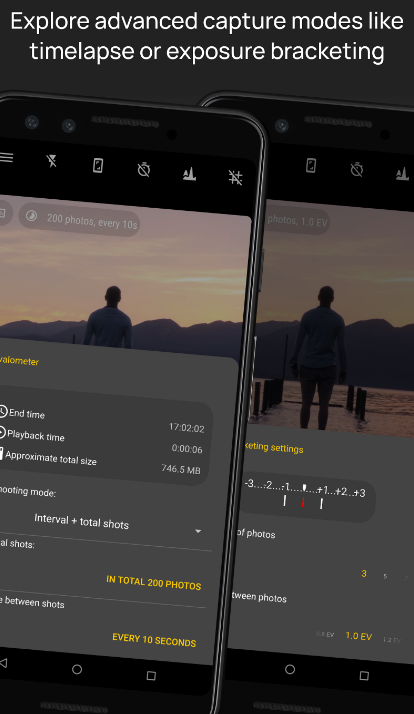
Camera FV-5 is an advanced photography app designed for mobile devices, providing users with DSLR-like manual controls right at their fingertips. This application is specifically crafted for both photography enthusiasts and professionals, enabling you to take remarkable raw images that can be edited later for breathtaking outcomes. The boundaries of your creativity and imagination are the only things that can limit your photography experience! Users have full access to adjustable photographic parameters, including exposure compensation, ISO settings, metering modes, focus options, white balance, and program modes. You can create impressive timelapse videos, including bracketed and HDR variants, as well as controlled series of images. Furthermore, all essential camera functions can be mapped to volume buttons, allowing for quick adjustments to EV, ISO, and color temperature. The app also supports devices equipped with dedicated hardware camera shutter keys, enhancing the shooting experience. Additionally, the capability for background photo and RAW development ensures that your camera operation remains fluid and uninterrupted. This combination of features empowers you to explore your photographic potential fully.
API Access
Has API
No
API Access
Has API
No




Integrations
Ticketsauce
No
Pricing Details
No price information available.
Free Trial
No
Free Version
No
Pricing Details
Free
Free Trial
No
Free Version
Yes
Deployment
Web-Based
No
On-Premises
No
iPhone App
Yes
iPad App
No
Android App
No
Windows
No
Mac
No
Linux
No
Chromebook
No
Deployment
Web-Based
No
On-Premises
No
iPhone App
No
iPad App
No
Android App
Yes
Windows
No
Mac
No
Linux
No
Chromebook
No
Customer Support
Business Hours
No
Live Rep (24/7)
No
Online Support
Yes
Customer Support
Business Hours
No
Live Rep (24/7)
No
Online Support
Yes
Types of Training
Training Docs
No
Webinars
No
Live Training (Online)
No
In Person
No
Types of Training
Training Docs
Yes
Webinars
No
Live Training (Online)
No
In Person
No
Vendor Details
Company Name
BOCA
Website
apps.apple.com/us/app
Vendor Details
Company Name
Camera FV-5
Country
Germany
Website
www.camerafv5.com
Product Features
Video Making
Animation
No
Collaboration Tools
No
Customizable Branding
No
Drag & Drop
No
Media Library
No
Privacy Options
No
Social Sharing
No
Templates
No
Text Overlay
No
Text to Video
No
Video Capture
No
Voice-Over
No
