Average Ratings 0 Ratings
Average Ratings 0 Ratings
Similar Products
-
Aikido SecurityAikido is the all-in-one security platform for development teams to secure their complete stack, from code to cloud. Aikido centralizes all code and cloud security scanners in one place. Aikido offers a range of powerful scanners including static code analysis (SAST), dynamic application security testing (DAST), container image scanning, and infrastructure-as-code (IaC) scanning. Aikido integrates AI-powered auto-fixing features, reducing manual work by automatically generating pull requests to resolve vulnerabilities and security issues. It also provides customizable alerts, real-time vulnerability monitoring, and runtime protection, enabling teams to secure their applications and infrastructure seamlessly.
-
GearsetGearset is a full‑featured Salesforce DevOps solution built for the enterprise, giving teams the tools to adopt best practices across every stage of the DevOps lifecycle. From metadata and CPQ deployments to CI/CD, testing, code analysis, sandbox seeding, backups, archiving, and observability, Gearset gives teams unmatched insight and control over their Salesforce workflows. Over 3,000 organizations — including names like McKesson and IBM — rely on Gearset to deliver with security and scale in mind. With advanced governance, detailed audit trails, SOX/ISO/HIPAA support, multi‑team pipelines, integrated security checks, and adherence to ISO 27001, SOC 2, GDPR, CCPA/CPRA, and HIPAA, Gearset combines enterprise‑ready compliance with rapid onboarding and an intuitive interface — all in one platform. Leading firms in finance, healthcare, and tech trust Gearset to power their DevOps initiatives without adding complexity.
-
ParasoftParasoft's mission is to provide automated testing solutions and expertise that empower organizations to expedite delivery of safe and reliable software. A powerful unified C and C++ test automation solution for static analysis, unit testing and structural code coverage, Parasoft C/C++test helps satisfy compliance with industry functional safety and security requirements for embedded software systems.
-
Securden Password Vault for EnterprisesSecurden Password Vault is an enterprise-grade password management solution that allows you to securely store, organize, share, manage, and keep track of all human and machine identities. With a sleek access management system, Securden lets your IT teams share administrator credentials and effectively automate the management of privileged accounts in your organization. Securden seamlessly integrates with industry solutions like SIEM, SAML-based SSO, AD, and Azure AD among others to provide a smooth deployment in any organization. With Securden, organizations can rest easy as all their sensitive data is protected with strong encryption methods and supported by a robust high availability setup. Securden offers drilled-down granular access controls that allow users to grant access to accounts without revealing the underlying credentials in a just-in-time fashion. Securden Password Vault can be deployed both on-premise for self-hosting and on the cloud (SaaS).
-
Kasm WorkspacesKasm Workspaces streams your workplace environment directly to your web browser…on any device and from any location. Kasm is revolutionizing the way businesses deliver digital workspaces. We use our open-source web native container streaming technology to create a modern devops delivery of Desktop as a Service, application streaming, and browser isolation. Kasm is more than a service. It is a platform that is highly configurable and has a robust API that can be customized to your needs at any scale. Workspaces can be deployed wherever the work is. It can be deployed on-premise (including Air-Gapped Networks), in the cloud (Public and Private), or in a hybrid.
-
WindocksWindocks provides on-demand Oracle, SQL Server, as well as other databases that can be customized for Dev, Test, Reporting, ML, DevOps, and DevOps. Windocks database orchestration allows for code-free end to end automated delivery. This includes masking, synthetic data, Git operations and access controls, as well as secrets management. Databases can be delivered to conventional instances, Kubernetes or Docker containers. Windocks can be installed on standard Linux or Windows servers in minutes. It can also run on any public cloud infrastructure or on-premise infrastructure. One VM can host up 50 concurrent database environments. When combined with Docker containers, enterprises often see a 5:1 reduction of lower-level database VMs.
-
Virtuoso QAVirtuoso QA is an AI-native test automation solution built to streamline and scale enterprise quality assurance processes. It allows users to author tests in natural language, making it accessible for both technical and non-technical team members. The platform leverages self-healing AI to automatically adapt to changes in applications, reducing test flakiness and maintenance overhead. With features like live authoring, real-time execution, and automated diagnostics, teams can quickly identify and resolve issues. Virtuoso QA supports continuous testing across multiple browsers, devices, and environments, ensuring comprehensive test coverage. It integrates seamlessly with popular tools such as Jira, Jenkins, Azure DevOps, and BrowserStack, enabling smooth CI/CD workflows. The platform also provides detailed analytics and dashboards to track performance and optimize testing strategies. By automating test generation and execution, it significantly reduces manual effort and accelerates release cycles. Virtuoso QA empowers organizations to deliver high-quality software faster and more reliably.
-
Securden Endpoint Privilege ManagerSecurden Endpoint Privilege Manager (EPM) enables enterprises to remove admin rights without impacting productivity on Windows, Mac, and Linux endpoints. Securden EPM helps elevate applications for standard users and grant admin rights on a Just-in-Time (JIT) basis, eliminating standing privileges while ensuring users can run required applications without friction. Organizations can enforce application control using allowlisting and blocklisting to prevent unauthorized or risky software execution while enabling secure operations. The solution supports on-demand application elevation and policy-based granular application elevation control, allowing security teams to define exactly which apps can run with elevated rights and under what conditions. Privilege management continues even on offline endpoints, ensuring protection for remote and traveling users. Built-in JIT local admin rights reduce risk by granting temporary elevation only when required. Additional capabilities include application usage tracking for better policy decisions, continuous local administrator group monitoring to prevent privilege creep, and secure remote access for IT helpdesk teams to troubleshoot systems without exposing credentials. Securden EPM also helps organizations meet compliance requirements such as HIPAA, PCI-DSS, GDPR, and NERC-CIP. With a highly scalable architecture and a wide array of integrations, the platform delivers enterprise-grade endpoint privilege management while maintaining operational efficiency and user productivity.
-
TrustInSoft AnalyzerTrustInSoft commercializes a source code analyzer called TrustInSoft Analyzer, which analyzes C and C++ code and mathematically guarantees the absence of defects, immunity of software components to the most common security flaws, and compliance with a specification. The technology is recognized by U.S. federal agency the National Institute of Standards and Technology (NIST), and was the first in the world to meet NIST’s SATE V Ockham Criteria for high quality software. The key differentiator for TrustInSoft Analyzer is its use of mathematical approaches called formal methods, which allow for an exhaustive analysis to find all the vulnerabilities or runtime errors and only raises true alarms. Companies who use TrustInSoft Analyzer reduce their verification costs by 4, efforts in bug detection by 40, and obtain an irrefutable proof that their software is safe and secure. The experts at TrustInSoft can also assist clients in training, support and additional services.
-
EasySendEasySend simplifies the creation of digital customer journeys by allowing businesses to automate customer data intake, document management, and approval processes. Whether it’s for claims, loans, or quotes, EasySend’s no-code platform helps companies digitize their workflows, eliminating manual tasks and speeding up processes. With secure integrations, seamless e-signatures, and compliance with global data regulations, EasySend offers a robust solution for digital transformation. Trusted by Fortune 500 companies, it empowers businesses to offer dynamic, branded customer experiences while maintaining security and compliance across all stages of the journey.
Description
AttackFlow's Enterprise Edition is an advanced web application that integrates with various repositories and offers a multitude of enterprise-grade features aimed at enhancing application security. IDE extensions provide real-time document scanning during development, ensuring that potential vulnerabilities are caught early. AttackFlow eliminates the need for compilation by offering a just-in-time, flow-sensitive, and highly accurate static source code scanning solution that effectively identifies security flaws in your code. The on-premise nature of AttackFlow's Enterprise Edition allows organizations to secure everything from small scripts to large enterprise-level applications. By providing tools such as CLI and DevOps/Jenkins extensions, Enterprise Edition makes Static Application Security Testing (SAST) more compatible with DevOps practices. This application ensures security is prioritized at every stage of the DevOps lifecycle. A pivotal aspect of successfully integrating security into DevOps is recognizing its necessity, and in this rapidly evolving landscape, AttackFlow adds significant value by fostering the development of more secure applications. Overall, AttackFlow stands as a critical ally for organizations striving to enhance their security posture while embracing DevOps methodologies.
Description
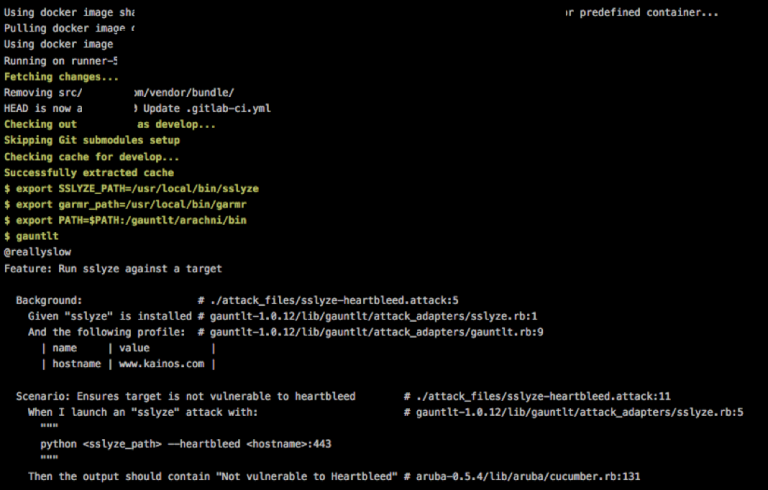
Gauntlt offers integrations with various security tools, enabling security, development, and operations teams to work together effectively in creating robust software. It is designed to enhance testing and foster communication among different teams, allowing for the creation of practical tests that can be incorporated into deployment and testing workflows. The attacks in Gauntlt are composed in a straightforward language that is easy to understand. It seamlessly integrates with your organization's existing testing tools and processes. Included with Gauntlt are security tool adapters that streamline the integration process. It utilizes standard error and standard output from Unix to communicate status updates. There are two primary methods for getting started with Gauntlt: you can either install it via the gem method, which requires you to download and configure the security tools (but rest assured, Gauntlt provides guidance throughout this process), or opt for the Gauntlt Starter Kit, a Vagrant script that automatically sets up the necessary tools for you. Traditionally, security testing occurs according to the auditors' timelines, and the resulting outputs often lack actionable insights, highlighting the need for more efficient solutions in security testing protocols. By using Gauntlt, teams can shift towards a more proactive and integrated approach to security testing, ultimately improving the overall security posture of their software projects.
API Access
Has API
API Access
Has API




Integrations
Eclipse IDE
Visual Studio
Pricing Details
No price information available.
Free Trial
Free Version
Pricing Details
No price information available.
Free Trial
Free Version
Deployment
Web-Based
On-Premises
iPhone App
iPad App
Android App
Windows
Mac
Linux
Chromebook
Deployment
Web-Based
On-Premises
iPhone App
iPad App
Android App
Windows
Mac
Linux
Chromebook
Customer Support
Business Hours
Live Rep (24/7)
Online Support
Customer Support
Business Hours
Live Rep (24/7)
Online Support
Types of Training
Training Docs
Webinars
Live Training (Online)
In Person
Types of Training
Training Docs
Webinars
Live Training (Online)
In Person
Vendor Details
Company Name
AttackFlow
Country
Turkey
Website
www.attackflow.com
Vendor Details
Company Name
Gauntlt
Website
gauntlt.org
Product Features
Automated Testing
Hierarchical View
Move & Copy
Parameterized Testing
Requirements-Based Testing
Security Testing
Supports Parallel Execution
Test Script Reviews
Unicode Compliance
Static Application Security Testing (SAST)
Application Security
Dashboard
Debugging
Deployment Management
IDE
Multi-Language Scanning
Real-Time Analytics
Source Code Scanning
Vulnerability Scanning
Product Features
Automated Testing
Hierarchical View
Move & Copy
Parameterized Testing
Requirements-Based Testing
Security Testing
Supports Parallel Execution
Test Script Reviews
Unicode Compliance
