Average Ratings 0 Ratings
Average Ratings 0 Ratings
Similar Products
-
LALAL.AIAny audio or video can be extracted to extract vocal, accompaniment, and other instruments. High-quality stem cutting based on the #1 AI-powered technology in the world. Next-generation vocal remover and music source separator service for fast, simple, and precise stem removal. You can remove vocal, instrumental, drums and bass tracks, as well as acoustic guitar, electric guitar, and synthesizer tracks, without any quality loss. You can start the service free of charge. Upgrade to get more files processed and faster results. Only for personal use. Move to the next level. You can process thousands of minutes of audio and/or video. This software is suitable for both personal and business use. Each LALAL.AI package has a limit on the amount of audio/video that can be split. The package minute limit is deducted from each file that has been fully split. You can split as many files you like, provided their total length does not exceed the minute limit.
-
MuzaicMuzaic.ai is a browser-based tool that scores video automatically. You give it a cut (or a folder of cuts); it returns a finished audio mix — music, SFX, ambience and voiceover as separate layers — mastered to broadcast spec, in roughly 30 seconds per clip. What it actually does The pipeline runs in four stages. First it analyses the video: scenes, objects, pacing, colour and sentiment. From that it builds an audio plan and commits each concept to a clear direction (the site's example: a string quartet under a battle scene) rather than averaging toward something inoffensive. Then it composes every layer to fit the picture and the other layers — SFX land on the action, ambience ducks under speech, the voiceover is drafted from your brief rather than read out. Finally it mixes and masters the result. Existing audio in the source can be kept, replaced or mixed under. Output is three concepts per clip, exported as MP3 or WAV. Layer balance is adjusted inside Muzaic before export; the deliverable is the finished mix, not separate stems. The commercial angle Pricing is metered in minutes of finished audio, not per track or per download; downloads are unlimited. Personal is free for 10 minutes a month, non-commercial only. Creator ($45/month) covers your own brand and paid ads. Studio ($249/month) is for agencies: the licence travels to the client and the legal cover extends to them too. Enterprise adds TV, radio, cinema and OOH, plus a custom contract, DPA and SLA. What it is not It is not a music-generation toy. The free tier exists to test the workflow on your own footage; nothing from it may be published. The target user is a team producing hundreds of ad variants a month, where the audio step is the bottleneck.
-
ScreencaptScreencapt allows you to record the entire screen or a selected area. You can also record a specific window. Screencapt is the ideal screen recorder because of its flexibility. Using the integrated audio recording you can also add your commentary or system sound directly into the screen recording. This is particularly useful when creating explanation videos or presentations. Screencapt's ability to record a webcam is a special feature. You can now add your comments and reactions to the video. This makes your screen recordings more personal and professional. Screencapt offers advanced options to record the cursor. You can choose to hide the cursor or add special effects to highlight specific actions. This is especially useful for software tutorials and demonstrations where a clear cursor view is required.
-
4K Video DownloaderYou can watch videos from anywhere, anytime, even offline. It's easy to download: simply copy the link from your browser, and then click 'Paste Link" in the application. You can save full playlists and channels on YouTube in high-quality and other video or audio formats. Download your YouTube Mix, Watch Later and Liked videos as well as private YouTube playlists. Receive new videos from your favorite YouTube channels automatically. You can feel the action around you with virtual reality videos. To experience the amazing VR experience in 360deg, download 360deg videos. You can bypass any restrictions placed by your Internet service provider to bypass your school firewall or workplace firewall. To access YouTube and other sites, set up an in-app proxy connection.
-
LTXMost AI video tools hand you a black box: closed weights, a subscription, and no way to see what is happening under the hood. LTX takes the opposite approach. Built by Lightricks, LTX is an open foundation model that generates and simulates across video, audio, and the physical world, and it puts the weights, the code, and the control in your hands. At the center of the model is LTX-2.5, a 22B-parameter dual-stream diffusion transformer that produces native 4K video at up to 50 frames per second, with audio and video generated together in a single pass rather than stitched together afterward. Artificial Analysis, an independent benchmarking group, currently ranks LTX among the top three AI video models in the world. You choose how you want to use it. Download the open weights and run LTX-2.5 on your own hardware. License the model for on-premise deployment backed by enterprise support. Or build directly on LTX Studio, the production suite that turns the model into a full creative workflow. Companies like ElevenLabs, Asteria Film Co., Magnopus, and NVIDIA already rely on LTX for their own work. LTX is not built for one-off social clips. It is infrastructure for teams that generate motion, audio, and physical environments as part of their own products and pipelines.
-
ClickLearnClickLearn simplifies complex business processes using popular software. You can create multi-format learning materials in any language and publish them to a 24/7 learning portal with just one click. A video walkthrough of the process, with narration in your preferred language. Put your learning to the test. This interactive simulation of your workplace allows you to test your knowledge without any hints. Interactive simulation of your workplace environment that guides you through the process. This guide is step-by-step. ClickLearn wrote this guide with perfectly cropped screenshots. ClickLearn Assist can be your go-to helper when you are stuck, need process help, or want to try a new process in the live system. You don't have to worry about making another mistake. All your learning materials can be auto-translated with a click of a button
-
Dynamo SoftwareUnlock precision and clarity in alternative investments with Dynamo Software, a cloud-native, AI-powered platform that unifies your entire workflow. We provide a single, configurable solution for your front-, middle-, and back-office needs. For General Partners (GPs), Dynamo enhances every stage of the investment lifecycle with advanced CRM, deal pipeline tracking, fundraising tools, and secure investor relations and fund accounting reporting. For Limited Partners (LPs), our platform delivers real-time research and portfolio management capabilities. We automate document ingestion, data extraction, and holdings enrichment, providing deep exposure analytics for informed decision-making. Dynamo serves a wide range of private capital firms, including private equity, venture capital, real estate, hedge funds, and infrastructure. Our platform is also tailored for endowments, pensions, foundations, family offices, fund of funds, and fund administrators. By centralizing all investment data into a single source of truth, we equip your team with the control needed to uncover powerful insights. Our AI-driven system automates data ingestion and tagging, while our HoldingsInsight feature enriches portfolio data for advanced analysis. All modules work together seamlessly, supported by a dedicated Client Services team committed to your success. With Dynamo, you can streamline operations, improve data accuracy, and drive strategic decisions with confidence.
-
CompanyCamCompanyCam is a photo-based solution created specifically for contractors. Users can take unlimited photos—which are location and time stamped, sent to the cloud, and stored securely. Every photo is organized by project and instantly available to your team, allowing you to see what’s going on anytime, anywhere.
-
ISL Light Remote DesktopISL Light is a remote desktop software that is easy to use for security-conscious users. It offers great value-performance. ISL Light is a powerful tool for IT staff and support personnel to solve problems remotely via remote support, unattended access, or screen-sharing from mobile devices. It is cross-platform and provides 256-bit encrypted sessions, all the standard remote access features, as well as session recording, chat, videocall and multi-monitor support, file transfers, reporting, and many other important extras. Users can choose between cloud and on-premise services. ISL Online license doesn't limit the number or workstations of clients, users, and users you can support. It is a reliable, highly secure software that can be used in all industries, including banks, hospitals, government institutions, and insurances.
-
RemotePeopleRemotePeople helps businesses build international teams through Employer of Record services, recruitment and workforce administration in 150+ countries. Founded in 2018 and based in New York, RemotePeople combines a web platform with dedicated account managers and in-country HR expertise. With EOR, RemotePeople handles local employment contracts, onboarding, payroll, tax administration and statutory benefits while clients manage employees' daily work. EOR Flex starts at $199 per employee/month. EOR Plus starts at $399 per employee/month, billed annually for 5+ employees. Salaries and statutory employer costs are additional; availability and terms vary by country. In-house recruitment and executive search help companies source talent before hiring. Recruitment + EOR costs 2% of annual salary each month for recruitment, plus the EOR fee. Other services include Global Payroll, US Payroll, Contractor Management, Contractor of Record and US PEO. RemotePeople also supports global benefits, equity, visas and immigration, company incorporation, ongoing entity management and transfers from EOR to a client's own entity. Optional support includes employment contracts, legal assistance, background checks, compliance audits, equipment, workplace services, expenses and offboarding. AI Command Center accepts natural-language requests for onboarding, payroll, leave, expenses and contract changes, with expert review of high-impact actions and an audit trail. Employee self-service brings payslips, documents and requests into one platform. Request a demo or country-specific quote; no free trial is offered.
Description
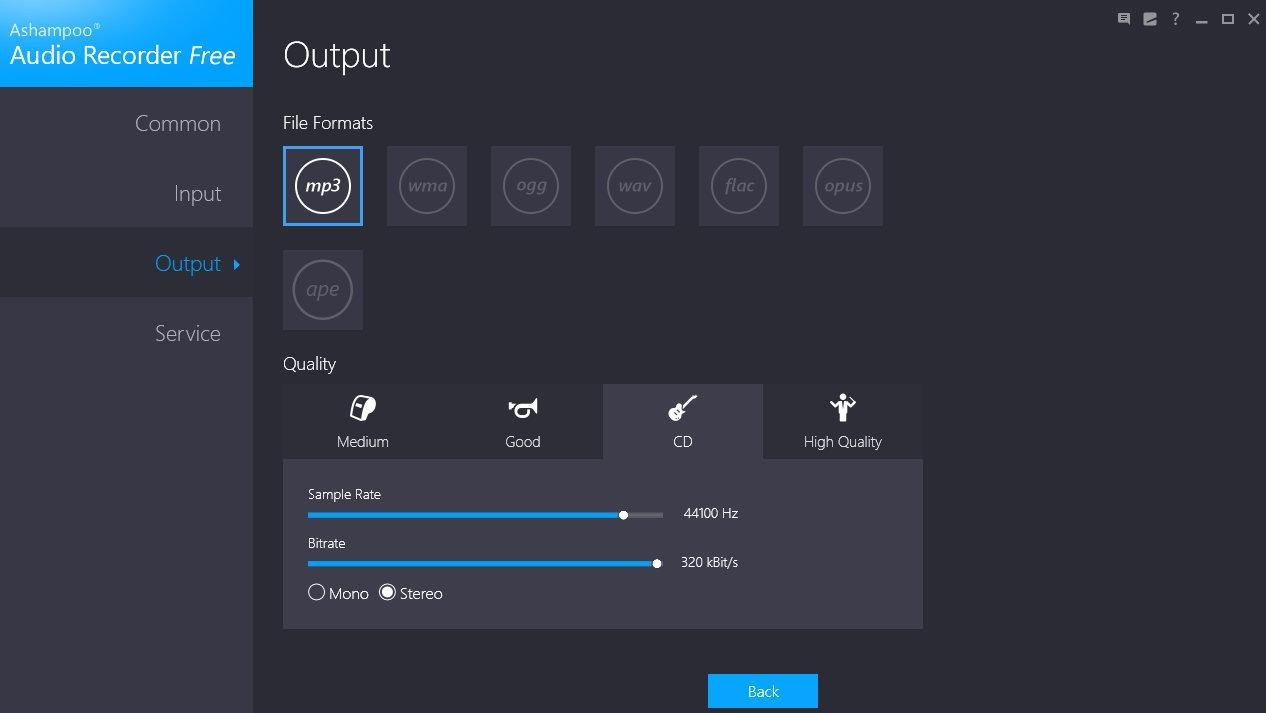
Ashampoo Audio Recorder Free is an easy-to-use tool designed for recording both voice and music, allowing you to capture sound directly from your microphone or through your sound card's loopback function. Whether you want to create simple voice memos or record audio from your browser and other sources, the process is straightforward: select your audio source, hit the Record button, and start capturing. The software's intuitive interface allows for various output formats, such as MP3, WMA, OGG, WAV, FLAC, OPUS, and APE, catering to diverse audio needs. With sampling rates reaching up to 48kHz, it stands out as an excellent choice for recording high-quality streams, podcasts, and music. All your recordings are organized in a built-in media library that is fully playable, streamlining the tasks of reviewing and renaming files. Additionally, the program offers a trimming feature that lets you extract specific audio segments effortlessly, ensuring you get precisely what you need with minimal effort. This combination of features makes Ashampoo Audio Recorder Free an indispensable tool for anyone looking to capture high-quality audio easily.
Description
Free Audio Editor allows you to convert sound recordings from your unique music cassette tapes, vinyl LPs, and video content into standard digital audio files. It features recording capabilities triggered by a timer or input level, ensuring flexibility during the process. A convenient button is available to bring up the system Windows Mixer, eliminating the need to navigate through the control panel. Once recorded, your audio can be instantly loaded into the waveform window for further refinement. You have the option to edit audio using either the classic waveform view or a frequency-based spectral display, which simplifies the task of identifying and eliminating unwanted noise. Intuitive functions such as cut, copy, paste, trim, and mute can be executed with ease, enhancing user experience. The selection tools allow for editing actions to be carried out with millisecond accuracy, ensuring precision in your work. Additionally, you can elevate your audio quality with over 30 built-in signal and effects processing engines, including compression, EQ, fade in/out, delay, chorus, reverb, time stretching, and pitch shifting, among others. This comprehensive suite of tools significantly expands your audio processing capabilities, making it an invaluable resource for audio enthusiasts.
API Access
Has API
No
API Access
Has API
No


Integrations
No details available.
Integrations
No details available.
Pricing Details
Free
Free Trial
No
Free Version
Yes
Pricing Details
Free
Free Trial
No
Free Version
Yes
Deployment
Web-Based
No
On-Premises
No
iPhone App
No
iPad App
No
Android App
No
Windows
Yes
Mac
No
Linux
No
Chromebook
No
Deployment
Web-Based
No
On-Premises
No
iPhone App
No
iPad App
No
Android App
No
Windows
Yes
Mac
Yes
Linux
No
Chromebook
No
Customer Support
Business Hours
No
Live Rep (24/7)
No
Online Support
Yes
Customer Support
Business Hours
No
Live Rep (24/7)
No
Online Support
Yes
Types of Training
Training Docs
Yes
Webinars
No
Live Training (Online)
No
In Person
No
Types of Training
Training Docs
Yes
Webinars
No
Live Training (Online)
No
In Person
No
Vendor Details
Company Name
Ashampoo
Founded
1999
Country
Germany
Website
www.ashampoo.com/en-us/audio-recorder-free
Vendor Details
Company Name
Free Audio Editor
Country
United States
Website
free-audio-editor.com
Product Features
Product Features
Audio Editing
Audio Effects
No
Batch Processing
No
Export Audio (Multiple File Types)
No
Record Live Audio
No
Record Multiple Simultaneous Tracks
No
Scrub, Search, Bookmark
No
Sound Editing Tools
No
Spectral Analysis / FFT
No
Speech Synthesis (TTS)
No
Swappable Patches
No
Virtual Instruments
No
Virtual Mixing
No
Voice Changer
No
