Average Ratings 0 Ratings
Average Ratings 0 Ratings
Similar Products
-
Comet BackupStart running backups and restores in less than 15 minutes! Comet is a fast, secure all-in-one backup platform for businesses and IT providers. You control your backup environment and storage destination (local, Wasabi, AWS, Google Cloud Storage, Azure, Backblaze, or other S3 storage providers). Our software supports businesses across 120 countries in 13 languages. Test drive Comet Backup with a 30-day FREE trial!
-
AdRem NetCrunchNetCrunch is commercial, self-hosted, agentless network and IT infrastructure monitoring software for Windows Server. It monitors network devices, servers, virtualization platforms, cloud services, applications, websites, logs, telemetry, and network traffic across distributed environments. NetCrunch supports 680+ monitoring targets and provides 270+ ready-to-use Monitoring Packs for devices, applications, and operating systems. Policy-based monitoring automatically applies monitoring settings, Monitoring Packs, thresholds, and alerts to matching devices and systems. Licensing is based on monitored nodes and network interfaces rather than individual sensors, checks, or metrics. NetCrunch provides real-time dashboards and automatic Layer 2 and routing topology maps for visibility into network status and performance. Network traffic analysis supports NetFlow, sFlow, IPFIX, and other flow technologies. Its alerting system supports event correlation, dependency-aware suppression, predictive thresholds, escalation, and 40+ automated response actions, including scripts, notifications, API calls, and integrations with external systems. Distributed Monitoring Probes extend monitoring to remote and isolated locations. NetCrunch also provides a REST API for integration and automation with external IT management, service management, and operational systems. NetCrunch is self-hosted on Windows Server and can monitor on-premises, air-gapped, cloud, and hybrid IT environments.
-
BackUp MakerMalware, accidental deletion, and hardware defects can put valuable files at risk. BackUp Maker helps you create dependable backups with minimal effort, giving you a reliable copy of your data whenever you need it. Select the files, folders, or drives you want to protect, define a schedule or trigger-based backup, and choose a suitable destination. BackUp Maker stores your data efficiently in ZIP archives on local and external drives, network locations, USB media, web servers, or in the cloud. Protect confidential content with powerful AES encryption of up to 256 bits. Encrypted backup archives can also be transferred securely to web servers using SFTP or FTP/FTPS. BackUp Maker supports a flexible backup strategy tailored to your needs. Back up only new and modified files, maintain several backup generations, distribute copies across different storage locations, and run custom actions before or after each backup. This makes it easy to automate comprehensive, space-saving, and secure data protection.
-
Bitdefender Ultimate Small Business SecurityBitdefender Small Business Security provides robust, enterprise-level cyber-defense tailored for smaller companies, ensuring protection across various platforms including Windows, macOS, iOS, and Android. With a centralized management system that is user-friendly, it allows organizations lacking dedicated IT personnel to efficiently implement and oversee their security measures from a single interface. The solution features a multi-layered approach to endpoint protection, incorporating machine learning, behavioral analysis, real-time monitoring, process termination, and rollback capabilities to safeguard against both known and emerging threats. Additionally, it includes ransomware prevention and remediation strategies that detect unusual encryption activities and facilitate file recovery from backups. Users are also protected against fileless attacks, with measures like memory and back-injection interference as well as script blocking. The software further enhances security by preventing phishing and fraud through the blocking of malicious websites and alerting users accordingly, while offering advanced exploit protection with real-time shields for common applications such as browsers, Office software, and Adobe Reader, thus ensuring all-encompassing endpoint security. This comprehensive suite of features makes it an ideal choice for small businesses seeking to fortify their cybersecurity defenses.
-
Veeam Data PlatformVeeam Data Platform is a unified data resilience solution that helps organizations recover from cyberattacks and outages, and protect workloads across hybrid and multicloud environments – all without vendor lock-in. The platform includes built-in security capabilities designed to mitigate ransomware and other data-loss threats, including AI-backed threat detection across a broad range of workload types. This is intended to help teams identify and respond to threats before they disrupt operations. Veeam Data Platform supports workload portability across hypervisors, cloud providers, and on-premises environments, allowing organizations to move or recover data across infrastructure without being tied to a specific vendor or platform. For organizations looking to simplify deployment, Veeam Software Appliance provides a pre-built, hardened, and highly available option, reducing the manual setup and maintenance work required from IT teams.
-
IONOS Cloud Object StorageIONOS Cloud Object Storage is a flexible storage solution tailored for the management and retrieval of extensive volumes of unstructured data within cloud platforms. Fully compliant with the S3 API standard, it empowers developers and IT professionals to utilize existing S3 clients and tools for bucket and object management, seamlessly integrating into modern cloud-native applications and systems. This service allows businesses to store nearly limitless amounts of static or backup data without the complexities of traditional storage management. Engineered for both reliability and high availability, it ensures data remains accessible and secure through redundant storage mechanisms across multiple nodes, safeguarding against potential infrastructure failures. Ideal for a variety of use cases, it supports the storage of backups, archives, and disaster recovery snapshots, while also efficiently managing substantial datasets that are essential for analytics, machine learning, or digital content initiatives. Furthermore, its scalability makes it an excellent choice for organizations anticipating growth or needing to adapt quickly to changing data storage requirements.
-
AuvikAuvik Network Management is a network management and monitoring software designed to empower IT professionals with deep visibility, automation, and control over their network infrastructure. This innovative platform is trusted by businesses of all sizes to streamline network operations, enhance security, and optimize performance. One of Auvik's standout features is its real-time network mapping and discovery capabilities. It automatically generates interactive, visual maps of your network topology, allowing you to easily identify devices, connections, and potential bottlenecks. This invaluable insight helps in planning and optimizing network architecture for maximum efficiency.
-
IPVanishIPVanish VPN protects personal data in the face of privacy threats. Protect your connection over hotspots or unsecured networks today. We have the solution for you, whether you need a Wi Fi hotspot shield or safe file access. IPVanish VPN and storage solutions simplify online security for the entire home. There are setups for mobile, desktop, consoles, routers, and routers. VPN privacy can protect your internet activity. You can also pair VPN + storage to provide complete online protection. To go incognito, you need more than a private internet browser. Our anonymous IP addresses will keep your internet activity secretive and help keep hackers, ISPs and advertisers away from your connection. VPN can protect your Wi-Fi connection as well as your location data. The best data defense combines security and convenience. Secure your most valuable files with remote wiping, automated syncing and encrypted backup.
-
TIMiHigh-Performance Data Engineering. Total Sovereignty. TIMi delivers the power of a complete cloud data stack—on-premises, fully sovereign, and ridiculously fast. We reject artificial vendor lock-in and hidden costs. Instead, we offer absolute peace of mind through engineering excellence, giving your team the freedom to experiment, innovate, and solve complex AI, analytics, and automation challenges in record time. Why Top Enterprises Choose TIMi? Enterprise Integration & *No-Code* ETL/Data preparation: Automate complex workflows and seamlessly link your entire stack: SAP, Salesforce, SharePoint, S3, Azure Storage, PowerBI, Tableau, etc. Unmatched Infrastructure Efficiency: Our competitors such as Databricks, Dataiku, and MS Fabric all rely on Spark—and that makes them inherently inefficient since a single €2k TIMi server outperforms a 267-node Spark cluster. TIMi process billions of rows in seconds and manage petabyte-scale data lakes at a fraction of the cost. Proven AI Leadership: Harness pioneering machine learning from the creators of the first Auto-ML engine (est. 2007). Whether deployed on-premises or via our EU-Hosted Sovereign Cloud, TIMi empowers leaders in Banking, Telecoms, Manufacturing, Retail, Defense and Government.
-
SynchredibleSynchredible makes it easy to synchronize, copy, and back up individual folders or entire drives with just a single click. Its intuitive assistant guides you step by step in setting up tasks that can be scheduled, triggered by changes (real-time monitoring), or executed automatically when an external storage device is connected. Keep your data synchronized effortlessly and manage it seamlessly! With years of proven technology, Synchredible not only transfers data from A to B but also supports bidirectional synchronization. It automatically detects changes and reliably syncs the most recently edited files. Thanks to advanced duplicate detection, Synchredible saves valuable time by skipping unchanged files, enabling fast synchronization of large datasets in seconds! Synchredible is highly versatile, supporting local folder synchronization, network and USB device synchronization, as well as synchronization with cloud storage.
Description
We are dedicated to providing tools that stand out as the finest in their categories. Our exceptional product support has garnered us a reputation for being the best in the industry, as frequently noted by our clients. We are in a constant state of innovation, launching new features and tools on a rapid timeline. Our capabilities include auditing and masking to protect sensitive data, managing and discovering SQL Server instances, and performing comprehensive health and security assessments. We enable significant reductions in backup and restore durations as well as associated storage expenses. Users can select the optimal balance between CPU resource efficiency and minimized backup storage requirements, thanks to our eight levels of compression. To ensure the integrity of data and structural changes during backup processes, we capture ongoing transactions and replay them during restores. Additionally, we offer functionalities to reverse truncate operations, allowing for the recovery of any lost data. This commitment to excellence ensures that our clients always have the best solutions at their disposal.
Description
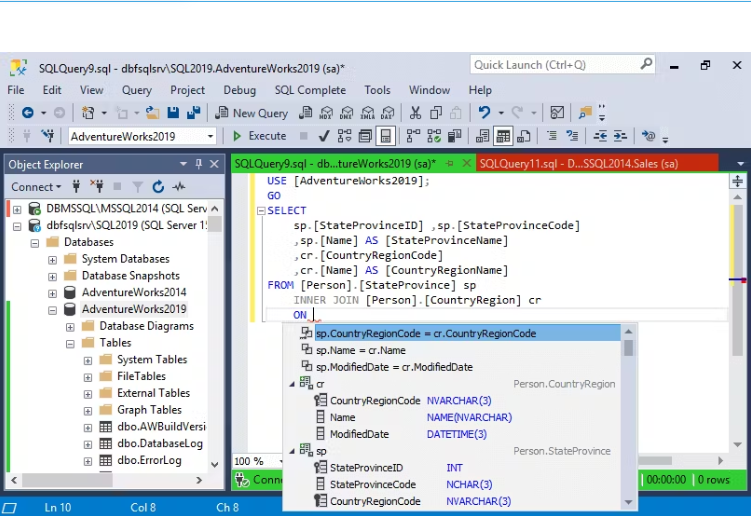
dbForge SQL Complete is a robust coding assistance tool designed as an add-in for SQL Server Management Studio (SSMS) and Visual Studio (VS). It provides numerous features to improve code quality and speed up code creation within the SSMS interface, helping to organize coding efforts and boost overall productivity.
Key Features:
- Context-aware suggestions for keywords and objects
- Flexible SQL formatting with various customization options
- Professional, safe, and fast code refactoring
- Quick access to database object descriptions
- T-SQL debugger for improving code quality
- Customizable code snippets with the ability to create user-defined snippets
- Execute statements against the target database directly from the SQL - -
- Complete window
- Various data visualization options
- Customizable execution warnings and notifications
- Query history with the ability to restore lost or closed documents or tabs
- A comprehensive set of tools for data manipulation
dbForge SQL Complete significantly reduces human typing errors. Its integration with SSMS enhances coding capabilities, providing users with a powerful toolset. A free edition of the solution is also available.
API Access
Has API
No
API Access
Has API
No




Integrations
SQL Server
Yes
AWS Marketplace
Yes
SQL
No
SQL Server Management Studio (SSMS)
No
Visual Studio
No
Integrations
SQL Server
Yes
AWS Marketplace
No
SQL
Yes
SQL Server Management Studio (SSMS)
Yes
Visual Studio
Yes
Pricing Details
No price information available.
Free Trial
No
Free Version
No
Pricing Details
$129.95
Free Trial
Yes
Free Version
Yes
Deployment
Web-Based
No
On-Premises
No
iPhone App
No
iPad App
No
Android App
No
Windows
Yes
Mac
No
Linux
No
Chromebook
No
Deployment
Web-Based
No
On-Premises
No
iPhone App
No
iPad App
No
Android App
No
Windows
Yes
Mac
No
Linux
No
Chromebook
No
Customer Support
Business Hours
No
Live Rep (24/7)
No
Online Support
Yes
Customer Support
Business Hours
Yes
Live Rep (24/7)
No
Online Support
Yes
Types of Training
Training Docs
Yes
Webinars
No
Live Training (Online)
No
In Person
No
Types of Training
Training Docs
Yes
Webinars
No
Live Training (Online)
Yes
In Person
No
Vendor Details
Company Name
Quest Software
Founded
1987
Country
United States
Website
www.apexsql.com
Vendor Details
Company Name
Devart
Founded
1997
Country
United States of America
Website
www.devart.com
Product Features
Database
Backup and Recovery
No
Creation / Development
No
Data Migration
No
Data Replication
No
Data Search
No
Data Security
No
Database Conversion
No
Mobile Access
No
Monitoring
No
NOSQL
No
Performance Analysis
No
Queries
No
Relational Interface
No
Virtualization
No
Database Backup
Automatic Backup
No
Backup Locations
No
Backup Scope Settings
No
Differential Backup
No
Filegroup Backup
No
Full Backup
No
Incremental Backup
No
Manual Backup
No
Multiple Backups
No
Product Features
Database
Backup and Recovery
No
Creation / Development
No
Data Migration
No
Data Replication
No
Data Search
No
Data Security
No
Database Conversion
No
Mobile Access
No
Monitoring
No
NOSQL
No
Performance Analysis
No
Queries
No
Relational Interface
No
Virtualization
No
