Average Ratings 0 Ratings
Average Ratings 10 Ratings
Similar Products
-
Google Cloud RunFully managed compute platform to deploy and scale containerized applications securely and quickly. You can write code in your favorite languages, including Go, Python, Java Ruby, Node.js and other languages. For a simple developer experience, we abstract away all infrastructure management. It is built upon the open standard Knative which allows for portability of your applications. You can write code the way you want by deploying any container that listens to events or requests. You can create applications in your preferred language with your favorite dependencies, tools, and deploy them within seconds. Cloud Run abstracts away all infrastructure management by automatically scaling up and down from zero almost instantaneously--depending on traffic. Cloud Run only charges for the resources you use. Cloud Run makes app development and deployment easier and more efficient. Cloud Run is fully integrated with Cloud Code and Cloud Build, Cloud Monitoring and Cloud Logging to provide a better developer experience.
-
Kasm WorkspacesKasm Workspaces streams your workplace environment directly to your web browser…on any device and from any location. Kasm is revolutionizing the way businesses deliver digital workspaces. We use our open-source web native container streaming technology to create a modern devops delivery of Desktop as a Service, application streaming, and browser isolation. Kasm is more than a service. It is a platform that is highly configurable and has a robust API that can be customized to your needs at any scale. Workspaces can be deployed wherever the work is. It can be deployed on-premise (including Air-Gapped Networks), in the cloud (Public and Private), or in a hybrid.
-
ChainstackChainstack's APIs and software are used by thousands of businesses, large and small, to build, scale, and maintain blockchain applications. To ensure your security and control, Chainstack's APIs offer secure node connections and key security best practices. Invite other members to join your network and deploy their infrastructure using simple network management tools. You can build and deploy the blockchain protocol that suits your needs. The protocol will never be updated or modified again. Chainstack's managed services for blockchain make it easy to launch, join, and scale decentralized networks. You can now safely experiment with enterprise-grade tools and services and then run production. Continuously monitor and provision your resources.
-
Google Cloud BigQueryBigQuery is a serverless, multicloud data warehouse that makes working with all types of data effortless, allowing you to focus on extracting valuable business insights quickly. As a central component of Google’s data cloud, it streamlines data integration, enables cost-effective and secure scaling of analytics, and offers built-in business intelligence for sharing detailed data insights. With a simple SQL interface, it also supports training and deploying machine learning models, helping to foster data-driven decision-making across your organization. Its robust performance ensures that businesses can handle increasing data volumes with minimal effort, scaling to meet the needs of growing enterprises. Gemini within BigQuery brings AI-powered tools that enhance collaboration and productivity, such as code recommendations, visual data preparation, and intelligent suggestions aimed at improving efficiency and lowering costs. The platform offers an all-in-one environment with SQL, a notebook, and a natural language-based canvas interface, catering to data professionals of all skill levels. This cohesive workspace simplifies the entire analytics journey, enabling teams to work faster and more efficiently.
-
Google Cloud PlatformGoogle Cloud is an online service that lets you create everything from simple websites to complex apps for businesses of any size. Customers who are new to the system will receive $300 in credits for testing, deploying, and running workloads. Customers can use up to 25+ products free of charge. Use Google's core data analytics and machine learning. All enterprises can use it. It is secure and fully featured. Use big data to build better products and find answers faster. You can grow from prototypes to production and even to planet-scale without worrying about reliability, capacity or performance. Virtual machines with proven performance/price advantages, to a fully-managed app development platform. High performance, scalable, resilient object storage and databases. Google's private fibre network offers the latest software-defined networking solutions. Fully managed data warehousing and data exploration, Hadoop/Spark and messaging.
-
Google Compute EngineCompute Engine (IaaS), a platform from Google that allows organizations to create and manage cloud-based virtual machines, is an infrastructure as a services (IaaS). Computing infrastructure in predefined sizes or custom machine shapes to accelerate cloud transformation. General purpose machines (E2, N1,N2,N2D) offer a good compromise between price and performance. Compute optimized machines (C2) offer high-end performance vCPUs for compute-intensive workloads. Memory optimized (M2) systems offer the highest amount of memory and are ideal for in-memory database applications. Accelerator optimized machines (A2) are based on A100 GPUs, and are designed for high-demanding applications. Integrate Compute services with other Google Cloud Services, such as AI/ML or data analytics. Reservations can help you ensure that your applications will have the capacity needed as they scale. You can save money by running Compute using the sustained-use discount, and you can even save more when you use the committed-use discount.
-
ConvesioConvesio gives commerce businesses the edge they need to grow faster — combining ultra-reliable WordPress hosting with seamless, built-in payment processing. At the heart of it all is ConvesioPay, a powerful payments platform that integrates directly with your hosting stack. No clunky plugins. No middlemen. Just faster, more secure transactions that help you convert and scale without friction. With auto-scaling containers, PCI-compliant infrastructure, and real-time revenue insights, Convesio removes the bottlenecks that slow down online stores. It’s performance, payments, and peace of mind — all in one place. Highlights: Integrated payments through ConvesioPay Built for WooCommerce and high-traffic stores Enterprise-grade uptime and scalability Security-first, PCI-compliant environment Real-time performance and revenue visibility
-
RunpodRunpod provides a cloud infrastructure that enables seamless deployment and scaling of AI workloads with GPU-powered pods. By offering access to a wide array of NVIDIA GPUs, such as the A100 and H100, Runpod supports training and deploying machine learning models with minimal latency and high performance. The platform emphasizes ease of use, allowing users to spin up pods in seconds and scale them dynamically to meet demand. With features like autoscaling, real-time analytics, and serverless scaling, Runpod is an ideal solution for startups, academic institutions, and enterprises seeking a flexible, powerful, and affordable platform for AI development and inference.
-
TinyPNGTinyPNG (by Tinify) is a free image optimization service built for developers and designers. It utilizes smart lossy compression to reduce the file sizes of JPEG, PNG, WebP, and AVIF files by up to 80% with no visible quality loss. That means faster load times, better SEO, and lower bandwidth. You can compress, convert, and resize images via a clean web interface or integrate it into your workflow with the API. The platform also provides an image CDN for fast global delivery of optimized assets. SDKs are available for Python, Node.js, PHP, Java, Ruby, and .NET. WordPress plugin included, plus plenty of community-driven integrations. No tuning, no noise, Tinify just works. Whether you're optimizing a handful of images or processing millions, it scales effortlessly. All plans include a generous free tier, and support is quick when you need it. George the panda 🐼 approves.
-
pCloud BusinesspCloud Business is a cloud storage and file synchronization platform designed for teams that need controlled access, cross-platform compatibility, and predictable storage allocation. It provides centralized file management with granular permissions and optional client-side encryption. Founded in 2013 in Switzerland, pCloud operates under EU-aligned privacy standards and offers data residency in Luxembourg (EU) and Dallas, Texas (US). The platform supports over 23 million users globally. Core Functionality : - Per-User Storage Allocation : 1 TB or 2 TB per user, suitable for small to mid-sized teams and distributed environments. - Virtual File System (pCloud Drive) : Mounts as a local drive on Windows, macOS, and Linux. Files are streamed on demand, reducing local disk usage. - File Sync & Sharing : Folder-level sync, link-based sharing, and permission control (view/edit/manage). Supports password-protected and time-limited links. - Admin & Access Control : Centralized user management, role assignment, and storage distribution via admin console. - Versioning & File History : File versioning with up to 180 days retention, enabling rollback and recovery. - Cross-Platform Support : Native clients for Windows, macOS, Linux, iOS, Android, plus web interface. - Client-Side Encryption (Optional) : Zero-knowledge encryption via pCloud Encryption for sensitive data; encryption keys are not stored server-side. Technical Positioning: - Swiss jurisdiction; GDPR-aligned processing - No file size limits - Works without mandatory ecosystem lock-in (no bundled office suite required) - Compatible with heterogeneous environments (Linux included) Trial : 30-day free trial available for up to 10 users.
Description
AWS Elastic Beanstalk offers a user-friendly platform for deploying and scaling web applications and services built using various programming languages such as Java, .NET, PHP, Node.js, Python, Ruby, Go, and Docker, utilizing well-known servers like Apache, Nginx, Passenger, and IIS. By merely uploading your code, Elastic Beanstalk takes care of the entire deployment process, which includes capacity provisioning, load balancing, auto-scaling, and monitoring application health. Importantly, you maintain complete control over the AWS resources that support your application and can access the underlying infrastructure whenever necessary. There is no extra cost associated with Elastic Beanstalk itself; you are charged solely for the AWS resources required to store and operate your applications. Notably, Elastic Beanstalk is considered the quickest and most straightforward method for deploying your application on AWS. You can effortlessly upload your application using the AWS Management Console, a Git repository, or an integrated development environment (IDE) like Eclipse or Visual Studio, ensuring a seamless integration into your workflow. This flexibility allows developers to focus on coding rather than worrying about the intricacies of deployment.
Description
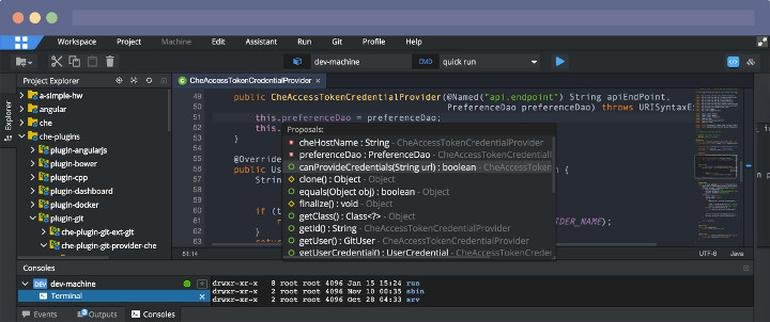
Eclipse IDE stands as the premier open platform tailored for professional developers engaged in computer programming, and it has never been better. This IDE provides essential tools to drive rapid innovation with a simplified configuration process, including the Eclipse IDE Installer 2020-09, which now incorporates a Java Runtime Environment (JRE) in several of its packages. The enhancements also extend to theming and styling, featuring an improved dark theme for Windows and a refined light theme for GTK. Additionally, Eclipse IDE has transitioned to require Java 11 as its minimum operating version while maintaining the ability to compile older versions as desired. Among its new experimental features is support for aarch64, along with robust Linux support that has been integrated into this version. Furthermore, Node.js is now embedded within all LSP-based tools, facilitating seamless functionality from the start. Eclipse IDE remains free and open source, distributed under the Eclipse Public License 2.0, underscoring its commitment to community-driven development. The platform thrives on an extensive ecosystem of plugins, bolstered by an active and engaged community of contributors. This collaborative environment ensures that Eclipse IDE continues to evolve and meet the diverse needs of developers worldwide.
API Access
Has API
No
API Access
Has API
No


Integrations
Amazon EC2
Yes
AttackFlow
No
Betterscan.io
No
EvoSuite
No
HTML
No
Klera
Yes
Kovair DevOps
No
OpenClover
No
Opsera
Yes
PHP
No
Integrations
Amazon EC2
No
AttackFlow
Yes
Betterscan.io
Yes
EvoSuite
Yes
HTML
Yes
Klera
No
Kovair DevOps
Yes
OpenClover
Yes
Opsera
No
PHP
Yes
Pricing Details
No price information available.
Free Trial
No
Free Version
No
Pricing Details
No price information available.
Free Trial
No
Free Version
No
Deployment
Web-Based
Yes
On-Premises
No
iPhone App
No
iPad App
No
Android App
No
Windows
No
Mac
No
Linux
No
Chromebook
No
Deployment
Web-Based
Yes
On-Premises
No
iPhone App
No
iPad App
No
Android App
No
Windows
No
Mac
No
Linux
No
Chromebook
No
Customer Support
Business Hours
Yes
Live Rep (24/7)
No
Online Support
Yes
Customer Support
Business Hours
No
Live Rep (24/7)
No
Online Support
Yes
Types of Training
Training Docs
Yes
Webinars
Yes
Live Training (Online)
Yes
In Person
Yes
Types of Training
Training Docs
Yes
Webinars
No
Live Training (Online)
No
In Person
No
Vendor Details
Company Name
Amazon
Founded
1994
Country
United States
Website
aws.amazon.com/elasticbeanstalk/
Vendor Details
Company Name
Eclipse Foundation
Country
Canada
Website
www.eclipse.org/eclipseide/
Product Features
Application Development
Access Controls/Permissions
No
Code Assistance
No
Code Refactoring
No
Collaboration Tools
No
Compatibility Testing
No
Data Modeling
No
Debugging
No
Deployment Management
No
Graphical User Interface
No
Mobile Development
No
No-Code
No
Reporting/Analytics
No
Software Development
No
Source Control
No
Testing Management
No
Version Control
No
Web App Development
No
Cloud Management
Access Control
No
Billing & Provisioning
No
Capacity Analytics
No
Cost Management
No
Demand Monitoring
No
Multi-Cloud Management
No
Performance Analytics
No
SLA Management
No
Supply Monitoring
No
Workflow Approval
No
Product Features
Application Development
Access Controls/Permissions
No
Code Assistance
No
Code Refactoring
No
Collaboration Tools
Yes
Compatibility Testing
No
Data Modeling
No
Debugging
No
Deployment Management
No
Graphical User Interface
No
Mobile Development
No
No-Code
No
Reporting/Analytics
No
Software Development
Yes
Source Control
No
Testing Management
No
Version Control
No
Web App Development
Yes
Code Editors
API
No
Auto-Complete
No
Code Folding
No
Column Editing
No
Customizable Themes
No
Debugging
No
Formatting / Table Editing
No
Keyboard Shortcuts
No
Multi-Monitor Editing
No
Syntax Highlighting
No
WYSIWYG
No
IDE
Code Completion
No
Compiler
No
Cross Platform Support
No
Debugger
No
Drag and Drop UI
No
Integrations and Plugins
No
Multi Language Support
No
Project Management
No
Text Editor / Code Editor
No

