Average Ratings 0 Ratings
Average Ratings 0 Ratings
Similar Products
-
ActCAD SoftwareACTCAD is suitable for professional drawings creation for Architects, Structural Engineers, Civil Engineres, Mechanical Drawings, Electrical drawings, interior design, tool design, machine designs etc.ActCAD is professional grade 2D Drafting and 3D Modeling CAD software which works in dwg and dxf file formats. Most affordable cad software.ActCAD is a native dwg/dxf cad software suitable for professional 2D drafting and 3D modeling projects. ActCAD is trusted by over 30000 users in over 103 countries for more than 10 years. The interface, commands, icons, dialogs, shortcuts etc. are very much similar to other popular cad software tools available in market. Flexible license types available even for single license. There is no learning for existing cad users while saving 80% of the costs.ActCAD offers free email technical support without any limitations. ActCAD can be fully customized and programs can be developed using our free API toolkit. It supports popular programming languages like , lisp dcl, .net, C++ etc. Apart from all regular commands, ActCAD offers many productive tools like pdf to cad converter, Block libraries, Image to Cad converter, handling point sets between Cad and Excel and many more.
-
MyQAt MyQ, the core belief is that print solutions should be automated, personalized, and easy to use, allowing people to focus on what matters most in their daily work. This principle is reflected in MyQ’s approach to our product design, combining intuitive user experiences with strong data security and efficient document workflows. MyQ’s print management solutions strengthen document security while helping organizations reduce costs, save time, and lower their environmental impact.
-
DaylightDaylight combines cutting-edge agentic AI with top-tier human skills to offer an advanced managed detection and response service that transcends mere notifications, striving to “take command” of your cybersecurity landscape. It ensures comprehensive monitoring of your entire environment, leaving no gaps, while providing context-sensitive protection that adapts and evolves based on your systems and historical incidents, including communications through platforms like Slack. This service boasts an exceptionally low rate of false positives, the quickest detection and response times in the industry, and seamless integration with your existing IT and security tools, accommodating limitless platforms and integrations while delivering actionable insights through AI-enhanced dashboards without unnecessary noise. With Daylight, you receive true comprehensive threat detection and response without the need for escalations, round-the-clock expert assistance, tailored response workflows, extensive visibility across your environment, and quantifiable enhancements in analyst efficiency and response time, all designed to transition your security operations from a reactive stance to a proactive command approach. This holistic approach not only empowers your team but also fortifies your defenses against evolving threats in the digital landscape.
-
DriveStrikeDriveStrike is simple to use, implement, and manage. DriveStrike allows you to perform remote wipe, remote lock, or remote locate commands on any platform. Mobile device management MDM for mobile platforms. Integrated drive encryption support. Our support team is available to answer any questions, help you install our services, or manage your account. It's never been easier to protect your data and devices. We are happy to answer any questions you may have or help you understand how to best protect your data. Protect your business with a device- and data protection platform that keeps all devices protected with a single solution. Your Workstations, iPads and iPads, Smartphones as well as Tablets, Tablets, Tablets, and Laptops will be protected, organized, secure, & protected.
-
RemotePeopleRemotePeople helps businesses build international teams through Employer of Record services, recruitment and workforce administration in 150+ countries. Founded in 2018 and based in New York, RemotePeople combines a web platform with dedicated account managers and in-country HR expertise. With EOR, RemotePeople handles local employment contracts, onboarding, payroll, tax administration and statutory benefits while clients manage employees' daily work. EOR Global starts at $499 per employee/month; your rate is confirmed in your quote. EOR Select starts at $199 per employee/month for selected countries and qualifying employee salary ranges. Country and salary conditions apply. Salaries and statutory employer costs are additional; availability and terms vary by country. In-house recruitment and executive search help companies source talent before hiring. Recruitment + EOR costs 2% of annual salary each month for recruitment, plus the EOR fee. Other services include Global Payroll, US Payroll, Contractor Management, Contractor of Record and US PEO. RemotePeople also supports global benefits, equity, visas and immigration, company incorporation, ongoing entity management and transfers from EOR to a client's own entity. Optional support includes employment contracts, legal assistance, background checks, compliance audits, equipment, workplace services, expenses and offboarding. AI Command Center accepts natural-language requests for onboarding, payroll, leave, expenses and contract changes, with expert review of high-impact actions and an audit trail. Employee self-service brings payslips, documents and requests into one platform. Request a demo or country-specific quote; no free trial is offered.
-
Project InsightProject Insight helps organizations connect project data across teams and systems to make better decisions about their business. As a strategic project and portfolio management platform, it brings together resource and capacity planning, financial management, project requests, execution, governance, and portfolio performance. The result is a connected project data backbone that gives PMOs and executives visibility into organization-wide work and supports trustworthy reporting, forecasting, and AI analysis. Teams can continue using familiar tools such as Jira, Azure DevOps, Microsoft, Salesforce, ServiceNow, and HubSpot while Project Insight brings their project information into one central command center, reducing manual data entry and disconnected reporting. Manage projects, programs, and portfolios using flexible workflows, intelligent scheduling, Gantt charts, Kanban boards, time tracking, budget management, and customizable dashboards. Leaders can monitor workloads, project health, costs, and strategic priorities without chasing information across departments. AI-powered features help create project plans, turn meeting discussions into action items, recommend resources, forecast capacity, and evaluate what-if scenarios. From growing teams outgrowing spreadsheets to established PMOs with complex business processes, Project Insight adapts to the way organizations work through configurable processes, dedicated onboarding support, and free view-only access for clients and stakeholders.
-
CareLineLiveCareLineLive is an all-in-one, cloud-based homecare management platform trusted by over 700 home care agencies and domiciliary care providers across the United Kingdom and Australia. The platform covers rostering, scheduling, care planning, care monitoring (ECM), eMAR, payroll, invoicing and the Care Circle portal for friends and family. Subscription includes CQC and CIW compliance tool MOA Benchmarking to deliver a solution combining both homecare management and compliance. Customers find the comprehensive functionality easy to use because of the intuitive user interface and enjoy excellent day-to-day support which is recognised by CareLineLive’s high rating on Trustpilot. CareLineLive is an NHS England Assured Supplier for Digital Social Care Records (DSCR). CareLineLive is accredited to ISO 27001 (Information Security), ISO 9001 (Quality Management), and Cyber Essentials Plus. In addition to being hosted on secure AWS servers with data stored in the UK (or Australia for customers there) for data sovereignty. Founded in 2014, CareLineLive is led by Managing Director Josh Hough and is headquartered in West Sussex with offices in London and Melbourne. CareLineLive is part of MAS Technicae Group and received majority investment from technology-focused investment firm Accel-KKR in June 2025.
-
WrikeWrike is a powerful work management platform that gives cross-functional teams full visibility into complex projects. Our cloud-based collaboration software software is trusted by 20,000+ leading companies around the world, including tech giants such as Fitbit and Siemens. Wrike boasts a wide range of award-winning features, including dynamic request forms, automated workflows, cross-tagging, custom item types, and 400+ app integrations. Work smarter with Work Intelligence™: our advanced communication software that offers voice commands, smart replies, and document processing. We also offer tailor-made templates to help teams kick-start Agile projects and tick every box for compliance. As well as 99.9% uptime, our enterprise-grade security offers single sign-on, role-based access control, and continuous data backup. For extra peace of mind, you can use the Wrike Lock add-on and gain full ownership of your master encryption key. Wrike has been proven to make organizational processes 40% more efficient, eliminating time-consuming admin work and reducing costs across the board. Discover how it can benefit your team — start your free two-week trial today.
-
FreshserviceFreshservice is the right choice if you are looking for an IT service desk solution with simplicity. Freshservice is an easy-to-use ITIL service desk from Freshworks that helps businesses modernize IT and other business functions without the complexity and cost. Freshservice provides everything teams need to manage proactive IT services, including asset management, ticketing, configuration management, enhanced impact analysis, robust incident management functions, and more.
-
ISL Light Remote DesktopISL Light is a remote desktop software that is easy to use for security-conscious users. It offers great value-performance. ISL Light is a powerful tool for IT staff and support personnel to solve problems remotely via remote support, unattended access, or screen-sharing from mobile devices. It is cross-platform and provides 256-bit encrypted sessions, all the standard remote access features, as well as session recording, chat, videocall and multi-monitor support, file transfers, reporting, and many other important extras. Users can choose between cloud and on-premise services. ISL Online license doesn't limit the number or workstations of clients, users, and users you can support. It is a reliable, highly secure software that can be used in all industries, including banks, hospitals, government institutions, and insurances.
Description
The AWS Command Line Interface (AWS CLI) serves as a comprehensive tool for overseeing your AWS services efficiently. By simply downloading and configuring this single tool, users can manage various AWS services directly from the command line and streamline processes through automation scripts. The latest version, AWS CLI v2, introduces a host of enhancements, including better installation processes, new configuration options like AWS IAM Identity Center (which replaces AWS SSO), and a range of interactive features designed to elevate user experience. This command-line shell program is tailored to enhance convenience and productivity, catering to both beginners and experienced AWS CLI users alike. It supports resource identifiers such as Amazon EC2 instance IDs, Amazon SQS queue URLs, and Amazon SNS topic names, making it easier to work with AWS resources. As you type, detailed documentation for commands and options is readily available to assist you. The user guide for the AWS Command Line Interface provides step-by-step instructions for installation and configuration, ensuring you are well-equipped to start utilizing your AWS services from the command line right away. With this powerful tool at your disposal, managing cloud resources becomes more efficient than ever.
Description
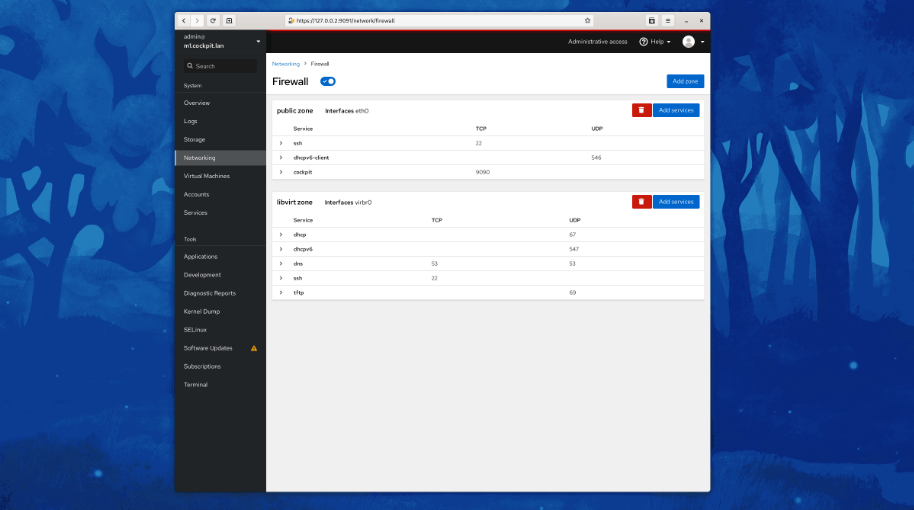
Cockpit serves as a user-friendly web-based graphical interface designed for server management, catering to everyone from beginners to seasoned Linux administrators. By leveraging system APIs and commands, Cockpit allows an entire team of administrators to manage systems in their preferred manner, whether that involves using the command line or various utilities alongside the Cockpit interface. With Cockpit, users can access their servers through a web browser and execute system tasks effortlessly using a mouse. It simplifies operations such as initiating containers, managing storage, configuring networks, and reviewing logs. Essentially, Cockpit acts like a graphical "desktop interface" tailored specifically for individual servers. If you have preferred applications or command-line tools for server management, you can continue utilizing those alongside Cockpit without any disruptions. Since Cockpit operates using the same system tools as the command line, you can seamlessly switch between Cockpit and your other preferred methods. This flexibility ensures that you can efficiently manage your servers while still maintaining your usual workflow.
API Access
Has API
No
API Access
Has API
No



Integrations
AWS Copilot
Yes
AWS Identity and Access Management (IAM)
Yes
AWS Marketplace
Yes
AWS Parallel Computing Service
Yes
Amazon EC2
Yes
Amazon Linux 2
Yes
Amazon Simple Notification Service (SNS)
Yes
Amazon Simple Queue Service (SQS)
Yes
Ansible
No
CentOS
No
Integrations
AWS Copilot
No
AWS Identity and Access Management (IAM)
No
AWS Marketplace
No
AWS Parallel Computing Service
No
Amazon EC2
No
Amazon Linux 2
No
Amazon Simple Notification Service (SNS)
No
Amazon Simple Queue Service (SQS)
No
Ansible
Yes
CentOS
Yes
Pricing Details
No price information available.
Free Trial
No
Free Version
Yes
Pricing Details
No price information available.
Free Trial
No
Free Version
Yes
Deployment
Web-Based
No
On-Premises
No
iPhone App
No
iPad App
No
Android App
No
Windows
Yes
Mac
Yes
Linux
Yes
Chromebook
No
Deployment
Web-Based
No
On-Premises
No
iPhone App
No
iPad App
No
Android App
Yes
Windows
Yes
Mac
Yes
Linux
Yes
Chromebook
No
Customer Support
Business Hours
No
Live Rep (24/7)
Yes
Online Support
Yes
Customer Support
Business Hours
No
Live Rep (24/7)
No
Online Support
Yes
Types of Training
Training Docs
Yes
Webinars
Yes
Live Training (Online)
No
In Person
Yes
Types of Training
Training Docs
Yes
Webinars
No
Live Training (Online)
No
In Person
No
Vendor Details
Company Name
Amazon
Founded
1994
Country
United States
Website
aws.amazon.com/cli/
Vendor Details
Company Name
Cockpit
Website
cockpit-project.org
Product Features
Cloud Management
Access Control
No
Billing & Provisioning
No
Capacity Analytics
No
Cost Management
No
Demand Monitoring
No
Multi-Cloud Management
No
Performance Analytics
No
SLA Management
No
Supply Monitoring
No
Workflow Approval
No
Product Features
Server Management
CPU Monitoring
No
Credential Management
No
Database Servers
No
Email Monitoring
No
Event Logs
No
History Tracking
No
Patch Management
No
Scheduling
No
User Activity Monitoring
No
Virtual Machine Monitoring
No
