
Web applications no longer behave consistently across regions and network conditions, and developers may observe this when identical requests return different latencies or content. Checking applications from a single location is not sufficient anymore. Synthetic monitoring is partially to blame for the gap between simulated test results and actual user experience. This gap can be closed by integrating proxy solutions that help engineers validate uptime, geo-specific rendering, content variation, and the behavior of individual requests.
Let’s answer the questions of why location-based testing plays an important role and why teams turn to proxies. Keep reading to learn more.
What is synthetic monitoring
Synthetic monitoring or testing is a technique used to track how an application is performing. It aims to reproduce real user interactions for various scenarios. It is a valuable solution if you want to get updates on performance or alerts of possible issues. The process is based on scripted test requests transmitted by automated clients that act like users. These scripts can run at fixed intervals, such as every 15 minutes, although other frequencies are also possible depending on the setup. After each simulated request, a robot client gets a response from an app, it sends the results back to the monitoring system for analysis. Some errors can occur during the tests, but the system may automatically retry the request to confirm whether the issue is temporary or persistent.
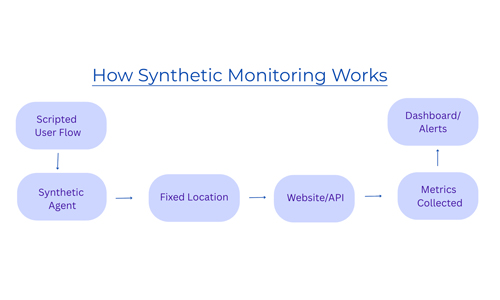
Modern applications are complex by nature, and synthetic monitoring is not strong enough to notice all potential dangers. Regardless of earlier testing adoption in DevOps, synthetic monitoring still requires specialized knowledge, and it can be time-consuming even for skilled engineers. Besides, UI changes can generate unnecessary alert noise. Many monitoring tools lack deeper context around failures, which makes it hard to find the root of the problem. As a result, troubleshooting takes forever.
Why website content varies by location
Servers usually identify a user’s IP address upon receiving a request to determine factors such as region, language, currency, available products, and layout. Content delivery networks provide page versions based on the nearest edge location. Businesses implement location-based rules for compliance, pricing, or A/B testing, resulting in variations in page content for different users. From an engineering perspective, it means that identical requests may yield different responses based on the origin of the request.
What are the key steps for accurate geo-based testing
To achieve high-fidelity testing results, verification checks should align with the nuances of actual user behavior. Because application performance varies very much based on location and environmental context, simulations must mirror these complexities. The following are the recommended steps to improve testing accuracy within production-like conditions.
1. Implement geographically distributed testing
Rather than relying on a single origin, distribute your test operations across global regions. It helps to analyze variables such as network latency, Content Delivery Network routing, and localized content delivery. By monitoring from multiple points, you can pay attention to bottlenecks that would be invisible in centralized environments.
2. Emulate diverse network environments
To gain an authentic understanding of the user experience, transition from datacenter-based testing to the use of residential and mobile IP addresses. Datacenter IPs are often easily identified. Security protocols treat them differently. When using residential or mobile IPs, you imitate the actual connectivity patterns of users via ISPs or cellular carriers. This way, chances of getting caught by anti-bot systems are small.
3. Evaluate results over time
Single test results aren’t enough for identifying systemic issues. Continuous monitoring and the comparison of patterns assist in detecting anomalies and regional inconsistencies. This activity helps distinguish between temporary fluctuations and persistent system issues.
4. Combine behavior and context signals
Meaningful testing requires replicating both user behavior and operational conditions. This means modeling full session flows such as navigation and logins, along with geographic distribution, network connectivity, and timing patterns. These factors provide a comprehensive assessment of application performance.
Proxies, geo-targeting, mobile IPs: how do they help?
Engineers use residential proxies to control where requests originate and how they are routed. This proxy solution routes traffic through IPs assigned by ISPs to actual devices. It is a useful approach because developers can see how an application behaves, especially during testing stages. Geo-targeting is another asset. It helps to detect geo-specific bugs and even verify how applications respond to special regulatory or localization rules.
With mobile IPs, traffic is directed through mobile carriers, typically behind carrier-grade NAT. There, many users share the same public IP. Compared to residential or datacenter networks, mobile ones create a different traffic profile. The advantage is the higher reputation of IP, less deterministic request patterns, and routing path variability. For engineers, this is especially relevant for testing app behaviors on mobile devices or analysis of performance under network conditions common in 4G or 5G environments.
Choosing a reputable provider is key. DataImpulse is a provider of a residential proxy network across 195 countries. The company offers more than 90 million ethically sourced residential, mobile, and datacenter IPs, with non-expiring traffic. Pay-as-you-go pricing model lets users consume GBs whenever they need. The typical price starts at $1 per GB. Users can target specific cities and ASNs for localized testing. Developers usually choose DataImpulse proxies for web scraping, website testing, market research, and other cases due to fair prices, an intuitive dashboard, and integration with Python, Selenium, Puppeteer, Scrapy, and custom scripts with full documentation and setup guides.
Here, we compare how systems may perform with and without proxies.
| Metric | With proxies | Without proxies |
| Request success rate | High | Low |
| Block rate | Low via rotation and IP pools | IP bans and 403 errors |
| Geo testing | Supported | Not available |
| Scalability | Distributed request load | Limited by IP restrictions |
| Data consistency | Stable and accurate results | Incomplete or blocked data |
| Retry load | Spread across networks | Pressure on the same IP |
| Cost efficiency | Lower cost per successful request | Higher due to failed requests |
What mistakes to avoid
One of the popular mistakes is selecting an inappropriate proxy type. For example, using residential or mobile IPs where high anonymity is not required or datacenter proxies for protected targets. It can result in unnecessary expenses or even blocks. Ineffective retry and rotation strategies are another concern. Frequent rotation can increase bandwidth consumption without improving success rates. If your system doesn’t use caching or deduplication, it may lead to redundant requests for the same information and higher costs per successful response.
Finally, the cost-aware routing must be present. If not, it often results in inefficient proxy selection, as all requests are processed identically regardless of their complexity or the target site’s behavior.
FAQ
How to do user testing for a website?
Use automated scripts like Selenium or Playwright and integrate proxies. The aim is to identify how the website performs, renders, and responds. Include different locations and devices.
Can someone get your IP from a website?
Yes. The website you visit can see your IP address. First, your browser sends the request, then the server receives your IP, so it knows where to send the response. IP doesn’t reveal identity, but it’s connected to an ISP or approximate location. If you want to stay invisible, you can route your traffic through a proxy, and the website will see the intermediary IP, not your original one.
What is the difference between synthetic monitoring and real user testing?
Synthetic monitoring is about scripted tests that imitate user actions, while real user testing is about data from actual users interacting with the site. Synthetic tests are predictable, real user testing reflects true user experience.
Why is testing from a single location not enough?
Because it shows app behavior only under one set of conditions. Without testing in multiple locations, engineers can encounter slowdowns, specific bugs, and content inconsistency.
_____________________________________________________________________
About Us:
DataImpulse is a reliable proxy provider offering residential, mobile, and datacenter proxies on a pay-as-you-go pricing model. More than 90 million IPs across 195 countries. Traffic doesn’t expire. No subscription, no extra costs for targeting. 24/7 human support.
_________________________
Related Categories