
AnyDesk Description
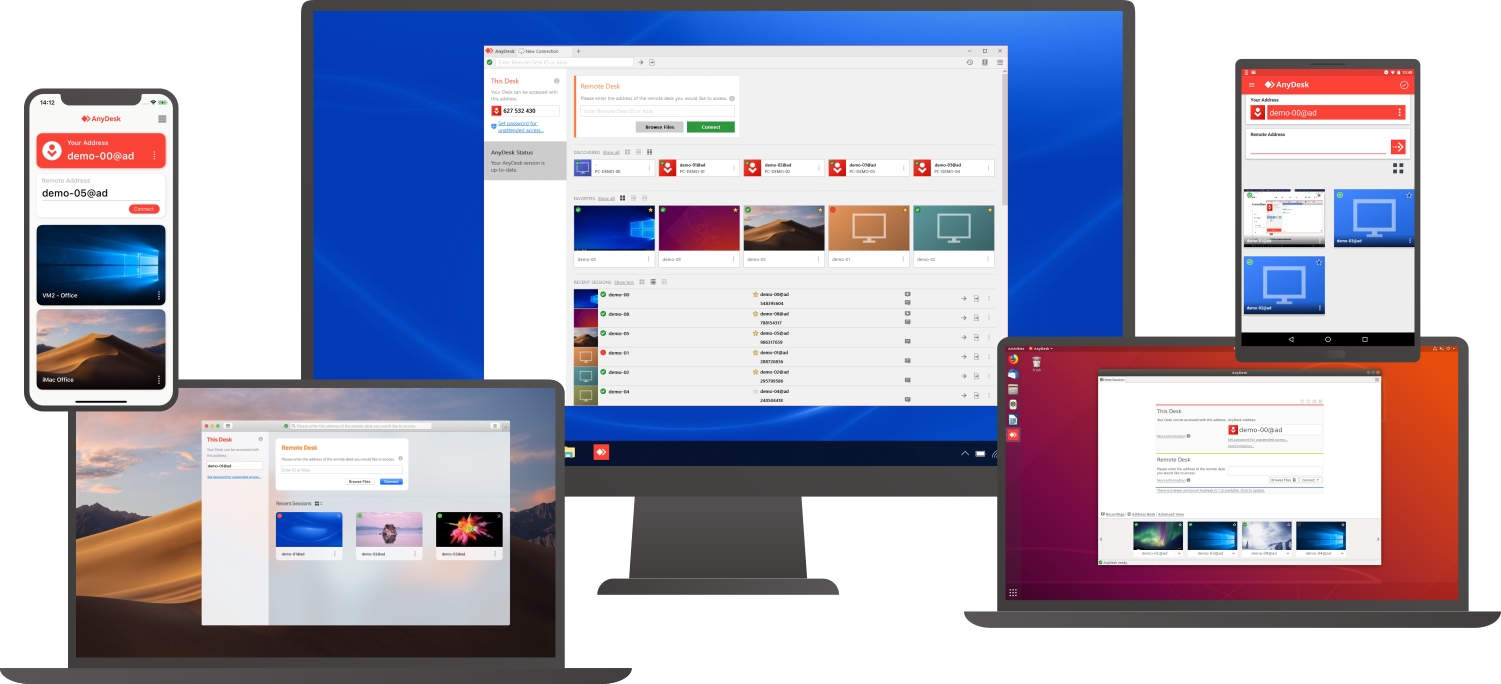
Access a computer remotely, whether you're just down the hall or on a different continent. AnyDesk guarantees secure and dependable remote desktop connections tailored for both IT specialists and individuals on the move. This versatile application is compatible with a wide range of devices and operating systems, including Windows, macOS, iOS, Android, Linux, FreeBSD, and even Raspberry Pi! Seamlessly collaborate and communicate, whether you're conducting online meetings and presentations or co-editing documents from afar. You can easily transfer files between computers using the new transfer tab or by simply copying and pasting. There's no need for administrative rights or complex installations; just download the lightweight 3MB file, and you're ready to go. If you require unattended access while traveling, it’s simple to set up by installing the software and establishing a password. Plus, you can personalize the AnyDesk interface to provide a remote desktop experience that aligns with your brand identity, ensuring a cohesive user experience. With these user-friendly features, AnyDesk makes remote work more efficient than ever before.
Pricing
Integrations
Company Details
Media

Product Details
AnyDesk Features and Options
Remote Support Software
Screen Sharing Software
Remote Desktop Software
AnyDesk Lists
-
Likelihood to Recommend to Others1 2 3 4 5 6 7 8 9 10
AnyDesk: Remote desktop solution Date: Jan 25 2024
Summary: AnyDesk provides an easy way for individuals to access their computers remotely. The free version works great for basic ad hoc use.
Positive: Intuitive interface & easy setup for ad hoc remote access needs, Low latency sharing even in poor connections.
Negative: Lack of robust access controls & auditing capabilities, Limited multi-monitor & file transfer support.
Read More... -
Likelihood to Recommend to Others1 2 3 4 5 6 7 8 9 10
Navigating remote desktop efficiency Date: Jan 16 2024
Summary: My overall experience has been great with AnyDesk, particularly when seeking a fast & reliable solution for remote connectivity.
Positive: It exceptional speed & low latency make remote connection feel almost as responsive to local ones. Its cross platform compatibility allows for seamless connections between various operating systems.
Negative: The free version has limitations such as restricted file transfer & limited access options which doesn't lets people try the full potential of AnyDesk before purchasing the full version.
Read More... -
Likelihood to Recommend to Others1 2 3 4 5 6 7 8 9 10
An outstanding and quick remote solution Date: Aug 18 2023
Summary: Overall, AnyDesk is very efficient and speedy software for remote operations. Its exclusive features make it a perfect fit for private and business use. Due to its simple and easy framework, no technical skills need to be acquired. However, it is more appealing to IT and business professionals.
Positive: I found AnyDesk is the smallest quickest, and easiest remote desktop solution. It works smoothly in almost low bandwidth and smaller desktops. My best experience with it is it can be integrated with mobile, so even if you are away from your desktop, you can operate it.
Furthermore, file transferring, desktop sharing, and whiteboarding is very easy and proficient features.Negative: It is worth saying that I could not find any technical drawback to mention here. However, I would suggest the peers seeking an online remote solution. AnyDesk is the best choice.
Read More... -
Likelihood to Recommend to Others1 2 3 4 5 6 7 8 9 10
Like TeamViewer but Free Date: Jun 30 2021
Summary: If you're looking for something to replace TeamViewer look no further, this software has worked flawlessly in that department.
Positive: This software has been incredible, it is basically a free version of TeamViewer but it comes with a ton of useful features.
Negative: Any cons that I have for this software is based on the desire to have it be better, considering it is free its hard to say any of it is a major con.
Read More... -
Likelihood to Recommend to Others1 2 3 4 5 6 7 8 9 10
Everything I need to access and remotely control other computers Date: Jun 20 2021
Summary: I have used it to provide and receive assistance from my co-workers, and we have been able to offer more support mechanisms to our customers without the need for them to come to our facilities. It makes it easy to connect to other devices, it's fast, and it's so easy to share your desktop to provide and receive support remotely. AnyDesk revolutionizes how you can access and control any computer wherever you are from your computer, laptop, or mobile device. It is a workable solution, especially for collaborative and remote support purposes.
Positive: I love it; it allows me to remotely access and control other computers; I have used it to collaborate, assist colleagues, and provide live customer support with excellent efficiency. Its interface is very intuitive, it is easy to use, and I like that it has an authentication method for accessing computers. Every tool has made it very easy to remotely control other computers and servers, communicate, collaborate, and support real-time.
Negative: I love that it has a mechanism to authenticate user access to control other devices; however, I feel it is not secure enough; I would like users to allow or deny remote access to their computers.
Read More... -
Likelihood to Recommend to Others1 2 3 4 5 6 7 8 9 10
Accessing other computers and controlling them remotely has never been easier Date: Jun 09 2021
Summary: It has been a favorite resource for assisting colleagues and customers without the need to be in the same place. It is an excellent element for technical support, connection, and remote communication. It is effortless to log in, access a remote computer or server, and control it according to the needs of use or support; it saves time, energy, and money spent on travel.
I recommend it every time; it works flawlessly, its user interface is quite friendly, and it provides tools that encourage remote communication and support.Positive: I use AnyDesk frequently to log into my office computer when I'm away from my office or provide support to third parties remotely, and it's incredible how easily I can do it. AnyDesk's UI is quite lovely and makes the user lose; it is easy to understand how it works. It is a great tool to access and control computers remotely.
Negative: I have had no problem with using this tool, it is easy to use, and its performance is optimal; it provides a good experience in accessing and managing computers remotely.
Read More... -
Likelihood to Recommend to Others1 2 3 4 5 6 7 8 9 10
The remote connection prevails to support a quality service Date: Apr 28 2021
Summary: AnyDesk is interesting to understand a good remote connection plan; it helps establish a balance of communication and problem-solving. The organization has had the opportunity to value the work of other companies and be able to improve its capabilities through remote connectivity. It has excellent performance to strengthen internal communication; it is necessary to create competent support to improve the quality and overall performance of the remote connection. It is effortless and ideal for those who work in the technical support area of a company.
Positive: AnyDesk is very good; in short, I am thrilled to get a very positive performance to solve any kind of problem through the remote connection. The interface pleases me because it projects a very viable option in the way of communicating and doing a successful job. It has excellent performance overall; it does not slow down.
Negative: The program contains many advantages; I have no complaints that would diminish its reputation.
Read More... -
Likelihood to Recommend to Others1 2 3 4 5 6 7 8 9 10
Fast remote support with Anydesk Date: Apr 13 2021
Summary: The experience in general is excellent and without problems. Works on any workstation and also on the Android smartphone. Access is fast and has no delay. It is all very easy and intuitive. It is only necessary to install the software on the devices.
Positive: Essential and important tool for us to remotely service users. You don't have to leave the office to install software and solve problems on our employees' PCs. The interface is great, intuitive and easy to understand.
Negative: We haven't had a problem with Anydesk yet. Honestly, the documentation is ok and the software works perfectly. I have no complaints.
Read More... -
Likelihood to Recommend to Others1 2 3 4 5 6 7 8 9 10
Redundant interface but powerful with remote access Date: Feb 18 2021
Summary: Easy to hold online meetings.
Team chats makes communication easy.
Faster to send or receive money
Nice UI.Positive: Efficiency with access of invoices while are the office.
Superb and fantastic customer support.
Terrific with offering remote IT assistance.Negative: Great and most convenient with video conferencing.
Read More... -
Likelihood to Recommend to Others1 2 3 4 5 6 7 8 9 10
Creativity and innovative with remote support Date: Feb 18 2021
Summary: Quite effective with screen share for presentations.
Reliable with video conferencing.
User friendly interface.Positive: Good and very impressive with remote support.
Support support is very reliable.
Easy to connect remotely.Negative: Most convenient and very convenient with screen sharing.
Read More... -
Likelihood to Recommend to Others1 2 3 4 5 6 7 8 9 10
Secure and reliable with remote control. Date: Feb 18 2021
Summary: Connecting is easy just by username and password.
Reliable with remote support and access.
Very fast to transfer files and documents.Positive: Most secure with remote access and control.
Faster to access from different devices from mobile, desktop.
Efficiency with recording virtual classroom.Negative: Great and secure with remote access and control and easy to connect.
Read More... -
Likelihood to Recommend to Others1 2 3 4 5 6 7 8 9 10
Resilient and more effective with file transfer and screen sharing. Date: Feb 18 2021
Summary: Easy to use and download and configure.
Secure to join and be able to participate on online meetings.
Superb with video conferencing.Positive: Screen sharing is very superb with remote control.
Efficiency with file transfer.
User friendly and intuitive user interface.Negative: Most convenient and efficient with video conferencing.
Read More... -
Likelihood to Recommend to Others1 2 3 4 5 6 7 8 9 10
Better control of all my devices remotely. Date: Feb 18 2021
Summary: Secure with access control.
Reliable to share large files from one computer to another.
It's have a free trial to have a taste of it and works perfectly.
Screen share is very important with presentations.Positive: Effectiveness to access all my devices remotely.
Secure to connect with username and password authentication.
Reliable to record sessions and virtual classroom.Negative: Efficiency to connect to multiple devices at once from anywhere.
Read More... -
Likelihood to Recommend to Others1 2 3 4 5 6 7 8 9 10
Robust, affordable and amazing with remote access Date: Jan 05 2021
Summary: Outstanding with holding online meetings with clients anytime.
Reliable with file transfer which is fast.
It's very easy to install and configure.Positive: Simple to install and configure.
Excellent with remote access for helping colleagues with computer issue anytime.
Mobile access and desktop access for convenience.Negative: Reliable with video conferencing for its clear and quality videos.
Read More... -
Likelihood to Recommend to Others1 2 3 4 5 6 7 8 9 10
Highly recommended AnyDesk!! Edited: Nov 05 2020
Summary: Overall, Anydesk is a powerful tool for remote computer control. The interface is streamlined and intuitive. Highly recommend this tool for remote screen control.
Positive: I like the ability to being able to remotely control and getting access to another computer using the Anydesk connection bridge. It enables a seamless connection and super easy to configure with another desktop.
Negative: Nothing so far. I loved this platform. Great tool.
Read More...
