Average Ratings 0 Ratings
Average Ratings 0 Ratings
Similar Products
-
DbVisualizerDbVisualizer is a universal database client for anyone who works with data, from indie developers and startups to professional teams managing complex database environments, including developers, DBAs, analysts, and data engineers working across relational and NoSQL databases. Key features: - SQL editor with intelligent autocomplete, visual query builders, variables, and execution tools - AI Assistant for answering questions, explaining errors, and analyzing code - Git integration for managing SQL scripts and team collaboration - Customizable layouts, key bindings, and UI themes - Favorites for frequently used scripts and database objects - Configurable security settings for organizational requirements Connects via JDBC to MySQL, PostgreSQL, SQL Server, Oracle, Snowflake, SQLite, Cassandra, BigQuery, and more. Runs on Windows, macOS, and Linux. Nearly 7 million downloads, with Pro users in 150 countries, scaling from solo projects to enterprise database management.
-
Google Cloud SQLCloud SQL is a fully managed relational database service that supports MySQL, PostgreSQL, and SQL Server. It includes rich extensions, configuration flags, and developer ecosystems. Cloud SQL offers $300 in credits for new customers. You won't pay until you upgrade. Reduce maintenance costs by using fully managed MySQL, PostgreSQL, and SQL Server databases. The SRE team provides 24/7 support for reliable and secure services. Data encryption in transit and at rest ensures the highest level of security. Private connectivity with Virtual Private Cloud, user-controlled network access, and firewall protection add an additional layer of safety. Compliant with SSAE 16, ISO 27001, PCI DSS, and HIPAA, you can trust your data to be protected. Scale your database instances with a single API request, whether you are just testing or need a highly available database in production. Standard connection drivers and integrated migration tools let you create and connect to a database in a matter of minutes. Transform your database management with AI-driven support in Gemini, currently available in preview on Cloud SQL. It enhances development, optimizes performance, and simplifies fleet management, governance, and migration.
-
RaimaDBRaimaDB, an embedded time series database that can be used for Edge and IoT devices, can run in-memory. It is a lightweight, secure, and extremely powerful RDBMS. It has been field tested by more than 20 000 developers around the world and has been deployed in excess of 25 000 000 times. RaimaDB is a high-performance, cross-platform embedded database optimized for mission-critical applications in industries such as IoT and edge computing. Its lightweight design makes it ideal for resource-constrained environments, supporting both in-memory and persistent storage options. RaimaDB offers flexible data modeling, including traditional relational models and direct relationships through network model sets. With ACID-compliant transactions and advanced indexing methods like B+Tree, Hash Table, R-Tree, and AVL-Tree, it ensures data reliability and efficiency. Built for real-time processing, it incorporates multi-version concurrency control (MVCC) and snapshot isolation, making it a robust solution for applications demanding speed and reliability.
-
Google Cloud BigQueryBigQuery is a serverless, multicloud data warehouse that makes working with all types of data effortless, allowing you to focus on extracting valuable business insights quickly. As a central component of Google’s data cloud, it streamlines data integration, enables cost-effective and secure scaling of analytics, and offers built-in business intelligence for sharing detailed data insights. With a simple SQL interface, it also supports training and deploying machine learning models, helping to foster data-driven decision-making across your organization. Its robust performance ensures that businesses can handle increasing data volumes with minimal effort, scaling to meet the needs of growing enterprises. Gemini within BigQuery brings AI-powered tools that enhance collaboration and productivity, such as code recommendations, visual data preparation, and intelligent suggestions aimed at improving efficiency and lowering costs. The platform offers an all-in-one environment with SQL, a notebook, and a natural language-based canvas interface, catering to data professionals of all skill levels. This cohesive workspace simplifies the entire analytics journey, enabling teams to work faster and more efficiently.
-
RetoolRetool is a modern AI-native application development platform designed to help teams build internal software quickly and efficiently. It enables users to create agents, workflows, dashboards, and full-stack apps using natural language prompts and visual tools. Retool connects directly to databases, APIs, vector stores, and AI models to ensure applications work seamlessly with existing systems. The platform allows teams to transform raw data into actionable tools such as dashboards, admin panels, and monitoring systems. With drag-and-drop UI building, code-level customization, and AI-assisted generation, Retool supports multiple development styles. Built-in workflows automate complex processes while maintaining auditability and security. Retool fits naturally into standard engineering stacks with support for CI/CD and version control. Enterprise-grade permissions and hosting options ensure sensitive data stays protected. Used by thousands of companies worldwide, Retool helps teams ship AI-powered software faster. It bridges the gap between idea and production with speed and control.
-
TIMiHigh-Performance Data Engineering. Total Sovereignty. TIMi delivers the power of a complete cloud data stack—on-premises, fully sovereign, and ridiculously fast. We reject artificial vendor lock-in and hidden costs. Instead, we offer absolute peace of mind through engineering excellence, giving your team the freedom to experiment, innovate, and solve complex AI, analytics, and automation challenges in record time. Why Top Enterprises Choose TIMi? Enterprise Integration & *No-Code* ETL/Data preparation: Automate complex workflows and seamlessly link your entire stack: SAP, Salesforce, SharePoint, S3, Azure Storage, PowerBI, Tableau, etc. Unmatched Infrastructure Efficiency: Our competitors such as Databricks, Dataiku, and MS Fabric all rely on Spark—and that makes them inherently inefficient since a single €2k TIMi server outperforms a 267-node Spark cluster. TIMi process billions of rows in seconds and manage petabyte-scale data lakes at a fraction of the cost. Proven AI Leadership: Harness pioneering machine learning from the creators of the first Auto-ML engine (est. 2007). Whether deployed on-premises or via our EU-Hosted Sovereign Cloud, TIMi empowers leaders in Banking, Telecoms, Manufacturing, Retail, Defense and Government.
-
ParasoftParasoft's mission is to provide automated testing solutions and expertise that empower organizations to expedite delivery of safe and reliable software. A powerful unified C and C++ test automation solution for static analysis, unit testing and structural code coverage, Parasoft C/C++test helps satisfy compliance with industry functional safety and security requirements for embedded software systems.
-
Google Cloud PlatformGoogle Cloud is an online service that lets you create everything from simple websites to complex apps for businesses of any size. Customers who are new to the system will receive $300 in credits for testing, deploying, and running workloads. Customers can use up to 25+ products free of charge. Use Google's core data analytics and machine learning. All enterprises can use it. It is secure and fully featured. Use big data to build better products and find answers faster. You can grow from prototypes to production and even to planet-scale without worrying about reliability, capacity or performance. Virtual machines with proven performance/price advantages, to a fully-managed app development platform. High performance, scalable, resilient object storage and databases. Google's private fibre network offers the latest software-defined networking solutions. Fully managed data warehousing and data exploration, Hadoop/Spark and messaging.
-
Google AI StudioGoogle AI Studio is an all-in-one environment designed for building AI-first applications with Google’s latest models. It supports Gemini, Imagen, Veo, and Gemma, allowing developers to experiment across multiple modalities in one place. The platform emphasizes vibe coding, enabling users to describe what they want and let AI handle the technical heavy lifting. Developers can generate complete, production-ready apps using natural language instructions. One-click deployment makes it easy to move from prototype to live application. Google AI Studio includes a centralized dashboard for API keys, billing, and usage tracking. Detailed logs and rate-limit insights help teams operate efficiently. SDK support for Python, Node.js, and REST APIs ensures flexibility. Quickstart guides reduce onboarding time to minutes. Overall, Google AI Studio blends experimentation, vibe coding, and scalable production into a single workflow.
-
CouchbaseCouchbase’s operational data platform for AI is a scalable foundation for enterprise operational, analytical, mobile and AI workloads that replaces legacy infrastructure and data services. Couchbase connects and mobilizes your data, so you can power peak experiences, harness the power of AI and scale globally—all with less risk and lower overhead.
Description
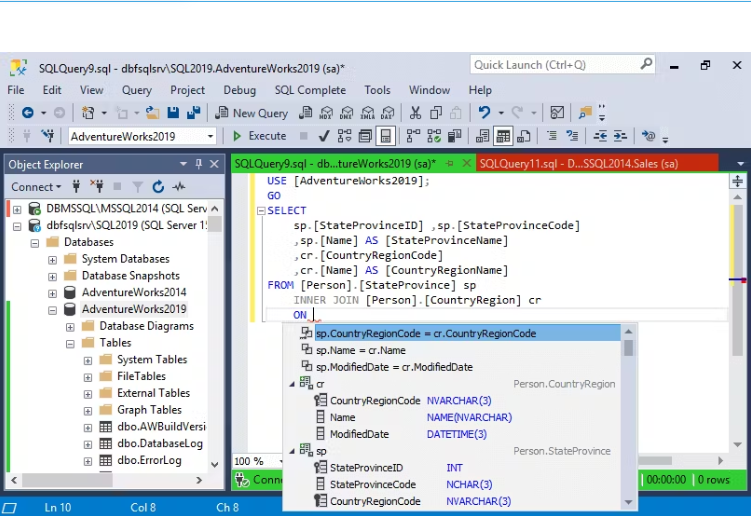
dbForge SQL Complete is a robust coding assistance tool designed as an add-in for SQL Server Management Studio (SSMS) and Visual Studio (VS). It provides numerous features to improve code quality and speed up code creation within the SSMS interface, helping to organize coding efforts and boost overall productivity.
Key Features:
- Context-aware suggestions for keywords and objects
- Flexible SQL formatting with various customization options
- Professional, safe, and fast code refactoring
- Quick access to database object descriptions
- T-SQL debugger for improving code quality
- Customizable code snippets with the ability to create user-defined snippets
- Execute statements against the target database directly from the SQL - -
- Complete window
- Various data visualization options
- Customizable execution warnings and notifications
- Query history with the ability to restore lost or closed documents or tabs
- A comprehensive set of tools for data manipulation
dbForge SQL Complete significantly reduces human typing errors. Its integration with SSMS enhances coding capabilities, providing users with a powerful toolset. A free edition of the solution is also available.
Description
dbForge Search for SQL Server is a free tool designed to assist database developers in searching for specific SQL objects, data, and text across multiple databases. It eliminates the need for manually inspecting entire database schemas by offering a user-friendly graphical interface for efficient and rapid searches.
Key Features:
- Customizable search options, including DDL or data searches, case matching, whole-word matching, and wildcard support.
- Ability to search for database objects containing specific data.
- Conduct simultaneous searches across multiple databases and object types.
- Name-based searches within object names and bodies.
- SQL code search for specific code fragments within database objects.
- Sorting, filtering, and grouping of search results.
- Displaying search results in a grid format for improved readability.
- Quick navigation to locate objects without browsing through extensive lists.
dbForge Search flawlessly integrates with SQL Server Management Studio (SSMS), enabling users to perform all search operations and manage results directly within the SSMS interface.
API Access
Has API
No
API Access
Has API
No




Integrations
SQL
Yes
SQL Server
Yes
SQL Server Management Studio (SSMS)
Yes
Visual Studio
Yes
Integrations
SQL
Yes
SQL Server
Yes
SQL Server Management Studio (SSMS)
Yes
Visual Studio
No
Pricing Details
$129.95
Free Trial
Yes
Free Version
Yes
Pricing Details
$0
Free product
Free Trial
No
Free Version
Yes
Deployment
Web-Based
No
On-Premises
No
iPhone App
No
iPad App
No
Android App
No
Windows
Yes
Mac
No
Linux
No
Chromebook
No
Deployment
Web-Based
No
On-Premises
No
iPhone App
No
iPad App
No
Android App
No
Windows
Yes
Mac
No
Linux
No
Chromebook
No
Customer Support
Business Hours
Yes
Live Rep (24/7)
No
Online Support
Yes
Customer Support
Business Hours
Yes
Live Rep (24/7)
No
Online Support
Yes
Types of Training
Training Docs
Yes
Webinars
No
Live Training (Online)
Yes
In Person
No
Types of Training
Training Docs
Yes
Webinars
No
Live Training (Online)
Yes
In Person
No
Vendor Details
Company Name
Devart
Founded
1997
Country
United States of America
Website
www.devart.com
Vendor Details
Company Name
Devart
Founded
1997
Country
United States of America
Website
www.devart.com
Product Features
Database
Backup and Recovery
No
Creation / Development
No
Data Migration
No
Data Replication
No
Data Search
No
Data Security
No
Database Conversion
No
Mobile Access
No
Monitoring
No
NOSQL
No
Performance Analysis
No
Queries
No
Relational Interface
No
Virtualization
No
Product Features
Database
Backup and Recovery
No
Creation / Development
No
Data Migration
No
Data Replication
No
Data Search
No
Data Security
No
Database Conversion
No
Mobile Access
No
Monitoring
No
NOSQL
No
Performance Analysis
No
Queries
No
Relational Interface
No
Virtualization
No
