Average Ratings 0 Ratings
Average Ratings 0 Ratings
Similar Products
-
JDisc DiscoveryJDisc Discovery is a powerful IT asset management and network discovery tool, designed to provide organizations with clear, real-time insights into their entire IT environment. By automatically scanning the network, it identifies and catalogs devices, from physical servers and workstations to virtual machines and network appliances, giving users a detailed inventory of their assets. The tool captures essential data such as hardware specifications, installed software, system configurations, and interdependencies among devices. A key advantage of JDisc Discovery is its agentless architecture. Rather than requiring installation on each device, it uses multiple protocols (like SNMP, SSH, WMI) to gather information, ensuring quick deployment and compatibility across various operating systems, including Windows, Linux, and Unix. This makes it ideal for diverse and dynamic IT ecosystems, enabling efficient and non-intrusive data collection.
-
ISL Light Remote DesktopISL Light is a remote desktop software that is easy to use for security-conscious users. It offers great value-performance. ISL Light is a powerful tool for IT staff and support personnel to solve problems remotely via remote support, unattended access, or screen-sharing from mobile devices. It is cross-platform and provides 256-bit encrypted sessions, all the standard remote access features, as well as session recording, chat, videocall and multi-monitor support, file transfers, reporting, and many other important extras. Users can choose between cloud and on-premise services. ISL Online license doesn't limit the number or workstations of clients, users, and users you can support. It is a reliable, highly secure software that can be used in all industries, including banks, hospitals, government institutions, and insurances.
-
BranditScanBranditScan is an advanced platform utilizing artificial intelligence for safeguarding brands and monitoring online content, mainly serving digital creators and businesses to identify and eliminate unauthorized materials. This tool is particularly popular among content creators and influencers active on platforms like OnlyFans or Fansly, as it helps them fight against piracy and impersonation effectively. By leveraging this technology, users can maintain their brand integrity and ensure their work is protected from misuse.
-
DriveStrikeDriveStrike is simple to use, implement, and manage. DriveStrike allows you to perform remote wipe, remote lock, or remote locate commands on any platform. Mobile device management MDM for mobile platforms. Integrated drive encryption support. Our support team is available to answer any questions, help you install our services, or manage your account. It's never been easier to protect your data and devices. We are happy to answer any questions you may have or help you understand how to best protect your data. Protect your business with a device- and data protection platform that keeps all devices protected with a single solution. Your Workstations, iPads and iPads, Smartphones as well as Tablets, Tablets, Tablets, and Laptops will be protected, organized, secure, & protected.
-
AdRem NetCrunchNetCrunch is commercial, self-hosted, agentless network and IT infrastructure monitoring software for Windows Server. It monitors network devices, servers, virtualization platforms, cloud services, applications, websites, logs, telemetry, and network traffic across distributed environments. NetCrunch supports 680+ monitoring targets and provides 270+ ready-to-use Monitoring Packs for devices, applications, and operating systems. Policy-based monitoring automatically applies monitoring settings, Monitoring Packs, thresholds, and alerts to matching devices and systems. Licensing is based on monitored nodes and network interfaces rather than individual sensors, checks, or metrics. NetCrunch provides real-time dashboards and automatic Layer 2 and routing topology maps for visibility into network status and performance. Network traffic analysis supports NetFlow, sFlow, IPFIX, and other flow technologies. Its alerting system supports event correlation, dependency-aware suppression, predictive thresholds, escalation, and 40+ automated response actions, including scripts, notifications, API calls, and integrations with external systems. Distributed Monitoring Probes extend monitoring to remote and isolated locations. NetCrunch also provides a REST API for integration and automation with external IT management, service management, and operational systems. NetCrunch is self-hosted on Windows Server and can monitor on-premises, air-gapped, cloud, and hybrid IT environments.
-
pCloud BusinesspCloud Business is a cloud storage and file synchronization platform designed for teams that need controlled access, cross-platform compatibility, and predictable storage allocation. It provides centralized file management with granular permissions and optional client-side encryption. Founded in 2013 in Switzerland, pCloud operates under EU-aligned privacy standards and offers data residency in Luxembourg (EU) and Dallas, Texas (US). The platform supports over 23 million users globally. Core Functionality : - Per-User Storage Allocation : 1 TB or 2 TB per user, suitable for small to mid-sized teams and distributed environments. - Virtual File System (pCloud Drive) : Mounts as a local drive on Windows, macOS, and Linux. Files are streamed on demand, reducing local disk usage. - File Sync & Sharing : Folder-level sync, link-based sharing, and permission control (view/edit/manage). Supports password-protected and time-limited links. - Admin & Access Control : Centralized user management, role assignment, and storage distribution via admin console. - Versioning & File History : File versioning with up to 180 days retention, enabling rollback and recovery. - Cross-Platform Support : Native clients for Windows, macOS, Linux, iOS, Android, plus web interface. - Client-Side Encryption (Optional) : Zero-knowledge encryption via pCloud Encryption for sensitive data; encryption keys are not stored server-side. Technical Positioning: - Swiss jurisdiction; GDPR-aligned processing - No file size limits - Works without mandatory ecosystem lock-in (no bundled office suite required) - Compatible with heterogeneous environments (Linux included) Trial : 30-day free trial available for up to 10 users.
-
UnimusUnimus is a powerful network automation, configuration backup, and change management solution designed to simplify network operations for businesses of all sizes. Supporting 450+ device types across 160+ vendors, Unimus is a network-agnostic platform that eliminates manual network tasks while enhancing security and reliability. With automated configuration backups, Unimus ensures seamless disaster recovery, giving IT teams quick access to historical versions and real-time change tracking. Its network auditing features provide instant visibility into configuration consistency, compliance, and security risks. Change management is simplified with automatic change detection, detailed version history, and customizable notifications. Unimus' intuitive web-based interface makes it easy to manage networks without requiring deep technical expertise, while its integrated CLI access allows for real-time troubleshooting and command execution. Whether you're looking to automate bulk configuration changes, perform firmware upgrades, or improve network visibility, Unimus provides a scalable, cost-effective solution for modern network infrastructures.
-
Control DControl D is a customizable DNS filtering and traffic redirection platform that leverages Secure DNS protocols like DNS-over-HTTPS, DNS-over-TLS and DNS-over-QUIC, with support for Legacy DNS. With Control D you can: block malicious threats, block unwanted types of content network wide (ads & trackers, IoT telemetry, adult content, socials, and more), redirect traffic using transparent proxies and gain visibility on network events and usage patterns, with client level granularity. Think of it as your personal Authoritative DNS resolver for the entire Internet that gives you granular control over what domains get resolved, redirected or blocked.
-
ManageEngine EventLog AnalyzerEventLog Analyzer from Manage Engine is the industry's most affordable security information and event management software (SIEM). This cloud-based, secure solution provides all essential SIEM capabilities, including log analysis, log consolidation, user activity monitoring and file integrity monitoring. It also supports event correlation, log log forensics and log retention. Real-time alerting is possible with this powerful and secure solution. Manage Engine's EventLog Analyzer allows users to prevent data breaches, detect the root cause of security issues, and mitigate sophisticated cyber-attacks.
-
PathSolutions TotalViewTotalView offers network monitoring as well as root-cause troubleshooting of problems in plain-English. The solution monitors every device as well as every interface on every device. In addition, TotalView goes deep, collecting 19 error counters, performance, configuration, and connectedness so nothing is outside of it’s view. A built-in heuristics engine analyzes this information to produce plain-English answers to problems. Complex problems can now be solved by junior level engineers leaving the senior level engineers to work on more strategic level projects. The core product includes everything needed to run a perfectly healthy network: Configuration management, server monitoring, cloud service monitoring, IPAM, NetFlow, path mapping, and diagramming. Get Total Network Visibility on your network and solve more problems faster.
Description
Network Device Discovery is accessible via our xQuore platform, which operates on a SaaS subscription basis. It was designed specifically for xQuore, our diverse online platform that supports multiple languages, including English and Spanish, with additional languages planned for the future. The device scanning functionality employs various protocols such as ICMP, SNMP, WMI, and OS Agent to ensure comprehensive coverage. Our Agent Apps for Android and iOS facilitate mobile device management through the use of geofences. Additionally, there is a server application that enables continuous scanning of the local network from a centralized point. We proudly provide free technical support to assist you during the installation phase. For immediate assistance, you can utilize our automated chatbot or reach out to our technicians during business hours. Support tickets can be submitted directly from your customer account for added convenience. An initial rapid network scan is conducted using the ICMP protocol and DNS reversing techniques. Our multi-threading Windows service application enables the simultaneous scanning of devices across extensive networks, ensuring efficiency and effectiveness in network management. Furthermore, we are committed to enhancing your experience by continuously improving our services based on user feedback.
Description
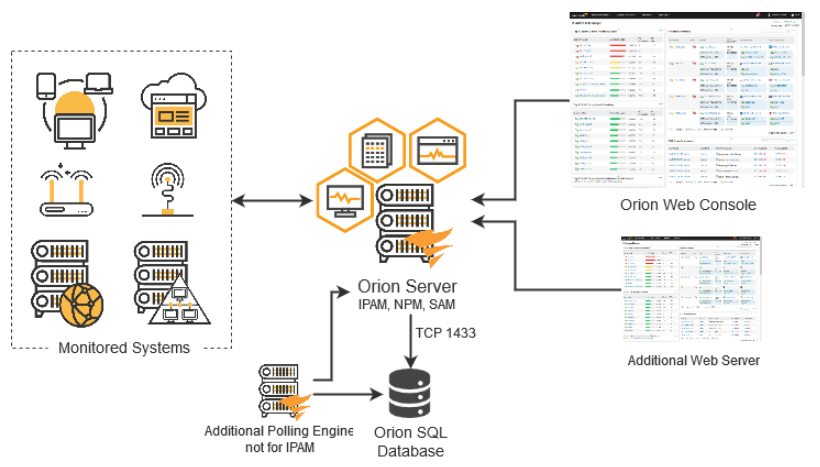
SolarWinds® IPAM IP address tracking software automatically identifies the IPv4 addresses in your network and facilitates the creation of IPv6 subnets through an intuitive step-by-step wizard. It continuously scans the IP addresses in managed subnets utilizing ICMP, SNMP, and neighborhood scanning methods, ensuring that changes to MAC addresses, hostnames, and status (reserved, transient, in use, and available) are accurately logged and maintained. This automated feature allows for the retrieval of historical information related to any IP address over a designated timeframe. Additionally, the tool provides a timestamp that administrators can use to enhance their network troubleshooting efforts. By accessing comprehensive device information, network admins can swiftly analyze and resolve any issues that arise. Utilize the SolarWinds IP address tracker to pinpoint existing conflicts, determine which device originally held the IP address, and modify the IP of the conflicting device as necessary, thereby ensuring smoother network operations and reducing downtime.
API Access
Has API
No
API Access
Has API
No


Integrations
SQL Sentry
No
Pricing Details
$4.75 per month
Free Trial
No
Free Version
No
Pricing Details
$1,288 one-time payment
Free Trial
Yes
Free Version
No
Deployment
Web-Based
Yes
On-Premises
No
iPhone App
No
iPad App
No
Android App
No
Windows
No
Mac
No
Linux
No
Chromebook
No
Deployment
Web-Based
No
On-Premises
No
iPhone App
No
iPad App
No
Android App
No
Windows
Yes
Mac
No
Linux
No
Chromebook
No
Customer Support
Business Hours
Yes
Live Rep (24/7)
No
Online Support
Yes
Customer Support
Business Hours
Yes
Live Rep (24/7)
No
Online Support
Yes
Types of Training
Training Docs
Yes
Webinars
No
Live Training (Online)
No
In Person
Yes
Types of Training
Training Docs
Yes
Webinars
No
Live Training (Online)
Yes
In Person
No
Vendor Details
Company Name
Systemake
Country
Panama
Website
www.systemake.com/portfolio/ndd
Vendor Details
Company Name
SolarWinds
Founded
1999
Country
United States
Website
www.solarwinds.com/ip-address-manager/use-cases/ip-address-tracker
Product Features
Digital Asset Management
Asset Categorization
Yes
Asset Library
Yes
Asset Sharing
No
Brand Control
No
Customizable Branding
Yes
File Conversion
No
Metadata Management
No
Mobile App
No
Reporting/Analytics
Yes
Search Within Document
No
Search/Filter
Yes
Version Control
No
Watermarking
No
Workflow Management
Yes
