Average Ratings 0 Ratings
Average Ratings 0 Ratings
Similar Products
-
IPVanishIPVanish VPN protects personal data in the face of privacy threats. Protect your connection over hotspots or unsecured networks today. We have the solution for you, whether you need a Wi Fi hotspot shield or safe file access. IPVanish VPN and storage solutions simplify online security for the entire home. There are setups for mobile, desktop, consoles, routers, and routers. VPN privacy can protect your internet activity. You can also pair VPN + storage to provide complete online protection. To go incognito, you need more than a private internet browser. Our anonymous IP addresses will keep your internet activity secretive and help keep hackers, ISPs and advertisers away from your connection. VPN can protect your Wi-Fi connection as well as your location data. The best data defense combines security and convenience. Secure your most valuable files with remote wiping, automated syncing and encrypted backup.
-
Private Internet Access (PIA)Browse without revealing your identity by using a private IP address and activating robust encryption to safeguard your online activities from your internet service provider and unsecured public Wi-Fi connections. Experience limitless connectivity with our anonymous VPN service, allowing you to bypass geographical restrictions and protocol limitations effortlessly. Whether you're focused on browsing or streaming content, Private Internet Access guarantees reliable performance. With the most extensive network capacity globally, Private Internet Access ensures top-notch speeds and superior encryption levels. Notably, it is the only VPN service worldwide that has consistently maintained a no-logs policy, providing peace of mind for its users. Take control of your online privacy and enjoy a seamless internet experience.
-
AiraloStay connected effortlessly across more than 200 countries and regions with an eSIM that can be installed in just minutes. Experience seamless global connectivity without the burden of roaming charges — it’s straightforward and budget-friendly. This technology is integrated into your phone's hardware, functioning just like a traditional SIM card but operating entirely in a digital format. By opting for an eSIM, you can bypass the hassle of physical SIM cards and spotty Wi-Fi, allowing you to connect to a mobile network as soon as you reach your destination. Choose from a variety of prepaid local, regional, or global eSIM plans tailored to help you stay online wherever you go. Simply download the eSIM, install it on your device, and you’ll be ready to access mobile networks seamlessly upon arrival. With this modern solution, you can enjoy the freedom and flexibility of staying connected without any unexpected fees or complications.
-
PathSolutions TotalViewTotalView offers network monitoring as well as root-cause troubleshooting of problems in plain-English. The solution monitors every device as well as every interface on every device. In addition, TotalView goes deep, collecting 19 error counters, performance, configuration, and connectedness so nothing is outside of it’s view. A built-in heuristics engine analyzes this information to produce plain-English answers to problems. Complex problems can now be solved by junior level engineers leaving the senior level engineers to work on more strategic level projects. The core product includes everything needed to run a perfectly healthy network: Configuration management, server monitoring, cloud service monitoring, IPAM, NetFlow, path mapping, and diagramming. Get Total Network Visibility on your network and solve more problems faster.
-
T-Mobile for BusinessT-Mobile for Business is a connectivity provider that helps organizations manage wireless service, business internet, devices, security, and network performance from one business-focused ecosystem. T-Mobile for Business provides next-level enterprise network solutions on America's Best Network* to supercharge your business. Leverage best-in-class mobile and business internet plans through one provider. SuperMobile is the first and only business plan to elevate your critical communications with performance that intelligently adapts to your needs in real time, even in times of high demand, powered by the first-ever nationwide network slice for business. Plus, get cutting-edge privacy protections and robust encryption to keep your communications secure. SuperBroadband delivers unbreakable connectivity nationwide, with unmatched coverage reaching every ZIP code in the U.S., including remote areas where legacy networks simply can't go. Stay online through virtually all outages and manage your connection needs through one contract with managed installation and end-to-end support. T-Mobile for Business provides right-sized solutions tailored to your industry, enabled by the leader in 5G. T-Mobile Public Network, Hybrid Mobile Network, and Private Mobile Network deployments meet your business where you are at on your technology journey. Core Infrastructure also includes backup connectivity options including dual-network redundancy, fixed wireless failover, and resilient LTE/5G backup for uninterrupted operations. Keep your business protected with T-Mobile for Business' enterprise cybersecurity solutions, with strong encryption, secure network design, and continuous threat monitoring. *Based on analysis by Ookla of Speedtest Intelligence® data 2H 2025.
-
StatseekerStatseeker is a powerful network performance monitor solution. It's fast, scalable, and cost-effective. Statseeker requires only one server or virtual machine to be up and running in minutes. It can also discover your entire network in under an hour without any significant impact on your bandwidth availability. It can monitor networks of all sizes, polling upto one million interfaces every sixty second, and collecting network data like SNMP, ping, NetFlow (sFlow, and J-Flow), sylog and trap messages, SDN configuration, and health metrics. Statseeker performance data are never averaged or rolled up. This eliminates the guesswork when it comes to identifying over- and underestimated infrastructure, root cause analysis, capacity planning, and other tasks. Statseeker's complete data retention means the in-built analytic engine can accurately detect anomalies in performance and forecast network behaviour months in advance. This allows network admins to plan and perform cost-effective, preventative maintenance, instead of fire-fighting problems as they occur. Statseeker's dashboards and out-of-the box reports allow you to troubleshoot and fix problems in your network before users are aware.
-
ManageEngine EventLog AnalyzerEventLog Analyzer from Manage Engine is the industry's most affordable security information and event management software (SIEM). This cloud-based, secure solution provides all essential SIEM capabilities, including log analysis, log consolidation, user activity monitoring and file integrity monitoring. It also supports event correlation, log log forensics and log retention. Real-time alerting is possible with this powerful and secure solution. Manage Engine's EventLog Analyzer allows users to prevent data breaches, detect the root cause of security issues, and mitigate sophisticated cyber-attacks.
-
JDisc DiscoveryJDisc Discovery is a powerful IT asset management and network discovery tool, designed to provide organizations with clear, real-time insights into their entire IT environment. By automatically scanning the network, it identifies and catalogs devices, from physical servers and workstations to virtual machines and network appliances, giving users a detailed inventory of their assets. The tool captures essential data such as hardware specifications, installed software, system configurations, and interdependencies among devices. A key advantage of JDisc Discovery is its agentless architecture. Rather than requiring installation on each device, it uses multiple protocols (like SNMP, SSH, WMI) to gather information, ensuring quick deployment and compatibility across various operating systems, including Windows, Linux, and Unix. This makes it ideal for diverse and dynamic IT ecosystems, enabling efficient and non-intrusive data collection.
-
AuvikAuvik Network Management is a network management and monitoring software designed to empower IT professionals with deep visibility, automation, and control over their network infrastructure. This innovative platform is trusted by businesses of all sizes to streamline network operations, enhance security, and optimize performance. One of Auvik's standout features is its real-time network mapping and discovery capabilities. It automatically generates interactive, visual maps of your network topology, allowing you to easily identify devices, connections, and potential bottlenecks. This invaluable insight helps in planning and optimizing network architecture for maximum efficiency.
-
AdRem NetCrunchNetCrunch is commercial, self-hosted, agentless network and IT infrastructure monitoring software for Windows Server. It monitors network devices, servers, virtualization platforms, cloud services, applications, websites, logs, telemetry, and network traffic across distributed environments. NetCrunch supports 680+ monitoring targets and provides 270+ ready-to-use Monitoring Packs for devices, applications, and operating systems. Policy-based monitoring automatically applies monitoring settings, Monitoring Packs, thresholds, and alerts to matching devices and systems. Licensing is based on monitored nodes and network interfaces rather than individual sensors, checks, or metrics. NetCrunch provides real-time dashboards and automatic Layer 2 and routing topology maps for visibility into network status and performance. Network traffic analysis supports NetFlow, sFlow, IPFIX, and other flow technologies. Its alerting system supports event correlation, dependency-aware suppression, predictive thresholds, escalation, and 40+ automated response actions, including scripts, notifications, API calls, and integrations with external systems. Distributed Monitoring Probes extend monitoring to remote and isolated locations. NetCrunch also provides a REST API for integration and automation with external IT management, service management, and operational systems. NetCrunch is self-hosted on Windows Server and can monitor on-premises, air-gapped, cloud, and hybrid IT environments.
Description
Network Analyzer serves as a simplified version of Network Analyzer Pro, designed for advanced network diagnostics, LAN scanning, and troubleshooting. This application assists users in identifying a range of issues associated with their wifi network configuration and Internet connectivity, utilizing a variety of diagnostic tools. It features a rapid wifi device discovery function that lists all LAN devices by their addresses and names, enabling efficient network management. Additionally, users can assess the reachability of any device through the built-in ping tool, which is essential for troubleshooting connectivity problems. The app also provides a wealth of pertinent information regarding both wifi and cellular connections, including round trip delay tests alongside the server's IP address and hostname. Furthermore, it delivers comprehensive details about wifi networks, such as SSID, BSSID, and both IPv4 and IPv6 addresses along with the subnet mask, as well as essential cellular network information including IP address, network provider, and mobile country and network codes. Overall, Network Analyzer is an invaluable tool for anyone looking to optimize their network performance and resolve connectivity issues effectively.
Description
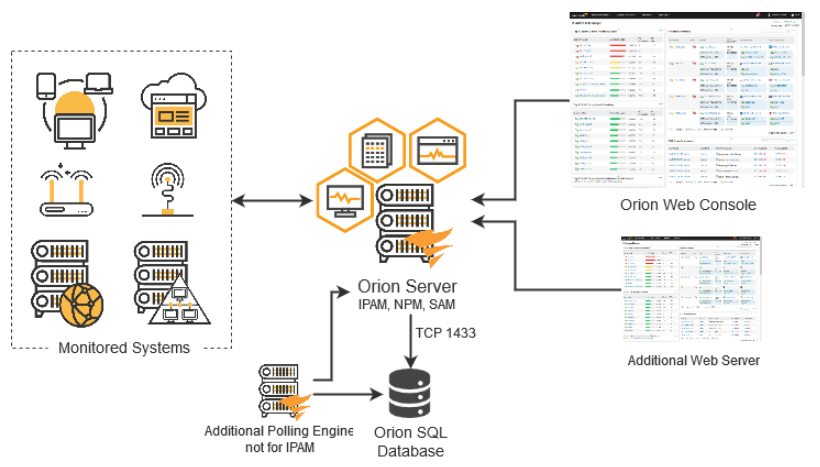
SolarWinds® IPAM IP address tracking software automatically identifies the IPv4 addresses in your network and facilitates the creation of IPv6 subnets through an intuitive step-by-step wizard. It continuously scans the IP addresses in managed subnets utilizing ICMP, SNMP, and neighborhood scanning methods, ensuring that changes to MAC addresses, hostnames, and status (reserved, transient, in use, and available) are accurately logged and maintained. This automated feature allows for the retrieval of historical information related to any IP address over a designated timeframe. Additionally, the tool provides a timestamp that administrators can use to enhance their network troubleshooting efforts. By accessing comprehensive device information, network admins can swiftly analyze and resolve any issues that arise. Utilize the SolarWinds IP address tracker to pinpoint existing conflicts, determine which device originally held the IP address, and modify the IP of the conflicting device as necessary, thereby ensuring smoother network operations and reducing downtime.
API Access
Has API
No
API Access
Has API
No



Integrations
SQL Sentry
No
Pricing Details
$3.99 one-time payment
Free Trial
No
Free Version
Yes
Pricing Details
$1,288 one-time payment
Free Trial
Yes
Free Version
No
Deployment
Web-Based
No
On-Premises
No
iPhone App
Yes
iPad App
Yes
Android App
Yes
Windows
No
Mac
No
Linux
No
Chromebook
No
Deployment
Web-Based
No
On-Premises
No
iPhone App
No
iPad App
No
Android App
No
Windows
Yes
Mac
No
Linux
No
Chromebook
No
Customer Support
Business Hours
No
Live Rep (24/7)
No
Online Support
Yes
Customer Support
Business Hours
Yes
Live Rep (24/7)
No
Online Support
Yes
Types of Training
Training Docs
Yes
Webinars
No
Live Training (Online)
No
In Person
No
Types of Training
Training Docs
Yes
Webinars
No
Live Training (Online)
Yes
In Person
No
Vendor Details
Company Name
Techet
Website
techet.net/netanalyzer
Vendor Details
Company Name
SolarWinds
Founded
1999
Country
United States
Website
www.solarwinds.com/ip-address-manager/use-cases/ip-address-tracker
