Average Ratings 0 Ratings
Average Ratings 0 Ratings
Similar Products
-
AteraThe all-in-one IT management platform, powered by Action AI™ Atera is the all-in-one IT management platform that combines RMM, Helpdesk, and ticketing with AI to boost organizational efficiency at scale. Try Atera Free Now!
-
FreshserviceFreshservice is the right choice if you are looking for an IT service desk solution with simplicity. Freshservice is an easy-to-use ITIL service desk from Freshworks that helps businesses modernize IT and other business functions without the complexity and cost. Freshservice provides everything teams need to manage proactive IT services, including asset management, ticketing, configuration management, enhanced impact analysis, robust incident management functions, and more.
-
PylonPylon is an All-in-one B2B Support Platform for modern B2B businesses. We provide everything a post-sales team needs, including a ticketing software, B2B omnichannel (Slack Connect and Microsoft Teams), a modern chat widget, a knowledge base, an AI support bot, customer marketing and account management. Support system for B2B businesses. Support your customers wherever they want and allow multiple support levels. Let AI create support articles based on the resolutions of your issues. Use Triggers to codify workflows and business processes, and create Macros for common responses. Track engagement and broadcast new features, newsletters and more to customers. All customer data can be stored, tracked and organized in a dedicated location. Shared view that gives your stakeholders visibility on their team's current issues. If you use or want Slack for customer support, we should talk. Our Slack power users average 180+ customer channels
-
DomotzDiscover why MSPs, IT Professionals, and System Integrators trust our Network Monitoring and Management Solution to monitor thousands of networks worldwide. Try for free now!
-
JDisc DiscoveryJDisc Discovery is a powerful IT asset management and network discovery tool, designed to provide organizations with clear, real-time insights into their entire IT environment. By automatically scanning the network, it identifies and catalogs devices, from physical servers and workstations to virtual machines and network appliances, giving users a detailed inventory of their assets. The tool captures essential data such as hardware specifications, installed software, system configurations, and interdependencies among devices. A key advantage of JDisc Discovery is its agentless architecture. Rather than requiring installation on each device, it uses multiple protocols (like SNMP, SSH, WMI) to gather information, ensuring quick deployment and compatibility across various operating systems, including Windows, Linux, and Unix. This makes it ideal for diverse and dynamic IT ecosystems, enabling efficient and non-intrusive data collection.
-
Service CenterService Center by Office Ally is trusted by more than 80,000 healthcare providers and health services organizations to help them take complete control of their revenue cycle. Service Center can verify patient eligibility and benefits, submit, correct, and check claims status online, and receive remittance advice. Accepting standard ANSI formats, data entry, and pipe-delimited formats, Service Center helps streamline administrative tasks and create more efficient workflows for providers.
-
SuperOpsSuperOps is a next-generation, all-in-one PSA-RMM platform designed for ambitious MSPs looking to scale efficiently. Infused with AI-driven intelligence and smart automation, SuperOps offers a comprehensive suite of features, from IT documentation to project management, ensuring MSPs have everything they need in one place. Say goodbye to juggling multiple disconnected tools—SuperOps empowers MSPs to move beyond outdated, fragmented systems with a cloud-native platform built for simplicity and productivity. Experience a seamless, modern solution that streamlines operations and makes managing IT services effortless.
-
CrowdinGet quality translations for your app, website, game, supporting documentation, and on. Invite your own translation team or work with professional translation agencies within Crowdin. Features that ensure quality translations and speed up the process • Glossary – create a list of terms to get consistent translations • Translation Memory (TM) – no need to translate identical strings • Screenshots – tag source strings to get context-relevant translations • Integrations – set up integration with GitHub, Google Play, API, CLI, Android Studio, and on • QA checks – make sure that all the translations have the same meaning and functions as the source strings • In-Context – proofreading within the actual web application • Machine Translations (MT) – pre-translate via translation engine • Reports – get insights, plan and manage the project Crowdin supports more than 30 file formats for mobile, software, documents, subtitles, graphics and assets: .xml, .strings, .json, .html, .xliff, .csv, .php, .resx, .yaml, .xml, .strings and on.
-
ScreenMeetScreenMeet offers a suite of secure, browser-based remote support and screen-sharing tools designed to enhance customer service and IT support. With capabilities like remote desktop access, live voice and video support, co-browsing, and asynchronous screen recording, ScreenMeet allows agents to assist customers or employees seamlessly. It integrates with major ITSM, CRM, and contact center platforms such as ServiceNow, Salesforce, and Microsoft Dynamics 365, providing a unified support experience. Designed for enterprises, ScreenMeet ensures high security, scalability, and flexibility, making it ideal for businesses aiming to improve support efficiency and customer satisfaction.
-
PeerGFSA Comprehensive Solution for Streamlined File Orchestration and Management across Edge, Data Center, and Cloud Storage PeerGFS presents an exclusively software-based solution designed to address file management and replication challenges within multi-site and hybrid multi-cloud environments. With our extensive expertise spanning over 25 years, we specialize in file replication for geographically dispersed organizations. Here's how PeerGFS can benefit your operations: Enhanced Availability: Achieve high availability through Active-Active data centers, whether located on-premises or in the cloud. Edge Data Protection: Safeguard your valuable data at the Edge with continuous protection to the central Data Center. Improved Productivity: Empower distributed project teams by providing swift, local access to critical file information. In today's world, having a real-time data infrastructure is paramount. PeerGFS seamlessly integrates with your existing storage systems, supporting: High-volume data replication between interconnected data centers. Wide area networks characterized by lower bandwidth and higher latency. Rest assured, PeerGFS is designed to be user-friendly, making installation and management a breeze.
Description
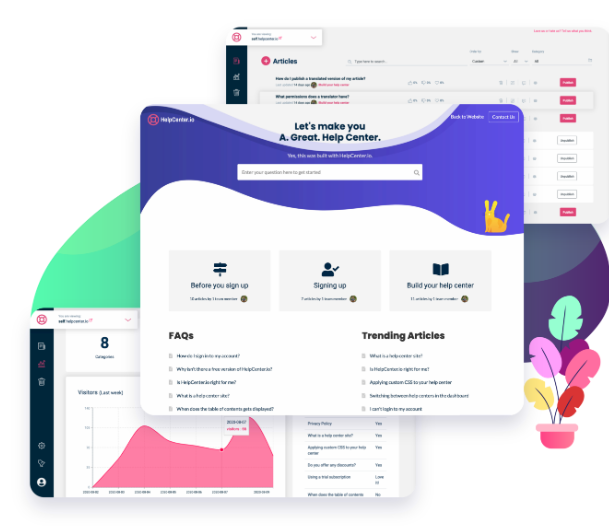
An effective knowledge base is built upon a robust tool. Create a streamlined help center in mere minutes instead of taking months to set it up. By quickly establishing a customer-focused knowledge base, you can provide proactive support, alleviating your team's burden from urgent cases and enhancing overall customer satisfaction. Effortlessly manage multiple help centers from a single dashboard. Explore the simplest method to launch your help center. Focus on producing high-quality articles instead of getting caught up in their design. Support a variety of content types, such as images, videos, documents, and audio files. Seamlessly link to other articles within your help center while remaining in the editor. Benefit from automatic suggestions generated by your help center, customized according to the user's location and actions. Open help center materials in a widget, allowing customers to access information without navigating away from their current page. Easily maintain and organize FAQs in your help center for straightforward presentation on your website, eliminating the need for outdated, hard-to-modify FAQ sections. Furthermore, a well-structured knowledge base can significantly reduce support ticket volume, allowing your team to focus on more complex issues.
Description
MkDocs is an elegant and efficient static site generator designed specifically for creating project documentation. You can write your documentation in Markdown format and manage it using a straightforward YAML configuration file. There are numerous visually appealing themes to choose from in MkDocs, including the default themes like mkdocs and readthedocs, as well as various third-party options found on the MkDocs Themes wiki page, or you can even craft your own unique theme. By personalizing your theme or adding plugins, you can ensure your project documentation has the appearance you desire. Additionally, you have the ability to enhance Markdown's functionality through various extensions. A wealth of configuration options is at your disposal, and the built-in development server enables you to see your documentation in real-time as you create it, complete with automatic reloading and browser refreshing upon saving changes. Ultimately, MkDocs produces entirely static HTML sites that are ready to be hosted on platforms such as GitHub Pages, Amazon S3, or any other hosting service you prefer, giving you flexibility in how you distribute your documentation. This makes it an excellent choice for developers seeking a streamlined way to present their project information.
API Access
Has API
API Access
Has API


Integrations
Amazon S3
ChatGPT
CloudCannon
GitHub
Knoku
Mermaid Chart
PushFeedback
Integrations
Amazon S3
ChatGPT
CloudCannon
GitHub
Knoku
Mermaid Chart
PushFeedback
Pricing Details
$19 per month
Free Trial
Free Version
Pricing Details
No price information available.
Free Trial
Free Version
Deployment
Web-Based
On-Premises
iPhone App
iPad App
Android App
Windows
Mac
Linux
Chromebook
Deployment
Web-Based
On-Premises
iPhone App
iPad App
Android App
Windows
Mac
Linux
Chromebook
Customer Support
Business Hours
Live Rep (24/7)
Online Support
Customer Support
Business Hours
Live Rep (24/7)
Online Support
Types of Training
Training Docs
Webinars
Live Training (Online)
In Person
Types of Training
Training Docs
Webinars
Live Training (Online)
In Person
Vendor Details
Company Name
HelpCenter.io
Country
United States
Website
helpcenter.io
Vendor Details
Company Name
MkDocs
Founded
2014
Country
United States
Website
www.mkdocs.org
Product Features
Knowledge Management
Artificial Intelligence (AI)
Cataloging / Categorization
Collaboration
Content Management
Decision Tree
Discussion Boards
Full Text Search
Knowledge Base Management
Self Service Portal
Product Features
Help Authoring Tools
Collaboration Tools
Content Library
Drag & Drop Editing
Image Library
Import HTML / Word
Multi-Format Output
Offline Editing
Preview Output
Screenshot Tool
Search
Templates
Text Editor / Word Processor
Translation Tools
Version Control
Software Documentation
Access Roles / User Permissions
Automatic Documentation Generation
Collaboration Tools
Docs Web Hosting
Feedback Capture
Markdown Support
Multiple Formats Support
Multiple Versions Support
Version Control
WYSIWIG Editor
Webhooks
reStructured Text Support
