Average Ratings 0 Ratings
Average Ratings 0 Ratings
Similar Products
-
MuukTestYou know that you could be testing more to catch bugs earlier, but QA testing can take a lot of time, effort and resources to do it right. MuukTest can get growing engineering teams up to 95% coverage of end-to-end tests in just 3 months. Our QA experts create, manage, maintain, and update E2E tests on the MuukTest Platform for your web, API, and mobile apps at record speed. We begin exploratory and negative tests after achieving 100% regression coverage within 8 weeks to uncover bugs and increase coverage. The time you spend on development is reduced by managing your testing frameworks, scripts, libraries and maintenance. We also proactively identify flaky tests and false test results to ensure the accuracy of your tests. Early and frequent testing allows you to detect errors in the early stages your development lifecycle. This reduces the burden of technical debt later on.
-
Checksum.aiEngineering teams shipping with AI have a new bottleneck: validation. Code output has accelerated. Quality hasn't. Checksum closes the gap. Checksum is a continuous quality platform with a suite of AI agents that handle testing end-to-end, at every stage of the development lifecycle. Where most tools wait for a human to trigger them, Checksum runs autonomously in the background, generating tests, executing them, and repairing failures without manual intervention. Seventy percent of test failures are resolved automatically through real-time auto-recovery. The platform covers every layer: end-to-end UI flows via Playwright, API endpoint chains, and targeted CI tests scoped to exactly what changed in a PR. All tests land as real code in your repository and are delivered as standard Playwright, owned by your team. Checksum is fine-tuned on 1.5+ million test runs and integrates natively with Cursor, Claude Code, and 100+ AI coding agents. Type /checksum and your coding agent's output gets tested before it ever reaches review. Generation and healing happen on Checksum's cloud infrastructure which means no LLM tokens consumed, no local resources required. The result: test suites that stay green as the product evolves, fewer regressions reaching production, and release confidence that scales alongside AI output.
-
QA WolfQA Wolf helps engineering teams achieve 80% automated test coverage end-to-end in just four months. Here's an overview of what you get in the box, whether it's 100 or 100,000 tests. • Automated end-to-end testing for 80% of the user flows in 4 months. The tests are written in Playwright, an open-source tool (no vendor lock-in; you own the code). • Test matrix and outline in the AAA framework. • Unlimited parallel testing on any environment of your choice. • We host and maintain 100% parallel-run infrastructure. • Maintenance of flaky and broken test for 24 hours. • Guaranteed 100% reliable results -- zero flakes. • Human-verified bugs sent via your messaging app as a bug report. • CI/CD Integration with your deployment pipelines and issue trackers. • Access to full-time QA Engineers at QA Wolf 24 hours a day.
-
Virtuoso QAVirtuoso QA is a secure, agentic test automation platform for any browser-based application. Touchstone, our agentic assurance layer, turns your business requirements into tests, then runs, fixes and maintains them as your application changes. More than thirty specialised agents author, generate, triage and self-heal your functional and end-to-end tests, while a deterministic engine executes every run and your team approves every decision that matters. Every release comes with evidence of what was tested, what changed and who approved it. Release Insights shows execution risk and requirement coverage across every journey, and teams can export an Evidence Report in minutes rather than assembling one over weeks. That makes the platform a natural fit for regulated industries like financial services, insurance, healthcare, the public sector and more. The mission is to set the standard of proof for software releases. AI generates software. Virtuoso QA generates the evidence to trust it.
-
ParasoftParasoft's mission is to provide automated testing solutions and expertise that empower organizations to expedite delivery of safe and reliable software. A powerful unified C and C++ test automation solution for static analysis, unit testing and structural code coverage, Parasoft C/C++test helps satisfy compliance with industry functional safety and security requirements for embedded software systems.
-
CloudflareCloudflare is the foundation of your infrastructure, applications, teams, and software. Cloudflare protects and ensures the reliability and security of your external-facing resources like websites, APIs, applications, and other web services. It protects your internal resources, such as behind-the firewall applications, teams, devices, and devices. It is also your platform to develop globally scalable applications. Your website, APIs, applications, and other channels are key to doing business with customers and suppliers. It is essential that these resources are reliable, secure, and performant as the world shifts online. Cloudflare for Infrastructure provides a complete solution that enables this for everything connected to the Internet. Your internal teams can rely on behind-the-firewall apps and devices to support their work. Remote work is increasing rapidly and is putting a strain on many organizations' VPNs and other hardware solutions.
-
Google Cloud PlatformGoogle Cloud is an online service that lets you create everything from simple websites to complex apps for businesses of any size. Customers who are new to the system will receive $300 in credits for testing, deploying, and running workloads. Customers can use up to 25+ products free of charge. Use Google's core data analytics and machine learning. All enterprises can use it. It is secure and fully featured. Use big data to build better products and find answers faster. You can grow from prototypes to production and even to planet-scale without worrying about reliability, capacity or performance. Virtual machines with proven performance/price advantages, to a fully-managed app development platform. High performance, scalable, resilient object storage and databases. Google's private fibre network offers the latest software-defined networking solutions. Fully managed data warehousing and data exploration, Hadoop/Spark and messaging.
-
CodemagicCodemagic’s macOS build environments facilitate the smooth creation of hybrid applications, bolstered by an extensive array of preinstalled software. You can efficiently configure your Cordova Android and iOS application builds and workflows through a single codemagic.yaml file. To maintain the performance of your Android and iOS applications, Codemagic provides automated testing on simulators, emulators, and actual devices, ensuring you receive prompt feedback on your build outcomes. Integration with the Apple Developer Portal streamlines iOS code signing, enabling seamless deployment to App Store Connect and Google Play. Similarly, you can also set up your React Native app builds and workflows in one straightforward codemagic.yaml file. With multiple versions of Xcode, Android SDK, and npm preinstalled, Codemagic’s macOS build machines are designed for effortless Android and iOS builds. Moreover, Codemagic simplifies the automation of testing for your React Native applications across a variety of testing platforms. This comprehensive approach not only boosts productivity but also enhances the overall development experience.
-
InnoslateSPEC Innovations’ leading model-based systems engineering solution is designed to help your team minimize time-to-market, reduce costs, and mitigate risks, even with the most complex systems. Available as both a cloud-based and on-premise application, it offers an intuitive graphical user interface accessible through any modern web browser. Innoslate's comprehensive lifecycle capabilities include: • Requirements Management • Document Management • System Modeling • Discrete Event Simulation • Monte Carlo Simulation • DoDAF Models and Views • Database Management • Test Management with detailed reports, status updates, results, and more • Real-Time Collaboration And much more.
-
Servers.com by NexcessServers.com by Nexcess delivers hybrid bare metal cloud hosting solutions that give businesses greater control over their infrastructure while maintaining the flexibility needed to grow. Its portfolio includes Scalable Bare Metal for on-demand capacity, Enterprise Bare Metal for customized deployments, AI Compute for GPU-powered workloads, and Managed Kubernetes for containerized applications. The platform is built to accommodate organizations that require reliable performance, security, and predictable infrastructure management. Through a network of data centers across multiple continents, customers can deploy services closer to their users and minimize latency. Businesses in industries such as gaming, financial services, advertising technology, streaming, SaaS, and Web3 rely on the platform to support high-demand operations. The infrastructure is designed to handle traffic spikes, intensive computing requirements, and geographically distributed workloads. Advanced networking capabilities and direct connectivity options help optimize application responsiveness and uptime. Organizations can combine different infrastructure offerings to create environments that align with their operational and budget requirements. By providing scalable and customizable bare metal solutions, Servers.com helps businesses maintain performance while adapting to changing market demands.
Description
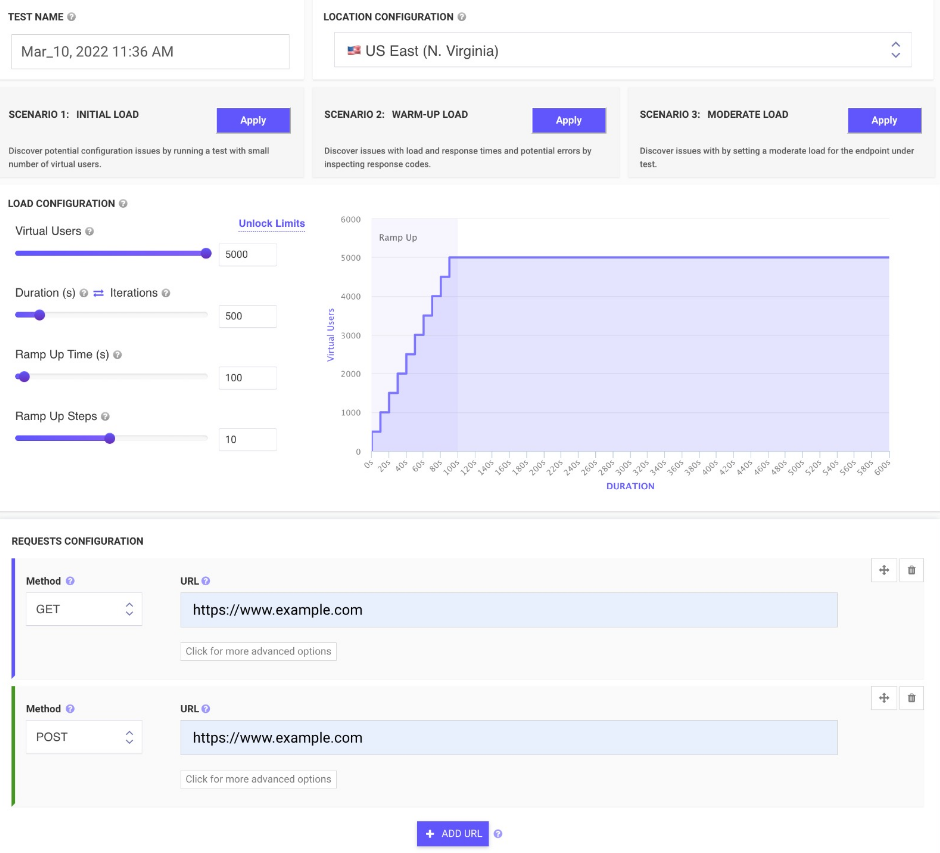
Evaluate your web application, REST API, and mobile application effortlessly with just three straightforward steps. Start by inputting your API endpoints or URLs for testing. Next, set up your load testing parameters, including the number of simultaneous users, testing duration, and bandwidth simulation requirements. Select from various global locations to initiate your load tests, and we will handle the rest! Once your tests are complete, your results will be readily available for review. You can analyze your data while the tests are ongoing, check JMeter logs, or save your findings as a PDF at any point. There's no need for installation; you can craft scenarios directly in your browser, all operated from the cloud. With a pay-as-you-go model, you can simulate hundreds of thousands of concurrent users from diverse locations and apply bandwidth simulations. As your tests progress, examine the results to identify any performance bottlenecks. Detailed reports can be downloaded anytime you need them. There’s no need for migration from JMeter, as you can import any JMX project into Frugal Testing and export it whenever you choose. Consistently enhance both your product and business operations with the insights gained from Frugal Testing, ensuring you are always moving towards success.
Description
All-in-one cloud testing platform for performance testing, load testing, website speed testing and website UI testing. Mobile applications and API endpoints are all covered.
JMeter testing is easy from multiple cloud locations, with thousands of users. Apache JMeter allows you to see real-time performance metrics of your website and APIs from the cloud.
You can monitor changes over time and receive advice on how to speed up page loading times. We run your tests on cloud instances at set times and notify you if anything goes wrong.
To find rendering issues, invalid HTML, missing or incorrect CSS, load your web pages and websites in mobile emulators. In seconds, schedule runs and inspect the rendered images on all devices. Simulate your site on different screen sizes and resolutions.
Take screenshots of two websites in seconds. To check for differences, you can compare the generated screenshots using a threshold.
API Access
Has API
Yes
API Access
Has API
Yes


Pricing Details
$48
per test
Free Trial
No
Free Version
Yes
Pricing Details
$24 per month
Free Trial
No
Free Version
Yes
Deployment
Web-Based
Yes
On-Premises
No
iPhone App
No
iPad App
No
Android App
No
Windows
No
Mac
No
Linux
No
Chromebook
No
Deployment
Web-Based
Yes
On-Premises
No
iPhone App
No
iPad App
No
Android App
No
Windows
No
Mac
No
Linux
No
Chromebook
No
Customer Support
Business Hours
Yes
Live Rep (24/7)
Yes
Online Support
Yes
Customer Support
Business Hours
No
Live Rep (24/7)
No
Online Support
Yes
Types of Training
Training Docs
Yes
Webinars
No
Live Training (Online)
Yes
In Person
Yes
Types of Training
Training Docs
Yes
Webinars
Yes
Live Training (Online)
No
In Person
No
Vendor Details
Company Name
Frugal Testing
Founded
2016
Country
India
Website
frugaltesting.com
Vendor Details
Company Name
LoadFocus
Founded
2014
Country
United Kingdom
Website
loadfocus.com
Product Features
Load Balancing
Authentication
No
Automatic Configuration
No
Content Caching
No
Content Routing
No
Data Compression
No
Health Monitoring
No
Predefined Protocols
No
Redundancy Checking
No
Reverse Proxy
No
SSL Offload
No
Schedulers
No
Software Testing
Automated Testing
No
Black-Box Testing
No
Dynamic Testing
No
Issue Tracking
No
Manual Testing
No
Quality Assurance Planning
No
Reporting / Analytics
No
Static Testing
No
Test Case Management
No
Variable Testing Methods
No
White-Box Testing
No
Product Features
Automated Testing
Hierarchical View
Yes
Move & Copy
No
Parameterized Testing
Yes
Requirements-Based Testing
Yes
Security Testing
No
Supports Parallel Execution
Yes
Test Script Reviews
Yes
Unicode Compliance
No
Load Testing
API Load Testing
Yes
Database Load Testing
Yes
Load Test Performance Reporting
Yes
Mail Load Testing
No
Multilocation Load Testing
Yes
Multiple Protocol Support
No
Test Script Customization
Yes
Web Application Testing
No
Performance Testing
API Testing
Yes
Benchmarking
Yes
Cross Browser Testing
No
Debugging
Yes
Historical Reporting
Yes
Load Testing
Yes
Mobile Testing
Yes
Parallel Testing
No
Regression Testing
Yes
UI Testing
No
Web Testing
Yes
Website Monitoring
Availability Testing
No
Event Logs
No
Event-Based Notifications
No
FTP Monitoring
No
Mail Server Monitoring
No
Maintenance Scheduling
Yes
Performance Metrics
Yes
Real Time Monitoring
Yes
Transaction Monitoring
No
Uptime Reporting
Yes
