Average Ratings 0 Ratings
Average Ratings 0 Ratings
Similar Products
-
HighchartsHighcharts, a Javascript-based charting library, makes it easy to add interactive charts and graphs to web or mobile projects of any size. Highcharts is used by more than 80% of the 100 biggest companies in the world, as well as thousands of developers from a variety of industries, including finance, publishing, application development, and data science. Highcharts is in active development since 2009. It remains a favorite among developers due to its robust feature set and ease-of-use documentation, accessibility features and vibrant community.
-
DXchartsIn just a few days, you can integrate and customize a lightning-fast financial table with your product. You can make changes or create a completely new interface. You want more? We offer a full access alternative. Data feeds with futures and indices, equities, FX and cryptocurrencies by default. Sign up now to get your data feeds. DXcharts can be integrated with any market data source, as it is data feed-agnostic. Native libraries for all platforms. Native web, native mobile & desktop. Get a solution that is specifically tailored to your product. Analyzing statistics from trading activity can help you evaluate securities and predict their future movements. You can create custom studies with the intuitive dxScript. You can adjust the layout of charts however you like and sync them by instrument, chart type and timeframe, range, studies & appearance.
-
TradingView Stock WidgetsAs fast as it takes to make a cup of coffee, grab powerful charts and add real-time financial information to your website. Simply copy and paste our iFrame codes, and you're good to go. Our display ratings make it easy to see the technical analysis of a symbol. This widget is ideal for macro-level analysis of the markets. This widget is especially useful on homepages. The widget displays the top five most active stocks, as well as the losing and winning stocks. It updates based upon current market activity so you always see the most relevant stocks. Keep an eye out for announcements and important economic events. You can also set up filters in just a few clicks. Our scrolling ticker tape allows you to go vintage Wall Street. This stock exchange-style ticker can be embedded in just a few clicks. You don't need a power suit or expensive watch.
-
SmartDrawSmartDraw makes professional drawings and diagrams accessible to everyone. Non-technical users can quickly create floor plans, while professionals get the precision and scale they require. With industry-leading floor planning tools and an intuitive interface for traditional diagramming like flowcharts and organizational charts, SmartDraw delivers enterprise-ready power without unnecessary complexity. Key features: - Large collection of symbols and templates - Ability to create custom shapes - Import PDFs, images, Google Maps, Visio files, Visio stencils - Draw to any scale - Enrich drawings with data - Generate manifest and bills of materials - Generate diagrams from data automatically like org charts, AWS, Azure, PI Boards, and more - Use natural language text prompts to generate diagrams with AI - Save files directly to OneDrive, SharePoint, or Google Drive, or other preferred provider - Integrations with the Microsoft and Google enterprise stack plus Confluence and Jira SmartDraw supports a wide range of industries and real-world use cases, helping teams plan, document, and communicate more effectively. Construction professionals use it to create scaled floor plans, site layouts, and electrical and plumbing drawings. Fire departments rely on it for fire pre-planning and incident documentation, while police departments use it for accident reconstruction and crime scene diagrams. IT teams build network diagrams and cloud architectures, HR leaders create organizational charts, and product managers map out processes and workflows. From physical layouts to business processes, SmartDraw provides a single platform that adapts to the needs of each role and industry.
-
Expedience SoftwareEXPEDIENCE AUTOMATES MICROSOFT WORD PROPOSALS Use Microsoft Word to craft business proposals, RFP responses, or Statements of Work (SOWs)? Expedience delivers unmatched efficiency, flawless branding consistency, and 100% document accuracy – without ever leaving Microsoft Word! THE MICROSOFT ADVANTAGE Native to Microsoft Word, Expedience leverages the best of Microsoft 365: • Use Rich Content (tables, charts, videos, PowerPoint slides, etc) • Consistent Corporate Branding • Copilot Generative AI • Excel Data Integration • Realtime Collaboration AUTOMATED SALES PROPOSALS & SOWs Create complete Microsoft Word document proposals, sales documents, and SOWs in just a few clicks - even from Excel spreadsheets! Consistent, accurate, and perfectly formatted every time. TRUSTED CONTENT Expedience stores your curated, branded, approved content in a library for quick reuse. This means that your team will have trusted content at their fingertips directly within Microsoft Word.
-
GWIAnnually, we conduct surveys with over a million individuals worldwide, enabling businesses to swiftly grasp evolving consumer trends. Our user-friendly platform is tailored for busy teams, facilitating the extraction of essential information, customized analysis, and seamless sharing. Identify your ideal customer using more than 250,000 profiling metrics. Utilize question charts to gain insights into the thoughts, emotions, and actions of your audience. Aggregate data and visualizations to craft a compelling narrative for your team. Combine various data points for comprehensive analysis and deeper understanding. Access unparalleled insights into consumer behavior through survey results that capture the perspectives, interests, and actions of billions of individuals globally. We consistently pose the same survey questions across different regions, allowing for detailed insights into local markets while also providing a broader global perspective. Discover what consumers genuinely think about your brand and its competitors, gaining valuable insights into industry leaders and their market positions. This holistic approach ensures that businesses can navigate the complexities of consumer perception effectively.
-
FilerevFilerev is a powerful tool that helps you easily find and manage hidden files, duplicate files, large files, and oversized folders, ensuring a streamlined and clutter-free digital workspace. Key features include advanced scanning technology that identifies the unorganized files taking up the most space and cluttering your Google Drive. Filerev enhances productivity by saving time and reducing the frustration of manual file organization. The custom filters and bulk delete tool give you complete control over finding and removing unwanted files in your account. The storage analyzer lets you browse your folders by size to see where the space is being used in your Google Drive. Whether you're an individual, a small business, or a large enterprise, Filerev offers robust solutions tailored to your needs. Visit filerev.com to discover how Filerev can transform your Google Drive experience and boost efficiency.
-
MedsenderHIPAA compliant faxing and email, SMS and forms with seamless EHR integration. Medsender is a complete automation system for healthcare that uses the latest artificial intelligence. HIPAA compliant faxing and email, SMS, forms, signatures, and forms embedded seamlessly into your EMR. Our secure cloud platform makes it easy to process all your incoming faxes. All incoming faxes can be automatically sorted to the correct staff and patient charts. Patients can easily fill out forms and send notes. It integrates seamlessly with your EMR. It's easy to set up in one click and there is no need for fax machines! We integrate with all the most popular EMRs, with more integrations in the works. Medsender can be used with or without an EMR. We assist you in using the most recent AI technology to eliminate repetitive tasks and busy work. You can rest assured. Medsender currently processes over 5m pages patient data at 99.9%+ uptime.
-
BudgytYou know the pain. 8,000+ formulas in your Excel budget, any one of which could break. Department heads emailing versions back and forth. Mystery errors appearing right before board meetings. Weekends lost hunting for that one number that doesn't add up. We built Budgyt because we lived that nightmare as CFOs ourselves. It's a true database that works like Excel, so your team doesn't need training. But formulas never break. Every number traces back to source with one click. Import your chart of accounts and actuals directly from your accounting system. Click any variance to drill down to vendor-level detail instantly. Run rolling reforecasts every month without rebuilding everything from scratch. We connected it via API so you're up and running in hours, not spending months on implementation consulting. Built for multi-department organizations where budgeting needs to be collaborative, but the finance team needs to stay in control. No more emailing spreadsheets around. No more "did I break something?" panic. Just budgeting that actually works.
-
BidtracerBidtracer was developed by two highly engineers, combining expertise in mechanical, electrical, and computer engineering. This innovative tool serves as a specialized sales operations and channel partner solution specifically designed for the commercial construction sector. The tool simplifies the process of initiating sale opportunities, creating bid tracking plans, and specs, while also inviting subcontractors for assistance. This allows users to swiftly utilize the estimate tool to draft and send out proposals to customers. It assists sales professionals in automating their follow-up process with bids, enabling them to track and determine the winning contractor. This ultimately maximizes their chance of successful closing sale projects. Efficient project management is crucial to optimize time and maximize profits in construction projects. By automating various project management tasks, we can streamline operations and simplify all aspects of the project’s operational side.
Description
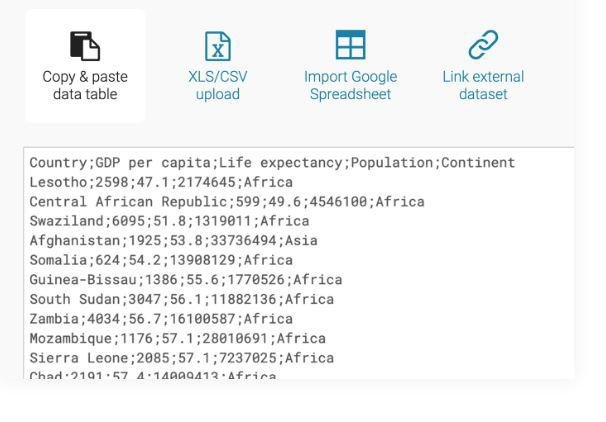
Enhance your narratives with a variety of charts, maps, and tables designed for optimal engagement. Our platform provides 19 interactive and responsive chart options, which range from straightforward bar and line visuals to more complex arrow, range, and scatter plots. Additionally, we feature three types of interactive and responsive maps, suitable for creating everything from basic locator maps to detailed thematic choropleth and symbol maps. Our newly designed responsive data tables offer extensive styling possibilities and support the inclusion of bar and line charts, images, as well as a search function and pagination for easy navigation. Datawrapper empowers some of the leading teams worldwide to effectively communicate their messages through the use of data. Our mission is to make it possible for everyone, including you, to craft stunning charts, maps, and tables effortlessly. You can easily transfer your data from online sources, Excel, or Google Sheets, and we also allow for CSV/XLS file uploads or linking to a URL or Google Sheet for real-time chart updates. With just a click, you can select from numerous chart and map types, after which you can personalize and annotate your visuals to enhance their impact and clarity. This user-friendly approach to data visualization ensures that everyone can tell compelling stories backed by accurate data.
Description
FlowBreeze is an innovative add-in for Microsoft® Excel® that simplifies the flowchart creation process by converting text into flowchart shapes automatically. With FlowBreeze, users can generate flowcharts effortlessly by merely typing each step and hitting Enter; the text then transforms into corresponding flowchart symbols. Automatic formatting ensures that symbols are properly aligned, and connecting arrows are added without any extra effort. Imagine having a flowchart tool that streamlines the entire process to the point where you only need to type your ideas. This tool not only selects the appropriate flowchart symbols based on your input but also connects them seamlessly, making the workflow incredibly user-friendly. Furthermore, its integration with Microsoft Office means that anyone can easily edit and update flowcharts, ensuring accessibility and convenience for all users. This level of automation and ease could revolutionize how we visualize processes in our daily tasks.
API Access
Has API
Yes
API Access
Has API
No



Integrations
Google Sheets
Yes
Microsoft 365
No
Microsoft Excel
Yes
Nocode HQ
Yes
SPP.co
Yes
Integrations
Google Sheets
No
Microsoft 365
Yes
Microsoft Excel
No
Nocode HQ
No
SPP.co
No
Pricing Details
€199 per month
Free Trial
No
Free Version
No
Pricing Details
$59.95 per license
Free Trial
No
Free Version
No
Deployment
Web-Based
Yes
On-Premises
No
iPhone App
No
iPad App
No
Android App
No
Windows
No
Mac
No
Linux
No
Chromebook
No
Deployment
Web-Based
Yes
On-Premises
No
iPhone App
No
iPad App
No
Android App
No
Windows
No
Mac
No
Linux
No
Chromebook
No
Customer Support
Business Hours
No
Live Rep (24/7)
No
Online Support
Yes
Customer Support
Business Hours
Yes
Live Rep (24/7)
No
Online Support
Yes
Types of Training
Training Docs
Yes
Webinars
No
Live Training (Online)
No
In Person
Yes
Types of Training
Training Docs
Yes
Webinars
No
Live Training (Online)
No
In Person
No
Vendor Details
Company Name
Datawrapper
Founded
2012
Country
Germany
Website
www.datawrapper.de/
Vendor Details
Company Name
BreezeTree Software
Founded
2005
Country
United States
Website
www.breezetree.com/flowchart-software
Product Features
Data Visualization
Analytics
Yes
Content Management
No
Dashboard Creation
No
Filtered Views
No
OLAP
No
Relational Display
No
Simulation Models
Yes
Visual Discovery
No
Product Features
Flowchart
Collaboration
Yes
Diagramming
No
Drag & Drop
Yes
Organizational Charting
No
Process Mapping
No
Revision Management
No
Templates
Yes
Text to Chart
Yes
