Average Ratings 0 Ratings
Average Ratings 10 Ratings
Similar Products
-
ParasoftParasoft's mission is to provide automated testing solutions and expertise that empower organizations to expedite delivery of safe and reliable software. A powerful unified C and C++ test automation solution for static analysis, unit testing and structural code coverage, Parasoft C/C++test helps satisfy compliance with industry functional safety and security requirements for embedded software systems.
-
RunMyJobs by RedwoodRunMyJobs by Redwood is the only SAP endorsed and premium-certified and the most awarded SAP-certified SaaS workload automation platform and only allowing enterprises to achieve end-to-end IT process automation and unify complex across any application, system or environment without limits and with high availability as you scale. We're the #1 job scheduling choice for SAP customers with seamless integration to S/4HANA, BTP, RISE, ECC and more while maintaining a clean core. Empower teams with seamless integration with any present and future tech stack, a low-code editor and a rich library of templates. Monitor processes in real-time with predictive SLA management and get proactive notifications via email or SMS on performance issues or delays in all your processes. Redwood team provides 24/7/365 day global support with the industry’s strongest SLAs and 15-minute response times and a proven approach to migration that secures continuous operations, including team training, on-demand learning and more.
-
Epicor Connected Process ControlEpicor Connected Process Control (CPC) is a flexible no-code/low-code MES and manufacturing operations platform that helps manufacturers standardize production and assembly processes, improve quality, and increase visibility across the shop floor. Using digital work instructions with multimedia content, manufacturers can guide operators through critical tasks, enforce process control, and improve consistency across products, workstations, and production lines. CPC connects equipment and devices to collect production and quality data in real time, helping manufacturers identify issues faster, reduce waste, and support continuous improvement. CPC provides product traceability with a complete historical record of each product's build and inspection history. Manufacturers use CPC to support assembly verification, error proofing, quality inspections, operator guidance, and other connected manufacturing initiatives. For manufacturers with complex product variations, CPC can dynamically present the correct work instructions based on the product or configuration being built, helping ensure products are assembled accurately and consistently. Available on-premises or in the cloud, CPC scales from a single work cell to enterprise-wide deployments.
-
TrustInSoft AnalyzerTrustInSoft commercializes a source code analyzer called TrustInSoft Analyzer, which analyzes C and C++ code and mathematically guarantees the absence of defects, immunity of software components to the most common security flaws, and compliance with a specification. The technology is recognized by U.S. federal agency the National Institute of Standards and Technology (NIST), and was the first in the world to meet NIST’s SATE V Ockham Criteria for high quality software. The key differentiator for TrustInSoft Analyzer is its use of mathematical approaches called formal methods, which allow for an exhaustive analysis to find all the vulnerabilities or runtime errors and only raises true alarms. Companies who use TrustInSoft Analyzer reduce their verification costs by 4, efforts in bug detection by 40, and obtain an irrefutable proof that their software is safe and secure. The experts at TrustInSoft can also assist clients in training, support and additional services.
-
QBenchQBench is a cloud-based Laboratory Information Management System (LIMS) designed to help laboratories manage samples, workflows, data, inventory, reporting, quality processes, and client interactions in one platform. Labs use QBench to manage operations from order placement and sample processing through results and automated reporting. The platform is highly configurable, allowing laboratories to build workflows, define custom data fields, and automate processes around the way their lab operates. QBench helps reduce manual work by connecting instruments, software, and other systems through file parsers and a robust API. These integrations can automate data transfer, reduce repetitive data entry, and lower the risk of transcription errors. Key capabilities include sample and workflow management, configurable workflows and custom fields, workflow automation, instrument and system integrations, file parsing, API connectivity, inventory management, client portals, automated reporting, analytics, and integrated Quality Management System (QMS) capabilities. QBench is designed to adapt as laboratory processes change. Teams can modify workflows, fields, and automations without relying heavily on custom development. As a cloud-based platform, QBench brings laboratory data, workflows, automation, quality management, and reporting into one centralized system. Customers are also supported by a team that includes former bench scientists who understand laboratory workflows and provide guidance during implementation and ongoing use.
-
AgeChecker.NetAgeChecker.Net offers a seamless checkout process while ensuring that your website adheres to the most current age regulations relevant to your field. With the ability to verify over 90% of customers instantly through our vast database of reliable records and advanced matching technology, we help you stay compliant with the latest FDA age standards, state regulations, and merchant account guidelines. Our customizable verification rules allow you to tailor the experience to your needs, minimizing cart abandonment and alleviating customer frustration often seen with other systems. Customers undergo verification directly on your site during the checkout phase, making us a genuine age verification solution rather than just a temporary pop-up. We utilize sophisticated identity networks to cross-reference customer details from your checkout form, ensuring they fulfill your minimum age standards. Compatibility with all leading e-commerce platforms ensures that integration is hassle-free, and as customers proceed to place their orders, a prompt from AgeChecker.Net will appear to clarify the verification process and its necessity. This commitment to transparency not only enhances the user experience but also builds trust with your clientele.
-
RetoolRetool is a modern AI-native application development platform designed to help teams build internal software quickly and efficiently. It enables users to create agents, workflows, dashboards, and full-stack apps using natural language prompts and visual tools. Retool connects directly to databases, APIs, vector stores, and AI models to ensure applications work seamlessly with existing systems. The platform allows teams to transform raw data into actionable tools such as dashboards, admin panels, and monitoring systems. With drag-and-drop UI building, code-level customization, and AI-assisted generation, Retool supports multiple development styles. Built-in workflows automate complex processes while maintaining auditability and security. Retool fits naturally into standard engineering stacks with support for CI/CD and version control. Enterprise-grade permissions and hosting options ensure sensitive data stays protected. Used by thousands of companies worldwide, Retool helps teams ship AI-powered software faster. It bridges the gap between idea and production with speed and control.
-
Aikido SecurityAikido is the all-in-one security platform for development teams to secure their complete stack, from code to cloud. Aikido centralizes all code and cloud security scanners in one place. Aikido offers a range of powerful scanners including static code analysis (SAST), dynamic application security testing (DAST), container image scanning, and infrastructure-as-code (IaC) scanning. Aikido integrates AI-powered auto-fixing features, reducing manual work by automatically generating pull requests to resolve vulnerabilities and security issues. It also provides customizable alerts, real-time vulnerability monitoring, and runtime protection, enabling teams to secure their applications and infrastructure seamlessly.
-
SumsubSumsub is a single verification platform that allows you to onboard more customers worldwide, speed up their access, reduce costs, and fight digital fraud. Sumsub combines effective verification flows with higher conversion rates worldwide through a powerful, all in one suite designed for a wide variety of needs: KYC/AML verification, KYB verifications, payment fraud prevention and face authentication.
-
XpertCodingXpertCoding by XpertDox is an AI medical coding software that utilizes advanced artificial intelligence, machine learning, and natural language processing (NLP) to automatically code medical claims within 24 hours. This software streamlines and enhances the coding process, ensuring faster and more accurate claim submissions and maximizing financial returns for healthcare organizations. Features include a comprehensive coding audit trail, minimal need for human supervision, a clinical documentation improvement module, seamless integration with EHR systems, a business intelligence platform, a flexible cost structure, significant reduction in claim denials and coding costs, and risk-free implementation with no initial fee and a free first month. XpertCoding's automated coding software ensures timely payments for healthcare providers & organizations, accelerating the revenue cycle and allowing them to focus on patient care. Choose XpertCoding for reliable, efficient, and precise medical coding tailored to your practice.
Description
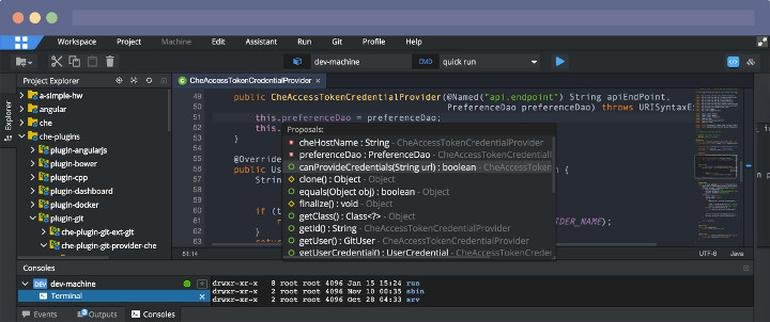
The DVT Eclipse IDE empowers engineers to transcend the limitations found in standard text-based code editors, effectively managing the complexities of modern projects. It promotes quicker and more intelligent code development while simplifying the maintenance of legacy code for both beginners and seasoned professionals. With its robust architecture, the DVT Eclipse IDE incorporates a parser, a sophisticated code editor, an easy-to-use GUI, and a wealth of features designed to enhance code inspection, navigation, and debugging processes. Furthermore, DVT provides specialized tools tailored for the hardware design and verification fields, including class and structural browsing, signal tracing, and support for various verification methodologies. This IDE is constructed upon the powerful Eclipse Platform, which is utilized by a vast community of engineers globally, benefiting from the best practices and features embedded in the platform's core. The extensible nature of the Eclipse Platform allows DVT to seamlessly integrate into a broad ecosystem of plugins, ensuring compatibility with numerous third-party extensions. Thus, it positions itself as an essential tool for engineers aiming to streamline their coding and verification tasks.
Description
Eclipse IDE stands as the premier open platform tailored for professional developers engaged in computer programming, and it has never been better. This IDE provides essential tools to drive rapid innovation with a simplified configuration process, including the Eclipse IDE Installer 2020-09, which now incorporates a Java Runtime Environment (JRE) in several of its packages. The enhancements also extend to theming and styling, featuring an improved dark theme for Windows and a refined light theme for GTK. Additionally, Eclipse IDE has transitioned to require Java 11 as its minimum operating version while maintaining the ability to compile older versions as desired. Among its new experimental features is support for aarch64, along with robust Linux support that has been integrated into this version. Furthermore, Node.js is now embedded within all LSP-based tools, facilitating seamless functionality from the start. Eclipse IDE remains free and open source, distributed under the Eclipse Public License 2.0, underscoring its commitment to community-driven development. The platform thrives on an extensive ecosystem of plugins, bolstered by an active and engaged community of contributors. This collaborative environment ensures that Eclipse IDE continues to evolve and meet the diverse needs of developers worldwide.
API Access
Has API
No
API Access
Has API
No


Integrations
ActiveControl
No
AttackFlow
No
Azure DevOps Labs
No
BMC AMI DevX
No
C++
No
Code Time
No
Dash
No
GenRocket
No
Java
No
JavaScript
No
Integrations
ActiveControl
Yes
AttackFlow
Yes
Azure DevOps Labs
Yes
BMC AMI DevX
Yes
C++
Yes
Code Time
Yes
Dash
Yes
GenRocket
Yes
Java
Yes
JavaScript
Yes
Pricing Details
No price information available.
Free Trial
No
Free Version
No
Pricing Details
No price information available.
Free Trial
No
Free Version
No
Deployment
Web-Based
Yes
On-Premises
No
iPhone App
No
iPad App
No
Android App
No
Windows
Yes
Mac
Yes
Linux
Yes
Chromebook
No
Deployment
Web-Based
Yes
On-Premises
No
iPhone App
No
iPad App
No
Android App
No
Windows
No
Mac
No
Linux
No
Chromebook
No
Customer Support
Business Hours
Yes
Live Rep (24/7)
Yes
Online Support
Yes
Customer Support
Business Hours
No
Live Rep (24/7)
No
Online Support
Yes
Types of Training
Training Docs
Yes
Webinars
No
Live Training (Online)
Yes
In Person
No
Types of Training
Training Docs
Yes
Webinars
No
Live Training (Online)
No
In Person
No
Vendor Details
Company Name
AMIQ EDA
Founded
2008
Country
United States
Website
www.dvteclipse.com
Vendor Details
Company Name
Eclipse Foundation
Country
Canada
Website
www.eclipse.org/eclipseide/
Product Features
Application Development
Access Controls/Permissions
No
Code Assistance
No
Code Refactoring
No
Collaboration Tools
No
Compatibility Testing
No
Data Modeling
No
Debugging
No
Deployment Management
No
Graphical User Interface
No
Mobile Development
No
No-Code
No
Reporting/Analytics
No
Software Development
No
Source Control
No
Testing Management
No
Version Control
No
Web App Development
No
Product Features
Application Development
Access Controls/Permissions
No
Code Assistance
No
Code Refactoring
No
Collaboration Tools
Yes
Compatibility Testing
No
Data Modeling
No
Debugging
No
Deployment Management
No
Graphical User Interface
No
Mobile Development
No
No-Code
No
Reporting/Analytics
No
Software Development
Yes
Source Control
No
Testing Management
No
Version Control
No
Web App Development
Yes
Code Editors
API
No
Auto-Complete
No
Code Folding
No
Column Editing
No
Customizable Themes
No
Debugging
No
Formatting / Table Editing
No
Keyboard Shortcuts
No
Multi-Monitor Editing
No
Syntax Highlighting
No
WYSIWYG
No
IDE
Code Completion
No
Compiler
No
Cross Platform Support
No
Debugger
No
Drag and Drop UI
No
Integrations and Plugins
No
Multi Language Support
No
Project Management
No
Text Editor / Code Editor
No
