Average Ratings 0 Ratings
Average Ratings 1 Rating
Similar Products
-
ScreencaptScreencapt allows you to record the entire screen or a selected area. You can also record a specific window. Screencapt is the ideal screen recorder because of its flexibility. Using the integrated audio recording you can also add your commentary or system sound directly into the screen recording. This is particularly useful when creating explanation videos or presentations. Screencapt's ability to record a webcam is a special feature. You can now add your comments and reactions to the video. This makes your screen recordings more personal and professional. Screencapt offers advanced options to record the cursor. You can choose to hide the cursor or add special effects to highlight specific actions. This is especially useful for software tutorials and demonstrations where a clear cursor view is required.
-
4K Video DownloaderYou can watch videos from anywhere, anytime, even offline. It's easy to download: simply copy the link from your browser, and then click 'Paste Link" in the application. You can save full playlists and channels on YouTube in high-quality and other video or audio formats. Download your YouTube Mix, Watch Later and Liked videos as well as private YouTube playlists. Receive new videos from your favorite YouTube channels automatically. You can feel the action around you with virtual reality videos. To experience the amazing VR experience in 360deg, download 360deg videos. You can bypass any restrictions placed by your Internet service provider to bypass your school firewall or workplace firewall. To access YouTube and other sites, set up an in-app proxy connection.
-
Switcher StudioSwitcher Studio allows you to capture video from multiple angles and edit it in real-time. This will allow you to connect with your community in a more engaging way. You can stream it live or save it for later. Your audience will be attracted to you with relevant content. Make it look great. There's no need to purchase, lug or learn largeequipment. Switcher is compatible with iPads and iPhones. Switcher is so intuitive that anyone can create amazing video with it. You don't need to hire outside videographers or producers. It takes an hour to edit every minute of edited video. Every minute of live-editing takes, well, one second. You can share every moment, live or recorded, external or internal, with video -- no matter what it holds.
-
TelemetryOSTelemetryTV is a powerful platform for digital signage that allows organizations to connect with audiences, generate awareness and give voice to their communities and teams. TelemetryTV lets you broadcast dynamic content by streaming video, images and social feeds to all your displays, wherever they may be. TelemetryTV powers internal communications and marketing at Starbucks, Amazon and Stanford University. Our success is based on being flexible, open to communication, collaborative, and open to collaboration. We believe in continuous learning, challenging the status-quo, and listening to customers. We are moving towards a world in which our walls will eventually talk. This begs the question: What do you want them saying?
-
Curtain MonGuard Screen WatermarkCurtain MonGuard Screen Watermark is an enterprise solution for displaying screen watermarks that administrators can enable on users' computers. This screen watermark can display various user information, such as the computer name, username, and IP address. The purpose of this watermark is to effectively grab the user's attention and serve as a reminder before they take a screenshot or photograph the screen to share the information with others. The key benefit of Curtain MonGuard is that it encourages users to "think before sharing" sensitive information. If the content being shared contains confidential company data, the watermark can help trace the source of the leaked information back to the user responsible. This allows organizations to hold users accountable and mitigate the consequences of data breaches or unauthorized information sharing. Key features: - On-screen watermark - Full screen-watermark - Application screen-watermark - Supports over 500 Applications - Self-defined content of watermark - Screen-watermark by condition - Central administration - Integration with Active Directory - Uninstall password for client - Password management - Admin delegation - Self protection for the software
-
YodeckNext-generation technology for digital signage professionals Yodeck, a cloud-based digital signage platform, is unbeatable. It powers your screen with dynamic content that instantly engages your target audience. Yodeck makes it easy to create, schedule, and design content from the web. To get your message across to those who matter most to you, use attention-grabbing media such as videos, images and PDF files, Office documents, data dashboards, and social media. It provides enterprise-grade security and control. Yodeck's drag-and-drop editing feature allows users to be creative in organizing content into interesting layouts. Yodeck is proud to offer a unique digital signage solution for businesses of all sizes. This includes local diners as well as global leaders like Delta Airlines, Autodesk and Adobe.
-
SetplexSeplex is an OTT solutions provider, serving global operators with simple, powerful and scalable OTT solutions—from content preparation, management and monetization to video delivery, multi-screen apps and real-time analytics. We offer a unified OTT platform that includes middleware, transcoders, CDNs, DRM, multi-screen apps, STBs, and analytics—all designed to support operators globally.
-
Hotspot ShieldSafeguard your personal information with top-tier encryption designed for military use, while enjoying unrestricted access to global websites and streaming services. Hotspot Shield ensures your connection is encrypted and maintains a strict no-logs policy, effectively protecting your identity and sensitive data from potential hackers and cyber threats. Boasting servers in over 80 countries and more than 35 cities, our unique Hydra protocol enhances your VPN experience, delivering swift and secure connections ideal for gaming, streaming, downloading, P2P sharing, and beyond. Experience the peace of mind that comes with knowing your online activities are safe and private. Take control of your digital presence today!
-
OptiSignsOptiSigns, your friendly digital signage software! Designed with simplicity and ease in mind, it's the perfect harmony of affordable software and usage with any hardware in the market. Pick from 140+ Apps, Thousands of Templates, and formats like images & videos, playlists, Google Slides, Weather, Instagram, Twitter, YouTube – you name it! Level up your business and start engaging your audience. For just $10/month per screen, use any display to capture your audiences attention! Remotely manage it all from one central portal. Indulge in features, images, videos, playlists, and schedules. Jazz it up with apps like Google Slides, Weather, Instagram, Facebook, Twitter, and more. Oh, and did we mention? We play nice with the most hardware and operating systems in the market like Fire TV Stick, Android, Chrome, Raspberry Pi, Roku, Windows, Linux, and MacOS. Time to unleash your business potential!
-
3Q3Q is an API-first video infrastructure for developers and engineering teams who want direct control over their media backend. A REST video API and native player SDKs give you programmatic access to hosting, ingestion, encoding, live streaming, video-on-demand, and delivery, so you can build video portals, streaming apps, or OTT backends on a single European platform. The stack is transparent by design. 3Q supports adaptive bitrate streaming over HLS and DASH with mixed HEVC and AVC codecs and automatic Live-to-VoD. Delivery runs over a proprietary global CDN, encryption, and HTTP/2 over TLS 1.3. The Cookie- and Consent-free HTML5 Video Player is barrier-free in accordance with WCAG 2.1/BITV 2.0 and needs no consent layer. Video AI exposes speech-to-text transcription, automatic subtitles, translation, and chapter markers through the same API, and integration fits your existing pipeline and video workflows. What sets 3Q apart is ownership. 3Q runs on its own independent European video infrastructure, so your data stays in the EU and under German jurisdiction. 3Q is GDPR-compliant and all processes are ISO/IEC 27001 certified, with modular pay-as-you-go pricing and 24/7 support from real video experts.
Description
CyberLink Screen Recorder 4 offers a comprehensive solution for both desktop recording and video streaming, combining these functionalities into one user-friendly application. Game streamers and digital content creators can now streamline their workflow without the need to switch between various platforms or tools for simultaneous video streaming and editing desktop captures for platforms like YouTube or Facebook. This software integrates the intuitive editing capabilities of PowerDirector with advanced screen capturing and streaming technology, positioning it as the ultimate tool for recording gameplay, vlogging, or sharing screen content with a wider audience. It allows users to elevate their content creation beyond mere gameplay, enabling them to connect more effectively with their followers on platforms such as Twitch, YouTube, or Facebook. Users can seamlessly add webcam commentary to their live streams, or they can record and edit gameplay footage to highlight the most exciting moments. With the backing of CyberLink’s top-tier video editing features, Screen Recorder stands out as more than just a basic screen capture tool; it transforms the way you engage with your audience. Additionally, it enhances presentations by allowing for dynamic screen sharing, making every interaction more engaging and informative.
Description
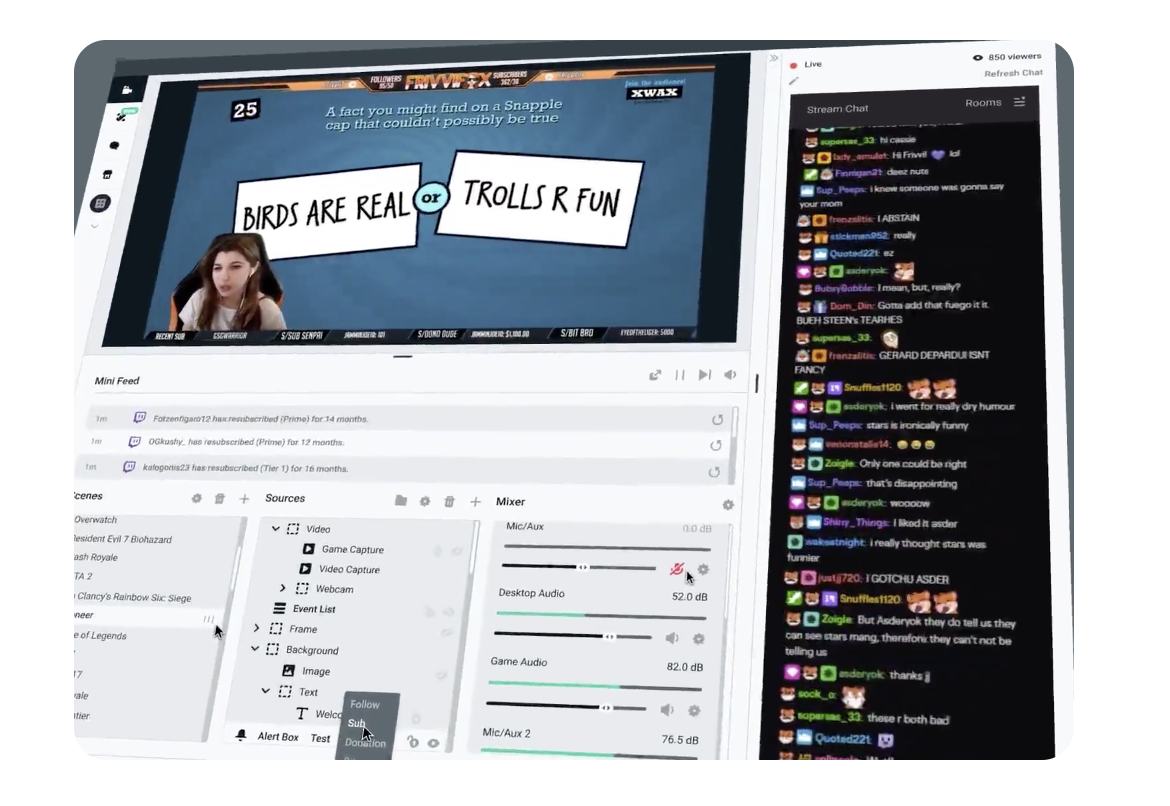
All-in-one streaming software. Live stream and grow your audience. One simple streaming software that is feature-packed and easy to use. Stream to Twitch, YouTube, Facebook in just seconds. Prime includes hundreds of stream overlays, plus many more. Stream on Twitch, YouTube and Facebook professionally. You can easily recognize your viewers live on stream using fully customizable alerts. Apps that give you more control, automation and better analytics. They also allow you to interact with viewers in new ways. All-in-one streaming software.
API Access
Has API
No
API Access
Has API
No


Integrations
Facebook
Yes
Twitch
Yes
YouTube
Yes
Basket Score
No
Bonterra DonorDrive
No
Cloudbot
No
Facebook Live
No
Firebot
No
Fourthwall
No
Mix It Up
No
Integrations
Facebook
Yes
Twitch
Yes
YouTube
Yes
Basket Score
Yes
Bonterra DonorDrive
Yes
Cloudbot
Yes
Facebook Live
Yes
Firebot
Yes
Fourthwall
Yes
Mix It Up
Yes
Pricing Details
$34.99
Free Trial
No
Free Version
No
Pricing Details
$0
Free Trial
No
Free Version
Yes
Deployment
Web-Based
No
On-Premises
No
iPhone App
No
iPad App
No
Android App
No
Windows
Yes
Mac
No
Linux
No
Chromebook
No
Deployment
Web-Based
No
On-Premises
No
iPhone App
No
iPad App
No
Android App
No
Windows
Yes
Mac
Yes
Linux
No
Chromebook
No
Customer Support
Business Hours
Yes
Live Rep (24/7)
No
Online Support
Yes
Customer Support
Business Hours
Yes
Live Rep (24/7)
Yes
Online Support
Yes
Types of Training
Training Docs
Yes
Webinars
Yes
Live Training (Online)
Yes
In Person
No
Types of Training
Training Docs
Yes
Webinars
No
Live Training (Online)
No
In Person
No
Vendor Details
Company Name
CyberLink
Founded
1996
Country
Taiwan
Website
www.cyberlink.com/products/screen-recorder/features_en_US.html
Vendor Details
Company Name
Streamlabs
Founded
2014
Country
United States
Website
streamlabs.com
Product Features
Screen Recording
Annotations / Drawing
No
Audio Capture
No
Backup
No
Collaboration Tools
No
File Sharing
No
Multi-Screen Recording
No
Screen Capture
No
Speech-to-Text
No
Video Editing
No
YouTube Uploading
No
Product Features
Live Streaming
Access Control
No
Audience Analytics
No
Audience Engagement
No
Browser-based
No
Customizable Branding
No
Encoding
No
Event Scheduling
No
Live Streaming Production
No
Moderation
No
Monetization Tools
No
Multi-Screen / Split-Screen
No
Multiple Camera Feeds
No
Multistreaming
No
Session Recording
No
Social Media Integration
No
Streaming Platform Integration
No
Screen Recording
Annotations / Drawing
No
Audio Capture
No
Backup
No
Collaboration Tools
No
File Sharing
No
Multi-Screen Recording
No
Screen Capture
No
Speech-to-Text
No
Video Editing
No
YouTube Uploading
No
