Average Ratings 0 Ratings
Average Ratings 0 Ratings
Similar Products
-
DXchartsIn just a few days, you can integrate and customize a lightning-fast financial table with your product. You can make changes or create a completely new interface. You want more? We offer a full access alternative. Data feeds with futures and indices, equities, FX and cryptocurrencies by default. Sign up now to get your data feeds. DXcharts can be integrated with any market data source, as it is data feed-agnostic. Native libraries for all platforms. Native web, native mobile & desktop. Get a solution that is specifically tailored to your product. Analyzing statistics from trading activity can help you evaluate securities and predict their future movements. You can create custom studies with the intuitive dxScript. You can adjust the layout of charts however you like and sync them by instrument, chart type and timeframe, range, studies & appearance.
-
All in One AccessibilityAn AI based accessibility tool enables websites to be accessible among people with hearing or vision impairments, motor impaired, color blind, dyslexia, cognitive & learning impairments, seizure & epileptic, ADHD, elderly, and Parkinson. It installs in just 2 minutes. It reduces the risk of time-consuming accessibility lawsuits by improving accessibility compliance for the standards WCAG 2.0, 2.1, 2.2, ADA, Section 508, European EAA EN 301 549, Canada ACA, California Unruh, Israeli Standard 5568, Australian DDA, UK Equality Act, Ontario AODA, Indian RPD Act, GIGW 3.0, France RGAA, German BITV, Brazilian Inclusion law LBI 13.146/2015, Spain UNE 139803:2012, JIS X 8341, Italian Stanca Act, Switzerland DDA & more. It supports GDPR, HIPAA, CCPA, SOC Type 2, ISO 9001:2015, & ISO 27001:2022. It supports 190+ languages. It is a cornerstone of improving web accessibility through its ease of use for companies of all sizes and with the help of paid add-ons like manual accessibility audit, remediation, PDF accessibility remediation, VPAT/ ACR, white label subscription, and live site translation, SkynetAccessibility Scanner, and video subtitle. Top features of the All in One Accessibility: - AI Screen Reader - Accessibility statement - Accessibility interface for UI design fixes - Free Accessibility Statement Generator - Voice Navigation - Talk & Type - Libras (Brazilian Portuguese) Sign Language - Dashboard Automatic accessibility score - AI based Image Alternative Text remediation - AI based Text to Speech Screen Reader - Select Screen Reader Voice - Auto-detect language - Keyboard navigation adjustments - Content, Color, Contrast, Orientation Adjustments - Custom widget color, position, icon size, type - Dedicated support
-
Adobe FireflyAdobe Firefly is a versatile AI-powered creative platform designed to help users generate and edit multimedia content with ease. It allows users to create images, videos, and audio using simple text prompts within an interactive and flexible workspace. The platform features tools like generative fill, image editing, and video editing, enabling users to refine and enhance their creations. Firefly also includes quick actions such as background removal, cropping, resizing, and format conversion to streamline workflows. Users can explore an infinite canvas for creative production and experiment with various styles and outputs. The platform encourages creativity by allowing users to remix content from a shared community gallery. With its intuitive design, it reduces the need for advanced technical skills. Firefly integrates AI capabilities to speed up content creation and editing processes. It supports both beginners and professionals in producing high-quality results. Overall, Adobe Firefly provides a powerful and accessible environment for modern digital creativity.
-
HighchartsHighcharts, a Javascript-based charting library, makes it easy to add interactive charts and graphs to web or mobile projects of any size. Highcharts is used by more than 80% of the 100 biggest companies in the world, as well as thousands of developers from a variety of industries, including finance, publishing, application development, and data science. Highcharts is in active development since 2009. It remains a favorite among developers due to its robust feature set and ease-of-use documentation, accessibility features and vibrant community.
-
AgeChecker.NetAgeChecker.Net offers a seamless checkout process while ensuring that your website adheres to the most current age regulations relevant to your field. With the ability to verify over 90% of customers instantly through our vast database of reliable records and advanced matching technology, we help you stay compliant with the latest FDA age standards, state regulations, and merchant account guidelines. Our customizable verification rules allow you to tailor the experience to your needs, minimizing cart abandonment and alleviating customer frustration often seen with other systems. Customers undergo verification directly on your site during the checkout phase, making us a genuine age verification solution rather than just a temporary pop-up. We utilize sophisticated identity networks to cross-reference customer details from your checkout form, ensuring they fulfill your minimum age standards. Compatibility with all leading e-commerce platforms ensures that integration is hassle-free, and as customers proceed to place their orders, a prompt from AgeChecker.Net will appear to clarify the verification process and its necessity. This commitment to transparency not only enhances the user experience but also builds trust with your clientele.
-
FilerevFilerev is a powerful tool that helps you easily find and manage hidden files, duplicate files, large files, and oversized folders, ensuring a streamlined and clutter-free digital workspace. Key features include advanced scanning technology that identifies the unorganized files taking up the most space and cluttering your Google Drive. Filerev enhances productivity by saving time and reducing the frustration of manual file organization. The custom filters and bulk delete tool give you complete control over finding and removing unwanted files in your account. The storage analyzer lets you browse your folders by size to see where the space is being used in your Google Drive. Whether you're an individual, a small business, or a large enterprise, Filerev offers robust solutions tailored to your needs. Visit filerev.com to discover how Filerev can transform your Google Drive experience and boost efficiency.
-
MobiPDFMobiPDF (formerly PDF Extra) is an intuitive reader and editor that allows you to read, edit, create, OCR, organize, annotate, fill and sign, convert, and share any PDF. This makes MobiPDF an excellent choice for users seeking a budget-friendly alternative to Adobe Acrobat Pro. HERE’S WHAT YOU GET WITH MOBIPDF: Multiple Page View Modes: Enjoy a distraction-free "Read Mode". Advanced Editing Tools: Experience a Word-like PDF editing environment. Two-Way Conversions: Convert PDFs to and from Word, Excel, PowerPoint, or image formats. OCR Support: Make scanned documents searchable. Markup Tools: Highlight, comment, strikethrough, stamp, and more to enhance your documents. Effortless PDF Organizer: Reorder, compress, split, and combine PDFs with ease. Sign & Secure: Add signatures, create and fill forms, and protect your PDFs with passwords, encryption, and digital certificates. Offline Mode: Work freely on your projects, even offline. Seamless translation: One-click translate any PDF into 50+ languages.
-
AthenaHQAthenaHQ is a powerful platform focused on Generative Engine Optimization (GEO), helping brands improve their AI search visibility and brand perception across AI-powered search engines. It offers tools to track brand mentions, identify gaps in AI-generated content, and enhance content to align with AI’s evolving preferences. With features like daily tracking, competitor analysis, and source intelligence, AthenaHQ provides actionable insights to help businesses stay relevant in an AI-dominated search landscape. The platform's AI-powered capabilities enable businesses to optimize content and drive more meaningful engagement through generative search.
-
FrameworkLTCFrameworkLTC's fully integrated and scalable platform automates all manual tasks, allowing LTC pharmacies to focus on what is most important: improving patient lives. Automation replaces manual tasks and allows you to expand your business while maximising margins. Delivering services that meet the needs of each facility will strengthen your partner relationships. Our facility-centric software allows you to provide concierge-level service, catering to every patient, wing, and facility. Allow facilities to print bills, check order statuses, and process returns according to your pre-defined rules. Your facilities will appreciate your reports. Automate refill and reorder prescriptions so they don't get lost on the production floor.
-
TinyPNGTinyPNG (by Tinify) is a free image optimization service built for developers and designers. It utilizes smart lossy compression to reduce the file sizes of JPEG, PNG, WebP, and AVIF files by up to 80% with no visible quality loss. That means faster load times, better SEO, and lower bandwidth. You can compress, convert, and resize images via a clean web interface or integrate it into your workflow with the API. The platform also provides an image CDN for fast global delivery of optimized assets. SDKs are available for Python, Node.js, PHP, Java, Ruby, and .NET. WordPress plugin included, plus plenty of community-driven integrations. No tuning, no noise, Tinify just works. Whether you're optimizing a handful of images or processing millions, it scales effortlessly. All plans include a generous free tier, and support is quick when you need it. George the panda 🐼 approves.
Description
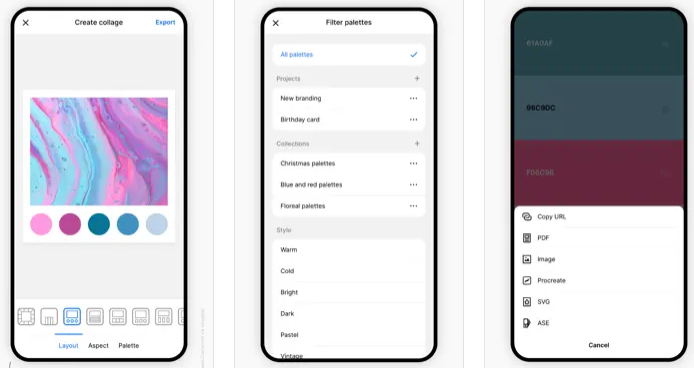
Coolors is a rapid color palette generator that assists you in crafting the ideal color palette or finding inspiration from a myriad of stunning color schemes. Accessible via web platforms, mobile applications, plugins, and extensions, it allows users to create color palettes in mere seconds by tapping the space bar, secure preferred colors to enhance the palette, and rearrange or modify the number of colors included. Additionally, it features an Image Picker to derive color schemes from personal photos and a Contrast Checker to ensure the combinations are accessible for all users. The Palette Visualizer offers a way to see how colors look in real design scenarios, while other tools, including a Color Picker, Collage Maker, gradient generator, and extensive color libraries, further enhance the experience. Users can export their palettes in various formats such as PDF, image, CSS, and SVG, as well as share links and integrate with design software like Figma or a Chrome extension. The platform also supports multiple color-space values including HEX, RGB, and CMYK, and includes functionalities for simulating color-blindness along with adjusting luminance, hue, and temperature for precision in design. Overall, Coolors combines functionality and creativity to cater to both amateur and professional designers alike.
Description
Bid farewell to tedious and time-consuming presentation creation. Let your computer take on the heavy lifting by generating stunning presentations on your behalf! With MagicSlides, you can effortlessly convert any text into engaging visuals, enhanced with images for added emphasis. Simply provide a topic and the desired number of slides to create personalized presentations, and use reference text to give it a distinctive flair. With various themes, font options, color schemes, and layouts at your disposal, you can ensure your presentation is visually appealing. Just input the topic and slide count, and MagicSlides will swiftly produce the slides for you. Additionally, you can include specific text for inclusion in the slides. After entering your details, click the generate button and wait a few seconds while MagicSlides works its magic. The result will be a set of beautifully crafted slides that not only stand out but also reflect your unique presentation style. Enjoy the ease of creating professional presentations without the hassle!
API Access
Has API
No
API Access
Has API
No



Integrations
Adobe Acrobat
Yes
Axis LMS
No
CSS
Yes
Figma
Yes
Google Chrome
Yes
Google Slides
No
Google Workspace
No
Instagram
Yes
Integrations
Adobe Acrobat
No
Axis LMS
Yes
CSS
No
Figma
No
Google Chrome
No
Google Slides
Yes
Google Workspace
Yes
Instagram
No
Pricing Details
Free
Free Trial
No
Free Version
Yes
Pricing Details
No price information available.
Free Trial
No
Free Version
No
Deployment
Web-Based
Yes
On-Premises
No
iPhone App
Yes
iPad App
Yes
Android App
Yes
Windows
No
Mac
Yes
Linux
No
Chromebook
No
Deployment
Web-Based
Yes
On-Premises
No
iPhone App
No
iPad App
No
Android App
No
Windows
No
Mac
No
Linux
No
Chromebook
No
Customer Support
Business Hours
No
Live Rep (24/7)
No
Online Support
Yes
Customer Support
Business Hours
No
Live Rep (24/7)
No
Online Support
Yes
Types of Training
Training Docs
Yes
Webinars
No
Live Training (Online)
Yes
In Person
No
Types of Training
Training Docs
No
Webinars
No
Live Training (Online)
No
In Person
No
Vendor Details
Company Name
Coolors
Founded
2014
Country
Italy
Website
coolors.co
Vendor Details
Company Name
MagicSlides
Website
www.magicslides.app/
Product Features
Graphic Design
Collaboration
No
Data Visualization
No
Filtering
No
Image Database
No
Image Editor
No
Templates
No
Product Features
Presentation
3D Objects
No
Animations & Transitions
No
Audio Content
No
Collaboration Tools
No
Content Library
No
Customizable Templates
No
Media Library
No
Offline Editing
No
Offline Presenting
No
Screen Sharing
No
Search/Filter
No
Templates
No
Video Content
No
