Average Ratings 0 Ratings
Average Ratings 0 Ratings
Similar Products
-
DXchartsIn just a few days, you can integrate and customize a lightning-fast financial table with your product. You can make changes or create a completely new interface. You want more? We offer a full access alternative. Data feeds with futures and indices, equities, FX and cryptocurrencies by default. Sign up now to get your data feeds. DXcharts can be integrated with any market data source, as it is data feed-agnostic. Native libraries for all platforms. Native web, native mobile & desktop. Get a solution that is specifically tailored to your product. Analyzing statistics from trading activity can help you evaluate securities and predict their future movements. You can create custom studies with the intuitive dxScript. You can adjust the layout of charts however you like and sync them by instrument, chart type and timeframe, range, studies & appearance.
-
All in One AccessibilityAll in One Accessibility® is an AI based accessibility tool to enable websites to be accessible among people with hearing or vision impairments, motor impaired, color blind, dyslexia, cognitive & learning impairments, seizure & epileptic, ADHD, & elderly. It installs in just 2 minutes. It reduces the risk of time-consuming accessibility lawsuits by improving accessibility compliance for the standards WCAG 2.0, 2.1, 2.2, ADA, Section 508, European EAA EN 301 549, Canada ACA, California Unruh, Israeli Standard 5568, Australian DDA, UK Equality Act, Ontario AODA, Indian RPD Act, GIGW 3.0, France RGAA, German BITV, Brazilian Inclusion law LBI 13.146/2015, Spain UNE 139803:2012, JIS X 8341, Italian Stanca Act, Switzerland DDA & more. It supports GDPR, HIPAA, CCPA, SOC Type 2, ISO 9001:2005, & ISO 27001:2022. It supports 190+ languages. It is a cornerstone of improving web accessibility through its ease of use for companies of all sizes and with the help of paid add-ons like manual accessibility audit, remediation, PDF accessibility remediation, VPAT/ ACR, white label subscription, and live site translation add-on. Top features of the All in One Accessibility®: - Accessibility statement - Accessibility interface for UI design fixes - Free Accessibility Statement Generator - Voice Navigation - Talk & Type - Libras (Brazilian Portuguese) Sign Language - Dashboard Automatic accessibility score - AI based Image Alternative Text remediation - AI based Text to Speech Screen Reader - Select Screen Reader Voice - Auto-detect language - Keyboard navigation adjustments - Content, Color, Contrast, and Orientation Adjustments - Custom widget color, position, icon size, and type - Dedicated email support
-
TattoogendaFor artists and studios who are at the top of their game! Keep track of appointments and customers digitally. Single artists who are able to work in their own shops or travel the world. Small to very large studios that want to book their artists as quickly as possible. Tattoogenda's software for tattoo shops will make your studio both artist-friendly and customer-friendly. Tattoogenda sends automatic reminder SMS and/or email to your customers before their appointments. We ensure that your clients are aware of your deposit rules. These steps are meant to allow you or your manager to ask the right questions to your customers when creating a tattoo project. You can ask questions about the size, color, black and gray, as well as how it will be placed. The list of dates is automatically emailed to customers when you make new bookings. No more sloppy writing on business cards.
-
HighchartsHighcharts, a Javascript-based charting library, makes it easy to add interactive charts and graphs to web or mobile projects of any size. Highcharts is used by more than 80% of the 100 biggest companies in the world, as well as thousands of developers from a variety of industries, including finance, publishing, application development, and data science. Highcharts is in active development since 2009. It remains a favorite among developers due to its robust feature set and ease-of-use documentation, accessibility features and vibrant community.
-
AgeChecker.NetAgeChecker.Net offers a seamless checkout process while ensuring that your website adheres to the most current age regulations relevant to your field. With the ability to verify over 90% of customers instantly through our vast database of reliable records and advanced matching technology, we help you stay compliant with the latest FDA age standards, state regulations, and merchant account guidelines. Our customizable verification rules allow you to tailor the experience to your needs, minimizing cart abandonment and alleviating customer frustration often seen with other systems. Customers undergo verification directly on your site during the checkout phase, making us a genuine age verification solution rather than just a temporary pop-up. We utilize sophisticated identity networks to cross-reference customer details from your checkout form, ensuring they fulfill your minimum age standards. Compatibility with all leading e-commerce platforms ensures that integration is hassle-free, and as customers proceed to place their orders, a prompt from AgeChecker.Net will appear to clarify the verification process and its necessity. This commitment to transparency not only enhances the user experience but also builds trust with your clientele.
-
FilerevFilerev is a powerful tool that helps you easily find and manage hidden files, duplicate files, large files, and oversized folders, ensuring a streamlined and clutter-free digital workspace. Key features include advanced scanning technology that identifies the unorganized files taking up the most space and cluttering your Google Drive. Filerev enhances productivity by saving time and reducing the frustration of manual file organization. The custom filters and bulk delete tool give you complete control over finding and removing unwanted files in your account. The storage analyzer lets you browse your folders by size to see where the space is being used in your Google Drive. Whether you're an individual, a small business, or a large enterprise, Filerev offers robust solutions tailored to your needs. Visit filerev.com to discover how Filerev can transform your Google Drive experience and boost efficiency.
-
OpusOpus is an all-encompassing platform that combines EHR, CRM, and RCM functionalities, specifically tailored to optimize the operations of treatment centers specializing in behavioral health, such as addiction, mental health, and substance use disorder clinics. This platform offers a suite of integrated features that facilitate patient management, billing processes, appointment scheduling, and telehealth capabilities. Opus significantly boosts operational efficiency through intelligent lead routing, insurance verification, automation of routine tasks, and customizable forms that cater to specific needs. Additional offerings include sophisticated reporting tools, AI-enhanced progress note creation, and smooth laboratory integrations. With its emphasis on adaptability and growth potential, Opus serves as an excellent choice for organizations of varying sizes, from small practices to large multi-center operations within the behavioral health sector. Ultimately, Opus stands out as a versatile solution designed to meet the evolving demands of the industry while ensuring high-quality care for patients.
-
MobiPDF (formerly PDF Extra)MobiPDF (formerly PDF Extra) is an intuitive reader and editor that allows you to read, edit, create, OCR, organize, annotate, fill and sign, convert, and share any PDF. This makes MobiPDF an excellent choice for users seeking a budget-friendly alternative to Adobe Acrobat Pro. HERE’S WHAT YOU GET WITH MOBIPDF: Multiple Page View Modes: Enjoy a distraction-free "Read Mode". Advanced Editing Tools: Experience a Word-like PDF editing environment. Two-Way Conversions: Convert PDFs to and from Word, Excel, PowerPoint, or image formats. OCR Support: Make scanned documents searchable. Markup Tools: Highlight, comment, strikethrough, stamp, and more to enhance your documents. Effortless PDF Organizer: Reorder, compress, split, and combine PDFs with ease. Sign & Secure: Add signatures, create and fill forms, and protect your PDFs with passwords, encryption, and digital certificates. Offline Mode: Work freely on your projects, even offline. Seamless translation: One-click translate any PDF into 50+ languages.
-
Google Chrome EnterpriseChrome Enterprise provides organizations with the tools needed to optimize productivity while ensuring robust security. By offering centralized management, Zero Trust protection, and integrations with existing IT systems, businesses can enhance their workflows with ease. Chrome Enterprise allows for secure remote work and collaboration, ensuring that teams have access to business apps and data no matter where they are. With flexible options for managing devices and policies, companies can streamline security, increase efficiency, and create an open, productive environment for employees across the globe.
-
FrameworkLTCFrameworkLTC's fully integrated and scalable platform automates all manual tasks, allowing LTC pharmacies to focus on what is most important: improving patient lives. Automation replaces manual tasks and allows you to expand your business while maximising margins. Delivering services that meet the needs of each facility will strengthen your partner relationships. Our facility-centric software allows you to provide concierge-level service, catering to every patient, wing, and facility. Allow facilities to print bills, check order statuses, and process returns according to your pre-defined rules. Your facilities will appreciate your reports. Automate refill and reorder prescriptions so they don't get lost on the production floor.
Description
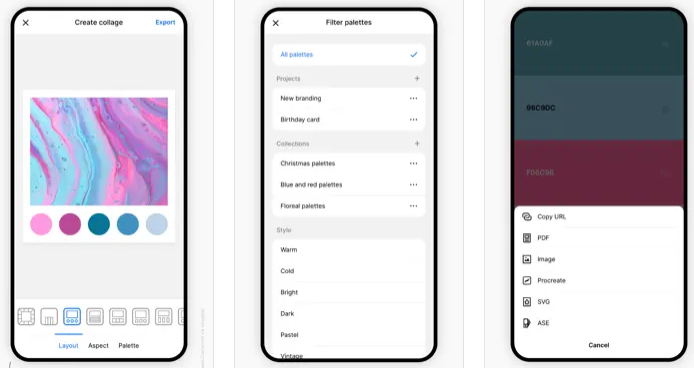
Coolors is a rapid color palette generator that assists you in crafting the ideal color palette or finding inspiration from a myriad of stunning color schemes. Accessible via web platforms, mobile applications, plugins, and extensions, it allows users to create color palettes in mere seconds by tapping the space bar, secure preferred colors to enhance the palette, and rearrange or modify the number of colors included. Additionally, it features an Image Picker to derive color schemes from personal photos and a Contrast Checker to ensure the combinations are accessible for all users. The Palette Visualizer offers a way to see how colors look in real design scenarios, while other tools, including a Color Picker, Collage Maker, gradient generator, and extensive color libraries, further enhance the experience. Users can export their palettes in various formats such as PDF, image, CSS, and SVG, as well as share links and integrate with design software like Figma or a Chrome extension. The platform also supports multiple color-space values including HEX, RGB, and CMYK, and includes functionalities for simulating color-blindness along with adjusting luminance, hue, and temperature for precision in design. Overall, Coolors combines functionality and creativity to cater to both amateur and professional designers alike.
Description
Utilize a compact JavaScript library to develop smooth and engaging gradient animations. You can create simple gradient animations using three color combinations in a queue, as well as intricate transitions featuring two gradients positioned differently with three distinct colors. Experiment with gradient animations that incorporate images and specific blending modes. Additionally, you can create animations with two colors alongside a background image and a chosen blending mode. For further customization, explore the options detailed on the API page. Implement a gradient animation that employs an image mask to produce effects beneath a defined shape. Furthermore, design animations that can react to user interactions; for instance, clicking on various states within the gradient animation will trigger changes in the gradients. Adjust the gradient direction using pixel or percentage values, and bear in mind that the animation will pause when you switch tabs. You also have the ability to control and modify the duration of these animations, ensuring that all options are at your disposal for personalizing the states and gradients involved. With this library, the possibilities for creative expression through gradient animations are virtually limitless.
API Access
Has API
API Access
Has API



Integrations
Adobe Acrobat
CSS
Figma
Google Chrome
Instagram
Pricing Details
Free
Free Trial
Free Version
Pricing Details
Free
Free Trial
Free Version
Deployment
Web-Based
On-Premises
iPhone App
iPad App
Android App
Windows
Mac
Linux
Chromebook
Deployment
Web-Based
On-Premises
iPhone App
iPad App
Android App
Windows
Mac
Linux
Chromebook
Customer Support
Business Hours
Live Rep (24/7)
Online Support
Customer Support
Business Hours
Live Rep (24/7)
Online Support
Types of Training
Training Docs
Webinars
Live Training (Online)
In Person
Types of Training
Training Docs
Webinars
Live Training (Online)
In Person
Vendor Details
Company Name
Coolors
Founded
2014
Country
Italy
Website
coolors.co
Vendor Details
Company Name
Granim.js
Country
United States
Website
sarcadass.github.io/granim.js/
Product Features
Graphic Design
Collaboration
Data Visualization
Filtering
Image Database
Image Editor
Templates

