Average Ratings 0 Ratings
Average Ratings 0 Ratings
Similar Products
-
AdmiralAdmiral is the top adblock recovery platform for publishers, helping recover millions of dollars in advertising revenue lost to adblockers, privacy tools, DNS filtering, VPNs, network-level blocking, and other forms of monetization disruption. Trusted by thousands of publishers and backed by more than a decade of expertise, Admiral pioneered Full Spectrum Adblock Recovery—combining multiple recovery approaches to maximize total adblock revenue. As the creator of Visitor Relationship Management (VRM), Admiral extends beyond ad recovery to help publishers recover and grow revenue through subscriptions, registrations, consent management, first-party data, email acquisition, social audience growth, donations, and other visitor monetization strategies. By combining recovery and revenue-growth approaches in one platform, Admiral helps publishers reduce revenue leakage, increase visitor lifetime value, and maximize monetization across the audience lifecycle. Admiral VRM delivers: * Industry-leading Full Spectrum Adblock Recovery * Paid subscriptions, paywalls, and donation campaigns * Visitor Copilot conversational AI for engagement and revenue growth * Registration walls, user accounts, and first-party data * Email, social audience, and app growth * GDPR and CCPA consent management Admiral also provides analytics, journey shaping, visitor segmentation, targeting, testing, and optimization. Publishers can add Admiral's free tag in minutes for immediate visibility into adblock rates and revenue recovery potential.
-
Veeam Data PlatformVeeam Data Platform is a unified data resilience solution that helps organizations recover from cyberattacks and outages, and protect workloads across hybrid and multicloud environments – all without vendor lock-in. The platform includes built-in security capabilities designed to mitigate ransomware and other data-loss threats, including AI-backed threat detection across a broad range of workload types. This is intended to help teams identify and respond to threats before they disrupt operations. Veeam Data Platform supports workload portability across hypervisors, cloud providers, and on-premises environments, allowing organizations to move or recover data across infrastructure without being tied to a specific vendor or platform. For organizations looking to simplify deployment, Veeam Software Appliance provides a pre-built, hardened, and highly available option, reducing the manual setup and maintenance work required from IT teams.
-
IONOS Cloud Object StorageIONOS Cloud Object Storage is a flexible storage solution tailored for the management and retrieval of extensive volumes of unstructured data within cloud platforms. Fully compliant with the S3 API standard, it empowers developers and IT professionals to utilize existing S3 clients and tools for bucket and object management, seamlessly integrating into modern cloud-native applications and systems. This service allows businesses to store nearly limitless amounts of static or backup data without the complexities of traditional storage management. Engineered for both reliability and high availability, it ensures data remains accessible and secure through redundant storage mechanisms across multiple nodes, safeguarding against potential infrastructure failures. Ideal for a variety of use cases, it supports the storage of backups, archives, and disaster recovery snapshots, while also efficiently managing substantial datasets that are essential for analytics, machine learning, or digital content initiatives. Furthermore, its scalability makes it an excellent choice for organizations anticipating growth or needing to adapt quickly to changing data storage requirements.
-
NinjaOneNinjaOne automates the hardest parts of IT, empowering more than 20,000 IT teams. By providing deep insights into endpoints, robust security measures, and centralized control, NinjaOne boosts efficiency while safeguarding sensitive data and cutting IT expenses. This comprehensive platform offers a versatile toolkit for managing and securing endpoints, including patch management, mobile device oversight, software distribution, remote support, backup solutions, and more, thanks to its extensive IT and security integrations.
-
Comet BackupStart running backups and restores in less than 15 minutes! Comet is a fast, secure all-in-one backup platform for businesses and IT providers. You control your backup environment and storage destination (local, Wasabi, AWS, Google Cloud Storage, Azure, Backblaze, or other S3 storage providers). Our software supports businesses across 120 countries in 13 languages. Test drive Comet Backup with a 30-day FREE trial!
-
DoctorConnectDoctorConnect is a trusted leader in patient engagement solutions, proudly serving the healthcare industry for over 25 years. We help medical practices of all sizes streamline communication, automate routine tasks, and improve the overall patient experience. From solo practitioners to large health systems, thousands of providers nationwide rely on our customizable tools to reduce administrative burden, decrease no-shows, and drive stronger revenue. Our platform is built for real-world healthcare operations—scalable, intuitive, and designed to integrate directly with hundreds of EMR and Practice Management (PM) systems. Whether you're looking to modernize appointment scheduling, automate reminders, or collect actionable patient feedback, DoctorConnect provides an end-to-end solution tailored to your workflow. With a focus on flexibility and results, we empower clinics to save time, enhance patient satisfaction, and operate more efficiently without disrupting existing systems.
-
RaimaDBRaimaDB, an embedded time series database that can be used for Edge and IoT devices, can run in-memory. It is a lightweight, secure, and extremely powerful RDBMS. It has been field tested by more than 20 000 developers around the world and has been deployed in excess of 25 000 000 times. RaimaDB is a high-performance, cross-platform embedded database optimized for mission-critical applications in industries such as IoT and edge computing. Its lightweight design makes it ideal for resource-constrained environments, supporting both in-memory and persistent storage options. RaimaDB offers flexible data modeling, including traditional relational models and direct relationships through network model sets. With ACID-compliant transactions and advanced indexing methods like B+Tree, Hash Table, R-Tree, and AVL-Tree, it ensures data reliability and efficiency. Built for real-time processing, it incorporates multi-version concurrency control (MVCC) and snapshot isolation, making it a robust solution for applications demanding speed and reliability.
-
InterProse ACEInterProse ACE is a modern, cloud-based debt collection software platform built for collection agencies who specialize in consumer or commercial debt, including healthcare, property management, education, and government accounts. ACE also serves collection attorneys, property managers, original creditors, financial institutions and government entities. Heavily configurable and flexible with no one business use case in mind, our debt collection application facilitates account management, secured/unsecured payment plans, client invoicing and reports, legal judgment tracking, data reporting/analytics, and process automation while doing it all in a highly efficient and cost-effective way. Key features include account bundling, account-level documents attachments, heavy process automation, client access, trust accounting, credit reporting, consumer self-service tools, and numerous tech integrations. ACE customers enjoy monthly updates/upgrades to the platform, real-time data & document backups, inherited third-party security audit attestations (SOC2Type2, PCI, PENTEST, HIPAA, StarAlliance, etc.), real-time consumer and client portals, open-API connections, among other modern conveniences that let them focus on business.
-
UnimusUnimus is a powerful network automation, configuration backup, and change management solution designed to simplify network operations for businesses of all sizes. Supporting 450+ device types across 160+ vendors, Unimus is a network-agnostic platform that eliminates manual network tasks while enhancing security and reliability. With automated configuration backups, Unimus ensures seamless disaster recovery, giving IT teams quick access to historical versions and real-time change tracking. Its network auditing features provide instant visibility into configuration consistency, compliance, and security risks. Change management is simplified with automatic change detection, detailed version history, and customizable notifications. Unimus' intuitive web-based interface makes it easy to manage networks without requiring deep technical expertise, while its integrated CLI access allows for real-time troubleshooting and command execution. Whether you're looking to automate bulk configuration changes, perform firmware upgrades, or improve network visibility, Unimus provides a scalable, cost-effective solution for modern network infrastructures.
-
DbVisualizerDbVisualizer is a universal database client for anyone who works with data, from indie developers and startups to professional teams managing complex database environments, including developers, DBAs, analysts, and data engineers working across relational and NoSQL databases. Key features: - SQL editor with intelligent autocomplete, visual query builders, variables, and execution tools - AI Assistant for answering questions, explaining errors, and analyzing code - Git integration for managing SQL scripts and team collaboration - Customizable layouts, key bindings, and UI themes - Favorites for frequently used scripts and database objects - Configurable security settings for organizational requirements Connects via JDBC to MySQL, PostgreSQL, SQL Server, Oracle, Snowflake, SQLite, Cassandra, BigQuery, and more. Runs on Windows, macOS, and Linux. Nearly 7 million downloads, with Pro users in 150 countries, scaling from solo projects to enterprise database management.
Description
The software is capable of restoring various database components including tables, triggers, views, functions, and more. It facilitates the recovery process for both MDF and NDF files associated with the database. Users can conveniently preview the data records that have been recovered prior to saving them, enabling them to make informed decisions about what to retain. The MSSQL Recovery Tool is proficient in retrieving a wide array of database elements such as tables, indexes, stored procedures, views, functions, and triggers. It offers both standard and advanced recovery options to effectively address varying degrees of corruption. This tool not only aids in SQL server recovery but also in restoring deleted MDF and NDF databases. Although the task at hand can be quite daunting, the enhanced algorithm utilized by the MSSQL Recovery Tool simplifies the entire process significantly, ensuring a smoother recovery experience for users. Ultimately, this tool stands out for its efficiency and effectiveness in data recovery tasks.
Description
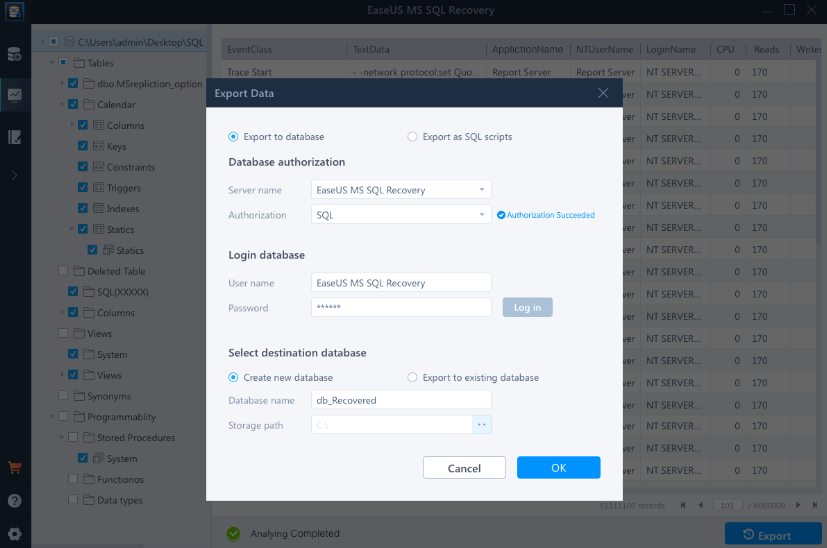
Advanced database repair solutions designed for enterprise settings effectively mend damaged MDF and NDF SQL Server databases, addressing a wide array of SQL database issues. This software proficiently recovers essential database elements such as tables, triggers, indexes, keys, rules, and stored procedures, while also allowing for the deletion of records from the SQL database. It accommodates various versions of MS SQL Server, including 2019, 2017, 2016, 2014, 2012, 2008, and even earlier iterations. When corruption occurs, it typically impacts both primary data (.mdf) and secondary data files (.ndf), but this tool thoroughly scans, identifies, and rectifies affected data files, ensuring that the database is returned to full functionality. Additionally, issues stemming from a corrupted transaction log file (.ldf) can lead to numerous database errors, but EaseUS MS SQL Recovery automatically repairs the damaged log file alongside the rest of the database. After completion, the restored transaction log is conveniently saved in the same directory as the other recovered components, ensuring a seamless recovery process. This comprehensive approach to database repair enhances operational reliability and minimizes downtime for enterprises.
API Access
Has API
No
API Access
Has API
No



Pricing Details
No price information available.
Free Trial
No
Free Version
No
Pricing Details
$299 per year
Free Trial
Yes
Free Version
No
Deployment
Web-Based
No
On-Premises
No
iPhone App
No
iPad App
No
Android App
No
Windows
Yes
Mac
No
Linux
No
Chromebook
No
Deployment
Web-Based
No
On-Premises
No
iPhone App
No
iPad App
No
Android App
No
Windows
Yes
Mac
No
Linux
No
Chromebook
No
Customer Support
Business Hours
No
Live Rep (24/7)
Yes
Online Support
Yes
Customer Support
Business Hours
No
Live Rep (24/7)
Yes
Online Support
Yes
Types of Training
Training Docs
Yes
Webinars
No
Live Training (Online)
No
In Person
No
Types of Training
Training Docs
Yes
Webinars
No
Live Training (Online)
No
In Person
No
Vendor Details
Company Name
Data Converter Tools
Founded
2014
Country
United States
Website
www.convertertools.org/microsoft-sql-recovery/
Vendor Details
Company Name
EaseUS
Founded
2004
Country
United States
Website
www.easeus.com/data-recovery-software/ms-sql-recovery.html
Product Features
Data Recovery
Web Access / Restoration
No
Backup Log
No
Backup Scheduling
No
Compression
No
Continuous Backup
No
Encryption
No
Incremental Backup
No
Local Server Options
No
Multiple System Support
No
Remote Server Options
No
Secure Data Storage
No
Product Features
Data Recovery
Web Access / Restoration
No
Backup Log
No
Backup Scheduling
No
Compression
No
Continuous Backup
No
Encryption
No
Incremental Backup
No
Local Server Options
No
Multiple System Support
No
Remote Server Options
No
Secure Data Storage
No
