Average Ratings 0 Ratings
Average Ratings 10 Ratings
Similar Products
-
WallesterWallester is an Estonian-licensed financial institution and has been an official Visa partner since 2018, specialising in innovative digital financial solutions and card issuance. We empower companies across the European Economic Area (EEA) and the UK to streamline payments, launch branded cards, and scale efficiently. What we do: 1. White-Label Solution with Embedded Finance Our White-Label solution enables businesses to integrate financial services directly into their platforms - a concept known as embedded finance. This allows companies to launch branded payment cards tailored to their specific needs, enhancing customer experiences and opening new revenue streams. We ensure a swift time-to-market with simplified integration and dedicated support from our implementation team. 2. Wallester Business: Corporate Expense Management Wallester Business is designed to modernise corporate expense management. It provides companies with instant access to virtual and physical Visa cards, streamlining financial processes through a modern app and comprehensive portal. Features include expense tracking, budget analytics, and seamless integration with accounting systems to enhance financial oversight and efficiency. With a diverse team of over 190 professionals located in Estonia, Latvia, France and the United Kingdom, we are dedicated to developing high-quality, profitable products for our clients. Our passion for innovation drives us to improve and adapt to the evolving financial landscape continuously. We aim to elevate businesses by providing the most advanced financial technologies, enabling them to reach new heights in efficiency and growth. We are always open to collaboration and eager to assist companies in navigating the future of finance.
-
CloudFilerCloudFiler provides filing and searching in both New and Classic Outlook on all phones & tablets, all popular browsers, Macs and ARM based devices. Created Microsoft's new web Add-in technology by the architect of the Oasys email management system previously owned by Arup Group Ltd and the Excitech Mail system owned by Symetri and latterly Pentagon. File to: the cloud, Windows folders, SharePoint, OneDrive, Egnyte, Autodesk Forma, Bentley ProjectWise, etc. Favoured by the biggest businesses globally.
-
Visual LeaseVisual Lease is the most popular lease accounting and management software. It simplifies compliance with ASC 842 and IFRS 16. Visual Lease's powerful platform is built with years of embedded knowledge, including from top lease experts and CPAs. It can support any size or type lease portfolio. Visual Lease is committed to providing top-notch customer service and offers in-house training, implementation, and support.
-
RaimaDBRaimaDB, an embedded time series database that can be used for Edge and IoT devices, can run in-memory. It is a lightweight, secure, and extremely powerful RDBMS. It has been field tested by more than 20 000 developers around the world and has been deployed in excess of 25 000 000 times. RaimaDB is a high-performance, cross-platform embedded database optimized for mission-critical applications in industries such as IoT and edge computing. Its lightweight design makes it ideal for resource-constrained environments, supporting both in-memory and persistent storage options. RaimaDB offers flexible data modeling, including traditional relational models and direct relationships through network model sets. With ACID-compliant transactions and advanced indexing methods like B+Tree, Hash Table, R-Tree, and AVL-Tree, it ensures data reliability and efficiency. Built for real-time processing, it incorporates multi-version concurrency control (MVCC) and snapshot isolation, making it a robust solution for applications demanding speed and reliability.
-
ParasoftParasoft's mission is to provide automated testing solutions and expertise that empower organizations to expedite delivery of safe and reliable software. A powerful unified C and C++ test automation solution for static analysis, unit testing and structural code coverage, Parasoft C/C++test helps satisfy compliance with industry functional safety and security requirements for embedded software systems.
-
Jama ConnectJama Connect®, a product development platform, uniquely creates Living Requirements™. This digital thread is created through siloed, test, and risk activities to provide end to end compliance, risk mitigation, process improvement, and compliance. Companies creating complex products, systems, and software can now define, align, and execute on what they need. This reduces the time and effort required to prove compliance and saves on rework. You can be sure of success by choosing a solution that is easy-to-use, flexible, and offers support and services that are adoption-oriented.
-
BridgeBridge is an easy-to-use LMS with employee development built in. Uniquely combining learning management, career and skill development, and performance and talent management all in one easy-to-use solution, it helps organizations stay on top of upskilling without administrative overwhelm. With Bridge, you can easily consolidate your learning tech stack, resulting in streamlined training and development programs, saved admin time, and a more engaging experience for employees and managers alike. You have the option of using the fully integrated Talent Suite, or choosing only the stand-alone products below: Bridge LMS: Simple, effective, and hassle-free learning. Admins quickly create and distribute compliance courses, employee learning, partner and customer education, and skill-building programs across teams. Learners easily find everything they need in one place. Bridge Performance Management: With 1on1 tools, talent reviews, skills mapping, and performance analytics, Bridge moves your team beyond completion rates, giving leaders the insights they need to cut skills gaps, and align talent with business goals. Bridge Skills Management Software: With a clear view of skills mastery across your organization, AI-powered skills mapping and personalized development plans, Bridge helps your workforce build tomorrow’s skills today. Real-time labor market data from Lightcast helps you create a skills taxonomy fit for the future. With courses auto-tagged with the right skills and courses automatically recommended to your learners, upskilling stays on track year round. Plus, peer-to-peer learning and skills mentoring is effortlessly facilitated right in the platform.
-
BidJSBidlogix provides auction software for auction houses all over the world. We offer webcast auction software and timed auction software. Our software is embedded on your website with fully customizable styling. Bidlogix, a UK-based company, began providing auction software in 2013. Our software is constantly being improved by our 2 in-house development teams. We have over 10 auctions running per day using our software. Our software can handle the largest auctions in real-time, and can be translated into multiple languages.
-
ScreenMeetScreenMeet offers a suite of secure, browser-based remote support and screen-sharing tools designed to enhance customer service and IT support. With capabilities like remote desktop access, live voice and video support, co-browsing, and asynchronous screen recording, ScreenMeet allows agents to assist customers or employees seamlessly. It integrates with major ITSM, CRM, and contact center platforms such as ServiceNow, Salesforce, and Microsoft Dynamics 365, providing a unified support experience. Designed for enterprises, ScreenMeet ensures high security, scalability, and flexibility, making it ideal for businesses aiming to improve support efficiency and customer satisfaction.
-
InEightInEight is integrated project controls software for capital construction, built as a modular platform where cost, schedule, contracts, and project information share one connected foundation. Organizations implement flexibly and scale from a single complex project to a billion-dollar capital portfolio. Purpose-built applications cover every project phase, and because the products are connected, field data updates budgets, forecasts, and schedules in real time, so every team works from the same numbers. Advanced analytics turn live project data into smarter decisions. Customers in 60+ countries run more than $1 trillion in projects on the platform, across industries including mining, nuclear, power and renewables, transportation, water, and oil, gas, and chemical. Teams use InEight to standardize best practices, manage budgets and forecasts, control scope changes, and modernize how capital projects get delivered.
Description
Capital Embedded AR Classic is a scalable AUTOSAR Classic software platform developed by Siemens for modern automotive embedded systems. It addresses the challenges of increasingly complex vehicle software by providing a reliable and standards-compliant foundation. Capital Embedded AR Classic supports recent AUTOSAR Classic releases and complies with ISO 26262 requirements up to ASIL D. The platform includes comprehensive communication protocol support, including CAN, CAN-FD, LIN, Ethernet, and FlexRay. It enables efficient development of multibus gateways and distributed embedded architectures. Capital Embedded AR Classic supports multicore processors and flexible partitioning of software components. Engineers can execute time-critical applications using built-in profiling capabilities. The solution is designed to scale from small-footprint ECUs to high-performance platforms. OEM-specific extensions are available, including cybersecurity enhancements. Capital Embedded AR Classic integrates seamlessly with other Siemens tools for streamlined ECU configuration.
Description
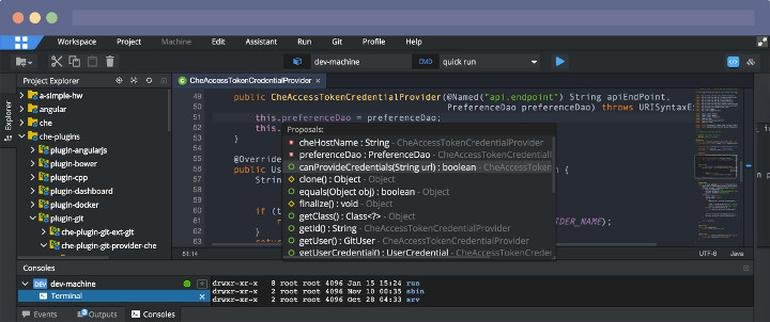
Eclipse IDE stands as the premier open platform tailored for professional developers engaged in computer programming, and it has never been better. This IDE provides essential tools to drive rapid innovation with a simplified configuration process, including the Eclipse IDE Installer 2020-09, which now incorporates a Java Runtime Environment (JRE) in several of its packages. The enhancements also extend to theming and styling, featuring an improved dark theme for Windows and a refined light theme for GTK. Additionally, Eclipse IDE has transitioned to require Java 11 as its minimum operating version while maintaining the ability to compile older versions as desired. Among its new experimental features is support for aarch64, along with robust Linux support that has been integrated into this version. Furthermore, Node.js is now embedded within all LSP-based tools, facilitating seamless functionality from the start. Eclipse IDE remains free and open source, distributed under the Eclipse Public License 2.0, underscoring its commitment to community-driven development. The platform thrives on an extensive ecosystem of plugins, bolstered by an active and engaged community of contributors. This collaborative environment ensures that Eclipse IDE continues to evolve and meet the diverse needs of developers worldwide.
API Access
Has API
No
API Access
Has API
No


Integrations
C
Yes
C++
Yes
BMC AMI DevX
No
DeepCode AI
No
DeepGit
No
EvoSuite
No
Gradle
No
HTML
No
IRI Voracity
No
JavaScript
No
Integrations
C
Yes
C++
Yes
BMC AMI DevX
Yes
DeepCode AI
Yes
DeepGit
Yes
EvoSuite
Yes
Gradle
Yes
HTML
Yes
IRI Voracity
Yes
JavaScript
Yes
Pricing Details
No price information available.
Free Trial
No
Free Version
No
Pricing Details
No price information available.
Free Trial
No
Free Version
No
Deployment
Web-Based
Yes
On-Premises
No
iPhone App
No
iPad App
No
Android App
No
Windows
No
Mac
No
Linux
No
Chromebook
No
Deployment
Web-Based
Yes
On-Premises
No
iPhone App
No
iPad App
No
Android App
No
Windows
No
Mac
No
Linux
No
Chromebook
No
Customer Support
Business Hours
No
Live Rep (24/7)
No
Online Support
Yes
Customer Support
Business Hours
No
Live Rep (24/7)
No
Online Support
Yes
Types of Training
Training Docs
Yes
Webinars
Yes
Live Training (Online)
No
In Person
No
Types of Training
Training Docs
Yes
Webinars
No
Live Training (Online)
No
In Person
No
Vendor Details
Company Name
Siemens
Founded
1847
Country
United States
Website
plm.sw.siemens.com/en-US/capital/products/capital-embedded-ar-classic/
Vendor Details
Company Name
Eclipse Foundation
Country
Canada
Website
www.eclipse.org/eclipseide/
Product Features
Product Features
Application Development
Access Controls/Permissions
No
Code Assistance
No
Code Refactoring
No
Collaboration Tools
Yes
Compatibility Testing
No
Data Modeling
No
Debugging
No
Deployment Management
No
Graphical User Interface
No
Mobile Development
No
No-Code
No
Reporting/Analytics
No
Software Development
Yes
Source Control
No
Testing Management
No
Version Control
No
Web App Development
Yes
Code Editors
API
No
Auto-Complete
No
Code Folding
No
Column Editing
No
Customizable Themes
No
Debugging
No
Formatting / Table Editing
No
Keyboard Shortcuts
No
Multi-Monitor Editing
No
Syntax Highlighting
No
WYSIWYG
No
IDE
Code Completion
No
Compiler
No
Cross Platform Support
No
Debugger
No
Drag and Drop UI
No
Integrations and Plugins
No
Multi Language Support
No
Project Management
No
Text Editor / Code Editor
No
