Average Ratings 0 Ratings
Average Ratings 0 Ratings
Similar Products
-
FormAssemblyFormAssembly allows organizations to take control over the data collection process. Our web-based platform allows companies to streamline old processes and drive business initiatives in any industry. Our platform seamlessly integrates with Salesforce and other business platforms, increasing efficiency across the organization. Furthermore, our advanced security and compliance standards instill confidence.
-
DocmosisDocmosis is a self-hosted or SaaS template-based document generation solution. Integrate with custom-built software applications or popular third-party apps using the API. Create templates using MS Word or LibreOffice. Add plain-text placeholders to control: the insertion of text/images/tables; conditionally add/remove any content; perform calculations; loop over repeating data; format data/numbers and much more. Integrate with: Custom software built using Java, C#, Python, PHP, Ruby and more via a REST API; Low-code and no-code platforms like Appian, Bubble, Mendix, Outsystems; Third-party form builders or apps that can perform a webhook such as FormAssembly or Salesforce. Used by customers in Finance, Health, Legal, Education, Government, HR, Insurance, Logistics, and Manufacturing to generate customized letters invoices, proposals, contracts, statements, reports and more.
-
Epicor Connected Process ControlEpicor Connected Process Control (CPC) is a flexible no-code/low-code MES and manufacturing operations platform that helps manufacturers standardize production and assembly processes, improve quality, and increase visibility across the shop floor. Using digital work instructions with multimedia content, manufacturers can guide operators through critical tasks, enforce process control, and improve consistency across products, workstations, and production lines. CPC connects equipment and devices to collect production and quality data in real time, helping manufacturers identify issues faster, reduce waste, and support continuous improvement. CPC provides product traceability with a complete historical record of each product's build and inspection history. Manufacturers use CPC to support assembly verification, error proofing, quality inspections, operator guidance, and other connected manufacturing initiatives. For manufacturers with complex product variations, CPC can dynamically present the correct work instructions based on the product or configuration being built, helping ensure products are assembled accurately and consistently. Available on-premises or in the cloud, CPC scales from a single work cell to enterprise-wide deployments.
-
Adobe Experience ManagerAdobe Experience Manager is an enterprise content management platform designed to power seamless digital experiences across web, mobile, apps, and other channels. Experience Manager Sites enables teams to create, manage, and optimize content efficiently while ensuring high performance and rapid delivery. Experience Manager Assets provides a robust digital asset management system with automation tools to source, adapt, and distribute content at scale. AI-driven Experience Platform Agents enhance productivity by automating tasks such as high-volume page updates, content migration, governance enforcement, and content optimization. Forms capabilities allow organizations to create responsive digital forms with secure e-signature workflows for streamlined customer interactions. Adobe Learning Manager integrates training and development directly into brand ecosystems, while Experience Manager Guides supports scalable documentation through a cloud-native CCMS. Built-in governance tools ensure compliance, brand consistency, and permission control across digital properties. By combining automation, AI, and centralized management, Adobe Experience Manager accelerates time-to-market and enhances customer engagement.
-
SurveyJSSurveyJS is a set of four open-source JavaScript libraries that offer the benefits of a tailor-made in-house survey application, while considerably reducing the time and resources needed to deploy the system. These libraries are independent of specific server code or database requirements and seamlessly integrate with popular JavaScript frameworks, including React, Angular, Vue.js, jQuery, Knockout, and more. They are designed to communicate with any server that can handle JSON requests, ensuring compatibility with various server architectures and databases. The product family is composed of: - An open-source MIT-licensed rendering library that renders dynamic JSON-based forms in your web application, and collects responses. - A self-hosted drag & drop form builder that features an integrated CSS-based theme editor and a GUI for conditional rules. It automatically generates JSON definitions (schemas) of your forms in real time. - PDF Generator, a library that renders SurveyJS surveys and forms as PDF files in a browser; - The Dashboard library that allows you to simplify survey data analysis with interactive and customizable charts and tables. Visit our website to try out and evaluate our full-scale demo for free.
-
SovosSovos is a global provider of tax, compliance, and trust solutions and services that enable businesses to navigate an increasingly regulated world with true confidence. More than 100,000 customers in 100+ countries - including half the Fortune 500 – trust Sovos for their compliance needs. Sovos annually processes more than three billion transactions across 19,000 global tax jurisdictions. Bolstered by a robust partner program more than 400 strong, Sovos brings to bear an unrivaled global network for companies across industries and geographies. Founded in 1979, Sovos has operations across the Americas and Europe, and is owned by Hg and TA Associates.
-
UnFormUnForm is a powerful enterprise document management and process automation solution that seamlessly integrates with any application. Our platform-independent, fully browser-based solutions provide the ability to create, deliver, capture, index, route, and store documents from start to finish so that a transaction’s entire life cycle can be accessed with one easy search. Our data extraction and workflow capabilities enable the automation of data entry-intensive processes. UnForm.Cloud, a hosting service for UnForm Document Management, is a perfect fit for those who are running cloud-based ERP systems or looking for a solution with no hardware to purchase, manage, or maintain. Implementing UnForm has never been easier. Backed by a proven hosting vendor, Oracle, you have the peace of mind knowing your data is safe and secure with well-managed data centers and cross-region backups, ensuring reliable and continues access to your data when you need it.
-
SorabanSoraban serves as an AI-driven administrative assistant tailored for accounting and tax firms, aimed at automating the processes of client data collection, document retrieval, and workflow management through a user-friendly, branded portal. By substituting monotonous manual tasks with flexible, customizable questionnaires that can send automatic reminders to clients via SMS, email, or voicemail, it also converts document uploads into PDFs and enhances client communication with intelligent, context-sensitive prompts. This tool integrates seamlessly with existing accounting software, enabling automatic data entry, the application of e-signatures for IRS documentation, and efficient coordination of tax return deliveries, all while minimizing the need for human involvement. By taking over repetitive administrative responsibilities, Soraban allows professionals to dedicate their time to advisory roles, thereby boosting overall efficiency, minimizing errors, and elevating the client experience through smooth, mobile-accessible interactions. Ultimately, Soraban not only transforms how accounting firms operate but also paves the way for a more streamlined future in client management.
-
iTacitYour employees can connect to everything they need to do the job. iTacit is more than an employee app. It gives your front-line access to email-free messages and training, a social intranet as well as digital forms, checklists, and other resources. Better engagement starts with hiring and continues through employee retention. iTacit makes it easy to streamline recruitment, onboarding, training, as well as setting performance goals and standards. Keep an eye on your workforce's progress. Give your team the tools and training they need to succeed and watch them grow. iTacit can reduce or eliminate in-person training, track compliance, and offer independent learning paths for employees. Multiple teams working together and a large front-line workforce can pose challenges. Your business and customer success depend on a skilled workforce. This means you will already face the challenges of segmenting communications, managing compliance records, and other tasks.
-
FirstPromoterRun affiliate, influencer, and referral programs from one platform. Connect your billing, set commission rules, and go live the same day. Native integrations with Stripe, Paddle, Chargebee, Recurly, and Braintree feed every billing event into your program. Upgrades, downgrades, renewals, refunds, and cancellations each update commissions on their own, so payouts stay in step with revenue. Run payouts fully managed, or in bulk through PayPal and Wise. W-9/W-8BEN forms are gathered before any money leaves, and an invoice accompanies every payout, removing most of the admin a program usually brings. Promoters get a dashboard in your branding, with links, coupon codes, and earnings in one view. You get 18-point reporting, commission structures from flat fee to multi-tier, fraud detection, and broadcast email to your entire promoter base. Start your program today with a 14-day free trial. No credit card required.
Description
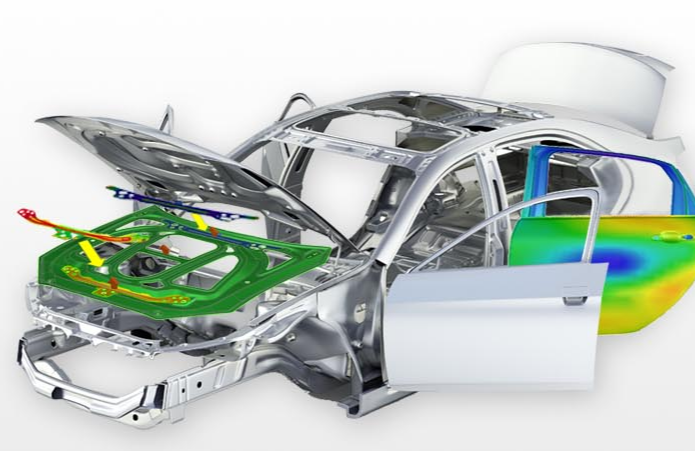
AutoForm provides a robust suite of software solutions that create a unified platform for the engineering, assessment, and enhancement of sheet metal forming and body-in-white (BiW) assembly processes. This platform facilitates complete digital transformation, ensuring smooth data and information exchange while adhering to Industry 4.0 principles. The AutoForm Forming suite includes a diverse array of software products equipped with advanced functionalities for the digital planning and validation of sheet metal processes and components. Complementing this, the AutoForm Assembly software suite manages the entire BiW assembly workflow, addressing aspects such as tolerance and quality management, process engineering, and iterative trial phases to refine real production outcomes. Additionally, AutoForm TubeXpert stands out as a user-friendly and highly intuitive solution designed for the rapid design and simulation of tube bending, forming, and hydroforming processes. For those involved in progressive die manufacturing, the Logopress software offers tailored solutions that streamline the design of progressive dies, enhancing efficiency and precision in production. Overall, AutoForm's comprehensive offerings cater to a wide range of industry needs, promoting innovation and effectiveness in metal forming operations.
Description
High-quality 3D CAD software designed for engineering and product design is available through Inventor® CAD software, which offers extensive tools for 3D mechanical design, documentation, and product simulation. This software allows users to operate efficiently by combining various design methods, such as parametric, direct, freeform, and rules-based approaches. Collaborate seamlessly with anyone, regardless of the CAD software they utilize, and leverage cloud-based design reviews to gather insights from important stakeholders wherever they are located. It supports the entire product development process with a unified data model, enabling more effective design through specialized features for sheet metal, frame design, and tube and pipe. Additionally, users can enhance their design, documentation, and process automation efforts using iLogic. The Inventor API allows for the creation of custom add-ins, while the Forge Design Automation API offers the ability to execute job processes in the cloud, providing further flexibility and innovation in design workflows. By utilizing these advanced tools, teams can significantly improve their efficiency and collaboration throughout the design process.
API Access
Has API
No
API Access
Has API
Yes






Integrations
AWS Secrets Manager
No
CAD+T
No
CADbro
No
Delcam Exchange
No
Diabatix ColdStream
No
DraftAid
No
Emulate3D
No
Epicor CPQ
No
Glovius CAD Viewer
No
ImageSite
No
Integrations
AWS Secrets Manager
Yes
CAD+T
Yes
CADbro
Yes
Delcam Exchange
Yes
Diabatix ColdStream
Yes
DraftAid
Yes
Emulate3D
Yes
Epicor CPQ
Yes
Glovius CAD Viewer
Yes
ImageSite
Yes
Pricing Details
No price information available.
Free Trial
No
Free Version
No
Pricing Details
$2,190 per year
Free Trial
Yes
Free Version
No
Deployment
Web-Based
Yes
On-Premises
No
iPhone App
No
iPad App
No
Android App
No
Windows
Yes
Mac
No
Linux
No
Chromebook
No
Deployment
Web-Based
Yes
On-Premises
No
iPhone App
No
iPad App
No
Android App
No
Windows
Yes
Mac
No
Linux
No
Chromebook
No
Customer Support
Business Hours
Yes
Live Rep (24/7)
No
Online Support
Yes
Customer Support
Business Hours
No
Live Rep (24/7)
No
Online Support
Yes
Types of Training
Training Docs
Yes
Webinars
Yes
Live Training (Online)
Yes
In Person
Yes
Types of Training
Training Docs
Yes
Webinars
No
Live Training (Online)
No
In Person
No
Vendor Details
Company Name
AutoForm
Country
Switzerland
Website
www.autoform.com/en/
Vendor Details
Company Name
Autodesk
Founded
1982
Country
United States
Website
www.autodesk.com/products/inventor/overview
Product Features
Engineering
2D Drawing
No
3D Modeling
No
Chemical Engineering
No
Civil Engineering
No
Collaboration
No
Design Analysis
No
Design Export
No
Document Management
No
Electrical Engineering
No
Mechanical Engineering
No
Mechatronics
No
Presentation Tools
No
Structural Engineering
No
Product Features
CAD
2 1/2-Axis Milling
No
2D Drawing
No
3-Axis Milling
No
3D Modeling
No
4-Axis Milling
No
5-Axis Milling
No
Civil
No
Collaboration
No
Database Connectivity
No
Design Analysis
No
Design Export
No
Document Management
No
Electrical
No
Hole Making
No
Mechanical
No
Mechatronics
No
Presentation Tools
No
Simulate Cycles
No
Spiral Output
No
Structural Engineering
No
Toolpath Simulation
No
User Defined Cycles
No
CAD Viewers
Annotate
No
Batch Conversion
No
Collaboration Tools
No
Editing
No
Track Changes
No
View .DWF Files
No
View .DWG Files
No
View .IGES Files
No
View .STEP Files
No
View .STL Files
No
View 2D Files
No
View 3D Files
No
Engineering
2D Drawing
No
3D Modeling
No
Chemical Engineering
No
Civil Engineering
No
Collaboration
No
Design Analysis
No
Design Export
No
Document Management
No
Electrical Engineering
No
Mechanical Engineering
No
Mechatronics
No
Presentation Tools
No
Structural Engineering
No
Fashion Design
CAD Tools
No
Color Matching
No
Design Export
No
Fabric Matching
No
Fashion Illustrations
No
Pattern Grading
No
Pattern Layout / Print / Cut
No
Pattern, Color & Art Storage
No
Presentation Tools
No
Textile Pattern Design
No