Average Ratings 0 Ratings
Average Ratings 10 Ratings
Similar Products
-
Planview AdaptiveWorkPlanview AdaptiveWork, previously known as Clarizen, empowers PMOs and professional services teams of various sizes to achieve instant visibility across their operations, streamline workflows, proactively address potential risks, and enhance overall business outcomes. By aligning with the company’s strategic objectives, organizations can maximize workforce effectiveness, ensuring that teams concentrate on delivering the most critical tasks timely. It facilitates the tracking, management, and prioritization of work requests, guaranteeing that each request automatically encompasses all necessary information for execution. With bi-directional integration with your CRM and custom triggers in place, opportunity details can be effortlessly captured to aid in planning client projects. The platform automates and governs the various phases of the request lifecycle, including submission, scoring, prioritization, routing, and approval, thereby streamlining the pathway for converting requests into actionable projects, tasks, or work items. This comprehensive approach not only boosts efficiency but also fosters a culture of accountability and transparency within the organization.
-
Project InsightProject Insight helps organizations connect project data across teams and systems to make better decisions about their business. As a strategic project and portfolio management platform, it brings together resource and capacity planning, financial management, project requests, execution, governance, and portfolio performance. The result is a connected project data backbone that gives PMOs and executives visibility into organization-wide work and supports trustworthy reporting, forecasting, and AI analysis. Teams can continue using familiar tools such as Jira, Azure DevOps, Microsoft, Salesforce, ServiceNow, and HubSpot while Project Insight brings their project information into one central command center, reducing manual data entry and disconnected reporting. Manage projects, programs, and portfolios using flexible workflows, intelligent scheduling, Gantt charts, Kanban boards, time tracking, budget management, and customizable dashboards. Leaders can monitor workloads, project health, costs, and strategic priorities without chasing information across departments. AI-powered features help create project plans, turn meeting discussions into action items, recommend resources, forecast capacity, and evaluate what-if scenarios. From growing teams outgrowing spreadsheets to established PMOs with complex business processes, Project Insight adapts to the way organizations work through configurable processes, dedicated onboarding support, and free view-only access for clients and stakeholders.
-
Planview ProjectAdvantagePlanview ProjectAdvantage brings clarity, control, and scalability to enterprise project management by unifying project data, resources, and performance insights in one platform. Built for growing PMOs and complex organizations, it eliminates silos and inefficiencies by connecting teams through a single source of truth. Users can monitor resource allocation, track workloads, and forecast capacity with precision using dynamic dashboards. ProjectAdvantage’s portfolio scoring tools and sandbox environments make it easy to prioritize initiatives and align them with company strategy. Its flexibility supports any methodology—Agile, hybrid, or Waterfall—making it ideal for diverse industries and workflows. Seamless integrations with leading enterprise systems like Jira, ServiceNow, and Microsoft Teams enable cross-functional collaboration and real-time visibility. Backed by AI-driven analytics, Planview Projectadvantage helps accelerate project delivery, improve performance tracking, and ensure continuous strategic alignment. Designed for agility, it’s a transformative solution that turns project chaos into structured, measurable success.
-
FramnexFramnex is a financial infrastructure and client monetization platform for businesses that want to launch branded financial products around existing customer relationships. The platform helps partners offer accounts, payments, FX, cards, wallets, payouts, money transfers, mobile banking apps, and digital asset products without becoming a bank or assembling fragmented infrastructure vendors. Framnex is built for companies that already serve clients with financial needs, including FX brokers, company formation firms, banking consultants, payment providers, digital asset platforms, marketplaces, and fintech startups. Partners can start with one financial product and expand into a broader ecosystem as client demand grows. The platform includes core banking, ledger, cards, payments, wallets, compliance, connectors, and developer capabilities. Framnex connects with banking, payments, cards, compliance, and digital asset infrastructure providers to support real financial product launches. Its guided implementation model helps partners define the business opportunity, design the product scope, configure the solution, integrate systems, test workflows, and prepare for production. The platform emphasizes enterprise-grade compliance, KYC and AML controls, transaction monitoring, regulatory support, security, and partner-first delivery. By combining white-label financial products, embedded finance, banking infrastructure, compliance workflows, cards, wallets, payments, FX, and guided launch support, Framnex helps businesses create recurring financial revenue under their own brand.
-
DetrackStreamline everything from proof of delivery and real-time driver tracking, through to route optimisation and customer updates. Save time, reduce operating costs, and boost productivity with Detrack. Integrations Integrate with the best accounting and SMS platforms. From order creation through to proof of delivery, everything works together seamlessly - orders sync automatically, customers get notified instantly and drivers receive jobs in real-time. Test drive all features for free It only takes a few minutes to add your drivers, upload or create jobs and start branding your customer comms. Our free trial gives you access to all features for 14 days. We know that there aren’t enough hours in the day and our experts are available 24/5 to help you get set up to achieve your goals faster. You can chat live or book a call back for practical, hands-on support.
-
Shape SoftwareShape Software's purpose-built sales and marketing automation software empowers you to manage all aspects of your business from one platform. The cloud-based software from Shape offers many tools to help you manage and automate your online marketing, promotions via text, email and digital marketing ads, capture leads from online sources, nurture prospects and customers and project manage your day. You can also offer customers a secure portal to streamline your intake processes, systematically score leads with ShapeIQ, and run detailed custom reporting. Start growing your revenue with Shape's flexible suite of services today.
-
DbVisualizerDbVisualizer is a universal database client for anyone who works with data, from indie developers and startups to professional teams managing complex database environments, including developers, DBAs, analysts, and data engineers working across relational and NoSQL databases. Key features: - SQL editor with intelligent autocomplete, visual query builders, variables, and execution tools - AI Assistant for answering questions, explaining errors, and analyzing code - Git integration for managing SQL scripts and team collaboration - Customizable layouts, key bindings, and UI themes - Favorites for frequently used scripts and database objects - Configurable security settings for organizational requirements Connects via JDBC to MySQL, PostgreSQL, SQL Server, Oracle, Snowflake, SQLite, Cassandra, BigQuery, and more. Runs on Windows, macOS, and Linux. Nearly 7 million downloads, with Pro users in 150 countries, scaling from solo projects to enterprise database management.
-
Total ETOTotal ETO is a Totally Better ERP / MRP for Custom Machine Builders, providing better efficiency, accuracy, and profitability. Our system was designed by engineers to match the unique workflow of Engineer To Order manufacturers, including Integrators, Panel Shops & OEMs. Our solution will: -Increase efficiency in engineering by integrating with your CAD. -Allow designers to cost out the BOM before purchases are made. -Track changes to the BOM at any stage of the project and ensure the information is shared across departments. -Save time & money in procurement with your newly Dynamic BOMs. -Capture change order information, including labor, material, and sales price changes so they aren't omitted or forgotten. -Improve accuracy through out your organization, including sales estimates. -Route parts between various tasks, tracking both internal and external processes. -Help ensure parts are inspected and know who completed the inspection. You'll be able to record and follow up on quality issues on the shop floor, from engineering, or for purchased parts with embedded Non-Conformance Reports.
-
Altium DevelopAltium Develop is a collaborative platform for modern electronics engineering teams that connects requirements management, PCB design, systems engineering, and manufacturing workflows. Built on Altium Designer and Altium 365, the platform provides a centralized environment for design collaboration, requirements traceability, BOM management, supply chain visibility, and engineering change management. Altium Develop helps hardware organizations maintain alignment between requirements, design decisions, and manufacturing outcomes while supporting distributed engineering teams through cloud-based collaboration. Core Features: • PCB design collaboration • ECAD-MCAD co-design workflows • Component and supply chain visibility • BOM and engineering change management • Design review and approval workflows • Cloud-native team collaboration • Requirements management and traceability Used by electronics teams building complex PCB-based products, Altium Develop is frequently evaluated alongside Cadence OrCAD, Cadence Allegro, Autodesk Fusion Electronics, KiCad, Siemens Xpedition, and SOLIDWORKS PCB for organizations seeking greater collaboration and lifecycle visibility across hardware development programs.
-
PDFCreatorPDFCreator automates document output in Windows-based business environments, covering the whole creation pipeline from conversion to delivery. It converts print output from any application into PDF, JPG, PNG, or TIF via a virtual printer, so existing workflows don’t need to change. Businesses use PDFCreator to streamline repetitive document tasks: output is captured, formatted, named, secured, and routed according to configurable profiles. Typical use cases include automated report generation, batch processing of large document sets, and compliant document delivery in regulated industries. Key capabilities include encryption, password protection, digital signatures, watermarking, MSI-based deployment, Group Policy support, and centralized profile management. It works with Word, Excel, browsers, ERP platforms, and essentially any Windows application that can print. PDFCreator is available as a free edition for individual, non‑commercial use, alongside three paid editions tailored to business, terminal server, and broader enterprise deployments.
Description
Atmel START serves as a groundbreaking online platform designed for the straightforward, visual setup of embedded software projects. This tool enables users to choose and configure a variety of software components, drivers, middleware, and even complete example projects that are customized to meet specific application requirements. During the configuration process, you can assess the relationships among software components, identify potential conflicts, and understand hardware limitations. If any conflicts arise, Atmel START promptly offers tailored solutions that align with your unique configuration. With its user-friendly graphical interface for pin-multiplexing and clock settings, you can seamlessly integrate your software and drivers with your actual hardware design. Additionally, the tool offers automated support to facilitate the adaptation of projects and applications across different devices. This makes it incredibly simple to get sample code operational on your hardware. Once you've finished configuring your project, you can easily download it for integration with your chosen integrated development environment (IDE), streamlining the entire development process even further. Overall, Atmel START enhances the efficiency and effectiveness of developing embedded software projects.
Description
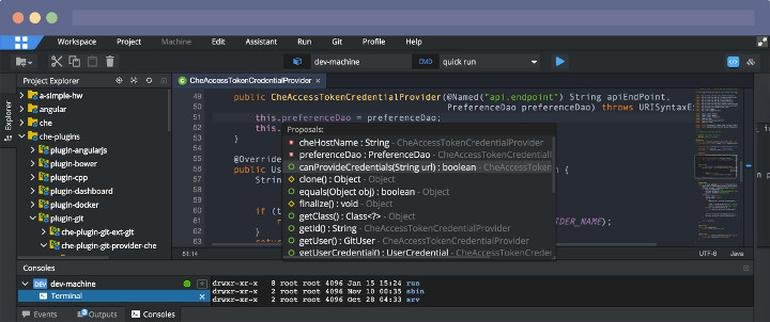
Eclipse IDE stands as the premier open platform tailored for professional developers engaged in computer programming, and it has never been better. This IDE provides essential tools to drive rapid innovation with a simplified configuration process, including the Eclipse IDE Installer 2020-09, which now incorporates a Java Runtime Environment (JRE) in several of its packages. The enhancements also extend to theming and styling, featuring an improved dark theme for Windows and a refined light theme for GTK. Additionally, Eclipse IDE has transitioned to require Java 11 as its minimum operating version while maintaining the ability to compile older versions as desired. Among its new experimental features is support for aarch64, along with robust Linux support that has been integrated into this version. Furthermore, Node.js is now embedded within all LSP-based tools, facilitating seamless functionality from the start. Eclipse IDE remains free and open source, distributed under the Eclipse Public License 2.0, underscoring its commitment to community-driven development. The platform thrives on an extensive ecosystem of plugins, bolstered by an active and engaged community of contributors. This collaborative environment ensures that Eclipse IDE continues to evolve and meet the diverse needs of developers worldwide.
API Access
Has API
Yes
API Access
Has API
No


Integrations
AiXcoder
No
Azure Marketplace
No
CSS
No
Contrast Assess
No
DeepGit
No
EvoSuite
No
JavaScript
No
Maven
No
Onapsis
No
Poolside
No
Integrations
AiXcoder
Yes
Azure Marketplace
Yes
CSS
Yes
Contrast Assess
Yes
DeepGit
Yes
EvoSuite
Yes
JavaScript
Yes
Maven
Yes
Onapsis
Yes
Poolside
Yes
Pricing Details
No price information available.
Free Trial
No
Free Version
No
Pricing Details
No price information available.
Free Trial
No
Free Version
No
Deployment
Web-Based
Yes
On-Premises
No
iPhone App
No
iPad App
No
Android App
No
Windows
No
Mac
No
Linux
No
Chromebook
No
Deployment
Web-Based
Yes
On-Premises
No
iPhone App
No
iPad App
No
Android App
No
Windows
No
Mac
No
Linux
No
Chromebook
No
Customer Support
Business Hours
Yes
Live Rep (24/7)
No
Online Support
Yes
Customer Support
Business Hours
No
Live Rep (24/7)
No
Online Support
Yes
Types of Training
Training Docs
Yes
Webinars
No
Live Training (Online)
No
In Person
Yes
Types of Training
Training Docs
Yes
Webinars
No
Live Training (Online)
No
In Person
No
Vendor Details
Company Name
Microchip
Founded
1989
Country
United States
Website
www.microchip.com/en-us/development-tools-tools-and-software/embedded-software-center/atmel-start
Vendor Details
Company Name
Eclipse Foundation
Country
Canada
Website
www.eclipse.org/eclipseide/
Product Features
Product Features
Application Development
Access Controls/Permissions
No
Code Assistance
No
Code Refactoring
No
Collaboration Tools
Yes
Compatibility Testing
No
Data Modeling
No
Debugging
No
Deployment Management
No
Graphical User Interface
No
Mobile Development
No
No-Code
No
Reporting/Analytics
No
Software Development
Yes
Source Control
No
Testing Management
No
Version Control
No
Web App Development
Yes
Code Editors
API
No
Auto-Complete
No
Code Folding
No
Column Editing
No
Customizable Themes
No
Debugging
No
Formatting / Table Editing
No
Keyboard Shortcuts
No
Multi-Monitor Editing
No
Syntax Highlighting
No
WYSIWYG
No
IDE
Code Completion
No
Compiler
No
Cross Platform Support
No
Debugger
No
Drag and Drop UI
No
Integrations and Plugins
No
Multi Language Support
No
Project Management
No
Text Editor / Code Editor
No
