Adobe Premiere
4.6 out of 5 starsKdenlive
5.0 out of 5 starsAverage Ratings 9 Ratings
Average Ratings 1 Rating
Similar Products
-
Adobe FireflyAdobe Firefly is a versatile AI-powered creative platform designed to help users generate and edit multimedia content with ease. It allows users to create images, videos, and audio using simple text prompts within an interactive and flexible workspace. The platform features tools like generative fill, image editing, and video editing, enabling users to refine and enhance their creations. Firefly also includes quick actions such as background removal, cropping, resizing, and format conversion to streamline workflows. Users can explore an infinite canvas for creative production and experiment with various styles and outputs. The platform encourages creativity by allowing users to remix content from a shared community gallery. With its intuitive design, it reduces the need for advanced technical skills. Firefly integrates AI capabilities to speed up content creation and editing processes. It supports both beginners and professionals in producing high-quality results. Overall, Adobe Firefly provides a powerful and accessible environment for modern digital creativity.
-
Adobe AcrobatAdobe Acrobat is an all-in-one PDF productivity and e-signature platform and one of the leading enterprise document platforms that scales for global teams — designed to simplify document creation, editing, collaboration, and protection. Users can edit text and images directly within PDFs, reorganize pages, and compare file versions to quickly identify changes. The software enables fast conversion between PDFs and common file formats such as Microsoft Word, Excel, PowerPoint, and image files. Integrated e-signature capabilities allow businesses to collect legally binding signatures and track responses securely. With Acrobat Studio, Adobe Acrobat expands beyond core PDF and e‑signature tasks into an AI‑powered workspace for document insight, content creation, and collaboration.Acrobat AI Assistant adds intelligent document support by summarizing content, generating insights, and answering contextual questions with cited references. PDF Spaces creates a collaborative workspace where teams can centralize files, comments, and AI-driven guidance. Built-in protection tools safeguard documents with encryption, permissions, and redaction features. Mobile apps such as Acrobat Reader and Adobe Scan ensure access and editing capabilities from anywhere. Designed for individuals, students, and enterprises, Adobe Acrobat helps reduce document processing time and improve overall productivity.
-
YodeckNext-generation technology for digital signage professionals Yodeck, a cloud-based digital signage platform, is unbeatable. It powers your screen with dynamic content that instantly engages your target audience. Yodeck makes it easy to create, schedule, and design content from the web. To get your message across to those who matter most to you, use attention-grabbing media such as videos, images and PDF files, Office documents, data dashboards, and social media. It provides enterprise-grade security and control. Yodeck's drag-and-drop editing feature allows users to be creative in organizing content into interesting layouts. Yodeck is proud to offer a unique digital signage solution for businesses of all sizes. This includes local diners as well as global leaders like Delta Airlines, Autodesk and Adobe.
-
AI Video CutAI Video Cut is a complimentary tool designed to convert long videos into dynamic short clips that are perfect for platforms such as YouTube Shorts, TikTok, and social media advertisements. By utilizing AI-enhanced prompts, it provides a range of ready-made templates alongside customizable features, enabling users to craft enticing trailers, product showcases, and educational content. The tool boasts advanced smart cropping technology that recognizes faces, a variety of caption styles, and multilingual support, ensuring that the content resonates with a wide array of audiences. Additionally, users have the flexibility to export their videos in different lengths and aspect ratios tailored to various platforms and viewer preferences. Ideal for content creators, digital marketers, social media strategists, e-commerce entrepreneurs, event coordinators, and podcasters, AI Video Cut streamlines the process of enhancing video content, making it accessible and efficient for anyone looking to elevate their visual storytelling. With its user-friendly interface and innovative features, AI Video Cut empowers individuals and businesses alike to make a lasting impact through their video content.
-
KnakKnak is the enterprise-grade, no-code solution that transforms how marketing teams build emails and landing pages — without relying on developers or agencies. With a robust modular design system, real-time collaboration, and native integrations with platforms like Marketo, SFMC, and Eloqua, Knak eliminates production bottlenecks while preserving brand governance. Empower your team to deliver high-performance assets quickly, securely, and at scale — no code required. Trusted by global brands to streamline campaign execution and accelerate time-to-market.
-
Adobe Experience ManagerAdobe Experience Manager is an enterprise content management platform designed to power seamless digital experiences across web, mobile, apps, and other channels. Experience Manager Sites enables teams to create, manage, and optimize content efficiently while ensuring high performance and rapid delivery. Experience Manager Assets provides a robust digital asset management system with automation tools to source, adapt, and distribute content at scale. AI-driven Experience Platform Agents enhance productivity by automating tasks such as high-volume page updates, content migration, governance enforcement, and content optimization. Forms capabilities allow organizations to create responsive digital forms with secure e-signature workflows for streamlined customer interactions. Adobe Learning Manager integrates training and development directly into brand ecosystems, while Experience Manager Guides supports scalable documentation through a cloud-native CCMS. Built-in governance tools ensure compliance, brand consistency, and permission control across digital properties. By combining automation, AI, and centralized management, Adobe Experience Manager accelerates time-to-market and enhances customer engagement.
-
MobiPDFMobiPDF (formerly PDF Extra) is an intuitive reader and editor that allows you to read, edit, create, OCR, organize, annotate, fill and sign, convert, and share any PDF. This makes MobiPDF an excellent choice for users seeking a budget-friendly alternative to Adobe Acrobat Pro. HERE’S WHAT YOU GET WITH MOBIPDF: Multiple Page View Modes: Enjoy a distraction-free "Read Mode". Advanced Editing Tools: Experience a Word-like PDF editing environment. Two-Way Conversions: Convert PDFs to and from Word, Excel, PowerPoint, or image formats. OCR Support: Make scanned documents searchable. Markup Tools: Highlight, comment, strikethrough, stamp, and more to enhance your documents. Effortless PDF Organizer: Reorder, compress, split, and combine PDFs with ease. Sign & Secure: Add signatures, create and fill forms, and protect your PDFs with passwords, encryption, and digital certificates. Offline Mode: Work freely on your projects, even offline. Seamless translation: One-click translate any PDF into 50+ languages.
-
MuzaicMuzaic.ai is a browser-based tool that scores video automatically. You give it a cut (or a folder of cuts); it returns a finished audio mix — music, SFX, ambience and voiceover as separate layers — mastered to broadcast spec, in roughly 30 seconds per clip. What it actually does The pipeline runs in four stages. First it analyses the video: scenes, objects, pacing, colour and sentiment. From that it builds an audio plan and commits each concept to a clear direction (the site's example: a string quartet under a battle scene) rather than averaging toward something inoffensive. Then it composes every layer to fit the picture and the other layers — SFX land on the action, ambience ducks under speech, the voiceover is drafted from your brief rather than read out. Finally it mixes and masters the result. Existing audio in the source can be kept, replaced or mixed under. Output is three concepts per clip, exported as MP3 or WAV. Layer balance is adjusted inside Muzaic before export; the deliverable is the finished mix, not separate stems. The commercial angle Pricing is metered in minutes of finished audio, not per track or per download; downloads are unlimited. Personal is free for 10 minutes a month, non-commercial only. Creator ($45/month) covers your own brand and paid ads. Studio ($249/month) is for agencies: the licence travels to the client and the legal cover extends to them too. Enterprise adds TV, radio, cinema and OOH, plus a custom contract, DPA and SLA. What it is not It is not a music-generation toy. The free tier exists to test the workflow on your own footage; nothing from it may be published. The target user is a team producing hundreds of ad variants a month, where the audio step is the bottleneck.
-
RAD PDFInstall-free PDF editing, form filling, redaction, signing, viewing, and more on your website with RAD PDF! Packaged as an easy to use library / WebControl (compatible with .NET 3.5+, .NET Core, and .NET 5+), RAD PDF can be used with just about any flavor of ASP.NET including MVC, Razor, Blazor, WebForms, and more. RAD PDF is compatible with 99% of internet browsers, including those on Linux, Mac OS X, Microsoft Windows, and mobile. No plugins. No Adobe Reader. RAD PDF is more than a PDF to HTML converter. It natively supports all the most common PDF features including annotations, bookmarks, form fields, page labels, and more. With advanced PDF options, RAD PDF allows you to selectively enable and disable features not available with Adobe Acrobat Reader, like protecting a PDF from being downloaded while still viewable online. RAD PDF users can use PDF form fields directly from the web browser by enabling PDF form filling and PDF form saving without having to install any software. Integrating directly with ASP.NET, RAD PDF allows your web application to capture input data, build custom workflows, and provide an intuitive graphical user interface (GUI) for just about any online PDF interaction imaginable!
-
LTXMost AI video tools hand you a black box: closed weights, a subscription, and no way to see what is happening under the hood. LTX takes the opposite approach. Built by Lightricks, LTX is an open foundation model that generates and simulates across video, audio, and the physical world, and it puts the weights, the code, and the control in your hands. At the center of the model is LTX-2.5, a 22B-parameter dual-stream diffusion transformer that produces native 4K video at up to 50 frames per second, with audio and video generated together in a single pass rather than stitched together afterward. Artificial Analysis, an independent benchmarking group, currently ranks LTX among the top three AI video models in the world. You choose how you want to use it. Download the open weights and run LTX-2.5 on your own hardware. License the model for on-premise deployment backed by enterprise support. Or build directly on LTX Studio, the production suite that turns the model into a full creative workflow. Companies like ElevenLabs, Asteria Film Co., Magnopus, and NVIDIA already rely on LTX for their own work. LTX is not built for one-off social clips. It is infrastructure for teams that generate motion, audio, and physical environments as part of their own products and pipelines.
Description
Adobe Premiere is a professional nonlinear video editing platform designed for filmmakers, video editors, broadcasters, marketers, and digital content creators. Developed by Adobe, the software combines video editing, color correction, audio production, motion graphics, and media management within a unified creative environment. Its timeline-based editing tools support precise trimming, multicamera editing, layered video sequences, transitions, and customizable effects. AI-powered Text-Based Editing automatically transcribes footage and allows users to assemble or modify video sequences by editing the associated transcript. Media Intelligence enables editors to locate relevant footage using natural-language descriptions, spoken dialogue, and visual characteristics. Generative AI functionality allows users to create additional video content, extend clips, and generate sound effects using Adobe Firefly and supported third-party models. Adobe Premiere includes advanced color grading, automated color matching, object masking, background replacement, and professional audio tools for improving dialogue and sound quality. Integrated collaboration features support Team Projects, Frame.io review and approval workflows, Creative Cloud Libraries, and direct connectivity with Adobe After Effects and Photoshop. With automatic captioning, multilingual subtitle translation, flexible aspect ratios, and extensive export capabilities, Adobe Premiere helps organizations create professional video content for broadcast, streaming, social media, and commercial production.
Description
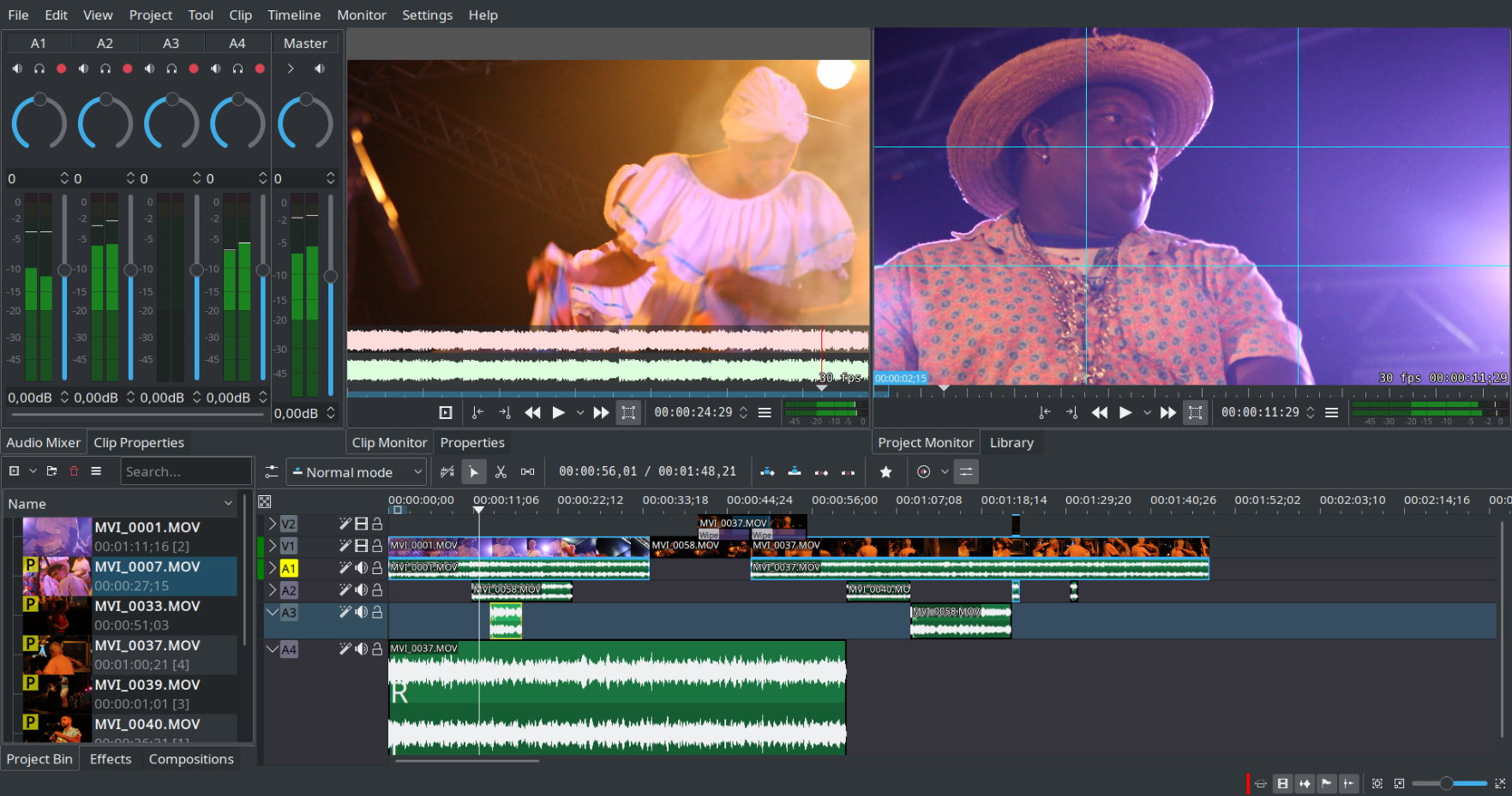
Kdenlive serves as a non-linear video editing software that operates on the MLT framework. This versatile tool supports a wide array of audio and video formats, enabling users to incorporate various effects and transitions into their projects while also providing the option to render in different formats as per their preferences. Additionally, Kdenlive's user-friendly interface makes it accessible for both beginners and experienced editors alike.
API Access
Has API
No
API Access
Has API
Yes




Integrations
AI Office Bot
Yes
Adobe Bridge
Yes
Adobe Photoshop
Yes
Adobe Stock
Yes
Air
Yes
AutoPod
Yes
CI HUB
Yes
Cliptude
Yes
DupDub
Yes
ERA Bundle
Yes
Integrations
AI Office Bot
No
Adobe Bridge
No
Adobe Photoshop
No
Adobe Stock
No
Air
No
AutoPod
No
CI HUB
No
Cliptude
No
DupDub
No
ERA Bundle
No
Pricing Details
$44.99/month
Free Trial
Yes
Free Version
No
Pricing Details
No price information available.
Free Trial
No
Free Version
No
Deployment
Web-Based
Yes
On-Premises
No
iPhone App
No
iPad App
No
Android App
No
Windows
Yes
Mac
Yes
Linux
No
Chromebook
No
Deployment
Web-Based
No
On-Premises
No
iPhone App
No
iPad App
No
Android App
No
Windows
No
Mac
No
Linux
Yes
Chromebook
No
Customer Support
Business Hours
No
Live Rep (24/7)
No
Online Support
Yes
Customer Support
Business Hours
No
Live Rep (24/7)
No
Online Support
Yes
Types of Training
Training Docs
Yes
Webinars
No
Live Training (Online)
No
In Person
No
Types of Training
Training Docs
Yes
Webinars
No
Live Training (Online)
No
In Person
No
Vendor Details
Company Name
Adobe
Founded
1982
Country
United States
Website
www.adobe.com/products/premiere.html
Vendor Details
Company Name
KDE
Founded
1996
Country
Germany
Website
apps.kde.org/kdenlive/
Product Features
Video Editing
3D Video Editing
No
Audio Tools
Yes
Brand Overlay
Yes
Collaboration
Yes
Media Library
Yes
Social Sharing
No
Speed Adjustment
Yes
Split / Merge
Yes
Supports HD Resolution
Yes
Text Overlay
Yes
Video Capture
No
Video Stabilization
Yes
Video Making
Animation
No
Collaboration Tools
Yes
Customizable Branding
Yes
Drag & Drop
Yes
Media Library
Yes
Privacy Options
No
Social Sharing
No
Templates
Yes
Text Overlay
Yes
Text to Video
No
Video Capture
Yes
Voice-Over
No
Product Features
Video Editing
3D Video Editing
No
Audio Tools
No
Brand Overlay
No
Collaboration
No
Media Library
No
Social Sharing
No
Speed Adjustment
No
Split / Merge
No
Supports HD Resolution
No
Text Overlay
No
Video Capture
No
Video Stabilization
No