Average Ratings 0 Ratings
Average Ratings 0 Ratings
Similar Products
-
MicroStationMicroStation is the trusted CAD software that empowers infrastructure professionals to design, manage, and deliver projects with precision and efficiency. Its power, flexibility, AI automation, and 3D geospatial context enable innovative designs and creative visualizations. Communicate design changes and unite critical project elements in a single environment, ensuring effective and secure project deliverables. MicroStation scales for any infrastructure project, whether it lasts days, months, or years. MicroStation is the foundation for the entire Bentley modeling environment including digital twins.
-
ActCAD SoftwareACTCAD is suitable for professional drawings creation for Architects, Structural Engineers, Civil Engineres, Mechanical Drawings, Electrical drawings, interior design, tool design, machine designs etc.ActCAD is professional grade 2D Drafting and 3D Modeling CAD software which works in dwg and dxf file formats. Most affordable cad software.ActCAD is a native dwg/dxf cad software suitable for professional 2D drafting and 3D modeling projects. ActCAD is trusted by over 30000 users in over 103 countries for more than 10 years. The interface, commands, icons, dialogs, shortcuts etc. are very much similar to other popular cad software tools available in market. Flexible license types available even for single license. There is no learning for existing cad users while saving 80% of the costs.ActCAD offers free email technical support without any limitations. ActCAD can be fully customized and programs can be developed using our free API toolkit. It supports popular programming languages like , lisp dcl, .net, C++ etc. Apart from all regular commands, ActCAD offers many productive tools like pdf to cad converter, Block libraries, Image to Cad converter, handling point sets between Cad and Excel and many more.
-
wp2printwp2print, an e-commerce web to print system, was created specifically for print providers to sell products online. Wp2print is able to sell digital, wide-format, and book products, as well as blueprints. wp2print comes with production management and proofing. WordPress-based wp2print has many strong advantages. 1. For accurate price calculations, use powerful pricing calculators 2. File uploader that can handle all file formats and unlimited file sizes 3. Online tool for award-winning design 4. Both public and private stores 5. 5. 6. Available for monthly rental or one-time purchase
-
KonstructIQKonstructIQ is an innovative platform that integrates artificial intelligence to serve the needs of residential general contractors, remodeling companies, and home builders by streamlining both construction and financial management. This comprehensive tool covers the entire project lifecycle, encompassing fast and professional estimates, budgeting, invoicing, payment processing, change-order management, cost tracking, subcontractor coordination, and real-time reporting, all within a unified interface. Its estimating feature allows contractors to create precise bids swiftly, utilizing customizable cost codes and the ability to calculate markups or margins, as well as accommodating both cost-plus and fixed-price pricing models. Upon approval of an estimate, it transforms into the project budget, ensuring that every bill, invoice, or change order automatically reflects on the budget, enabling contractors to maintain precise job costing and oversight of profitability. Additionally, the platform facilitates payments to subcontractors or suppliers, supporting various methods such as ACH transactions, checks, debit and credit cards, virtual cards, or Zelle, while also enabling clients to pay invoices directly through a user-friendly portal, which accelerates cash flow significantly. This holistic approach not only simplifies administrative tasks but also enhances financial transparency for contractors, ultimately contributing to more efficient project completion.
-
Gemini Enterprise Agent PlatformGemini Enterprise Agent Platform is Google Cloud’s next-generation system for designing and managing advanced AI agents across the enterprise. Built as the successor to Vertex AI, it unifies model selection, development, and deployment into a single scalable environment. The platform supports a vast ecosystem of over 200 AI models, including Google’s latest Gemini innovations and popular third-party models. It offers flexible development tools like Agent Studio for visual workflows and the Agent Development Kit for deeper customization. Businesses can deploy agents that operate continuously, maintain long-term memory, and handle multi-step processes with high efficiency. Security and governance are central, with features such as agent identity verification, centralized registries, and controlled access through gateways. The platform also enables seamless integration with enterprise systems, allowing agents to interact with data, applications, and workflows securely. Advanced monitoring tools provide real-time insights into agent behavior and performance. Optimization features help refine agent logic and improve accuracy over time. By combining automation, intelligence, and governance, the platform helps organizations transition to autonomous, AI-driven operations. It ultimately supports faster innovation while maintaining enterprise-grade reliability and control.
-
optivalue.aiThe sovereign AI that turns every answer into lasting expertise. Cut response times by up to 90%. Optivalue.ai automates information discovery and drafting, freeing experts for the high-impact personalization that wins bids. It acts as an expert librarian for your knowledge base: submit a questionnaire — RFP, audit, security or compliance — and get a complete, source-verified draft in minutes. Every answer is built on 89 Domain-Specific Language Models specialized by function and industry, not a generic LLM. Each answer carries a 0-100 confidence score and precise source citations (document, page, timestamp) for full traceability. When no source supports an answer, Optivalue.ai says "I don't know" rather than hallucinate. You don't just answer correctly — you prove it. It's an engine of progress for your organization. Optivalue.ai runs a gap analysis to identify weaknesses in your documentation. Following the recommendations strengthens your internal documents and builds lasting expertise across the organization. Your data stays yours: a private AI per client, never shared, deployed on-premise or in a sovereign cloud. Enterprise-grade security, compliant with GDPR, ISO 27001, HIPAA, SOC 2 and FedRAMP. All plans include unlimited users and unlimited projects. Start your 14-day free trial — no credit card, no commitment. Trusted by L'Oréal, Stellantis, Thales Alenia Space, Exaion (EDF Group), Equans and Mango. Winner of the European Sovereignty Prize 2026 (AI category).
-
Vibe RetailVibe Retail is a cloud-based point-of-sale (POS) and retail operations system designed exclusively for businesses that sell physical products through one or multiple locations. Unlike most POS platforms that attempt to serve restaurants, hospitality, or service-based businesses, Vibe Retail focuses only on retail, allowing the platform to be engineered around real retail workflows rather than generalized use cases. The system centralizes inventory, sales, employee, customer, and supplier data into a single, mobile-friendly interface. Retailers can track inventory across stores and warehouses in real time, manage product variations such as size, color, and material, and maintain serialized inventory for traceability. Additional capabilities include barcode generation and scanning, purchase order creation, supplier receiving, delivery reconciliation, and real-time stock transfers between locations. On the transaction side, Vibe Retail supports multiple retail payment types, including credit and debit cards, cash, checks, gift cards, and EBT. Retail-specific workflows such as layaway, delivery fulfillment, loyalty programs, and branded receipts are built into the system. Mobile receipt printing and role-based staff permissions allow retailers to operate efficiently both at fixed checkout counters and on the sales floor. Vibe Retail integrates with ecommerce platforms such as Shopify and WooCommerce, synchronizing inventory, orders, and customer data across online and physical channels. Built-in analytics provide more than 40 real-time reports covering sales performance, inventory movement, employee activity, and operational metrics, helping retailers maintain visibility and control as they scale.
-
CirrusPrintCirrusPrint helps you manage and streamline your printing and document delivery across multiple networks. It solves cloud migration issues related to printing and provides the fastest and most direct way to deliver documents to users. With CirrusPrint, traditional network printing is still possible without any changes to operations. You can also print to your users, email your printers, and send a file from your smartphone to a printer anywhere in the country. CirrusPrint can be used on Windows or Linux, either in the cloud or at your own data center. It can accept print jobs and other documents, compress them, and deliver them to remote printers and users. It is easy to integrate with applications. You can print to it as any network printer, email files, drop files into the device, or use REST API. CirrusPrint jobs are sent quickly and securely to remote printers as exact duplicates of the original job.
-
ContractSafeContractSafe is AI-enabled contract management software that actually does what it promises, without the six-month implementation, per-seat charges, or admin overhead that makes most CLM tools their own kind of problem. If you've been through that cycle before (a tool that takes months to deploy, requires a dedicated admin, hides pricing behind a sales call, and still leaves contracts expiring without warning), ContractSafe is the way out. Search is Google-fast across every contract and attachment, including full OCR on scanned PDFs. The AI assistant automatically extracts key metadata, categorizes contracts by type, and answers plain-language questions about contract content. Smart Search understands your intent rather than requiring exact keywords. None of it needs configuration or a dedicated admin. It works out of the box. Pricing is published publicly. No "contact sales for a quote," no per-seat charges that penalize you for adding users, no implementation fees. Every plan includes unlimited users, automated renewal and key-date alerts, a dedicated Customer Success Manager, and free onboarding assistance. Higher-tier plans add approval workflows, redlining, and built-in e-signature. Security: hosted on AWS, SOC 2 Type II and ISO 27001 certified, HIPAA and GDPR compliant, with data residency options across the US, Canada, EU, and Australia. Most teams are fully operational within hours of signing up. Free trial, no credit card required.
-
Google AI StudioGoogle AI Studio is an all-in-one environment designed for building AI-first applications with Google’s latest models. It supports Gemini, Imagen, Veo, and Gemma, allowing developers to experiment across multiple modalities in one place. The platform emphasizes vibe coding, enabling users to describe what they want and let AI handle the technical heavy lifting. Developers can generate complete, production-ready apps using natural language instructions. One-click deployment makes it easy to move from prototype to live application. Google AI Studio includes a centralized dashboard for API keys, billing, and usage tracking. Detailed logs and rate-limit insights help teams operate efficiently. SDK support for Python, Node.js, and REST APIs ensures flexibility. Quickstart guides reduce onboarding time to minutes. Overall, Google AI Studio blends experimentation, vibe coding, and scalable production into a single workflow.
Description
AStrutTie is a specialized design software tailored for the strut-and-tie model (STM) of concrete structures where conventional beam theory is inadequate, including applications in deep beams, corbels, pile caps, pier caps, footings, abutments, and anchorage zones. Users can select a template and input necessary dimensions, materials, and loads, allowing AStrutTie to generate the strut-and-tie model, perform truss analysis, and verify each strut, tie, nodal zone, and anchorage in accordance with the relevant design codes. The calculation report meticulously details each verification alongside its corresponding clause reference, enabling thorough review of the design process. Supported design codes include ACI 318, AASHTO LRFD, Eurocode 2, KDS, and KDS-LSD, allowing users to switch between codes for comparative analysis on the same model. The software operates seamlessly in a web browser across Windows, macOS, or Linux platforms without requiring installation; users simply sign in with their email. The free tier provides access to models with up to 15 nodes and generates reports that include a watermark, while Standard and Pro subscriptions begin at $100 per month. Additionally, professors and students can access the Pro version free for a year to facilitate their teaching and research efforts. AStrutTie is developed by Hangil IT, a company based in Korea, committed to enhancing the efficiency and accuracy of structural design.
Description
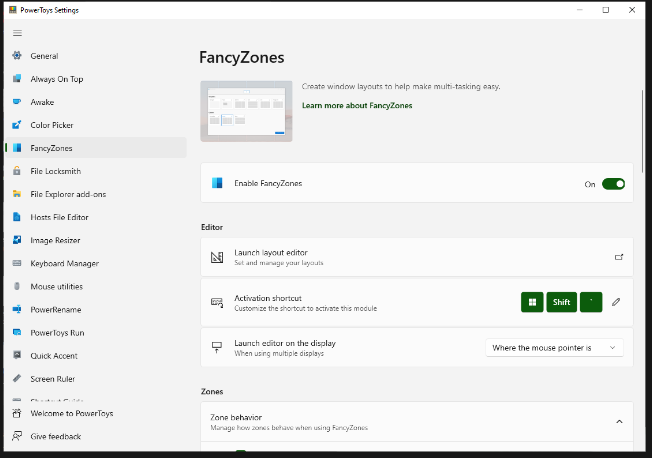
FancyZones serves as a window management tool designed to help users arrange and snap their application windows into optimized layouts, enhancing workflow efficiency and allowing for quick restoration of these layouts. This utility empowers you to specify a series of designated zones on your desktop where windows can be directed. By dragging a window into a predetermined zone or using a designated keyboard shortcut, the respective window automatically resizes and relocates to occupy that zone completely. Additionally, if you have the "Use non-primary mouse button to toggle zone activation" option activated, you can enter zone selection mode by simply clicking the secondary mouse button. When two zones are positioned next to each other, a window can be adjusted to span the combined area of both zones, effectively rounding up to the smallest rectangle that encompasses the two. As you maneuver the mouse cursor close to the shared boundary of two zones, both zones become active at the same time, giving you the flexibility to drop the window into either or both. Moreover, you can drag the window until it activates one zone and then, by pressing and holding the control key while continuing to drag, select multiple zones to expand your layout options. This feature significantly streamlines the process of organizing your desktop workspace efficiently.
API Access
Has API
No
API Access
Has API
No
Screenshots View All
No images available

Integrations
No details available.
Integrations
No details available.
Pricing Details
$100/month
Free Trial
No
Free Version
Yes
Pricing Details
Free
Free Trial
No
Free Version
Yes
Deployment
Web-Based
Yes
On-Premises
No
iPhone App
No
iPad App
No
Android App
No
Windows
No
Mac
No
Linux
No
Chromebook
No
Deployment
Web-Based
No
On-Premises
No
iPhone App
No
iPad App
No
Android App
No
Windows
Yes
Mac
No
Linux
No
Chromebook
No
Customer Support
Business Hours
No
Live Rep (24/7)
No
Online Support
Yes
Customer Support
Business Hours
Yes
Live Rep (24/7)
No
Online Support
Yes
Types of Training
Training Docs
Yes
Webinars
No
Live Training (Online)
No
In Person
No
Types of Training
Training Docs
Yes
Webinars
Yes
Live Training (Online)
No
In Person
Yes
Vendor Details
Company Name
Hangil IT
Founded
1997
Country
South Korea
Website
www.astruttie.com
Vendor Details
Company Name
Microsoft
Country
United States
Website
learn.microsoft.com/en-us/windows/powertoys/fancyzones