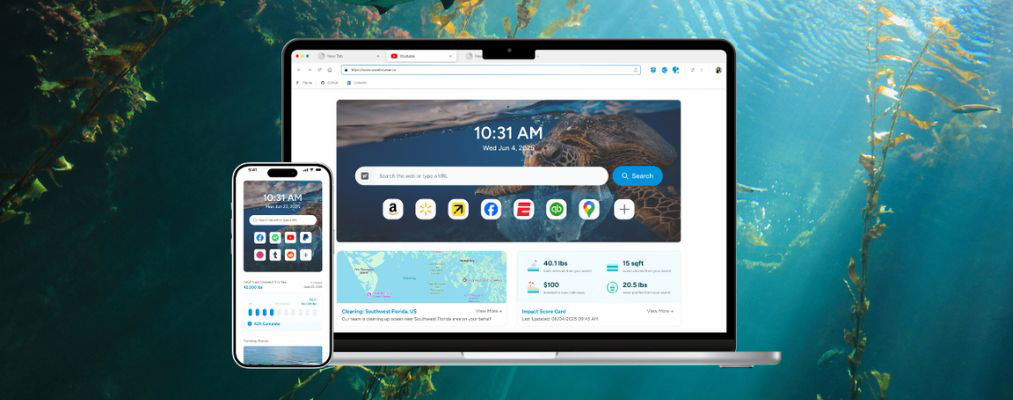
While many of us stick with the browser that came with our device, exploring alternatives can significantly upgrade your browsing experience.
Wave Browser offers a unique combination of efficiency, security, and purpose. It provides all the features you expect from a modern browser but with a powerful mission: saving our ocean. If you want your time online to make a real-world difference, this might just be the browser for you.
What is Wave Browser?
Wave Browser is a free web browser built on the Chromium open-source project, the same foundation used by many popular browsers. This means you get a familiar, intuitive interface that doesn’t require a learning curve. You can surf the web, check emails, and stream videos
just like you normally would. It’s designed to be a simple, user-friendly web browser that works just as you expect it to, with a clean design and smart organization.
What truly sets this browser apart is its core mission.
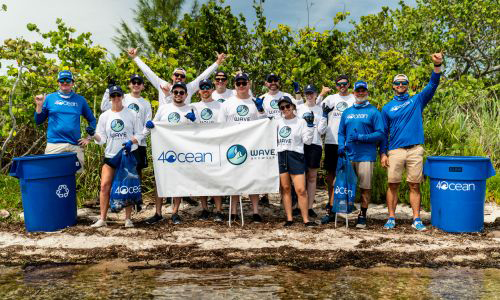
Every time you use Wave on your Windows, iOS, macOS, or Android device, you’re doing more than just browsing, you’re helping fund real, measurable ocean cleanups across the U.S., the Caribbean, and Indonesia. This is made possible through Wave’s partnership with 4ocean, a globally recognized, certified B-Corp founded by two surfers who turned their passion for the ocean into a large-scale movement for change.
Your time spent online surfing the web becomes part of a proven system that removes plastic and trash from our ocean, rivers, and coastlines. Whether you’re checking email, researching, or streaming, Wave transforms your daily online routine into meaningful environmental impact. It’s a simple way to support a cleaner, healthier ocean without changing your habits. Just by choosing a browser with purpose.
How Does Wave Browser Differ from Other Browsers?
Unlike most regular browsers that focus only on performance and features, Wave Browser integrates a powerful environmental purpose into its DNA. Your daily web browsing actively supports certified ocean cleanup crews without requiring any extra steps, subscriptions, or donations from you. This is a key distinction from other options on the market.
Additionally, Wave comes packed with built-in tools, reducing the need for third-party browser extensions that could potentially slow you down or compromise your security. Wave also provides extensive customization options and adjustable browser settings, including the ability to choose your preferred search engine—whether Google or another option—so you can fully personalize your experience.
From a built-in ad blocker to an AI assistant, this web browser provides a comprehensive suite of features designed for both productivity and a positive global impact.
Key Features and Benefits of Wave Browser
Wave Browser isn’t just about its environmental mission; it’s also a powerful tool designed to enhance your browsing experience. It comes loaded with features that other browsers often require you to add through browser extensions.
This means you get a faster, cleaner, and more productive experience right out of the box. With a focus on security and convenience, the browser offers a wide range of customization options to fit your needs.
Let’s explore some of the key features that make Wave stand out.
1. Built-in Ad Blocker
Wave comes with a free ad blocker built-in, automatically filtering out annoying pop-ups and distracting banners. This feature ensures cleaner, more focused online sessions, allowing you to concentrate on the content that matters most to you. By blocking unwanted and intrusive ads, the browser also helps pages load faster.
A seamless browsing experience is about more than just speed. The ad blocker also contributes to your online safety by preventing interactions with potentially malicious ads that could lead to malware. Because this tool is integrated directly into the browser homepage, you don’t need to search for and install a separate extension. It’s one less thing to worry about, giving you peace of mind while you surf the web.
2. AI Assistant
Imagine having a smart helper right inside your browser, ready to answer questions or summarize articles for you. Wave includes a powerful AI assistant that makes your browsing experience more efficient.
You can ask questions, get instant summaries of long texts, or find information without ever having to open a new tab or navigate away from your current page. This feature is designed to streamline your workflow and save you valuable time. It enhances your browsing by providing immediate support, making your online tasks simpler and faster. This is another premium feature you get without needing any extra downloads.
3. Translate Tool
Have you ever landed on a webpage in a language you don’t understand? Wave solves this problem with its handy, built-in translate tool. You can instantly translate text or entire pages without needing to copy and paste content into a separate translation website.
This feature breaks down language barriers and opens up a world of information, making the internet a more accessible place for everyone. It supports numerous languages, ensuring you can navigate international websites with confidence. Paired with other customization options, this feature allows you to create a browsing environment that is perfectly tailored to your needs, whether you’re traveling, learning a new language, or simply exploring global content.
4. Price and Package Tracker
For anyone who loves online shopping, keeping track of deals and deliveries can be a hassle. Wave simplifies this with its integrated price and package tracker. You can monitor the prices of items you’re interested in and receive alerts when they go on sale. This is a feature many users would typically need separate browser extensions for, but Wave includes it right out of the box.
In addition to price tracking, the built-in package tracker helps you stay updated on all your online orders from one convenient place. You no longer need to check multiple carrier websites or dig through emails to find tracking numbers. This tool consolidates everything, improving your shopping and browsing experience by making it more organized and stress-free.
5. Memory Saver
Do you often find your computer slowing down when you have too many tabs open? Wave addresses this common issue with its Memory Saver mode. This feature automatically frees up memory from inactive tabs, ensuring the browser runs smoothly and efficiently. By reducing background resource usage, it helps your device perform better and can even extend your laptop’s battery life.
It also provides a snappier browsing experience, made for users who like to multitask with many tabs open simultaneously. The Memory Saver works behind the scenes to optimize performance without you having to do anything. It’s part of Wave’s commitment to not only do more for the planet but also to do more with less energy, creating a more sustainable and efficient browser.
6. Bookmarks and Reading List
Keeping your favorite websites and articles organized is essential for a productive browsing experience. Wave includes intuitive tools on the home page for managing bookmarks and creating a reading list. You can easily save and categorize important sites for quick access later. This fundamental feature is designed to be user-friendly, so you can spend less time searching and more time reading and exploring.
The reading list function is perfect for when you find an interesting article but don’t have time to read it right away. Instead of leaving the tab open or installing separate browser extensions, you can add it to your list with a single click. This helps reduce clutter and ensures you never lose track of content you want to come back to, making your browsing sessions more organized and efficient.
7. Sidebar Social and Messaging Apps
Switching between your browser and messaging apps can disrupt your focus. Wave streamlines your communication with integrated sidebar apps. This feature allows you to access your favorite social media and messaging platforms directly from the browser’s sidebar, so you can chat with friends or check notifications without leaving the page you’re on. It’s a convenient way to stay connected while you work or browse.
8. Converter Tool
Wave Browser includes a powerful converter tool designed to make everyday tasks faster and easier, without opening extra tabs or relying on external websites. With just a click, you can convert files, units, measurements, temperatures, and more. It’s built directly into the browser, keeping your workflow smooth and distraction-free.
No clutter, no ads, no complicated menus, just fast, accurate conversions when you need them.
Environmental Initiatives Supported by Wave Browser
The most compelling reason to choose Wave is its dedication to environmental initiatives. Their primary mission is to fund ocean cleanup efforts through Wave Browser’s partnership with 4ocean. This means your daily internet use contributes directly to removing plastic and trash from the world’s ocean, rivers, and coastlines.
Wave Browser is committed to transparency, allowing you to see the real-world impact of your browsing. It’s not just a promise; it’s a verifiable action. The company is open about how it uses its revenue to support these important environmental goals.
Now, let’s explore exactly how it works.

How Wave Browser Contributes to Ocean Clean-up, Just by Browsing
Wave Browser turns your online activity into funding for real-world ocean cleanup. It does this through a verified partnership with 4ocean, an organization dedicated to ending the ocean plastic crisis. The revenue generated while you use Wave Browser helps fund 4ocean’s cleanup crews across the globe.
There are no extra sign-ups or steps required from you. Simply by browsing the internet as you normally would, you become part of a community helping to clean the ocean. Wave has set an ambitious goal to help remove over 300,000 pounds of trash by 2028.
This partnership combines tech with direct action, making it easy for anyone to support crucial environmental initiatives.
Transparency and Real-World Impact of Environmental Tech Efforts
A key principle of Wave Browser’s environmental initiatives is transparency. The company believes users should be able to see the results of their contributions. To achieve this, the browser includes a live impact tracker so that users can see the collective impact of the Wave community on ocean cleanup efforts.
You can view verified statistics on how many pounds of plastic and trash have been removed, giving you a clear picture of the progress being made. This isn’t just a vague promise; Wave provides tangible proof of its commitment.
This dedication to transparency helps build trust and demonstrates the real-world impact of its environmental mission. By partnering with a certified organization like 4ocean and sharing cleanup milestones, Wave Browser ensures that its users are part of a legitimate and effective effort to heal our oceans.
Desktop vs. Mobile Functionality (Windows, Mac, Android, iOS)
Wave Browser offers a consistent browsing experience across both desktop and mobile devices. The full-featured desktop version is available for Windows and Mac, providing access to all the productivity tools like the AI assistant, sidebar apps, and advanced security settings. This version is ideal for work, research, and comprehensive web surfing, transforming your main computer into a tool for environmental good.
While some desktop-specific features like the sidebar may function differently on a smaller screen, the Android app still includes key benefits—such as its built-in ad blocker—and a simple, familiar interface, ensuring you can make a difference on the go.
Frequently Asked Questions (FAQ)
Curious about Wave Browser? Many users wonder how it stacks up against popular browsers. A common question is whether it’s safe to use, especially regarding user data and malware protection. Others inquire about how easy it is to install and uninstall, or about the transparency of its default search engine settings.
No matter what you’re wondering, this FAQ aims to give you clear, straightforward answers so you can feel confident using Wave as your everyday browser.
1. Is Wave Browser Safe?
Yes, Wave Browser is a safe and secure browser. It is built on Chromium, the open-source technology behind Google Chrome, Microsoft Edge, and other major browsers. This gives Wave the same core security foundations as the most widely used browsers in the world.
You don’t have to worry about your personal information getting into the wrong hands. Wave is AppEsteem-certified, meaning it has been independently evaluated and approved by a respected cybersecurity standards organization. This certification verifies that Wave meets strict requirements for safe installation, responsible data handling, and transparent behavior.
The browser installs and uninstalls cleanly, without bundled software, hidden programs, or system modifications. Users can remove it at any time through normal device settings, just like any standard application.
Wave also includes a built-in ad blocker designed to filter out intrusive ads and reduce exposure to malicious advertising (malvertising), helping create a safer and more secure browsing experience.
Taken together, Wave’s Chromium foundation, AppEsteem certification, clean install/uninstall process, and built-in security tools position it as a safe, trustworthy browser for everyday use.
2. Why Should Someone Choose Wave Browser Over Popular Alternatives?
You should choose Wave Browser if you want your daily browsing experience to have a positive impact on the environment. Unlike other popular browsers, this free software combines a full suite of features with a mission to fund ocean cleanup. By making it your default browser, you contribute to a meaningful cause without changing your habits.
3. Does Wave Browser Really Contribute to Environmental Causes?
Absolutely. Wave Browser contributes to environmental initiatives through its verified partnership with 4ocean. This partnership helps fund certified ocean cleanup operations around the world. The browser also provides transparent monthly impact tracking, allowing you to see how the community is working together to clean the ocean and reach its goals.
Related Categories